LLM GPU utilization
Message boards :
Graphics cards (GPUs) :
LLM GPU utilization
Message board moderation
| Author | Message |
|---|---|
|
Send message Joined: 30 Apr 13 Posts: 109 Credit: 3,977,737,860 RAC: 9 Level  Scientific publications     
|
I'm impressed with the LLM tasks. Although many different projects' tasks show a GPU utilization of 98% or 99%, the power consumed rarely exceeds 300 watts on my RTX 4090. I've attributed that to the Windows11 OS limitations. Those LLM tasks often use 400 watts and peak up to 450 watts as reported by MSI Afterburner. I have a watt meter on my system (includes the monitor and network devices) and I see that peak over 620 watts! I've never seen that on any other project, GPUGrid or others. |
 Send message Joined: 13 Dec 17 Posts: 1424 Credit: 9,189,946,190 RAC: 0 Level  Scientific publications 
|
Because the card is actually using hardware in the gpu that historically has never been actuated, IOW the Tensor cores that no other Boinc project has ever utilized. |
|
Send message Joined: 4 Mar 20 Posts: 18 Credit: 3,273,571,062 RAC: 6 Level Scientific publications 
|
I'm running Windows 11 with an RTX 4090 as well and EVERY task from this project has failed within the first few minutes? I'm running Nvdia driver 32.0.15.7602, dated 4/12/25. |
|
Send message Joined: 30 Apr 13 Posts: 109 Credit: 3,977,737,860 RAC: 9 Level Scientific publications
|
On average I'm getting 2 successes for every errored task. Some of the failures waste over an hour. |
|
Send message Joined: 4 Mar 20 Posts: 18 Credit: 3,273,571,062 RAC: 6 Level Scientific publications
|
I'm wishing there was a way to set a percentage limit for how much of my GPU can be used when the computer is in use. 80% would be nice. I lose some functionality when it fully uses the GPU. |
|
Send message Joined: 13 Dec 17 Posts: 1424 Credit: 9,189,946,190 RAC: 0 Level Scientific publications
|
You could power limit your card. If you ran Linux you could use the Nvidia provided mps-server application and limit how much of the gpu cores are occupied so that your other gpu work would not be affected. But that feature is not available for Windows. |
|
Send message Joined: 4 Mar 20 Posts: 18 Credit: 3,273,571,062 RAC: 6 Level Scientific publications
|
Thanks, Win 11 here with a an I9 13900k CPU and an RTX 4090 GPU. I'd even be happy if I could pause the GPUGRID work unit and not lose my work or progress when starting back up. This near 100% utilization is actually causing me enough issues that I may rethink my participation. |
|
Send message Joined: 13 Dec 17 Posts: 1424 Credit: 9,189,946,190 RAC: 0 Level Scientific publications
|
You could run the ATMML tasks instead of the LLM's. The ATMML and ATM tasks do checkpoint and resume after stopping without erroring out. |
|
Send message Joined: 15 Jul 20 Posts: 96 Credit: 2,748,053,412 RAC: 9 Level  Scientific publications
|
yes but atm or atmml last between 15 and 20 hours on a rtx 4000 sff ada and they crash 2 times out of 3 when we restart the pc. In addition, the count of time remaining to finish the work unit is not good oui mais atm ou atmml durent entre 15 et 20 heures sur une rtx 4000 sff ada et elles plantent 2 fois sur 3 lorsque qu'on redémarre le pc.De plus le compte du temps restant pour finir l'unité de travail n'est pas bon |
|
Send message Joined: 19 May 09 Posts: 6 Credit: 1,149,760,333 RAC: 17 Level  Scientific publications
|
yes but atm or atmml last between 15 and 20 hours on a rtx 4000 sff ada and they crash 2 times out of 3 when we restart the pc. In addition, the count of time remaining to finish the work unit is not good I am running ATMML tasks. The runtime is round about 8 hours at both 4070TIS |
|
Send message Joined: 15 Jul 20 Posts: 96 Credit: 2,748,053,412 RAC: 9 Level Scientific publications
|
tgp rtx 4070 ti super 285 watts. tgp rtx 4000 sff ada 70 watts avec une puissance équivalente a une rtx 4060. J'en posséde 3 ce qui me permet d'avoir un pc qui tourne h24 pour boinc avec un i9 14900 et 2 ou 3 rtx 4000 sff installées. Ca consomme 220 watts au maximum. C'est le porte monnaie qui parle en premier. mon prochain gpu ce sera NVIDIA RTX PRO 4000 Blackwell. tgp rtx 4070 ti super 285 watts. tgp rtx 4000 sff ada 70 watts with power equivalent to a rtx 4060. I own 3 which allows me to have a pc that runs h24 for boinc with an i9 14900 and 2 or 3 rtx 4000 sff installed. It consumes 220 watts at most. It’s the wallet that speaks first. my next GPU will be NVIDIA RTX PRO 4000 Blackwell. |
|
Send message Joined: 7 Apr 15 Posts: 17 Credit: 3,095,057,945 RAC: 3 Level Scientific publications
|
Since June 19th there is no load with LLM on the GPU (4090) using Linux. Just 1-2 minutes CPU load at the beginning and then running without progress. After aboarding it, the resent to a Windows PC seems to work fine. https://gpugrid.net/gpugrid/workunit.php?wuid=31499403 https://gpugrid.net/gpugrid/workunit.php?wuid=31499413 I've aboarded 8 other WUs after seeing no load after some minutes. |
|
Send message Joined: 28 Aug 24 Posts: 9 Credit: 615,071,955 RAC: 4 Level  Scientific publications
|
Hi.I ask in this thread whether the TITAN RTX 24GB with Turing microarchitecture is included in the list of LLM-compatible GPUs, or if it is obsolete.Thanks! |
|
Send message Joined: 9 May 24 Posts: 8 Credit: 5,317,433,524 RAC: 28 Level Scientific publications
|
Hi.I ask in this thread whether the TITAN RTX 24GB with Turing microarchitecture is included in the list of LLM-compatible GPUs, or if it is obsolete.Thanks! Your computers are hidden, can you unhide them? That may give us more information on what is possibly wrong with your configuration. Another user asked a similar question on Discord and it turned out that: 1) his version of BOINC was too old; BOINC version > 7.20 is required to correctly report GPU VRAM to the server, 2) he had another, less powerful GPU in that computer, which was reported to the server instead of the TITAN RTX. If this is your case, you should edit the cc_config.xml file to exclude the less powerful gpu or set up another boinc client just for your TITAN RTX card if you still want to use the less powerful one for another project. |
|
Send message Joined: 28 Aug 24 Posts: 9 Credit: 615,071,955 RAC: 4 Level Scientific publications
|
Hi.I ask in this thread whether the TITAN RTX 24GB with Turing microarchitecture is included in the list of LLM-compatible GPUs, or if it is obsolete.Thanks! BOINC version is 8.0.2 Regarding the 'cc_config.xml' file, do you mean something like this? <cc_config> <options> <max_file_xfers_per_project>6</max_file_xfers_per_project> <suppress_net_info>1</suppress_net_info> <use_all_gpus>1</use_all_gpus> <rec_half_life_days>50.000000</rec_half_life_days> <exclude_gpu> <url>https://einstein.phys.uwm.edu</url> <device_num>0</device_num> <name>NVIDIA GeForce RTX 4060</name> <app_name>BRP7[cuda55]</app_name> <app_name>windows_x86_64[FGRPopencl-nvidia]</app_name> </exclude_gpu> <exclude_gpu> <url>https://moowrap.net/</url> <device_num>1</device_num> <name>NVIDIA TITAN RTX</name> <app_name>windows_intelx86[opencl_ati_101]</app_name> <app_name>windows_intelx86[cuda31]</app_name> </exclude_gpu> <exclude_gpu> <url>https://gpugrid.net/gpugrid/</url> <device_num>0</device_num> <name>NVIDIA GeForce RTX 4060</name> <preferences>no_work</preferences> <app_name>ATMML[cuda1121]</app_name> <preferences>no_work</preferences> <app_name>ATM[cuda1121]</app_name> </exclude_gpu> <include_gpu> <url>https://gpugrid.net/gpugrid/</url> <device_num>1</device_num> <name>NVIDIA TITAN RTX</name> <preferences>work</preferences> <app_name>ATMML[cuda1121]</app_name> <preferences>work</preferences> <app_name>LLM[cuda124L]</app_name> <preferences>work</preferences> <app_name>LLMS[cuda124S]</app_name> <preferences>work</preferences> <app_name>ATM[cuda1121]</app_name> <preferences>work</preferences> </include_gpu> <exclude_gpu> <url>https://www.primegrid.com/</url> <device_num>1</device_num> <name>NVIDIA TITAN RTX</name> <app_name>windows_x86_64[OCL_cuda_AP27]</app_name> </exclude_gpu> </options> </cc_config> If so, there must be something else wrong...or I did something wrong Edit: I add that the TITAN fits in the main PCI_Ex 16x slot Edit 2: maybe I got the URL wrong (now correct), I'll have to try again... |
|
Send message Joined: 21 Feb 20 Posts: 1117 Credit: 40,876,970,595 RAC: 0 Level  Scientific publications
|
Hi.I ask in this thread whether the TITAN RTX 24GB with Turing microarchitecture is included in the list of LLM-compatible GPUs, or if it is obsolete.Thanks! for one. you have your cc_config all screwed up. there is no"include_gpu" option and even in the exclude_gpu elements <name> is not a valid option. I'm not sure where you got this idea. please review the client configuration documentation here: https://github.com/BOINC/boinc/wiki/Client-configuration I also see that you probably have an RTX 4060 on this host. this GPU has less than 24GB and since this GPU is much newer than the Titan RTX, the 4060 is the GPU that will be communicated to the projects. so GPUGRID will only see that you have 8GB GPU and will not send you LLM work, which requires 24GB. put the Titan RTX in its own system so that it is the GPU that is displayed. or you can run two clients, with the other GPU(s) ignored (with ignore_nvidia_dev option, see link above). 
|
|
Send message Joined: 28 Aug 24 Posts: 9 Credit: 615,071,955 RAC: 4 Level Scientific publications
|
[cut]....
Apart cc_config.xml file, maybe I found the problem... 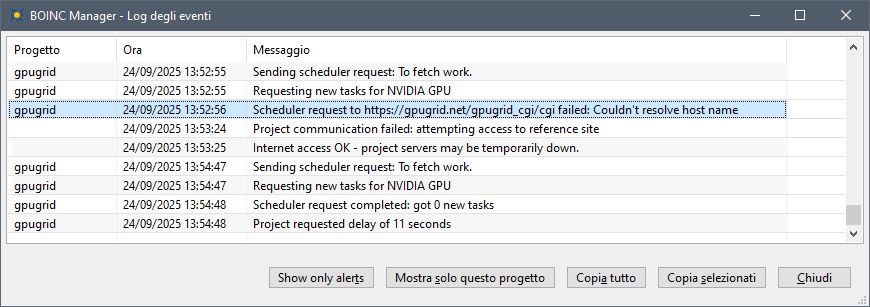 |
|
Send message Joined: 28 Aug 24 Posts: 9 Credit: 615,071,955 RAC: 4 Level Scientific publications
|
I finally solved the problem by removing the RTX 4060. Thanks to everyone who helped solve my problem. |
|
Send message Joined: 14 Aug 17 Posts: 1 Credit: 5,427,240,944 RAC: 7 Level Scientific publications
|
I was trying to see if I could coax BOINC into seeing my Titan RTX as a primary. I tried excluding the RTX 3050 from GPUGrid, but I ultimately removed the RTX 3050. Because my apartment's AC is trash. I am stuck with two hosts until temperatures drop. |



©2026 Universitat Pompeu Fabra