ATM

Message boards : News : ATM
Message board moderation

To post messages, you must log in.

Previous · 1 . . . 14 · 15 · 16 · 17 · 18 · 19 · 20 . . . 35 · Next

AuthorMessage
kotenok2000

Send message
Joined: 18 Jul 13
Posts: 79
Credit: 210,528,292
RAC: 0
Level
Leu
Scientific publications
wat
Message 60586 - Posted: 12 Jul 2023, 2:30:12 UTC

When will atm be unsuspended?
ID: 60586 · Rating: 0 · rate: Rate + / Rate - Report as offensive     Reply Quote
kotenok2000

Send message
Joined: 18 Jul 13
Posts: 79
Credit: 210,528,292
RAC: 0
Level
Leu
Scientific publications
wat
Message 60588 - Posted: 12 Jul 2023, 14:42:53 UTC - in response to Message 60425.  
Last modified: 12 Jul 2023, 14:43:36 UTC

Good evening, only on one of my PCs with Windows 11, I7-13700KF and RTX 2080 Ti, none of the GPUGRID ATMbeta tasks (CUDA 1121) can be processed. By now more than a hundred have ended after a few tens of seconds. Other tasks (for example based on CUDA 1131) are also processed on this PC and without any problems. I have no idea what could be causing it so I do not know how to fix it. Thanks in advance to anyone who can help me solve the problem.

Output su Stderr
<core_client_version>7.20.2</core_client_version>
<![CDATA[
<message>
(unknown error) - exit code 195 (0xc3)</message>
<stderr_txt>
04:36:16 (31676): wrapper (7.9.26016): starting
04:36:16 (31676): wrapper: running python.exe (bin/conda-unpack)
04:36:17 (31676): python.exe exited; CPU time 0.000000
04:36:17 (31676): wrapper: running Library/usr/bin/tar.exe (xjvf input.tar.bz2)
MCL1_m51_m45_0.xml
MCL1_m51_m45_asyncre.cntl
MCL1_m51_m45.inpcrd
MCL1_m51_m45.prmtop
run.bat
run.sh
04:36:18 (31676): Library/usr/bin/tar.exe exited; CPU time 0.000000
04:36:18 (31676): wrapper: running C:/Windows/system32/cmd.exe (/c call run.bat)
04:36:20 (31676): C:/Windows/system32/cmd.exe exited; CPU time 0.015625
04:36:20 (31676): app exit status: 0x1
04:36:20 (31676): called boinc_finish(195)
0 bytes in 0 Free Blocks.
530 bytes in 4 Normal Blocks.
1144 bytes in 1 CRT Blocks.
0 bytes in 0 Ignore Blocks.
0 bytes in 0 Client Blocks.
Largest number used: 0 bytes.
Total allocations: 481994 bytes.
Dumping objects ->
{3078527} normal block at 0x00000221DD3AE4C0, 64 bytes long.
Data: <PATH=C:\ProgramD> 50 41 54 48 3D 43 3A 5C 50 72 6F 67 72 61 6D 44
{3078506} normal block at 0x00000221DD2D1060, 241 bytes long.
Data: <<project_prefere> 3C 70 72 6F 6A 65 63 74 5F 70 72 65 66 65 72 65
..\api\boinc_api.cpp(309) : {3078503} normal block at 0x00000221DB70B460, 8 bytes long.
Data: < &#221;! > 00 00 1A DD 21 02 00 00
{3077864} normal block at 0x00000221DD2D11F0, 241 bytes long.
Data: <<project_prefere> 3C 70 72 6F 6A 65 63 74 5F 70 72 65 66 65 72 65
{3077239} normal block at 0x00000221DB70BE10, 8 bytes long.
Data: <pk=&#221;! > 70 6B 3D DD 21 02 00 00
..\zip\boinc_zip.cpp(122) : {281} normal block at 0x00000221DB70D7F0, 260 bytes long.
Data: < > 00 00 00 00 00 00 00 00 00 00 00 00 00 00 00 00
{266} normal block at 0x00000221DB713020, 16 bytes long.
Data: <87q&#219;! > 38 37 71 DB 21 02 00 00 00 00 00 00 00 00 00 00
{265} normal block at 0x00000221DB7128A0, 16 bytes long.
Data: < 7q&#219;! > 10 37 71 DB 21 02 00 00 00 00 00 00 00 00 00 00
{264} normal block at 0x00000221DB712490, 16 bytes long.
Data: <&#232;6q&#219;! > E8 36 71 DB 21 02 00 00 00 00 00 00 00 00 00 00
{263} normal block at 0x00000221DB712850, 16 bytes long.
Data: <&#192;6q&#219;! > C0 36 71 DB 21 02 00 00 00 00 00 00 00 00 00 00
{262} normal block at 0x00000221DB7122B0, 16 bytes long.
Data: < 6q&#219;! > 98 36 71 DB 21 02 00 00 00 00 00 00 00 00 00 00
{261} normal block at 0x00000221DB712E40, 16 bytes long.
Data: <p6q&#219;! > 70 36 71 DB 21 02 00 00 00 00 00 00 00 00 00 00
{260} normal block at 0x00000221DB70C780, 32 bytes long.
Data: <CUDA_DEVICE=0 PU> 43 55 44 41 5F 44 45 56 49 43 45 3D 30 00 50 55
{259} normal block at 0x00000221DB712A80, 16 bytes long.
Data: <p q&#219;! > 70 10 71 DB 21 02 00 00 00 00 00 00 00 00 00 00
{258} normal block at 0x00000221DB711070, 40 bytes long.
Data: < *q&#219;! &#199;p&#219;! > 80 2A 71 DB 21 02 00 00 80 C7 70 DB 21 02 00 00
{257} normal block at 0x00000221DB712350, 16 bytes long.
Data: <P6q&#219;! > 50 36 71 DB 21 02 00 00 00 00 00 00 00 00 00 00
{256} normal block at 0x00000221DB712300, 16 bytes long.
Data: <(6q&#219;! > 28 36 71 DB 21 02 00 00 00 00 00 00 00 00 00 00
{255} normal block at 0x00000221DB70CCC0, 32 bytes long.
Data: <C:/Windows/syste> 43 3A 2F 57 69 6E 64 6F 77 73 2F 73 79 73 74 65
{254} normal block at 0x00000221DB712CB0, 16 bytes long.
Data: < 6q&#219;! > 00 36 71 DB 21 02 00 00 00 00 00 00 00 00 00 00
{253} normal block at 0x00000221DB70C060, 32 bytes long.
Data: <xjvf input.tar.b> 78 6A 76 66 20 69 6E 70 75 74 2E 74 61 72 2E 62
{252} normal block at 0x00000221DB712800, 16 bytes long.
Data: <H5q&#219;! > 48 35 71 DB 21 02 00 00 00 00 00 00 00 00 00 00
{251} normal block at 0x00000221DB712670, 16 bytes long.
Data: < 5q&#219;! > 20 35 71 DB 21 02 00 00 00 00 00 00 00 00 00 00
{250} normal block at 0x00000221DB712C10, 16 bytes long.
Data: <&#248;4q&#219;! > F8 34 71 DB 21 02 00 00 00 00 00 00 00 00 00 00
{249} normal block at 0x00000221DB713160, 16 bytes long.
Data: <&#208;4q&#219;! > D0 34 71 DB 21 02 00 00 00 00 00 00 00 00 00 00
{248} normal block at 0x00000221DB712F80, 16 bytes long.
Data: <&#168;4q&#219;! > A8 34 71 DB 21 02 00 00 00 00 00 00 00 00 00 00
{247} normal block at 0x00000221DB712620, 16 bytes long.
Data: < 4q&#219;! > 80 34 71 DB 21 02 00 00 00 00 00 00 00 00 00 00
{245} normal block at 0x00000221DB712F30, 16 bytes long.
Data: <0 q&#219;! > 30 12 71 DB 21 02 00 00 00 00 00 00 00 00 00 00
{244} normal block at 0x00000221DB711230, 40 bytes long.
Data: <0/q&#219;! &#192;&#228;:&#221;! > 30 2F 71 DB 21 02 00 00 C0 E4 3A DD 21 02 00 00
{243} normal block at 0x00000221DB712EE0, 16 bytes long.
Data: <`4q&#219;! > 60 34 71 DB 21 02 00 00 00 00 00 00 00 00 00 00
{242} normal block at 0x00000221DB712530, 16 bytes long.
Data: <84q&#219;! > 38 34 71 DB 21 02 00 00 00 00 00 00 00 00 00 00
{241} normal block at 0x00000221DB70CD80, 32 bytes long.
Data: <Library/usr/bin/> 4C 69 62 72 61 72 79 2F 75 73 72 2F 62 69 6E 2F
{240} normal block at 0x00000221DB712AD0, 16 bytes long.
Data: < 4q&#219;! > 10 34 71 DB 21 02 00 00 00 00 00 00 00 00 00 00
{239} normal block at 0x00000221DB70C8A0, 32 bytes long.
Data: <bin/conda-unpack> 62 69 6E 2F 63 6F 6E 64 61 2D 75 6E 70 61 63 6B
{238} normal block at 0x00000221DB712260, 16 bytes long.
Data: <X3q&#219;! > 58 33 71 DB 21 02 00 00 00 00 00 00 00 00 00 00
{237} normal block at 0x00000221DB7124E0, 16 bytes long.
Data: <03q&#219;! > 30 33 71 DB 21 02 00 00 00 00 00 00 00 00 00 00
{236} normal block at 0x00000221DB7125D0, 16 bytes long.
Data: < 3q&#219;! > 08 33 71 DB 21 02 00 00 00 00 00 00 00 00 00 00
{235} normal block at 0x00000221DB712E90, 16 bytes long.
Data: <&#224;2q&#219;! > E0 32 71 DB 21 02 00 00 00 00 00 00 00 00 00 00
{234} normal block at 0x00000221DB7127B0, 16 bytes long.
Data: <&#184;2q&#219;! > B8 32 71 DB 21 02 00 00 00 00 00 00 00 00 00 00
{233} normal block at 0x00000221DB7123F0, 16 bytes long.
Data: < 2q&#219;! > 90 32 71 DB 21 02 00 00 00 00 00 00 00 00 00 00
{232} normal block at 0x00000221DB713110, 16 bytes long.
Data: <p2q&#219;! > 70 32 71 DB 21 02 00 00 00 00 00 00 00 00 00 00
{231} normal block at 0x00000221DB712FD0, 16 bytes long.
Data: <H2q&#219;! > 48 32 71 DB 21 02 00 00 00 00 00 00 00 00 00 00
{230} normal block at 0x00000221DB7123A0, 16 bytes long.
Data: < 2q&#219;! > 20 32 71 DB 21 02 00 00 00 00 00 00 00 00 00 00
{229} normal block at 0x00000221DB713220, 1488 bytes long.
Data: <&#160;#q&#219;! python.e> A0 23 71 DB 21 02 00 00 70 79 74 68 6F 6E 2E 65
{93} normal block at 0x00000221DB70CC60, 32 bytes long.
Data: <windows_x86_64__> 77 69 6E 64 6F 77 73 5F 78 38 36 5F 36 34 5F 5F
{92} normal block at 0x00000221DB70BCD0, 16 bytes long.
Data: < q&#219;! > 00 10 71 DB 21 02 00 00 00 00 00 00 00 00 00 00
{91} normal block at 0x00000221DB711000, 40 bytes long.
Data: <&#208;&#188;p&#219;! `&#204;p&#219;! > D0 BC 70 DB 21 02 00 00 60 CC 70 DB 21 02 00 00
{70} normal block at 0x00000221DB70BEB0, 16 bytes long.
Data: < &#234;&#249;&#134;&#246; > 80 EA F9 86 F6 7F 00 00 00 00 00 00 00 00 00 00
{69} normal block at 0x00000221DB70B0A0, 16 bytes long.
Data: <@&#233;&#249;&#134;&#246; > 40 E9 F9 86 F6 7F 00 00 00 00 00 00 00 00 00 00
{68} normal block at 0x00000221DB70BC80, 16 bytes long.
Data: <&#248;W&#246;&#134;&#246; > F8 57 F6 86 F6 7F 00 00 00 00 00 00 00 00 00 00
{67} normal block at 0x00000221DB70B8C0, 16 bytes long.
Data: <&#216;W&#246;&#134;&#246; > D8 57 F6 86 F6 7F 00 00 00 00 00 00 00 00 00 00
{66} normal block at 0x00000221DB70BDC0, 16 bytes long.
Data: <P &#246;&#134;&#246; > 50 04 F6 86 F6 7F 00 00 00 00 00 00 00 00 00 00
{65} normal block at 0x00000221DB70BBE0, 16 bytes long.
Data: <0 &#246;&#134;&#246; > 30 04 F6 86 F6 7F 00 00 00 00 00 00 00 00 00 00
{64} normal block at 0x00000221DB70B6E0, 16 bytes long.
Data: <&#224; &#246;&#134;&#246; > E0 02 F6 86 F6 7F 00 00 00 00 00 00 00 00 00 00
{63} normal block at 0x00000221DB70B640, 16 bytes long.
Data: < &#246;&#134;&#246; > 10 04 F6 86 F6 7F 00 00 00 00 00 00 00 00 00 00
{62} normal block at 0x00000221DB70B5F0, 16 bytes long.
Data: <p &#246;&#134;&#246; > 70 04 F6 86 F6 7F 00 00 00 00 00 00 00 00 00 00
{61} normal block at 0x00000221DB70B870, 16 bytes long.
Data: < &#192;&#244;&#134;&#246; > 18 C0 F4 86 F6 7F 00 00 00 00 00 00 00 00 00 00
Object dump complete.
</stderr_txt>
]]>

I just had a theory that cmd could fail because both you and i had set default command processor to Windows terminal instead of Console Window Host.
Unfortunately i can't test it because there are no more ATM tasks.
ID: 60588 · Rating: 0 · rate: Rate + / Rate - Report as offensive     Reply Quote
kotenok2000

Send message
Joined: 18 Jul 13
Posts: 79
Credit: 210,528,292
RAC: 0
Level
Leu
Scientific publications
wat
Message 60589 - Posted: 14 Jul 2023, 13:29:56 UTC

Didn't help.
ID: 60589 · Rating: 0 · rate: Rate + / Rate - Report as offensive     Reply Quote
Bedrich Hajek

Send message
Joined: 28 Mar 09
Posts: 490
Credit: 11,731,645,728
RAC: 57
Level
Trp
Scientific publications
watwatwatwatwatwatwatwatwatwatwatwatwatwatwatwatwatwatwatwatwatwatwatwatwatwatwatwat
Message 60590 - Posted: 14 Jul 2023, 20:48:33 UTC - in response to Message 60589.  
Last modified: 14 Jul 2023, 20:59:15 UTC

Didn't help.


It could be a hardware problem (processor, RAM, etc), not software.

I have 2 computers crunching here.

One is a Core 7 intel, with 32 Gigs RAM, and it completes both ACEMDs and ATMbetas successfully.

https://www.gpugrid.net/results.php?hostid=608721

There other is an AMD Phenol II, with 16 Gigs RAM, and it completes ACEMDs successfully, while ATMbetas error out. (I can't put any more RAM on this MB.)

https://www.gpugrid.net/results.php?hostid=607570

They both have the same OS.
ID: 60590 · Rating: 0 · rate: Rate + / Rate - Report as offensive     Reply Quote
kotenok2000

Send message
Joined: 18 Jul 13
Posts: 79
Credit: 210,528,292
RAC: 0
Level
Leu
Scientific publications
wat
Message 60591 - Posted: 15 Jul 2023, 14:03:28 UTC
Last modified: 15 Jul 2023, 14:05:49 UTC

In my case it crashes instantly on Wrapper: running C:/Windows/system32/cmd.exe (/c call run.bat)
ID: 60591 · Rating: 0 · rate: Rate + / Rate - Report as offensive     Reply Quote
Bedrich Hajek

Send message
Joined: 28 Mar 09
Posts: 490
Credit: 11,731,645,728
RAC: 57
Level
Trp
Scientific publications
watwatwatwatwatwatwatwatwatwatwatwatwatwatwatwatwatwatwatwatwatwatwatwatwatwatwatwat
Message 60597 - Posted: 15 Jul 2023, 23:15:45 UTC

These units still crash when shutdown and then restarted. The progress bar goes to 100% done after a few minutes, when you get to the subsequent units in the thread. Looks like nothing has been updated.
ID: 60597 · Rating: 0 · rate: Rate + / Rate - Report as offensive     Reply Quote
roundup

Send message
Joined: 11 May 10
Posts: 68
Credit: 12,293,491,875
RAC: 2,606
Level
Trp
Scientific publications
watwatwatwatwatwatwatwatwatwatwatwatwatwatwatwatwat
Message 60598 - Posted: 17 Jul 2023, 13:13:03 UTC - in response to Message 60597.  

ATM Beta still crashes after 40 seconds on a RTX 4080.
ID: 60598 · Rating: 0 · rate: Rate + / Rate - Report as offensive     Reply Quote
Erich56

Send message
Joined: 1 Jan 15
Posts: 1166
Credit: 12,260,898,501
RAC: 1
Level
Trp
Scientific publications
watwatwatwatwatwatwatwatwat
Message 60599 - Posted: 17 Jul 2023, 18:07:48 UTC

after some time, today I resumed crunching ATM tasks.

However, I notice a strange behaviour of BOINC when trying to download a second task per GPU:

When pushing the "update" button, no second task will download (although plenty of them available), and the event log says:

17.07.2023 20:00:19 | GPUGRID | Requesting new tasks for NVIDIA GPU
17.07.2023 20:00:21 | GPUGRID | Scheduler request completed: got 0 new tasks
17.07.2023 20:00:21 | GPUGRID | No tasks sent
17.07.2023 20:00:21 | GPUGRID | No tasks are available for ATM: Free energy calculations of protein-ligand binding
17.07.2023 20:00:21 | GPUGRID | Tasks won't finish in time: BOINC runs 96.7% of the time; computation is enabled 100.0% of that

I had downloaded hundreds of ATM tasks before on this system, and always I could download a second one which stayed in "waiting position" until the first one got finished.
Never before I saw this kind of statement.

Can anyone tell me what's wrong, and what I can do in order to get a second task downloaded?
ID: 60599 · Rating: 0 · rate: Rate + / Rate - Report as offensive     Reply Quote
Ian&Steve C.

Send message
Joined: 21 Feb 20
Posts: 1116
Credit: 40,839,470,595
RAC: 5,269
Level
Trp
Scientific publications
wat
Message 60600 - Posted: 17 Jul 2023, 18:14:27 UTC - in response to Message 60599.  

the estimate time to completion is too long. so BOINC thinks they wont finish by their listed 5 day deadline. that's why. you can try editing the DCF in the client state file manually, or just wait for it to adjust itself.
ID: 60600 · Rating: 0 · rate: Rate + / Rate - Report as offensive     Reply Quote
Erich56

Send message
Joined: 1 Jan 15
Posts: 1166
Credit: 12,260,898,501
RAC: 1
Level
Trp
Scientific publications
watwatwatwatwatwatwatwatwat
Message 60601 - Posted: 17 Jul 2023, 18:51:04 UTC - in response to Message 60600.  

the estimate time to completion is too long. so BOINC thinks they wont finish by their listed 5 day deadline. ...

that's what I suspected first (I had that before on another machine), then I took a look at the times, and surprise:
right now, a task has been running for 2:32 hrs, indicated completion time: 34:50 minutes(!).
So the problem must be somewhere else :-(
ID: 60601 · Rating: 0 · rate: Rate + / Rate - Report as offensive     Reply Quote
Ian&Steve C.

Send message
Joined: 21 Feb 20
Posts: 1116
Credit: 40,839,470,595
RAC: 5,269
Level
Trp
Scientific publications
wat
Message 60602 - Posted: 17 Jul 2023, 19:34:26 UTC - in response to Message 60601.  

the estimate time to completion is too long. so BOINC thinks they wont finish by their listed 5 day deadline. ...

that's what I suspected first (I had that before on another machine), then I took a look at the times, and surprise:
right now, a task has been running for 2:32 hrs, indicated completion time: 34:50 minutes(!).
So the problem must be somewhere else :-(


it has to do with the estimated completion time of the task it's trying to download + the tasks you have. not just the tasks you have.

a brand new task might say it will take 90hrs to finish. you have 34hrs remaining on your work. so it thinks it would be 5.1 days before the new task would finish, so it decides to not download any.
ID: 60602 · Rating: 0 · rate: Rate + / Rate - Report as offensive     Reply Quote
Erich56

Send message
Joined: 1 Jan 15
Posts: 1166
Credit: 12,260,898,501
RAC: 1
Level
Trp
Scientific publications
watwatwatwatwatwatwatwatwat
Message 60603 - Posted: 17 Jul 2023, 19:50:07 UTC - in response to Message 60602.  

... you have 34hrs remaining on your work. ...

NOT 34hrs, but 34 minutes !
ID: 60603 · Rating: 0 · rate: Rate + / Rate - Report as offensive     Reply Quote
Ian&Steve C.

Send message
Joined: 21 Feb 20
Posts: 1116
Credit: 40,839,470,595
RAC: 5,269
Level
Trp
Scientific publications
wat
Message 60604 - Posted: 17 Jul 2023, 19:59:25 UTC - in response to Message 60603.  
Last modified: 17 Jul 2023, 20:01:19 UTC

... you have 34hrs remaining on your work. ...

NOT 34hrs, but 34 minutes !


that's inconsequential, it was just an example. the point was that it depends mostly on the time estimate of the task to be downloaded. which could be in excess of 5 days already and you're in the same situation.

several of mine show initial estimates like 200+ days.
ID: 60604 · Rating: 0 · rate: Rate + / Rate - Report as offensive     Reply Quote
Profile ServicEnginIC
Avatar

Send message
Joined: 24 Sep 10
Posts: 592
Credit: 11,972,186,510
RAC: 1,187
Level
Trp
Scientific publications
watwatwatwatwatwatwatwatwatwatwatwatwatwatwatwatwatwatwatwatwatwatwatwat
Message 60605 - Posted: 17 Jul 2023, 20:16:02 UTC - in response to Message 60601.  

right now, a task has been running for 2:32 hrs, indicated completion time: 34:50 minutes(!).
So the problem must be somewhere else :-(

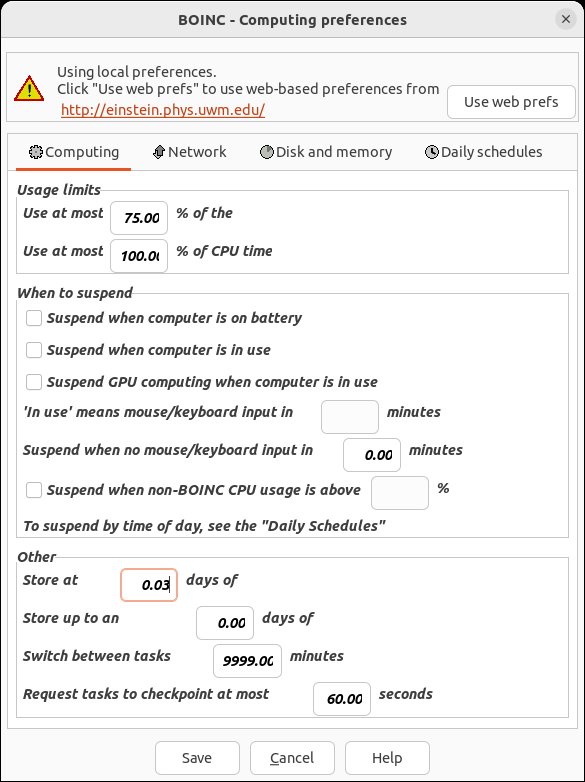
When trying to download a second task, set the "Store at least X days of work" parameter at BOINC local preferences as tight in excess as possible to remaining calculated time for the task in progress.
At your example: about 34 minutes remaining, try setting the "Store at least X days of work" parameter to 0.03 days (about 43 minutes).
And parameter "Store up to an additional X days of work" set to 0.00
ID: 60605 · Rating: 0 · rate: Rate + / Rate - Report as offensive     Reply Quote
Erich56

Send message
Joined: 1 Jan 15
Posts: 1166
Credit: 12,260,898,501
RAC: 1
Level
Trp
Scientific publications
watwatwatwatwatwatwatwatwat
Message 60606 - Posted: 18 Jul 2023, 14:31:30 UTC

@ ServicEnginIC, thanks for your hints.
However, I finally did not need to do anything: all of a sudden, two tasks per GPU got downlaoded :-)
ID: 60606 · Rating: 0 · rate: Rate + / Rate - Report as offensive     Reply Quote
Quico
Volunteer moderator
Project administrator
Project developer
Project tester
Volunteer developer
Volunteer tester
Project scientist

Send message
Joined: 28 Feb 23
Posts: 35
Credit: 0
RAC: 0
Level

Scientific publications
wat
Message 60610 - Posted: 20 Jul 2023, 13:26:42 UTC

Sorry for missing out for a while. We were testing ATM in a setup not available for GPUGRID. But we're back to crunching :)

I've seen that more or less everything is running fine. Albeit for some crashes that can happen everything seems to come back to me fine.

Is there anything in specific I should look into it? I already know about the progress reporting issue (if it persists) but there's not much more I can do on my end. If they plan to update the GPUGRID app at some point I'll insist.
ID: 60610 · Rating: 0 · rate: Rate + / Rate - Report as offensive     Reply Quote
Bedrich Hajek

Send message
Joined: 28 Mar 09
Posts: 490
Credit: 11,731,645,728
RAC: 57
Level
Trp
Scientific publications
watwatwatwatwatwatwatwatwatwatwatwatwatwatwatwatwatwatwatwatwatwatwatwatwatwatwatwat
Message 60611 - Posted: 20 Jul 2023, 13:53:53 UTC - in response to Message 60610.  

Sorry for missing out for a while. We were testing ATM in a setup not available for GPUGRID. But we're back to crunching :)

I've seen that more or less everything is running fine. Albeit for some crashes that can happen everything seems to come back to me fine.

Is there anything in specific I should look into it? I already know about the progress reporting issue (if it persists) but there's not much more I can do on my end. If they plan to update the GPUGRID app at some point I'll insist.


I have question regarding the minimum hardware requirements (i.e. Amount, speed, type of RAM, CPU speed and type, motherboard speed and requirements, etc.) for the computer to be able to complete successfully, these units for either windows and linux OS?

One of my computers has been running these units successfully, the other has not. They both have the same OS, but have different hardware. I just want to know the limits.


ID: 60611 · Rating: 0 · rate: Rate + / Rate - Report as offensive     Reply Quote
Quico
Volunteer moderator
Project administrator
Project developer
Project tester
Volunteer developer
Volunteer tester
Project scientist

Send message
Joined: 28 Feb 23
Posts: 35
Credit: 0
RAC: 0
Level

Scientific publications
wat
Message 60612 - Posted: 20 Jul 2023, 14:18:38 UTC - in response to Message 60611.  

Sorry for missing out for a while. We were testing ATM in a setup not available for GPUGRID. But we're back to crunching :)

I've seen that more or less everything is running fine. Albeit for some crashes that can happen everything seems to come back to me fine.

Is there anything in specific I should look into it? I already know about the progress reporting issue (if it persists) but there's not much more I can do on my end. If they plan to update the GPUGRID app at some point I'll insist.


I have question regarding the minimum hardware requirements (i.e. Amount, speed, type of RAM, CPU speed and type, motherboard speed and requirements, etc.) for the computer to be able to complete successfully, these units for either windows and linux OS?

One of my computers has been running these units successfully, the other has not. They both have the same OS, but have different hardware. I just want to know the limits.


I'm not sure to be the most adequate to answer this question but I might try my best. AFAIK it should run anywhere, maybe the issue is more driver related? We recently tested on 40 series GPUs locally and it run fine, since I saw some comments in the thread.
ID: 60612 · Rating: 0 · rate: Rate + / Rate - Report as offensive     Reply Quote
Erich56

Send message
Joined: 1 Jan 15
Posts: 1166
Credit: 12,260,898,501
RAC: 1
Level
Trp
Scientific publications
watwatwatwatwatwatwatwatwat
Message 60613 - Posted: 20 Jul 2023, 16:28:47 UTC

this kind of error

tar: run.log: file changed as we read it
tar: r*/*.xml: Cannot stat: No such file or directory
tar: Exiting with failure status due to previous errors


has happened quite often lately.
Quico, anything you can do about it?
ID: 60613 · Rating: 0 · rate: Rate + / Rate - Report as offensive     Reply Quote
Bedrich Hajek

Send message
Joined: 28 Mar 09
Posts: 490
Credit: 11,731,645,728
RAC: 57
Level
Trp
Scientific publications
watwatwatwatwatwatwatwatwatwatwatwatwatwatwatwatwatwatwatwatwatwatwatwatwatwatwatwat
Message 60614 - Posted: 20 Jul 2023, 16:43:47 UTC - in response to Message 60612.  

Sorry for missing out for a while. We were testing ATM in a setup not available for GPUGRID. But we're back to crunching :)

I've seen that more or less everything is running fine. Albeit for some crashes that can happen everything seems to come back to me fine.

Is there anything in specific I should look into it? I already know about the progress reporting issue (if it persists) but there's not much more I can do on my end. If they plan to update the GPUGRID app at some point I'll insist.


I have question regarding the minimum hardware requirements (i.e. Amount, speed, type of RAM, CPU speed and type, motherboard speed and requirements, etc.) for the computer to be able to complete successfully, these units for either windows and linux OS?

One of my computers has been running these units successfully, the other has not. They both have the same OS, but have different hardware. I just want to know the limits.


I'm not sure to be the most adequate to answer this question but I might try my best. AFAIK it should run anywhere, maybe the issue is more driver related? We recently tested on 40 series GPUs locally and it run fine, since I saw some comments in the thread.


Both computers are running the same driver, and both computers have the same type of video card rtx 2080ti.

Here is the portion from the log from the computer that has the errors:

Running command git clone --filter=blob:none --quiet https://github.com/raimis/AToM-OpenMM.git /var/lib/boinc-client/slots/0/tmp/pip-req-build-9y8_6t1d
Running command git rev-parse -q --verify 'sha^d7931b9a6217232d481731f7589d64b100a514ac'
Running command git fetch -q https://github.com/raimis/AToM-OpenMM.git d7931b9a6217232d481731f7589d64b100a514ac
Running command git checkout -q d7931b9a6217232d481731f7589d64b100a514ac
error: subprocess-exited-with-error

&#195;&#151; python setup.py egg_info did not run successfully.
&#226;&#148;&#130; exit code: -4
&#226;&#149;&#176;&#226;&#148;&#128;> [0 lines of output]
[end of output]

note: This error originates from a subprocess, and is likely not a problem with pip.
error: metadata-generation-failed

&#195;&#151; Encountered error while generating package metadata.
&#226;&#149;&#176;&#226;&#148;&#128;> See above for output.

note: This is an issue with the package mentioned above, not pip.
hint: See above for details.
15:34:05 (42979): bin/bash exited; CPU time 3.604100
15:34:05 (42979): app exit status: 0x1
15:34:05 (42979): called boinc_finish(195)

</stderr_txt>

https://www.gpugrid.net/result.php?resultid=33535521

Would this be a software or hardware problem?

ID: 60614 · Rating: 0 · rate: Rate + / Rate - Report as offensive     Reply Quote
Previous · 1 . . . 14 · 15 · 16 · 17 · 18 · 19 · 20 . . . 35 · Next

Message boards : News : ATM

©2025 Universitat Pompeu Fabra

