Managing non-high-end hosts
Message boards :
Number crunching :
Managing non-high-end hosts
Message board moderation
Previous · 1 · 2 · 3 · Next
| Author | Message |
|---|---|
|
Send message Joined: 1 Jan 15 Posts: 1171 Credit: 12,662,148,501 RAC: 1 Level  Scientific publications     
|
But, as said, I'll give it another try once new tasks become available. As recommended, I set at BOINC Manager Computing preferences "Use at most 50 % of the CPUs", and I lowered the GPU frequency by 50 MHz. Now new tasks were downloaded, but they failed after less than a minute. What I noticed is that in the stderr it says: ACEMD failed: Particle coordinate is nan https://www.gpugrid.net/result.php?resultid=32722445 https://www.gpugrid.net/result.php?resultid=32722418 So the question now is: did my changes in the settings cause the tasks to fail that quickly after start, or are they misconfigured? BTW, at the same time another machine (with a CPU Intel Core i7-4930K and GTX980ti inside) got a new task, and this is working well. This could indicate that the tasks are NOT misconfigured, but that rather the changes in the settings are the reason for failure. No idea. |
|
Send message Joined: 21 Feb 20 Posts: 1118 Credit: 40,876,970,595 RAC: 0 Level Scientific publications 
|
Firstly, I don't think your issue that you experienced is related to overclock or GPU temps at all, usually if temps or OC are the culprit you'll get a particle coordinate is nan error (but the nan error can also be a bad WU and not your fault, more on that later). Your error was a CUDA timeout. likely the driver crashed and the app couldn't hook back in. I'm on the fence if your CPU is the ultimate reason for this or not. certainly it's a very old platform to be running on Windows 10, so it's possible there are some issues. If your comfortable trying Linux, particularly a lightweight version with less system overhead, you might try that to see if you have a better experience with such an old system. Your CPU being a Core2Duo, this architecture does not have a dedicated PCIe link to the CPU. it uses the older architecture where the PCIe and memory connect to the Northbridge chipset and the chipset is what has a single 10.6GB/s link to the CPU, the memory will take most of this bandwidth unfortunately, and since GPUGRID is pretty heavy on bus use, I can see some conflicts happening on this kind of architecture. but the CPU power itself shouldnt be an issue if you're trying to run 1 GPU and no CPU work. Secondly, with regards to the work that is flowing this morning, a lot of them are bad WUs giving the nan error, so you can't jump to conclusions that whatever you changed wasn't effectual. I have errored like 80% of the WUs received this morning and my system is rock solid stable. If you check the WU record for your tasks this morning you will see that all of your wingmen errored out too, so it's not just you. 
|
|
Send message Joined: 1 Jan 15 Posts: 1171 Credit: 12,662,148,501 RAC: 1 Level Scientific publications
|
Ian&Steve C., thanks for the thorough explanations. I tried it one more time, and again the task failed after some 7.000 seconds. Excerpt from stderr: ACEMD failed: Error invoking kernel: CUDA_ERROR_LAUNCH_TIMEOUT (702) the complete report can be seen: https://www.gpugrid.net/result.php?resultid=32722583 So it seems clear that the current setting (hardware, software) is not working with GPUGRID :-( Which is too bad, because before, with a GTX750ti inside, I had successfully crunched many hundreds of GPUGRID tasks. Maybe the new GTX1650 does not fit well into the overall setting, or the GPUGRID tasks strain the systems more than ever before. As mentioned earlier, everything works well with the GPU tasks from WCG and with Folding&Home. |
|
Send message Joined: 21 Feb 20 Posts: 1118 Credit: 40,876,970,595 RAC: 0 Level Scientific publications
|
The very first thing I would recommend you try is to totally wipe out your existing nvidia drivers with DDU: https://www.guru3d.com/files-details/display-driver-uninstaller-download.html boot into safe mode, and run DDU to do a complete removal of the driver from all areas of your system, including the registry, and make sure to select the option to prevent Windows from installing the driver automatically (or unplug the network cable so it can't). Then re-install the latest stable (WHQL) nvidia driver for your platform. this will eliminate driver corruption (common on windows) as a potential cause of your problem. But if that still doesn't help, then I think the high PCIe use of GPUGRID ACEMD3 tasks is what's killing you, combined with the old architecture of that platform which wasnt designed to handle this kind of thing, or maybe even instability/errata with the chipset itself (they do age/degrade just like any other silicon). folding and other projects do not exhibit that behavior with the hardware and wont stress the same subsystems that GPUGRID will. maybe the 750Ti wasnt fast enough to bring this problem to light and the 1650 is causing more stress? certainly possible, but without some trial and error testing it's impossible to give a conclusive answer. Honestly I would recommend just replacing the whole platform with something more modern. just replace the CPU/Motherboard/Memory. You can get stuff only a few years old for dirt cheap, will outperform the old setup, and will pay for itself over time being more energy efficient and lower power use. something like even first gen AMD Ryzen or like a 14nm Intel platform with 4 cores, 8+GB DDR4 memory, and a low end motherboard will be very cheap, run circles around your current platform, be more compatible with modern system and software, and use the same or less power doing it. just my .02
|
 Send message Joined: 13 Dec 17 Posts: 1424 Credit: 9,189,946,190 RAC: 0 Level  Scientific publications
|
Big slug of bad work went out with NaN errors. |
|
Send message Joined: 8 May 18 Posts: 190 Credit: 104,426,808 RAC: 0 Level  Scientific publications
|
Both my GTX 1060 on a Windows 10 host and GTX 1650 on a Windows 11 host have completed and validated their tasks. Tullio |
 Retvari Zoltan Retvari Zoltan Send message Joined: 20 Jan 09 Posts: 2380 Credit: 16,897,957,044 RAC: 0 Level Scientific publications
|
However, meanwhile my suspicion is that the old processorI've reanimated (that was quite an adventure on its own) one ancient DQ45CB motherboard with a Core2Duo E8500 CPU in it, and I've put a GTX 1080Ti in it to test with GPUGrid, but there's no work available at the moment. You can follow the unfolding of this adventure here. EDIT: I've managed to receive one task... EDIT2: It failed because I've forget to install the Visual C++ runtime :( |
|
Retvari Zoltan Send message Joined: 20 Jan 09 Posts: 2380 Credit: 16,897,957,044 RAC: 0 Level Scientific publications
|
I was lucky again, the host received another workunit and it's running just fine for 90 minutes. (it needs another 12 hours to complete). The Core2Duo is definitvely struggling to feed the GTX1080Ti (the GPU usage has frequent deep drops), but I don't think it will run into that "Error invoking kernel: CUDA_ERROR_LAUNCH_TIMEOUT (702)" error. We'll see. I've tried to maximize GPU usage by changing process affinities and the priority of the acemd3.exe, making not much difference. |
|
Send message Joined: 1 Jan 15 Posts: 1171 Credit: 12,662,148,501 RAC: 1 Level Scientific publications
|
However, meanwhile my suspicion is that the old processorI've reanimated (that was quite an adventure on its own) one ancient DQ45CB motherboard with a Core2Duo E8500 CPU in it, and I've put a GTX 1080Ti in it to test with GPUGrid, but there's no work available at the moment. You can follow the unfolding of this adventure here. hm, I could try to run a GPUGRID task on my still existing box with a CPU Intel Core2Duo E8400 inside, motherboard is an Abit IP35Pro, GPU is a GTX970. Currently, this box crunches FAH and/or WCG (GPU tasks), without problems. However, the GTX970 gets very warm (although I dedusted it recently), so for FAH I have to underclock to about 700MHz which is far below the default clock of 1152MHz. I am afraid same would be true for GPUGRID, and a task would run, if at all, forever. |
|
Retvari Zoltan Send message Joined: 20 Jan 09 Posts: 2380 Credit: 16,897,957,044 RAC: 0 Level Scientific publications
|
The task is finihed successfully in 12h 35m 23s. On a Core i3-4xxx it takes about 12h 1m 44s, so it take 34m more for the Core2Duo, it was only 4.6% slower than an i3-4xxx. I've noticed that the present acemd3 app does not use a full CPU core (thread) on Windows while it does on Linux. There's a discrepancy between the run time and the CPU time, also the CPU usage is lower on Windows. |
|
Send message Joined: 1 Jan 15 Posts: 1171 Credit: 12,662,148,501 RAC: 1 Level Scientific publications
|
I've noticed that the present acemd3 app does not use a full CPU core (thread) on Windows while it does on Linux. There's a discrepancy between the run time and the CPU time, also the CPU usage is lower on Windows. hm, I acutally cannot confirm, see here: e7s141_e3s56p0f226-ADRIA_BanditGPCR_APJ_b1-0-1-RND0691_0 27100764 588817 10 Dec 2021 | 12:29:46 UTC 11 Dec 2021 | 5:50:18 UTC Fertig und Bestätigt 31,250.27 31,228.75 420,000.00 New version of ACEMD v2.19 (cuda1121) |
|
Retvari Zoltan Send message Joined: 20 Jan 09 Posts: 2380 Credit: 16,897,957,044 RAC: 0 Level Scientific publications
|
The discrepancy is smaller in some cases, perhaps it depends on more factors than the OS. Newer CPUs show less discrepancy. I'll test it with my E8500. Now I'm using Windows 11 on it, but I couldn't get a new workunit yet. My next attempt will be with Linux.I've noticed that the present acemd3 app does not use a full CPU core (thread) on Windows while it does on Linux. There's a discrepancy between the run time and the CPU time, also the CPU usage is lower on Windows. |
ServicEnginIC Send message Joined: 24 Sep 10 Posts: 598 Credit: 13,085,315,510 RAC: 159,133 Level Scientific publications
|
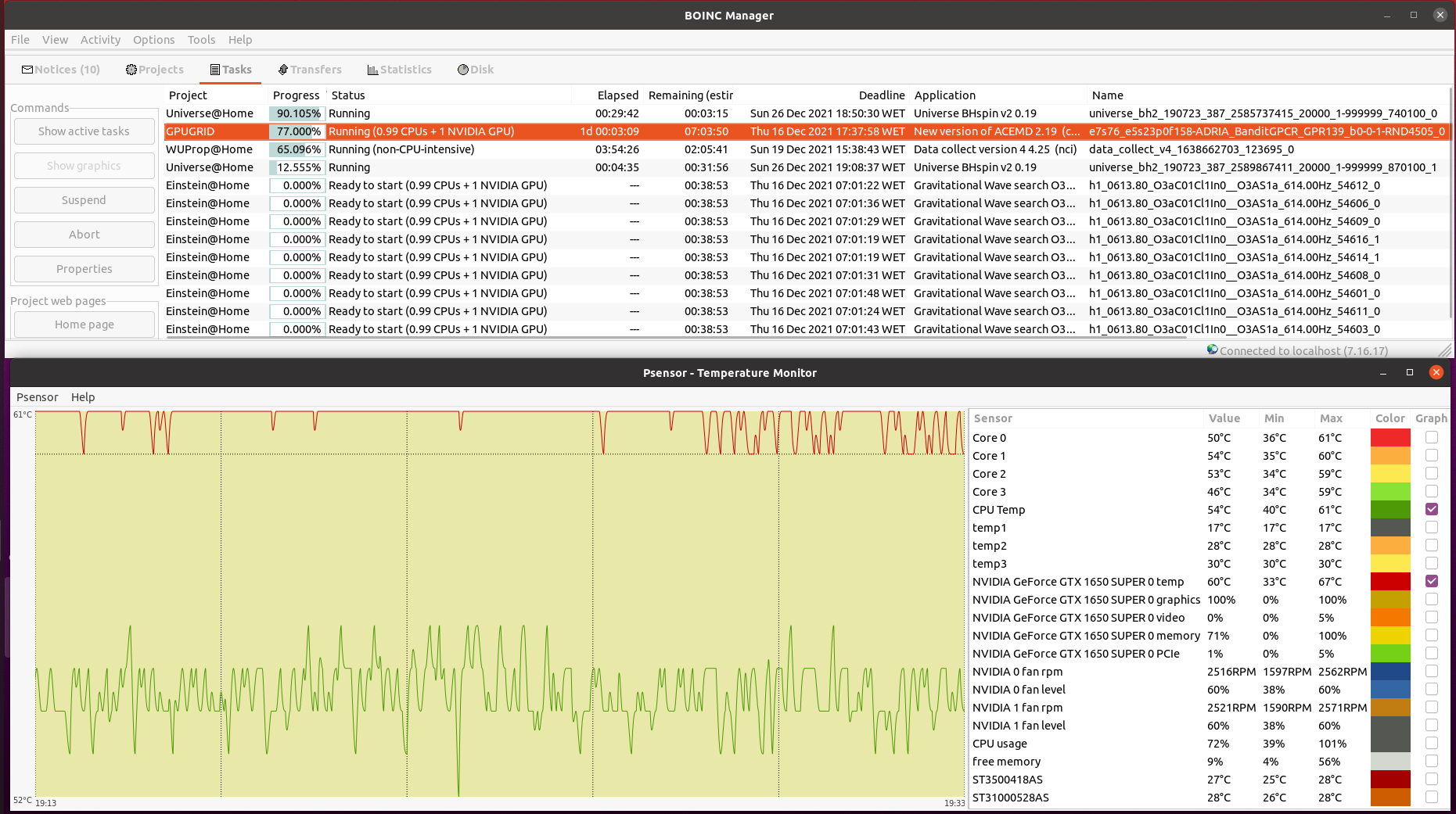
Your CPU being a Core2Duo, this architecture does not have a dedicated PCIe link to the CPU. it uses the older architecture where the PCIe and memory connect to the Northbridge chipset and the chipset is what has a single 10.6GB/s link to the CPU, the memory will take most of this bandwidth unfortunately, and since GPUGRID is pretty heavy on bus use, I can see some conflicts happening on this kind of architecture. but the CPU power itself shouldnt be an issue if you're trying to run 1 GPU and no CPU work. Inspired on your timely appointment, I've worked for experimenting the difference between newer dedicated PCIe link architecture versus the older based on an intermediate chipset. I have still in production Two Linux hosts based on the older architecture, same Asus P5E3 PRO motherboard. Main characteristics are: Intel X48/ICH9R chipset, DDR3 RAM, PCIe rev. 2.0, CPU socket LGA775 (the same as previously mentioned Core 2 Duo E7400 and E8500 CPUs) - Host #482132 - Host #325908 Both hosts are also based on the same low power Intel Core 2 Quad Q9550S CPU Host #482132 is harboring an Asus EX-GTX1050TI-4G graphics card (GTX 1050 Ti GPU) Host #325908 mounts a Gigabyte GV-N75TOC-2GI graphics card (GTX 750 Ti GPU) Psensor utility graphics for both hosts are the following (Gpugrid task running at each one): Host #482132: 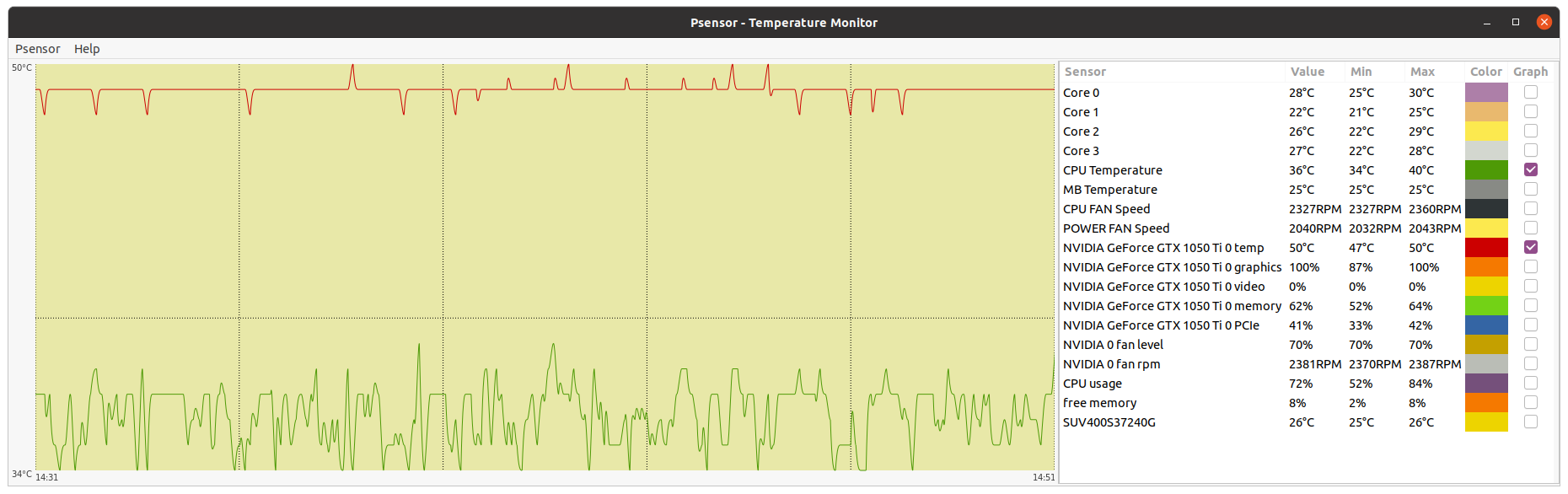 Host #325908:  Before going further, let's mention that Q9550S CPU TDP is 65 Watts, and that CPU series worked at fixed clock frequencies, 2,83 GHz in this case, so no power increase due to any turbo frequencies. This allows to easy maintain full load CPU temperatures at low levels, around 40 ºC. Also GPU TPDs are relatively low: 75 Watts for GTX 1050 Ti, and 46 Watts for GTX 750 Ti respectively. This helps to maintain their full-load temperatures at around 50 ºC, even being overclocked as they are. Now, for comparison, I'll take one of my newly refurbished hosts, Host #557889. It is based on the newer architecture with dedicated PCIe link to the CPU, Gigabyte Z390UD motherboard Main characteristics are: Intel Z390 chipset, DDR4 RAM, PCIe rev. 3.0, CPU socket LGA1151. This host mounts a 9th generation Intel Core i5-9400F CPU. Rated TDP for this processor is also 65 Watts at 2,90 GHz base clock frequency, but here come in play increased power consumptions due to higher turbo frequencies up to 4,10 GHz... Two of the three mainboard available PCIe slots are occupied by GTX 1650 GPU based graphics cards. Psensor utility graphic for this host is the following (2X Gpugrid tasks running, one at each GPU): Host #325908: 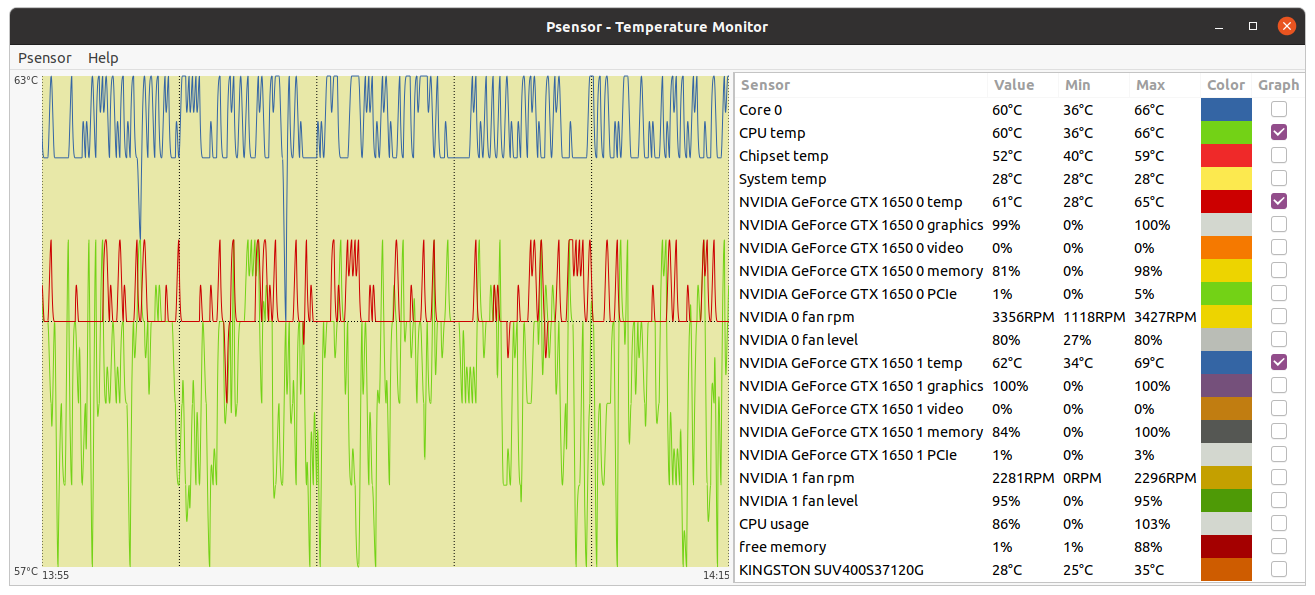 A general temperature rising at this host can be observed, due to the mentioned extra CPU power consumption, and the higher density (Two graphics cards) in the same computer case. And here is the conclusion we were looking for: While older architecture used respectively 41% and 36% of PCIe 2.0 bandwidth, the newer architecture is properly feeding two GPUs with only 1% to 2% PCIe 3.0 bandwidth usage each one. But it seems not to be an impediment for the older architecture to reliably manage the current ADRIA Gpugrid tasks...Slow but safe. |
|
Send message Joined: 21 Feb 20 Posts: 1118 Credit: 40,876,970,595 RAC: 0 Level Scientific publications
|
it would be a better comparison to run the same GPU on both systems for a more apples to apples comparison. something about your 1% PCIe use doesnt seem right. last year I had a 1650 and it used the normal PCIe bandwidth @ ~80% on a PCIe 3.0 x4 link. and about 20% on a PCIe 3.0 x16 link. and just spot checked my 2080Ti system, which showed ~20-25% use on a PCIe 3.0 x16 link, and ~40% on a PCIe 3.0 x8 link other than PCIe generation (3.0), what are the link widths for each card? how do you have them populated? I'm assuming the two topmost slots? that should be x16 and x4 respectively. also, what tasks were being processed when you did the test and took the screenshots? only the ACEMD3 tasks exhibit the high PCIe use. However, I've seen much lower on the Python beta tasks. finally, keep in mind that the PCIe measurement percentage is measured GPU-side, this value comes from the nvidia driver. as a percentage of the GPU's total bandwidth. a bottleneck on the CPU side will not be reflected here. you could very well be 40% on the PCIe 2.0 GPU, but totally maxed on the CPU side as the limiting factor. This is likely the case.
|
|
ServicEnginIC Send message Joined: 24 Sep 10 Posts: 598 Credit: 13,085,315,510 RAC: 159,133 Level Scientific publications
|
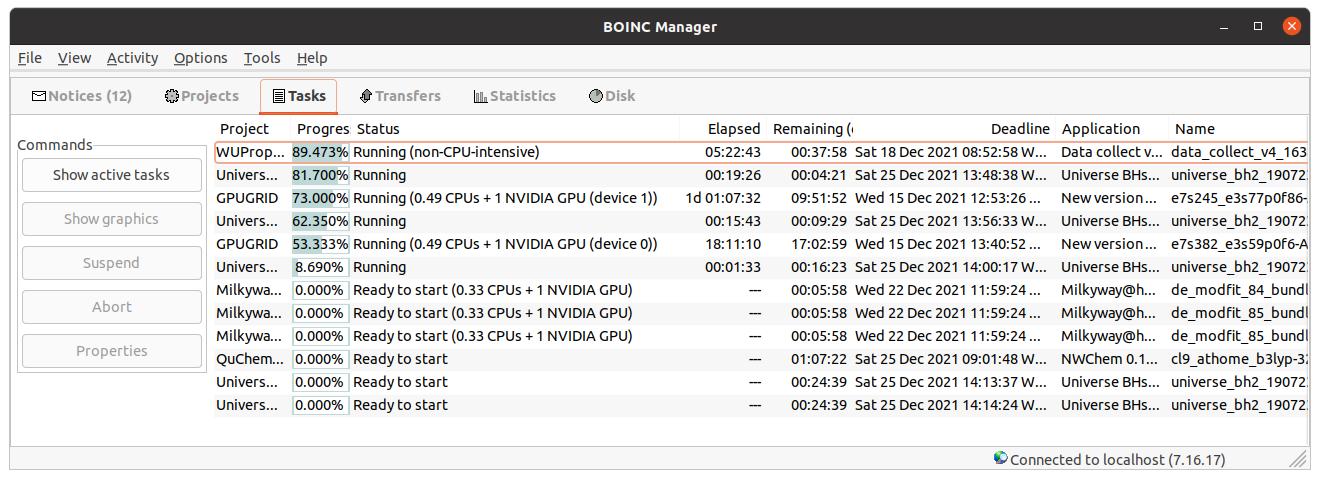
something about your 1% PCIe use doesnt seem right. Thank you for your kind comments. I enjoy reading every of them. I'm also somehow bewildered about it. I've noted such a PCIe bandwidth usage reduction at my newer hosts after New version of ACEMD 2.19 was launched on November 10th. Every of my four 9th generation i3-i5-i7 hosts are experiencing the same. At the moment of taking the presented Psensor graphic, GPU0 was executing task e7s382_e3s59p0f6-ADRIA_BanditGPCR_APJ_b1-0-1-RND7973_0, and GPU1 was executing task e7s245_e3s77p0f86-ADRIA_BanditGPCR_APJ_b1-0-1-RND1745_0 At the same moment, I took this Boinc Manager screenshot. Additionally, at the host I'm writing this on, I've just taken this combined Boinc Manager - Psensor image. As can be seen, at this i3-9100F CPU / GTX 1650 SUPER GPU host, the behavior is very similar. other than PCIe generation (3.0), what are the link widths for each card? how do you have them populated? I'm assuming the two topmost slots? that should be x16 and x4 respectively You're right. At this particular Gigabyte Z390UD motherboard, graphics card installed at PCIe 3.0 slot 0 runs at X8 link width, while graphics card installed at PCIe slot 1 (and any eventually installed at PCIe slot 2) runs at X4. At my most productive Host #480458, based on i7-9700F CPU / 3X GTX 1650 GPUs, all the three PCIe slots are used that way. |
|
Send message Joined: 21 Feb 20 Posts: 1118 Credit: 40,876,970,595 RAC: 0 Level Scientific publications
|
One thing that I just noticed. All of your hosts are running the New Feature Branch 495 drivers. These are “kinda-sorta” beta and the recommended driver branch is still the 470 branch. So I wonder if this is just a reporting issue. Does the Nvidia-Settings application report the same PCIe value as Psensor? Can you change one of these systems back to the 470 driver and re-check?
|
|
ServicEnginIC Send message Joined: 24 Sep 10 Posts: 598 Credit: 13,085,315,510 RAC: 159,133 Level Scientific publications
|
One thing that I just noticed. All of your hosts are running the New Feature Branch 495 drivers Good punctualization. In the interim between New version of ACEMD 2.18 and 2.19, I took the opportunity to update Nvidia drivers to version 495 at all my hosts. But I have no time left today for more than this: 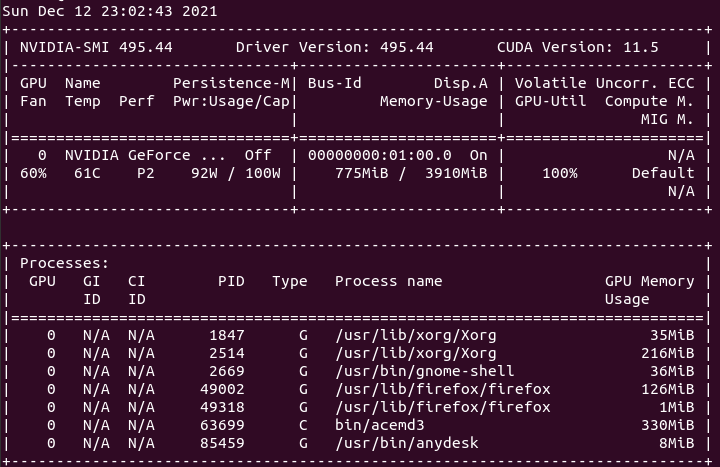 and this: 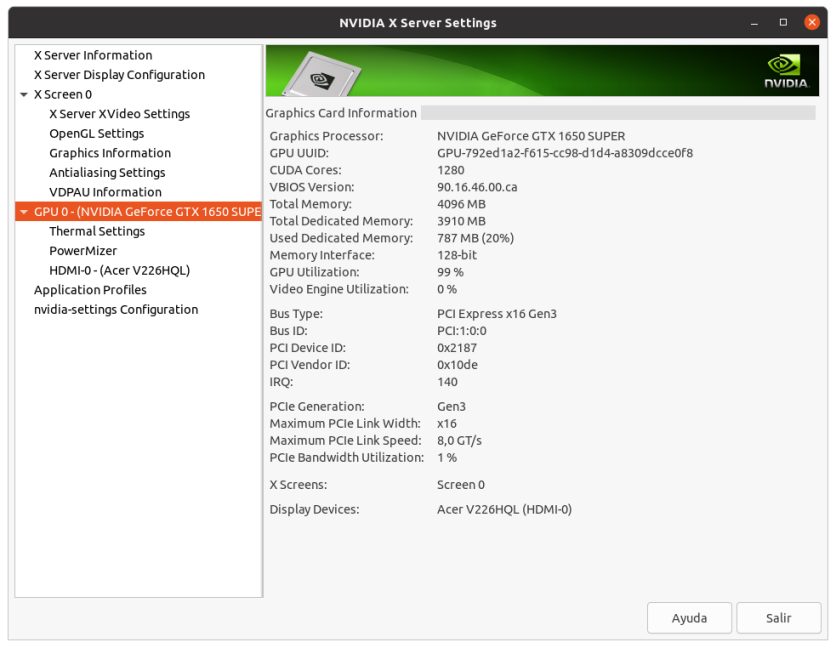 from my Host #186626 ... |
|
Send message Joined: 21 Feb 20 Posts: 1118 Credit: 40,876,970,595 RAC: 0 Level Scientific publications
|
Good to know that psensor is at least still reading the correct value from the new driver. Definitely interested to know if the reading goes back after the switch back to 470 when you have time.
|
|
ServicEnginIC Send message Joined: 24 Sep 10 Posts: 598 Credit: 13,085,315,510 RAC: 159,133 Level Scientific publications
|
Definitely interested to know if the reading goes back after the switch back to 470 when you have time. I am too. But I've experienced that there is a sure Gpugrid task crash when Nvidia driver update is done and the task is restarted. It crashes with the same error that when a task is restarted in a different device on a multi-GPU host. Luckily, my Host #186626, finished its Gpugrid task overnight, so I've reverted it to Nvidia Driver Version 470.86 Curious that PCIe load reduction is only reflected in my newer systems. As shown, PCIe usage at older ones remains about the same than usual. Now waiting to receive some (currently scarce) new task... |
 Send message Joined: 12 Jul 17 Posts: 404 Credit: 17,412,649,587 RAC: 0 Level Scientific publications
|
One thing that I just noticed. All of your hosts are running the New Feature Branch 495 drivers. These are “kinda-sorta” beta and the recommended driver branch is still the 470 branch. So I wonder if this is just a reporting issue. Does the Nvidia-Settings application report the same PCIe value as Psensor? I updated my driver on a couple of computers to 495 thinking higher is better. There was something hinky about it, I believe it reported something wrong. Then I read the nvidia driver page and sure enough it's beta so I reverted to 470.86 and will stick with the repository recommended driver. Linux Mint has another strange quirk. If you leave it to the update manager it will give you the oldest kernel, now 5.4.0-91. If you click on the 5.13 tab and then one of the kernels and install it from then on it will keep you updated to the latest kernel, now 5.13.0-22. I don't know if this is a wise thing to do or if I'm now running a beta kernel. |



©2026 Universitat Pompeu Fabra