Managing non-high-end hosts
Message boards :
Number crunching :
Managing non-high-end hosts
Message board moderation
| Author | Message |
|---|---|
 ServicEnginIC ServicEnginIC Send message Joined: 24 Sep 10 Posts: 598 Credit: 13,084,115,510 RAC: 42,299 Level  Scientific publications    
|
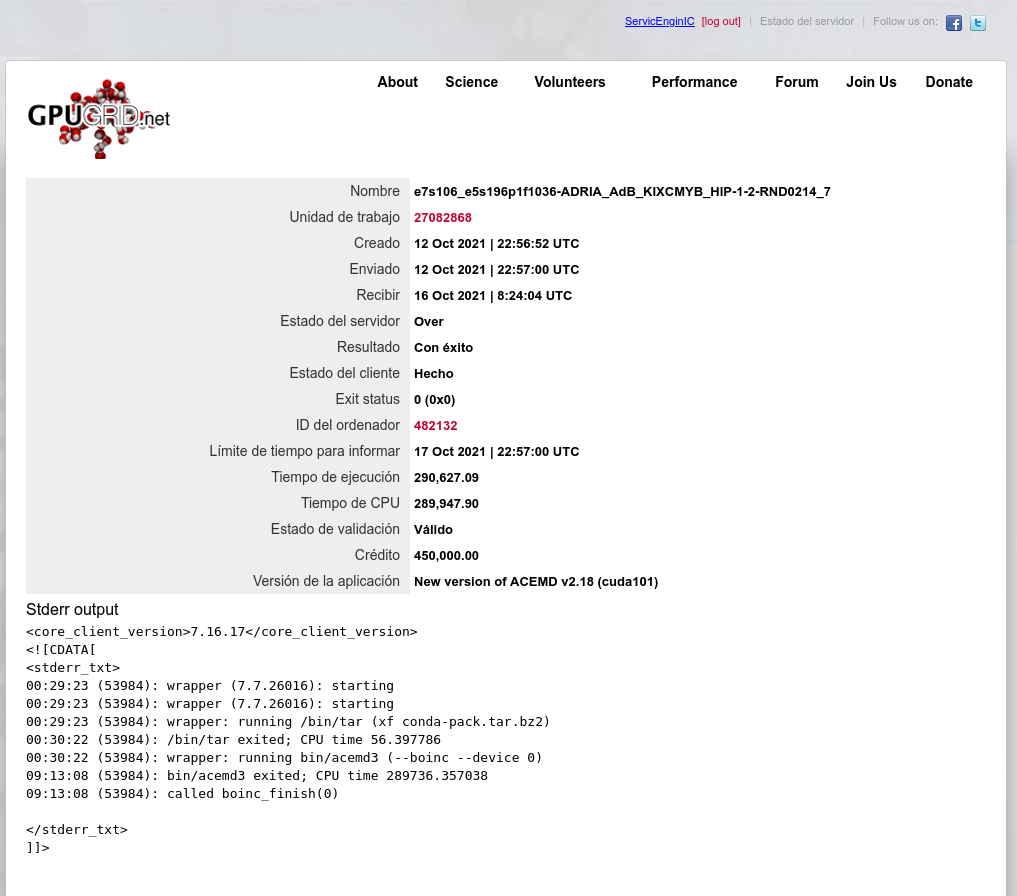
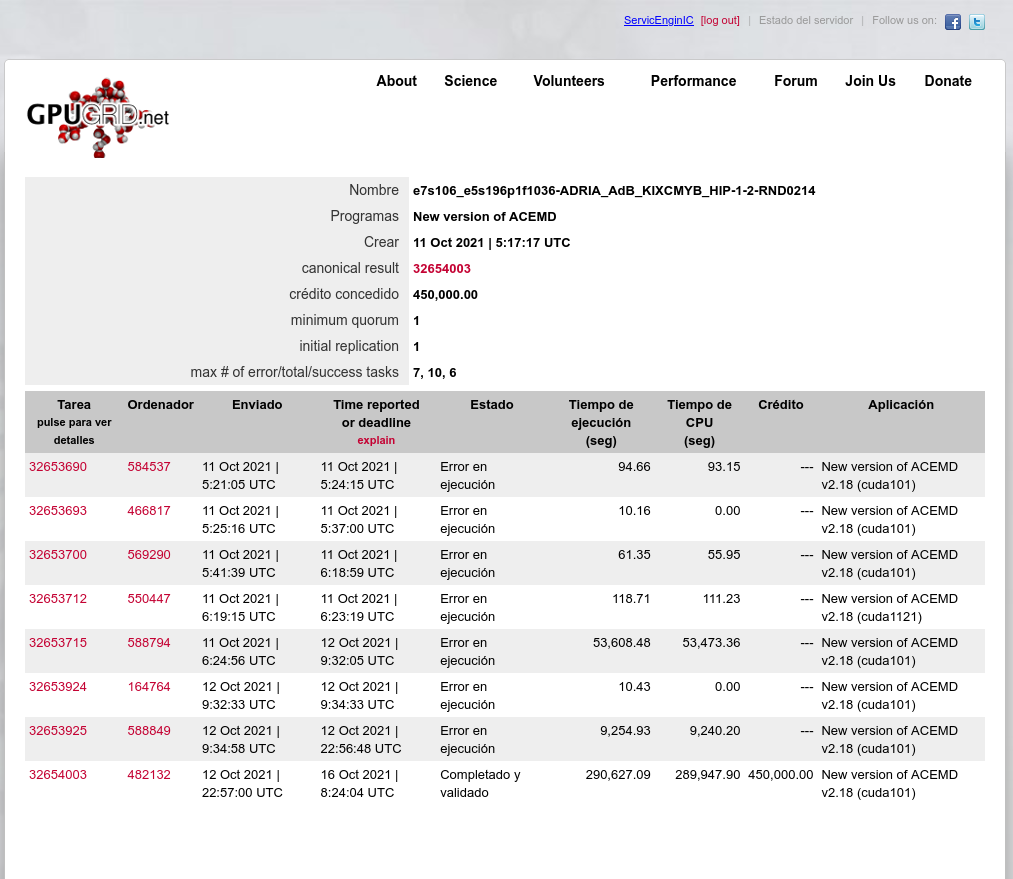
Managing non-high-end (slow) hosts Current extremely long ACEMD3 Gpugrid tasks represent a serious challenge for non-high-end hosts like mine ones. My current fastest host, based on a Turing GTX 1660 Ti GPU, takes about 1 day and 4,5 hours to process one of these tasks (around 103.000 seconds). My slowest one, based on a Pascal GTX 1050 Ti GPU, takes about 3 days and 9 hours doing the same kind of tasks (around 291.000 seconds). Are these kind of slower hosts worth for processing such heavy tasks? My personal opinion: Absolutely yes, as long as they be reliable systems. It would be of no use if one host returned an invalid/failed result after several days retaining a task. Let's take one example for sustaining my opinion: Task e7s106_e5s196p1f1036-ADRIA_AdB_KIXCMYB_HIP-1-2-RND0214_7 was recently processed at my mentioned slowest host. It took 290.627 seconds for it to return a valid result. That is: 3 days, 8 hours, 43 minutes and 47 seconds... But taking a close look to Work Unit #27082868 it was hanging of, it had previously failed on 7 other hosts. Maximum allowed number of failed tasks for current Work Units is 7, so that the task would have not be resent to any other host if mine had also failed, then resulting in a lost work unit for its intended scientific purposes... With time, I've had to adapt BOINC Manager settings at my hosts, trying to squeeze the maximum performance for eviting to miss deadlines. Here are my experiences: My Computing preferences for a 4 cores CPU host look as follows: 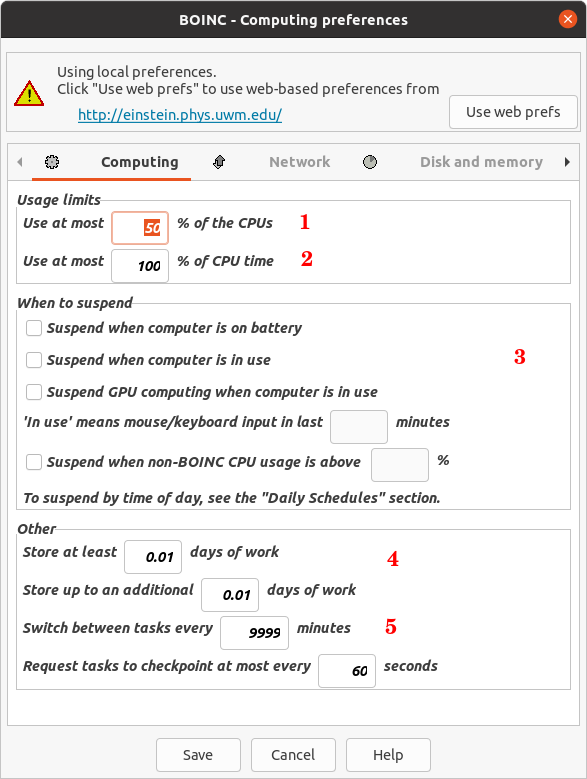 Where: -1) Use at most 50% of the CPUs, for not overcommitting the CPU for feeding GPU. This leaves two CPU full cores free for attending general system requirements. -2) Use at most 100% of the CPU time, for preventing to throttle the CPU. -3) Never suspending, for the task to be processed with the minimum pauses possible (preferably in one go). -4) Setting tasks buffer to a minimum, for not wasting time in waiting to the current task to finish. -5) Switch between tasks every 9999 minutes, for giving enough time for the current task be processed in one go, and only then switching to the next. My Network preferences look as follows: 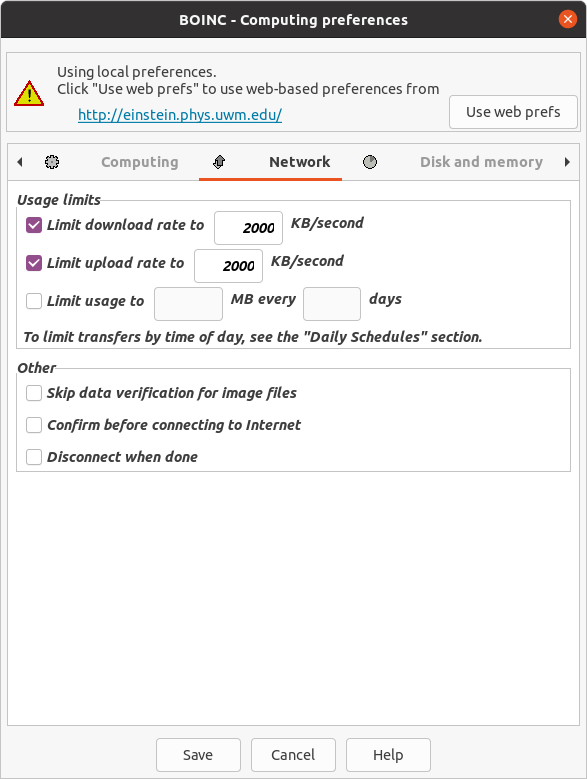 I set a certain Download/Upload rate limitation, for not saturating network bandwidth for my other hosts. But I try to set it to high limits, because Download + Upload times count when task deadline is close to the end, or to the credit bonus limit... And my Disk and memory preferences look as follows: 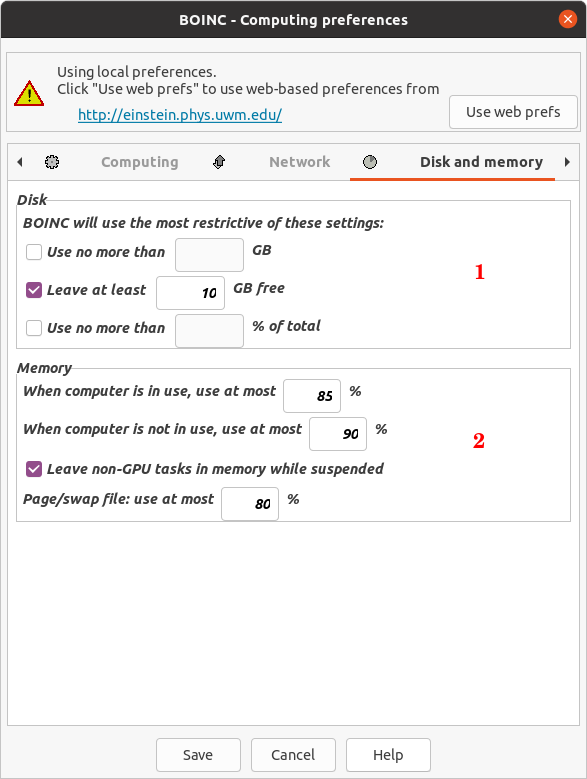 -1) Current Gpugrid environment takes a high disk space usage. I set all available space to be usable by BOINC, except for a certain security margin for the disk not resulting saturated. -2) Regarding memory usage, I raise the default limits to empirically tested values, to maximums for the system not becoming unresponsive to its other general tasks. And regarding system reliability: - I empirically test every system and each GPU for safe overclock settings, if I apply any. I do prefer a robust reliable system than a slightly faster but sporadically failing one. - I frequently check temperatures at every hosts, and try to maintain them at reasonable low levels. Lower temperatures result in a more reliable and faster system. - I perform preventive hardware maintenances when a temperature raise is detected at some element, or when a host starts failing tasks without a known reason. Regarding this last matter, I share my experiences at The hardware enthusiast's corner thread. |
|
ServicEnginIC Send message Joined: 24 Sep 10 Posts: 598 Credit: 13,084,115,510 RAC: 42,299 Level Scientific publications
|
When you are commanding a fleet of assorted slow GPUs (in my case currently 8), it is difficult to hold in mind how long will it take for every of them to finish their tasks. Here is a screenshot of the spreadsheet that I use for this purpose, at the time of writing this: 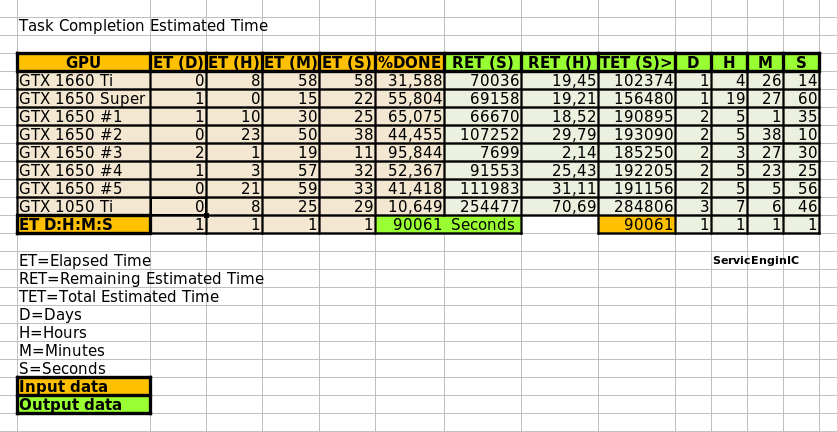 For me, it is useful for being aware to request new tasks when the ones in process are next to finish. This helps to maintain my GPUs crunching most of the time. An editable copy of this spreadsheet can be downloaded from here. |
|
Send message Joined: 10 Nov 13 Posts: 101 Credit: 15,776,452,122 RAC: 23,645 Level Scientific publications  
|
The slowest GPU's that I am using for GPUgrid are GTX 1070's. These average about 36hrs to process on Windows hosts. They seem to work fine, just need to let them run. A stable system with a reliable connection is really the best you can do. I have not tried anything slower like a GTX 1060 or some old Nvidia Grid K2 cards. They are only running Milkyway jobs which they do well with. There comes a time when the technology outpaces the physical hardware we have available but I am a firm believer of using what we have as long as possible. Remember, I'm the guy with the "Ragtag fugitive fleet" of old HP/HPE servers and workstations that I have saved from the scrap pile. |
|
ServicEnginIC Send message Joined: 24 Sep 10 Posts: 598 Credit: 13,084,115,510 RAC: 42,299 Level Scientific publications
|
There comes a time when the technology outpaces the physical hardware we have available but I am a firm believer of using what we have as long as possible. Yeah, Watching an old table of my working GPUs on 2019: 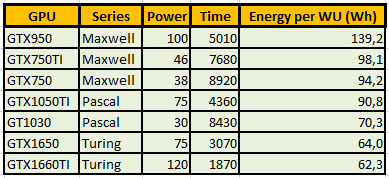 I published this table at Message # 52974, in "Low power GPUs performance comparative" thread. Since then, I've retired from production at Gpugrid all my Maxwell GPUs. GTX 750 and GTX 750 Ti for not being able to process the current ADRIA tasks inside the 5 days deadline. I estimate that GTX 950 could process them in about 3 days and 20 hours, but it doesn't worth it due to its low energetic efficiency. And Pascal GT 1030, I estimate that it would take about 6 days and 10 hours... Remember, I'm the guy with the "Ragtag fugitive fleet" of old HP/HPE servers and workstations that I have saved from the scrap pile. Unforgettable, since today you are at the top of Gpugrid Users ranking by RAC ;-) |
|
Send message Joined: 26 Jun 12 Posts: 12 Credit: 868,186,385 RAC: 0 Level  Scientific publications 
|
I've been running these tasks on a 1060 6gb, they take 161,000 - 163,000 seconds to complete. I will keep running tasks on this card until it can no longer meet the deadlines, I've been trying to hit the billion point milestone which would take another year or so if I could reliably get work units. Lets hope I can still run this card for that long! |
|
ServicEnginIC Send message Joined: 24 Sep 10 Posts: 598 Credit: 13,084,115,510 RAC: 42,299 Level Scientific publications
|
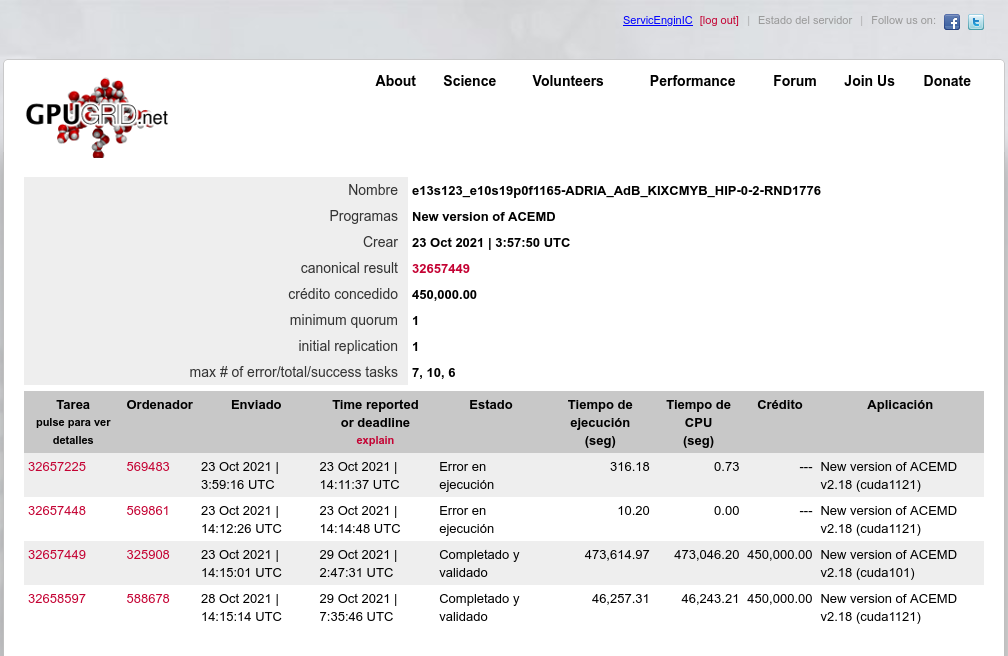
Some considerations about Gpugrid tasks deadlines: The criteria for receiving credits for a valid returned task is not strictly that it fits inside the 5 days deadline... Let's explain it. The official deadline for a Gpugrid task is currently 5 days, counting from the moment of Gpugrid server starts sending it to the receiving host. 5 days are exactly 432000 seconds. This time includes the task download time, the resting time until the task starts being processed, the pause times (if any), the total processing time, and the upload time of the result. When this time is past, the server will generate a copy of the same task, and resend it to a new host. Here comes the hint: An overdue task will not receive any credits for a returned result when it goes outside its deadline AND a valid result is received from the other host first. Continuing the process of a task past its deadline, is in some way a bet. Depending on the receiving host, in practice, the deadline is extended by the time that this new host takes to receive, process, and report a valid result for the task. If the new host is the fastest one for the current set of ADRIA tasks, it will take a mere 5 hours to process... That is the minimum deadline extension that you might expect for an overdue task. My fastest host takes 1 day and 4,5 hours with these tasks. That is the minimum extension that you could expect from my fleet. If the newly re-sent task gets a slower-than-medium host, you could expect an extension even longer. - If you report a valid result for your overdue task even 1 second before the new host, both tasks will receive the base (no bonus) credits amount. - If the new host reports a valid result even 1 second before yours, it will get the credits awarded, and your task will be labeled with "Completed, too late to validate", 0 credits. One practical example: I decided to test if I could get an old Maxwell GTX 750 Ti GPU to fit in deadline one of the current ADRIA extremely long tasks. I awakened my host #325908, I applied an aggressive +230 MHz overclock to the GPU, and I received task #32657449 It took 473615 seconds to process this task. Too long for fitting the deadline! This task was hanging from WU #27084724 My host returned a valid result 45150 seconds past the original deadline, but 17295 seconds before than the host that received the re-sent task. Both tasks received 450000 credits... This time I won my bet! 🎉 If I had aborted, extended beyond 17295 more seconds, or failed my task, the other host would have received 675000, 50% bonused credits, for returning its result inside the first 24 hours. It is an undesirable side effect, and I apologize for this. My example task exceeded the 5 days deadline by 45150 seconds (12 hours, 32 minutes, 30 seconds in excess) I'll give a last try to a new task by carefully readjusting the overclock for this 46 Watts low-power-consuming GPU and its harboring host. If It is still failing the 5 days deadline, I'll retire this GPU definitely for processing the current Gpugrid ADRIA tasks. Conversely, if I'm successful, I'll publish the measures taken. I strongly doubt it, since I have to trim more than 13 hours in processing time 🎬⏱️ |
|
Send message Joined: 10 Nov 13 Posts: 101 Credit: 15,776,452,122 RAC: 23,645 Level Scientific publications
|
Well said ServicEnginIC At one time there was data on the Performance tab that would give users a rough idea of where the GPU's they had would fit in. There are a great number of variables that affect GPU performance but they could at least tell if they were in the ballpark. I would very much like to see the Performance tab reinstated so that these general comparisons were available. While it's good for users to keep using GPU's as long as they are viable there comes a time when they should be retired or used for other projects. I hate to see people burn time and energy with little or no result to show for it. Maybe someone could come up with a general guide on what GPU's are useful for GPUgrid that would go back 2 or 3 generations. If users had a breakpoint where they should seriously consider upgrading to something more recent then they will at least have something to work toward. |
|
Send message Joined: 1 Jan 15 Posts: 1171 Credit: 12,662,148,501 RAC: 1 Level Scientific publications
|
well, the point here is, that in many cases it's not just a matter of removing the "old" graphic card and putting in a new one. often enough (like with some of my rigs, too), new generation cards are not well compatible with the remaining old PC hardware. So, in many cases, in order to be up to date GPU-wise, it would mean to buy a new PC :-( |
|
ServicEnginIC Send message Joined: 24 Sep 10 Posts: 598 Credit: 13,084,115,510 RAC: 42,299 Level Scientific publications
|
I fully agree, jjch. I reproduce my own words at Message #53367, in response to user Piri1974, where both slopes of your exposition were mentioned... But anyway, I would not recommend buying the GT710 or GT730 anymore unless you need their very low consumption. |
|
ServicEnginIC Send message Joined: 24 Sep 10 Posts: 598 Credit: 13,084,115,510 RAC: 42,299 Level Scientific publications
|
So, in many cases, in order to be up to date GPU-wise, it would mean to buy a new PC :-( Right. And I find it particularly annoying when trying to upgrade Windows hosts... As a hardware enthusiast, I've self-upgraded four of my Linux rigs from old socket LGA 775 Core 2 Quad processors and DDR3 RAM motherboards to new i3-i5-i7 processors and DDR4 RAM ones. I find Linux OS to be very resilient to this kind of changes, with usually no need to care more than upgrading the hardware. But one of them is a Linux/Windows 10 dual boot system. While Linux assumed the changes smoothly, I had to buy a new Windows 10 License to renew the previously existing... I related it in detail at my Message #55054, in "The hardware enthusiast's corner" thread. |
|
ServicEnginIC Send message Joined: 24 Sep 10 Posts: 598 Credit: 13,084,115,510 RAC: 42,299 Level Scientific publications
|
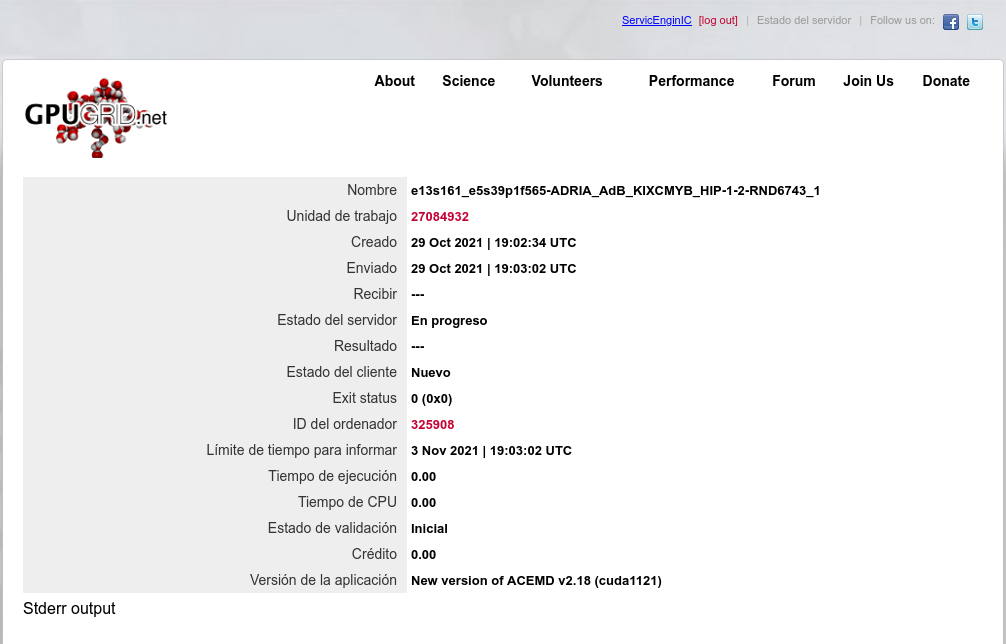
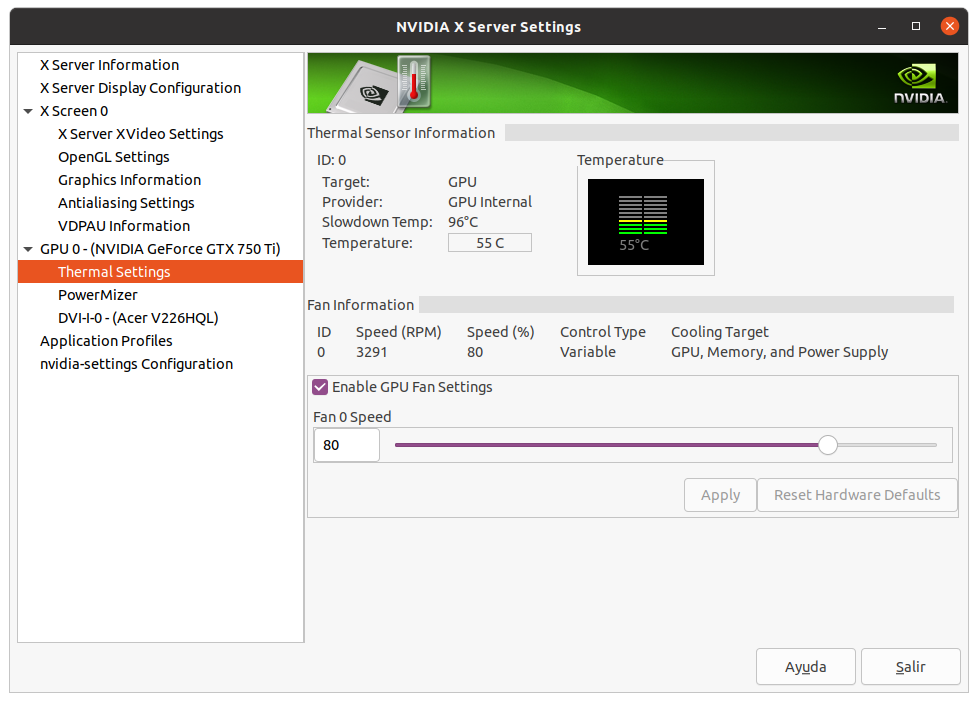
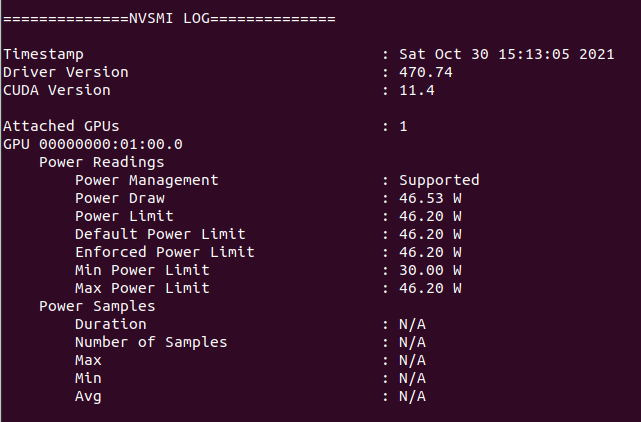
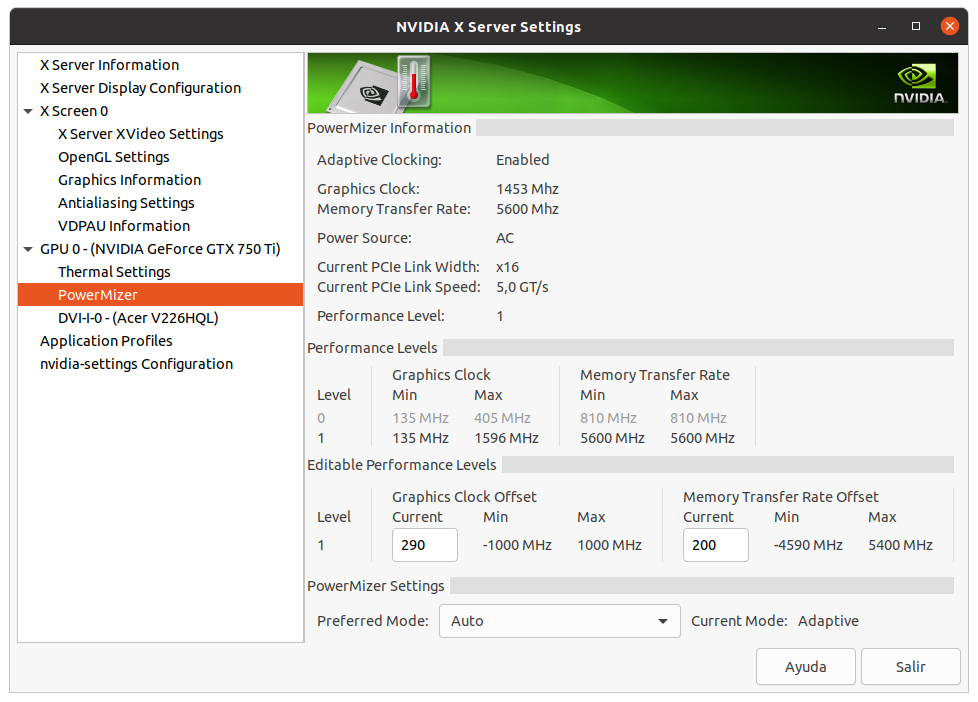
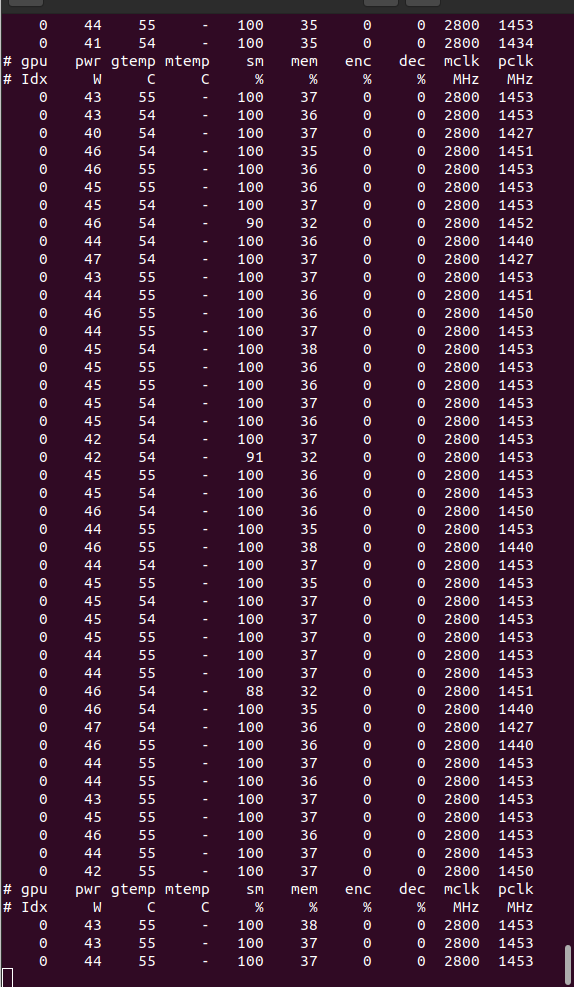
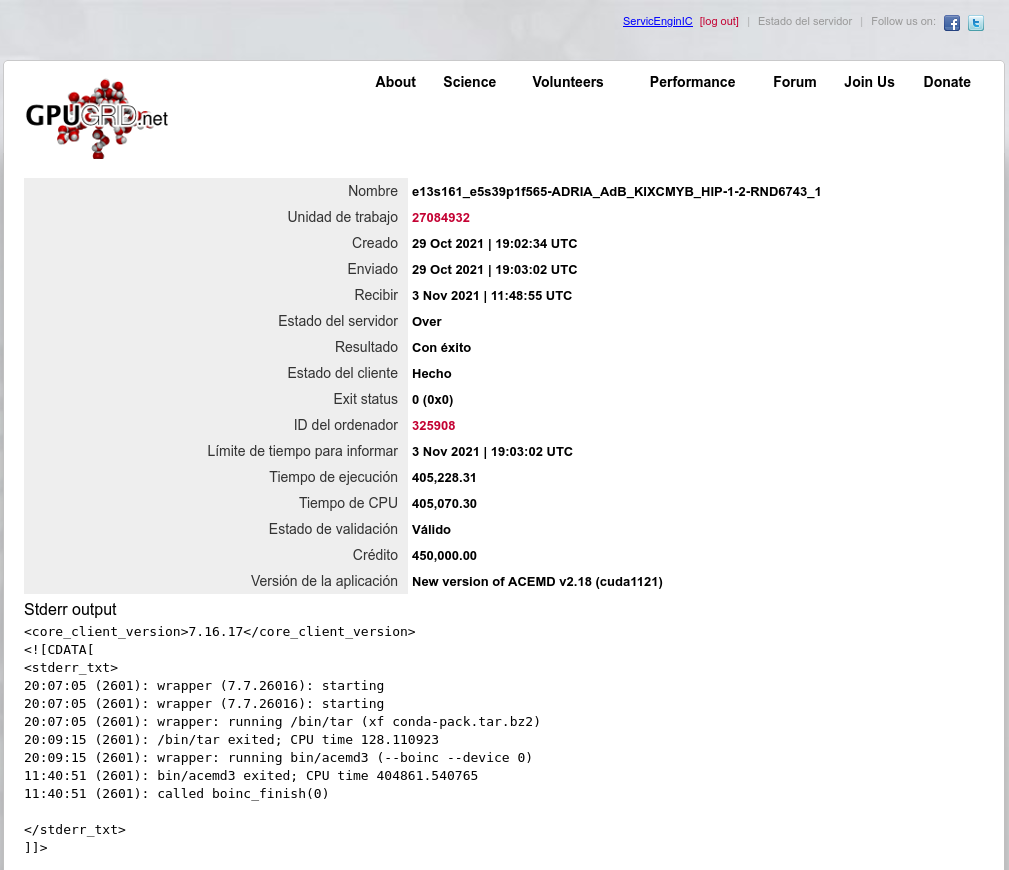
Overclocking to wacky (?) limits Conversely, if I'm successful, I'll publish the measures taken. I strongly doubt it, since I have to trim more than 13 hours in processing time 🎬⏱️ Well, we already have a verdict: Task e13s161_e5s39p1f565-ADRIA_AdB_KIXCMYB_HIP-1-2-RND6743_1 was sent to the mentioned Linux Host #325908 on 29 Oct 2021 at 19:03:02 UTC. This same host took 473615 seconds to process a previous task, and I did set myself the challenge of trimming more than 13 hours in processing time for fitting a new task into deadline. For achieving this, I've had to carefully study several strategies to apply, and I'll try to share with you everything I've learnt in the way. We're talking about a GV-N75TOC-2GI graphics card I've found this Gigabyte 46 Watts power consuming card being very tolerant to heavy overclocking, probably due to a good design and to its extra 6-pin power connector. Other manufacturers decide to take all the power from PCIe slot for cards consuming 75 Watts or less... This graphics card isn't its original shape. I had to refurbish its cooling system, as I related in my Message #55132 at "The hardware enthusiast's corner" thread. It is currently installed on an ASUS P5E3 PRO motherboard, also refurbished (Message #56488). Measures taken: The mentioned motherboard has two PCIe x16 V2.0 slots, Slot #0 occupied by the GTX 750 Ti graphics card, and Slot #1 remaining unused. For gaining the maximum bandwidth available for the GPU, I entered BIOS setup and disabled integrated PATA (IDE) interface, Sound, Ethernet, and RS232 ports. Communications are managed by a WiFi NIC, installed in one PCIe x1 slot, and storage is carried out by a SATA SSD. I also settled eXtreme Memory Profile (X.M.P) to ON, and Ai Clock Twister parameter to STRONG (highest performance available) Overclocking options had been previously enabled at this Ubuntu Linux host by means of the following Terminal command: sudo nvidia-xconfig --thermal-configuration-check --cool-bits=28 --enable-all-gpus It is a persistent command, and it is enough with executing it once. After that, entering Nvidia X Server Settings, options for adjusting fan curve and GPU and Memory frequency offsets will be available. First of all, I'm adjusting GPU Fan setting to 80%, thus enhancing refrigeration comparing to default fan curve. Then, I'll apply a +200 MHz offset to Memory clock, increasing from original 5400 MHz to a higher 5600 MHZ (GDDR 2800 MHz x 2). And finally, I'm gradually increasing GPU clock until power limit for the GPU is reached while working at full load. For determining the power limit, it is useful the following command: sudo nvidia-smi -q -d power For this particular graphics card, Power Limit is factory set at 46.20 W, and it coincides with the maximum allowed for this GTX 750 Ti kind of GPU. And final clock settings look this way. With this setup, let's look to an interesting redundancy check, by means of the following nvidia-smi GPU monitoring command: sudo nvidia-smi dmon As can be seen at previous link, GPU is consistently reaching a maximum frequency of 1453 MHz, and power consumptions of more than 40 Watts, frequently reaching 46 and even 47 Watts. Temperatures are maintaining a comfortable level of 54 to 55 ºC, and GPU usage is on 100% most of the time. That's good... as long as the processing maintains reliable... Will it? ⏳️🤔️ This new task e13s161_e5s39p1f565-ADRIA_AdB_KIXCMYB_HIP-1-2-RND6743_1 was processed by this heavily overclocked GTX 750 Ti GPU in 405229 seconds, and a valid result was returned on 03 Nov 2021 at 11:48:55 UTC Ok, I finally was able to trim the processing time in 68386 seconds. That is: 18 hours, 59 minutes and 46 seconds less than the previous task. It fit into deadline with an excess margin of 7 hours, 14 minutes and 7 seconds... (Transition from summer to winter time gave an extra hour this Sunday !-) Challenge completed! 🤗️ |
|
ServicEnginIC Send message Joined: 24 Sep 10 Posts: 598 Credit: 13,084,115,510 RAC: 42,299 Level Scientific publications
|
Yesterday, a new batch of tasks "_ADRIA_BanditGPCR_APJ_b0-" came out. It seems that the project has attended the request for reducing the size of tasks. This will allow for slower GPUs to process them into the 5 days deadline. Based on estimations from this morning (about 7:00 UTC), all my currently working GPUs will return their tasks in time. The GTX 1660 Ti is running for getting full bonus (+50% for result returned before 24 hours) From GTX 1650 SUPER down to GTX 1050 Ti are running for getting mid bonus (+25% for result returned before 48 hours) Even GTX 750 Ti will get with no problem its base credit for returning result into the 5 days deadline (before 120 hours) 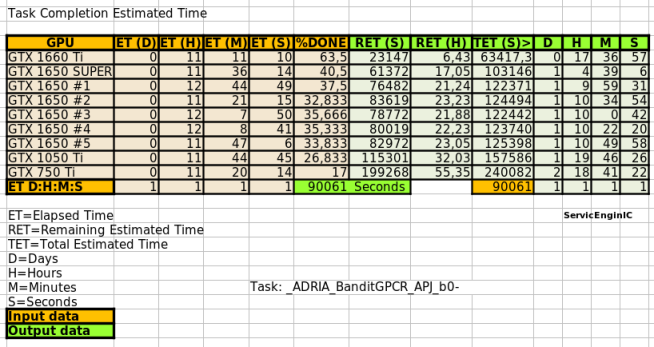 This might also solve the problem of sporadic oversized result files not being able to upload. Good. |
|
Send message Joined: 1 Jan 15 Posts: 1171 Credit: 12,662,148,501 RAC: 1 Level Scientific publications
|
could it be that a GTX1650 is not able to crunch the current series of tasks? Today, for the first time I tried GPUGRID on my host with a GTX1650 inside, and the task failed after some 4 hours: https://www.gpugrid.net/result.php?resultid=32721627 excerpt from the stderr: ACEMD failed: Error invoking kernel: CUDA_ERROR_LAUNCH_TIMEOUT (702) 19:28:44 (6344): bin/acemd3.exe exited; CPU time 13408.734375 So, as sorry as I am, I will go back to crunch other projects on this one host :-( |
Retvari Zoltan Send message Joined: 20 Jan 09 Posts: 2380 Credit: 16,897,957,044 RAC: 0 Level Scientific publications
|
could it be that a GTX1650 is not able to crunch the current series of tasks?I don't think so. Today, for the first time I tried GPUGRID on my host with a GTX1650 inside, and the task failed after some 4 hoursI can suggest only the ususal: check your GPU temperatures, lower the GPU frequency by 50MHz. |
|
ServicEnginIC Send message Joined: 24 Sep 10 Posts: 598 Credit: 13,084,115,510 RAC: 42,299 Level Scientific publications
|
could it be that a GTX1650 is not able to crunch the current series of tasks? I'm processing current ADRIA tasks on five GTX 1650 graphics cards of varied brands and models. They're behaving rock stable, and getting mid bonus (valid result returned before 48 hours) when working 24/7. Perhaps a noticeable difference with yours is that all of them are working under Linux, where some variables as antivirus and other interfering software can be discarded... As always, Retvari Zoltan's wise advices are to be taken in mind. |
|
Send message Joined: 1 Jan 15 Posts: 1171 Credit: 12,662,148,501 RAC: 1 Level Scientific publications
|
well, the GPU temperature was at 60/61°C - so not too high, I would guess. GPU runs at stock frequency, but I could try to go below as suggested by Zoltan. However, meanwhile my suspicion is that the old processor Intel(R) Core(TM)2 Duo CPU E7400 @ 2.80GHz may be the culprit. I will give it one more try; if it fails again, I guess this host is not able to successfully run GPUGRID (however, it works fine with WCG GPU tasks, and with F&H) |
|
ServicEnginIC Send message Joined: 24 Sep 10 Posts: 598 Credit: 13,084,115,510 RAC: 42,299 Level Scientific publications
|
However, meanwhile my suspicion is that the old processor Surely you're right. For a two-core CPU, I'd recommend to set at BOINC Manager Computing preferences "Use at most 50 % of the CPUs". This will cause that one CPU core to remain free for feeding the GPU. |
|
Send message Joined: 1 Jan 15 Posts: 1171 Credit: 12,662,148,501 RAC: 1 Level Scientific publications
|
However, meanwhile my suspicion is that the old processor the question then though is: how long would it take a task to get finished? Probably 4-5 days :-( |
|
ServicEnginIC Send message Joined: 24 Sep 10 Posts: 598 Credit: 13,084,115,510 RAC: 42,299 Level Scientific publications
|
Every of my five GTX 1650 graphics cards are currently taking less than 48 hours, in time for getting mid bonus (+25%). I published a table of computing times at Message #57886 |
|
Send message Joined: 1 Jan 15 Posts: 1171 Credit: 12,662,148,501 RAC: 1 Level Scientific publications
|
Every of my five GTX 1650 graphics cards are currently taking less than 48 hours, in time for getting mid bonus (+25%). I just looked up your CPUs: they are generations newer than my old Intel Core 2 Duo CPU E7400 @ 2.80GHz I am afraid that these new series of GPUGRID tasks are demanding the old CPU too much :-( But, as said, I'll give it another try once new tasks become available. |




©2026 Universitat Pompeu Fabra