Task failing after 3.669 seconds
Message boards :
Number crunching :
Task failing after 3.669 seconds
Message board moderation
| Author | Message |
|---|---|
|
Send message Joined: 1 Jan 15 Posts: 1171 Credit: 12,662,148,501 RAC: 1 Level  Scientific publications     
|
Any idea why this task failed with "computation error" about 1 hour after start: https://www.gpugrid.net/result.php?resultid=32654746 |
|
Send message Joined: 21 Feb 20 Posts: 1118 Credit: 40,876,970,595 RAC: 0 Level Scientific publications 
|
Exit status 194 (0xc2) EXIT_ABORTED_BY_CLIENT 
|
|
Send message Joined: 1 Jan 15 Posts: 1171 Credit: 12,662,148,501 RAC: 1 Level Scientific publications
|
Exit status 194 (0xc2) EXIT_ABORTED_BY_CLIENT which is definitely wrong. At least, if the client refers to me personally, for sure I did NOT abort the WU. Further, under result plus under clientstatus is says: "Berechnungsfehler", i.e. "computation error". |
|
Send message Joined: 21 Feb 20 Posts: 1118 Credit: 40,876,970,595 RAC: 0 Level Scientific publications
|
don't get too hung up on the verbiage used by BOINC. ANY kind of error, be it pre-computation, during-computation issues, manual aborts, automatic aborts, or even things like upload errors (after computation has completed) will be classified as "Computation Error". This is the same for all projects, It's just the generic words BOINC uses when there's an error it can't resolve, and more detailed info is usually in the logs or stderr output. since it failed with aborted by client I can only assume some kind of issue between BOINC and the app, and the BOINC client itself just killed the task. (unknown error) - exit code 194 (0xc2) since all you have is "unknown error" I don't think there's much to run down here.
|
|
Send message Joined: 1 Jan 15 Posts: 1171 Credit: 12,662,148,501 RAC: 1 Level Scientific publications
|
... in a way, I was lucky anyway that this happened after about 1 hour, and not, say, after 15 hours or so :-) |
|
Send message Joined: 1 Jan 15 Posts: 1171 Credit: 12,662,148,501 RAC: 1 Level Scientific publications
|
now, a task failed after about 16 hours, a few minitues before getting finished: https://www.gpugrid.net/result.php?resultid=32658707 very annoying, of course. Can anyone tell me what was going wrong with this task? |
 Send message Joined: 13 Dec 17 Posts: 1424 Credit: 9,189,946,190 RAC: 0 Level  Scientific publications
|
Detected memory leaks! Error invoking kernel: CUDA_ERROR_UNKNOWN (999) Probably an error in the VRAM on the card. Try reducing the card temp by moving the fan speed up or reducing any overclocking. |
|
Send message Joined: 11 Jul 09 Posts: 1639 Credit: 10,159,968,649 RAC: 0 Level Scientific publications
|
Detected memory leaks! All Windows users have that report from the app, on perfectly good tasks. I wouldn't worry about that. Error invoking kernel: CUDA_ERROR_UNKNOWN (999) Isn't that what happens after a reboot, particularly after the NVidia driver has been updated by Microsoft / Windows 10? Probably an error in the VRAM on the card. Try reducing the card temp by moving the fan speed up or reducing any overclocking. I think we'd need more evidence before making a leap of interpretation like that. Is the video card in question driving a monitor? If so, are there any problems with the visible display? Colour blocks, bad pixels, that sort of thing? Have you changed any operating parameters - overclocked? undervolted? |
|
Send message Joined: 2 Jul 16 Posts: 339 Credit: 8,283,381,558 RAC: 200,402 Level Scientific publications
|
Detected memory leaks! Windows updates doesn't include OpenCL, so not an issue here at GPUGrid. |
|
Send message Joined: 4 Jun 15 Posts: 19 Credit: 8,950,348,416 RAC: 77,350 Level Scientific publications
|
Is acemd3 for Windows broken? All tasks seem to be failing: Stderr output <core_client_version>7.16.20</core_client_version> <
|
Hi, so what is the answer for this post's title question (well actually it is a statement :) )? Why are python apps failing after 2-4 seconds? Should I install something on my machine (running Debian 11)? |
|
Send message Joined: 13 Dec 17 Posts: 1424 Credit: 9,189,946,190 RAC: 0 Level Scientific publications
|
The tasks are beta and the scientists are still debugging the configuration parameters. Errors are to be expected. If you have a task error, look at the task ID in your Tasks list and see if the task has been sent to many others that have also errored out the task. If so, everything is normal. However if the wingmen for the task has completed the task successfully, you need to look at the stderr.txt output of the task in the list and read to the end and see what kind of error was generated. If the error is local you might be able to do something about it by restarting the host or updating the video drivers. And you can't do anything else or need to do anything else like downloading libraries or similar because each task is bundled with exactly the resources it need to complete successfully. Or at least in theory. Again, these are beta tasks and are still being debugged. |
|
Send message Joined: 4 Jul 21 Posts: 23 Credit: 12,165,109,127 RAC: 207,692 Level Scientific publications
|
Thanks@KeithMyers for tips. Checked last 20 tasks I got and all failed (they all failed after 3 seconds) - they where all 'solved' by another host shortly thereafter, so... Everything is updated on my host. It is Debian bullseye though, on computers that finished the task I think I mostly saw they were running Ubuntu 20.04 LTS. But that is probably not the likely cause. My STDERR says: INTERNAL ERROR: cannot create temporary directory! Might that be a permissions problem? ---------------------------------------------- The full STDERR: <core_client_version>7.16.16</core_client_version> <![CDATA[ <message> process exited with code 195 (0xc3, -61)</message> <stderr_txt> 14:26:46 (1648902): wrapper (7.7.26016): starting 14:26:46 (1648902): wrapper (7.7.26016): starting 14:26:46 (1648902): wrapper: running /usr/bin/flock (/var/lib/boinc-client/projects/www.gpugrid.net/miniconda.lock -c "/bin/bash ./miniconda-installer.sh -b -u -p /var/lib/boinc-client/projects/www.gpugrid.net/miniconda && /var/lib/boinc-client/projects/www.gpugrid.net/miniconda/bin/conda install -m -y -p gpugridpy --file requirements.txt ") [1648927] INTERNAL ERROR: cannot create temporary directory! [1648931] INTERNAL ERROR: cannot create temporary directory! 14:26:47 (1648902): /usr/bin/flock exited; CPU time 0.139614 14:26:47 (1648902): app exit status: 0x1 14:26:47 (1648902): called boinc_finish(195) |
 ServicEnginIC ServicEnginIC Send message Joined: 24 Sep 10 Posts: 598 Credit: 13,084,835,510 RAC: 112,852 Level Scientific publications
|
My STDERR says: The same problem was treated at Message #55986 A workaround solution was detailed there, maybe you are interested in trying. |
|
Send message Joined: 4 Jul 21 Posts: 23 Credit: 12,165,109,127 RAC: 207,692 Level Scientific publications
|
Thanks! So, I tried: sudo systemctl edit boinc-client.service and added: [Service] PrivateTmp=true then rebooted Waiting for tasks now to see if it works... |
|
ServicEnginIC Send message Joined: 24 Sep 10 Posts: 598 Credit: 13,084,835,510 RAC: 112,852 Level Scientific publications
|
All right. If it was that, You're done. Now it's time to patiently wait for new Python WUs... |
|
Send message Joined: 13 Dec 17 Posts: 1424 Credit: 9,189,946,190 RAC: 0 Level Scientific publications
|
The bug where all tasks always run on Device#0 has been fixed this morning. Should be smooth sailing from now on for python tasks. |
|
ServicEnginIC Send message Joined: 24 Sep 10 Posts: 598 Credit: 13,084,835,510 RAC: 112,852 Level Scientific publications
|
If still failing, please, double check that your boinc-client.service is similar to this: 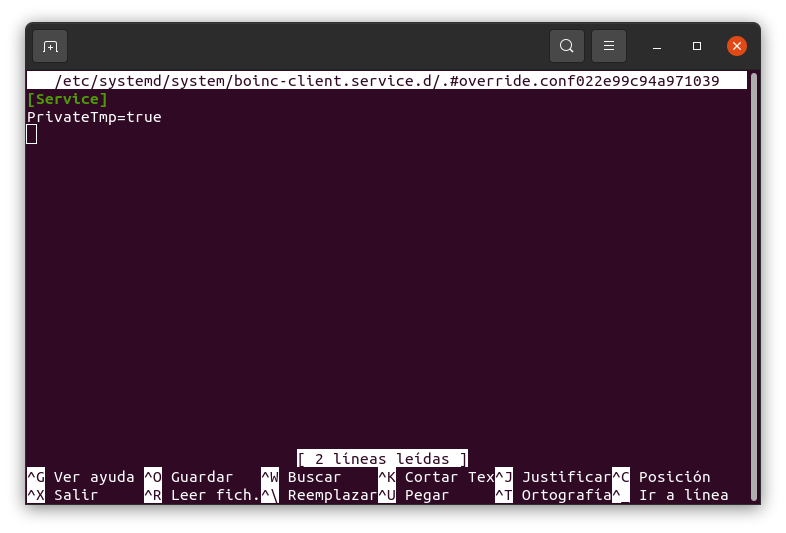 After adding the stated lines, it is necessary to save changes with Ctrl + O, confirm with Enter, then exit with Ctrl + X, and then reboot. (Excuse that the menus are shown in Spanish version :-) |



©2026 Universitat Pompeu Fabra