Experimental Python tasks (beta) - task description
Message boards :
News :
Experimental Python tasks (beta) - task description
Message board moderation
Previous · 1 . . . 18 · 19 · 20 · 21 · 22 · 23 · 24 . . . 50 · Next
| Author | Message |
|---|---|
|
Send message Joined: 11 Jul 09 Posts: 1639 Credit: 10,159,968,649 RAC: 0 Level  Scientific publications      
|
As abouh has posted previously, the two resource types are used alternately - "cyclical GPU load is expected in Reinforcement Learning algorithms. Whenever GPU load in lower, CPU usage should increase." (message 58590). Any instantaneous observation won't reveal the full situation: either CPU will be high, and GPU low, or vice-versa. |
|
Send message Joined: 27 Aug 21 Posts: 38 Credit: 7,254,068,306 RAC: 0 Level  Scientific publications 
|
Yep- I observe the alternation. When I suspend all other work units, I can see that just one of these tasks will use a little more than half of the logical processors. I know it has been talked about that although it says it uses 1 processor (or, 0.996, to be exact) that it uses more. I am running E@H work units and I think that running both is choking the CPU. Is there a way to limit the processor count that these python tasks use? In the past, I changed the app config to use 32, but it did not seem to speed anything up, even though they were reserved for the work unit. I am not sure there is a way to post images, but here are some links to show CPU and GPU usage when only running one python task. Is it supposed to use that much of the CPU? https://i.postimg.cc/Kv8zcMGQ/CPU-Usage1.jpg https://i.postimg.cc/LX4dkj0b/GPU-Usage-1.jpg https://i.postimg.cc/tRM0PZdB/GPU-Usage-2.jpg I am sorry for all of the questions.... just trying my best to understand. |
 ServicEnginIC ServicEnginIC Send message Joined: 24 Sep 10 Posts: 598 Credit: 13,083,686,510 RAC: 55 Level Scientific publications
|
As abouh has posted previously, the two resource types are used alternately - "cyclical GPU load is expected in Reinforcement Learning algorithms. Whenever GPU load in lower, CPU usage should increase. This can be very well graphically noticed at the following two images. Higher CPU - Lower GPU usage cycle: 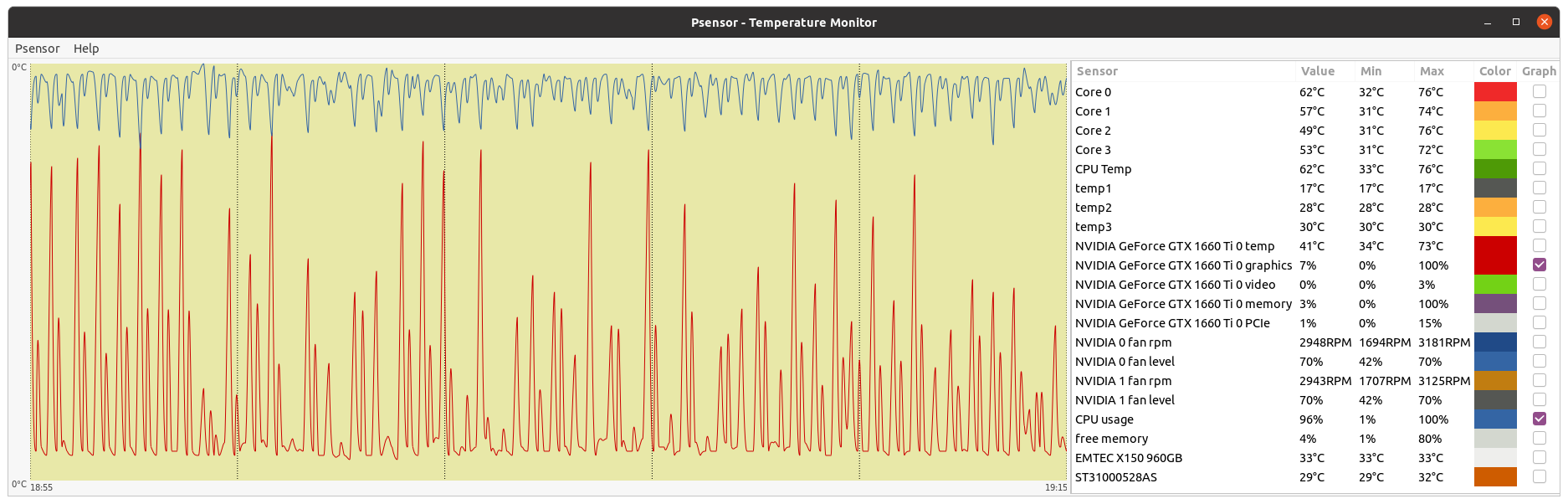 Higher GPU - Lower CPU usage cycle: 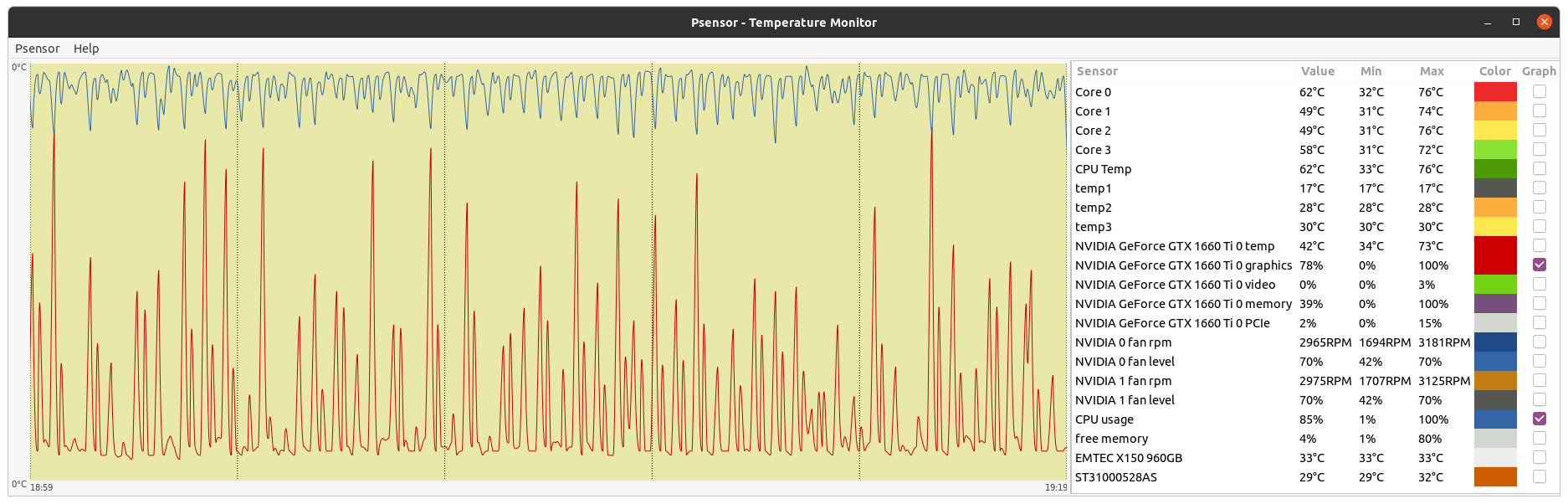 CPU and GPU usage graphics follow an anti cyclical pattern. |
 Send message Joined: 13 Dec 17 Posts: 1424 Credit: 9,189,946,190 RAC: 0 Level Scientific publications
|
Is there a way to limit the processor count that these python tasks use? In the past, I changed the app config to use 32, but it did not seem to speed anything up, even though they were reserved for the work unit. No there isn't as the user. These are not real MT tasks or any form that BOINC recognizes and provides some configuration options. Your only solution is to only run one at a time via an max_concurrent statement in an app_config.xml file and then also restrict the number of cores being allowed to be used by your other projects. That said, I don't know why you are having such difficulties. Maybe chalk it up to Windows, I don't know. I run 3 other cpu projects at the same times as I run the GPUGrid Python on GPU tasks with 28-46 cpu cores being occupied by Universe, TN-Grid or yoyo depending on the host. Every host primarily runs Universe as the major cpu project. No impact on the python tasks while running the other cpu apps. |
|
ServicEnginIC Send message Joined: 24 Sep 10 Posts: 598 Credit: 13,083,686,510 RAC: 55 Level Scientific publications
|
No impact on the python tasks while running the other cpu apps. Conversely, I notice a performance loss on other CPU tasks when python tasks are in execution. I processed yesterday python task e7a30-ABOU_rnd_ppod_demo_sharing_large-0-1-RND2847_2 at my host #186626 It was received at 11:33 UTC, and result was returned on 22:50 UTC At the same period, PrimeGrid PPS-MEGA CPU tasks were also being processed. The medium processing time for eighteen (18) PPS-MEGA CPU tasks was 3098,81 seconds. The medium processing time for 18 other PPS-MEGA CPU tasks processed outside that period was 2699,11 seconds. This represents an extra processing time of about 400 seconds per task, or about a 12,9% performance loss. There is not such a noticeable difference when running Gpugrid ACEMD tasks. |
|
Send message Joined: 13 Dec 17 Posts: 1424 Credit: 9,189,946,190 RAC: 0 Level Scientific publications
|
I also notice an impact on my running Universe tasks. Generally adds 300 seconds to the normal computation times when running in conjunction with a python task. |
|
Send message Joined: 9 May 13 Posts: 171 Credit: 4,739,796,466 RAC: 6 Level  Scientific publications 
|
Windows 10 machine running task 32899765. Had a power outage. When the power came back on, task was restarted but just sat there doing nothing. The stderr.txt file showed the following error: file pythongpu_windows_x86_64__cuda102.tar Task was stalled waiting on a response. BOINC was stopped and the pythongpu_windows_x86_64__cuda102.tar file was removed from the slots folder. Computer was restarted then the task was restarted. Then the following error message appeared several times in the stderr.txt file. OSError: [WinError 1455] The paging file is too small for this operation to complete. Error loading "C:\ProgramData\BOINC\slots\0\lib\site-packages\torch\lib\caffe2_detectron_ops_gpu.dll" or one of its dependencies. Page file size was increased to 64000MB and rebooted. Started task again and still got the error message about page file size too small. Then task abended. If you need more info about this task, please let me know. |
|
Send message Joined: 31 May 21 Posts: 200 Credit: 0 RAC: 0 Level  Scientific publications
|
Thank you captainjack for the info. 1. Interesting that the job gets stuck with: (Y)es / (N)o / (A)lways / (S)kip all / A(u)to rename all / (Q)uit? The job command line is the following: 7za.exe pythongpu_windows_x86_64__cuda102.tar -y and I got from the application documentation (https://info.nrao.edu/computing/guide/file-access-and-archiving/7zip/7z-7za-command-line-guide): 7-Zip will prompt the user before overwriting existing files unless the user specifies the -y So essentially -y assumes "Yes" on all Queries. Honestly I am confused by this behaviour, thanks for pointing it out. Maybe I am missing the x, as in 7za.exe x pythongpu_windows_x86_64__cuda102.tar -y I will test it on the beta app. 2. Regarding the other error OSError: [WinError 1455] The paging file is too small for this operation to complete. Error loading "C:\ProgramData\BOINC\slots\0\lib\site-packages\torch\lib\caffe2_detectron_ops_gpu.dll" or one of its dependencies. is related to pytorch and nvidia and it only affects some windows machines. It is explained here: https://stackoverflow.com/questions/64837376/how-to-efficiently-run-multiple-pytorch-processes-models-at-once-traceback TL;DR: Windows and Linux treat multiprocessing in python differently, and in windows each process commits much more memory, especially when using pytorch. We use the script suggested in the link to mitigate the problem, but it could be that for some machines memory is still insufficient. Does that make sense in your case? |
|
Send message Joined: 9 May 13 Posts: 171 Credit: 4,739,796,466 RAC: 6 Level Scientific publications
|
Thank you abouh for responding, I looked through my saved messages from the task to see if there was anything else I could find that might be of value and couldn't find anything. In regard to the "out of memory" error, I tried to read through the stackoverflow link about the memory error. It is way above my level of technical expertise at this point, but it seemed like the amount of nvidia memory might have something to do with it. I am using an antique GTX970 card. It's old but still works. Good luck coming up with a solution. If you want me to do any more testing, please let me know. |
|
Send message Joined: 31 May 21 Posts: 200 Credit: 0 RAC: 0 Level Scientific publications
|
Seems like here are some possible workarounds: https://github.com/Spandan-Madan/Pytorch_fine_tuning_Tutorial/issues/10 basically, two users mentioned
and If it's of any value, I ended up setting the values into manual and some ridiculous amount of 360GB as the minimum and 512GB for the maximum. I also added an extra SSD and allocated all of it to Virtual memory. This solved the problem and now I can run up to 128 processes using pytorch and CUDA. Maybe it can be helpful for someone |
|
Send message Joined: 4 May 17 Posts: 15 Credit: 17,759,125,743 RAC: 10 Level Scientific publications
|
Hi abouh, is there a commandline like 7za.exe pythongpu_windows_x86_64__cuda102.tar.gz without -y to get pythongpu_windows_x86_64__cuda102.tar ? |
|
Send message Joined: 16 Dec 08 Posts: 7 Credit: 1,549,469,403 RAC: 0 Level  Scientific publications
|
So whats going on here? https://www.gpugrid.net/workunit.php?wuid=27228431 RuntimeError: CUDA out of memory. Tried to allocate 446.00 MiB (GPU 0; 11.00 GiB total capacity; 470.54 MiB already allocated; 8.97 GiB free; 492.00 MiB reserved in total by PyTorch) If reserved memory is >> allocated memory try setting max_split_size_mb to avoid fragmentation. See documentation for Memory Management and PYTORCH_CUDA_ALLOC_CONF 22:40:37 (12736): python.exe exited; CPU time 3346.203125 All kinds of errors on other tasks from too old card (1080ti) to out of ram. Atm. commit charge is 70Gb and ram usage is 22Gb of 64Gb. |
|
Send message Joined: 31 May 21 Posts: 200 Credit: 0 RAC: 0 Level Scientific publications
|
The command line 7za.exe pythongpu_windows_x86_64__cuda102.tar.gz works fine if the job is executed without interruptions. However, in case the job is interrupted and restarted later, the command is executed again. Then, 7za needs to know whether or not to replace the already existing files with the new ones. The flag -y is just to make sure the script does not get stuck in that command prompt waiting for an answer. |
|
Send message Joined: 31 May 21 Posts: 200 Credit: 0 RAC: 0 Level Scientific publications
|
Unfortunately recent versions of PyTorch do not support all GPU's, older ones might not be compatible... Regarding this error RuntimeError: CUDA out of memory. Tried to allocate 446.00 MiB (GPU 0; 11.00 GiB total capacity; 470.54 MiB already allocated; 8.97 GiB free; 492.00 MiB reserved in total by PyTorch) If reserved memory is >> allocated memory try setting max_split_size_mb to avoid fragmentation. See documentation for Memory Management and PYTORCH_CUDA_ALLOC_CONF does it happen recurrently in the same machine? or depending on the job? |
|
Send message Joined: 13 Dec 17 Posts: 1424 Credit: 9,189,946,190 RAC: 0 Level Scientific publications
|
So whats going on here? The problem is not with the card but with the Windows environment. I have no issues running the Python on GPU tasks in Linux on my 1080 Ti card. https://www.gpugrid.net/results.php?hostid=456812 |
 Send message Joined: 17 Feb 09 Posts: 91 Credit: 1,603,303,394 RAC: 0 Level Scientific publications
|
Well so far, these new python WU's have been consistently completing and even surviving multiple reboots, OS kernel upgrades, and OS upgrades: Kernels --> 5.17.13 OS Fedora35 --> Fedora36 3 machines w/GTX-1060 510.73.05 |
|
Send message Joined: 13 Dec 17 Posts: 1424 Credit: 9,189,946,190 RAC: 0 Level Scientific publications
|
Yes, one nice thing about the Python gpu tasks is that they survive a reboot and can be restarted on a different gpu without erroring. Very nice compared to the acemd3/4 tasks which will error out under similar circumstance. The Python tasks create and reread checkpoints very well. Upon restart the task will show 1% completion but after a while jump forward to the point that the task was stopped, exited or suspended and continue on till the finish. |
|
Send message Joined: 17 Feb 09 Posts: 91 Credit: 1,603,303,394 RAC: 0 Level Scientific publications
|
Yes, one nice thing about the Python gpu tasks is that they survive a reboot and can be restarted on a different gpu without erroring. Good to know as I did not try a driver update or using a different GPU on a WU in progress. I do think BOINC needs to patch their estimated time to completion. XXXdays remaining makes it impossible to have any in a cache. |
|
Send message Joined: 13 Dec 17 Posts: 1424 Credit: 9,189,946,190 RAC: 0 Level Scientific publications
|
I haven't had any reason to carry a cache. I have my cache level set at only one task for each host as I don't want GPUGrid to monopolize my hosts and compete with my other projects. That said, I haven't gone 12 hours without a Python task on every host at all times. |
|
Send message Joined: 13 Dec 17 Posts: 1424 Credit: 9,189,946,190 RAC: 0 Level Scientific publications
|
Yes, one nice thing about the Python gpu tasks is that they survive a reboot and can be restarted on a different gpu without erroring. BOINC would have to completely rewrite that part of the code. The fact that these tasks run on both the cpu and gpu makes them impossible to decipher by BOINC. The closest mechanism is the MT or multi-task category but that only knows about cpu tasks which run solely on the cpu. |



©2026 Universitat Pompeu Fabra