Experimental Python tasks (beta) - task description
Message boards :
News :
Experimental Python tasks (beta) - task description
Message board moderation
Previous · 1 . . . 16 · 17 · 18 · 19 · 20 · 21 · 22 . . . 50 · Next
| Author | Message |
|---|---|
|
Send message Joined: 30 Jun 14 Posts: 154 Credit: 131,154,684 RAC: 0 Level  Scientific publications    
|
You use an app_config.xml file in the project like this: Ok thanks. I will make that file tomorrow or this weekend. To tired to try that tonight. |
 ServicEnginIC ServicEnginIC Send message Joined: 24 Sep 10 Posts: 598 Credit: 13,083,686,510 RAC: 55 Level  Scientific publications  
|
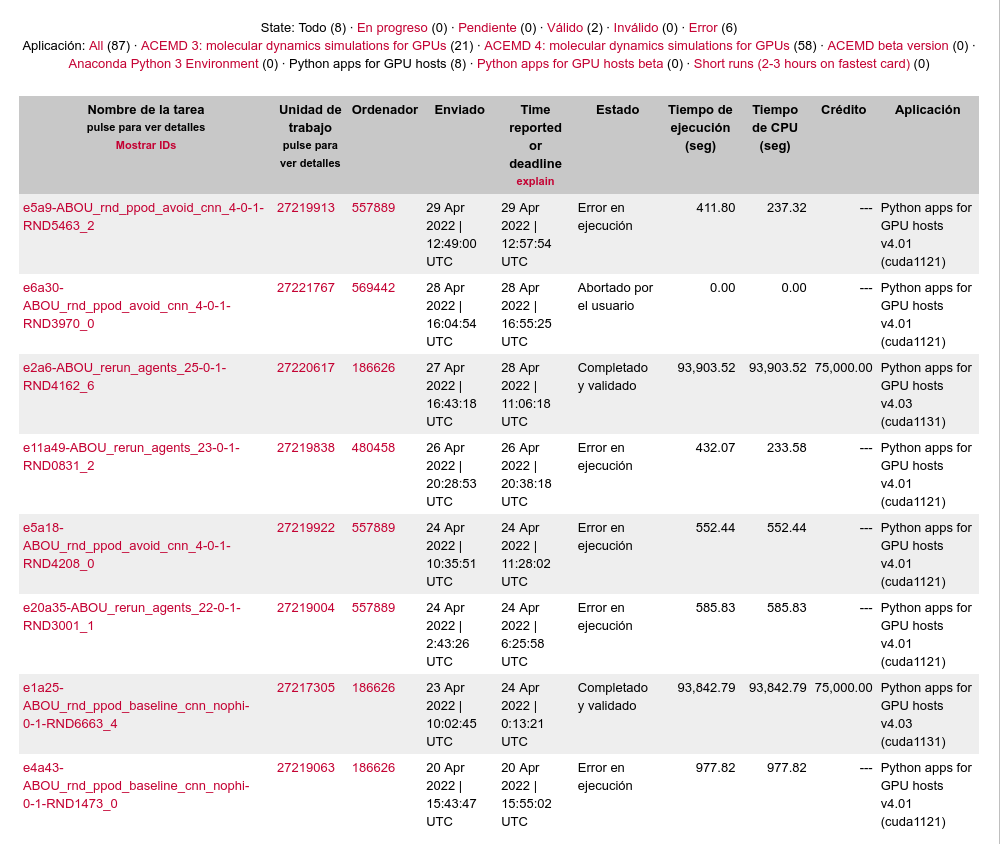
We have deprecated v4.01 I've recently reset Gpugrid project at every of my hosts, but I've still received v4.01 at several of them, and failed with the mentioned error. Some subsequent v4.03 resends for the same tasks have eventually succeeded at other hosts. |
 Send message Joined: 13 Dec 17 Posts: 1424 Credit: 9,189,946,190 RAC: 0 Level  Scientific publications
|
Unfortunately the admins never yanked the malformed tasks from distribution. They only will disappear when they hit the 7th (_6) resend and it fails. Then it will be pulled from distribution. (Too many errors (may have bug)) I've had a lot of the bad Python 4.01 tasks also but thankfully a lot of them were at the tail end of distribution. |
|
Send message Joined: 31 May 21 Posts: 200 Credit: 0 RAC: 0 Level  Scientific publications 
|
Sorry for the late reply Greg _BE, I was away for the last 5 days. Thank you very much for the detailed report. ---------- 1. Regarding this error: Exit status 195 (0xc3) EXIT_CHILD_FAILED Seems like the process failed after raising the exception: "The wandb backend process has shutdown". wandb is the python package we use to send out logs about the agent training process. It provides useful information to better understand the task results. Seems like the process failed and then the whole task got stuck, that is why no progress was being made. Since it reached 7.88% progress, I assume it worked well until then. I need to review other jobs to see why this could be happening and if it happened in other machines. We had not detected this issue before. Thanks for bringing it up. ---------- 2. Time estimation is not right for now due to the way BOINC makes it, Richard provided a very complete explanation in a previous posts. We hope it will improve over time... for now be aware that is it completely wrong. ---------- 3. Regarding this error: OSError: [WinError 1455] The paging file is too small for this operation to complete It is related to using pytorch in windows. It is explained here: https://stackoverflow.com/questions/64837376/how-to-efficiently-run-multiple-pytorch-processes-models-at-once-traceback We are applying this solution to mitigate the error, but for now it can not be eliminated completely. |
|
Send message Joined: 31 May 21 Posts: 200 Credit: 0 RAC: 0 Level Scientific publications
|
Seems like deprecating the version v4.01 did not work then... I will check if there is anything else we can do to enforce usage of v4.03 over the old one. |
|
Send message Joined: 13 Dec 17 Posts: 1424 Credit: 9,189,946,190 RAC: 0 Level Scientific publications
|
You need a to send a message to all hosts when they connect to the scheduler to delete the 4.01 application from the host physically and to delete the entry in the client_state.xml file |
|
Send message Joined: 31 May 21 Posts: 200 Credit: 0 RAC: 0 Level Scientific publications
|
I sent a batch which will fail with yaml.constructor.ConstructorError: could not determine a constructor for the tag 'tag:yaml.org,2002:python/object/apply:numpy.core.multiarray.scalar' It is just an error with the experiment configuration. I immediately cancelled the experiment and fixed the configuration, but the tasks were already sent. I am very sorry for the inconvenience. Fortunately the jobs will fail right after starting, so no need to kill them. The another batch contains jobs with the fixed configuration. |
|
Send message Joined: 27 Aug 21 Posts: 38 Credit: 7,254,068,306 RAC: 0 Level Scientific publications
|
I was not getting too many of the python work units, but I recently received/completed one. I know they take... a while to complete. Specifically, I am looking at task 32892659, work unit 27222901. I am glad it completed, but it was a long haul. It was mentioned that "completing a task gives 50000 credits and 75000 if completed specially fast" How fast do these need to complete for 75000? I am not saying I have the fastest processors but they are definitely not slow (they are running at ~3GHz with the boost) and the GPUs are definitely not slow. Thanks! |
|
Send message Joined: 13 Dec 17 Posts: 1424 Credit: 9,189,946,190 RAC: 0 Level Scientific publications
|
I get the full "quick" credits for my Python tasks because I normally crunch them in 5-8 hours. You took more than 2 days to report yours. You get a boost of 50% if returned within 1 day and 25% boost in credit if returned with 2 days. |
|
Send message Joined: 27 Aug 21 Posts: 38 Credit: 7,254,068,306 RAC: 0 Level Scientific publications
|
I get the full "quick" credits for my Python tasks because I normally crunch them in 5-8 hours. Got it. Thanks! I think I am confused why this task took so long to report. What is usually the "bottleneck" when running these tasks? |
|
Send message Joined: 21 Feb 20 Posts: 1117 Credit: 40,876,970,595 RAC: 0 Level Scientific publications
|
I get the full "quick" credits for my Python tasks because I normally crunch them in 5-8 hours. these tasks are multi-core tasks. they will use a lot of cores (maybe up to 32 threads?). are you running CPU work from other projects? if you are then it's probably starved on CPU resources trying to run the Python task. 
|
|
Send message Joined: 11 Jul 09 Posts: 1639 Credit: 10,159,968,649 RAC: 0 Level Scientific publications 
|
these tasks are multi-core tasks. they will use a lot of cores (maybe up to 32 threads?). are you running CPU work from other projects? if you are then it's probably starved on CPU resources trying to run the Python task. The critical point being that they aren't declared to BOINC as needing multiple cores, so BOINC doesn't automatically clear extra CPU space for them to run in. |
|
Send message Joined: 31 May 21 Posts: 200 Credit: 0 RAC: 0 Level Scientific publications
|
Right, I wish there was a way to specify that to BOINC on our side... does adjusting the app_config.xml help? I guess that has to be done of the user side |
|
Send message Joined: 31 May 21 Posts: 200 Credit: 0 RAC: 0 Level Scientific publications
|
yes, the tasks run 32 agent environments in parallel python processes. Definitely the bottleneck could be the CPU because BOINC is not aware of it. |
|
Send message Joined: 27 Aug 21 Posts: 38 Credit: 7,254,068,306 RAC: 0 Level Scientific publications
|
Thank you all for the replies- this was exactly the issue. I will keep that in mind if I receive another one of these work units. Theoretically, is it possible to run several of these tasks in parallel on the same GPU, since it really is not too GPU intensive and I have enough cores/memory? |
|
Send message Joined: 21 Feb 20 Posts: 1117 Credit: 40,876,970,595 RAC: 0 Level Scientific publications
|
Thank you all for the replies- this was exactly the issue. I will keep that in mind if I receive another one of these work units. Theoretically, is it possible to run several of these tasks in parallel on the same GPU, since it really is not too GPU intensive and I have enough cores/memory? Only if you have more than 64 threads per GPU available and you stop processing of any existing CPU work.
|
|
Send message Joined: 9 May 13 Posts: 171 Credit: 4,739,796,466 RAC: 6 Level  Scientific publications
|
abouh asked Right, I wish there was a way to specify that to BOINC on our side... does adjusting the app_config.xml help? I guess that has to be done of the user side I tried that, but boinc manager on my pc will overallocate CPU's. I am currently running multicore atlas cpu tasks from lhc alongside the python tasks from gpugrid. The atlas tasks are set to use 8 CPU's and the python tasks are set to use 10 CPU's. The example for this response is on an AMD cpu with 8 cores/16 threads. BOINC is set to use 15 threads. It will run one gpugrid python 10 thread task and one lhc 8 thread task at the same time. That is 18 threads running on a 15 thread cpu. Here is my app_config for gpugrid: <app_config>
<app>
<name>acemd3</name>
<gpu_versions>
<gpu_usage>1</gpu_usage>
<cpu_usage>1</cpu_usage>
</gpu_versions>
</app>
<app>
<name>PythonGPU</name>
<cpu_usage>10</cpu_usage>
<gpu_versions>
<gpu_usage>1</gpu_usage>
<cpu_usage>10</cpu_usage>
</gpu_versions>
<app_version>
<app_name>PythonGPU</app_name>
<plan_class>cuda1121</plan_class>
<avg_ncpus>10</avg_ncpus>
<ngpus>1</ngpus>
<cmdline>--nthreads 10</cmdline>
</app_version>
</app>
<app>
<name>PythonGPUbeta</name>
<cpu_usage>10</cpu_usage>
<gpu_versions>
<gpu_usage>1</gpu_usage>
<cpu_usage>10</cpu_usage>
</gpu_versions>
<app_version>
<app_name>PythonGPU</app_name>
<plan_class>cuda1121</plan_class>
<avg_ncpus>10</avg_ncpus>
<ngpus>1</ngpus>
<cmdline>--nthreads 10</cmdline>
</app_version>
</app>
<app>
<name>Python</name>
<cpu_usage>10</cpu_usage>
<gpu_versions>
<gpu_usage>1</gpu_usage>
<cpu_usage>10</cpu_usage>
</gpu_versions>
<app_version>
<app_name>PythonGPU</app_name>
<plan_class>cuda1121</plan_class>
<avg_ncpus>10</avg_ncpus>
<ngpus>1</ngpus>
<cmdline>--nthreads 10</cmdline>
</app_version>
</app>
<app>
<name>acemd4</name>
<gpu_versions>
<gpu_usage>1</gpu_usage>
<cpu_usage>1</cpu_usage>
</gpu_versions>
</app>
</app_config>And here is my app_config for lhc: <app_config>
<app>
<name>ATLAS</name>
<cpu_usage>8</cpu_usage>
</app>
<app_version>
<app_name>ATLAS</app_name>
<plan_class>vbox64_mt_mcore_atlas</plan_class>
<avg_ncpus>8</avg_ncpus>
<cmdline>--nthreads 8</cmdline>
</app_version>
</app_config>If anyone has any suggestions for changes to the app_config files, please let me know. |
|
Send message Joined: 31 May 21 Posts: 200 Credit: 0 RAC: 0 Level Scientific publications
|
I can run 2 jobs manually on my machine with 12 CPUs, in parallel. They are slower than a single job, but much faster than running them sequentially. Specially since the jobs iterate between using CPU and using GPU. 2 jobs won't be completely synchronous so as long as the GPU has enough memory. However, I think currently GPUGrid automatically assigns one job per GPU, with the environment variable GPU_DEVICE_NUM. |
|
Send message Joined: 11 Jul 09 Posts: 1639 Credit: 10,159,968,649 RAC: 0 Level Scientific publications
|
However, I think currently GPUGrid automatically assigns one job per GPU, with the environment variable GPU_DEVICE_NUM. Normally, the user's BOINC client will assign the GPU device number, and this will be conveyed to the job by the wrapper. You can easily run two jobs per GPU (both with the same device number), and give them both two full CPU cores each, by using an app_config.xml file including ...
<gpu_versions>
<gpu_usage>0.5</gpu_usage>
<cpu_usage>2.0</cpu_usage>
</gpu_versions>
...(full details in the user manual) |
|
Send message Joined: 31 May 21 Posts: 200 Credit: 0 RAC: 0 Level Scientific publications
|
I see, thanks for the clarification |



©2026 Universitat Pompeu Fabra