Anaconda Python 3 Environment v4.01 failures
Message boards :
Number crunching :
Anaconda Python 3 Environment v4.01 failures
Message board moderation
Previous · 1 · 2 · 3 · 4 · 5 · Next
| Author | Message |
|---|---|
 ServicEnginIC ServicEnginIC Send message Joined: 24 Sep 10 Posts: 598 Credit: 13,083,686,510 RAC: 34 Level  Scientific publications    
|
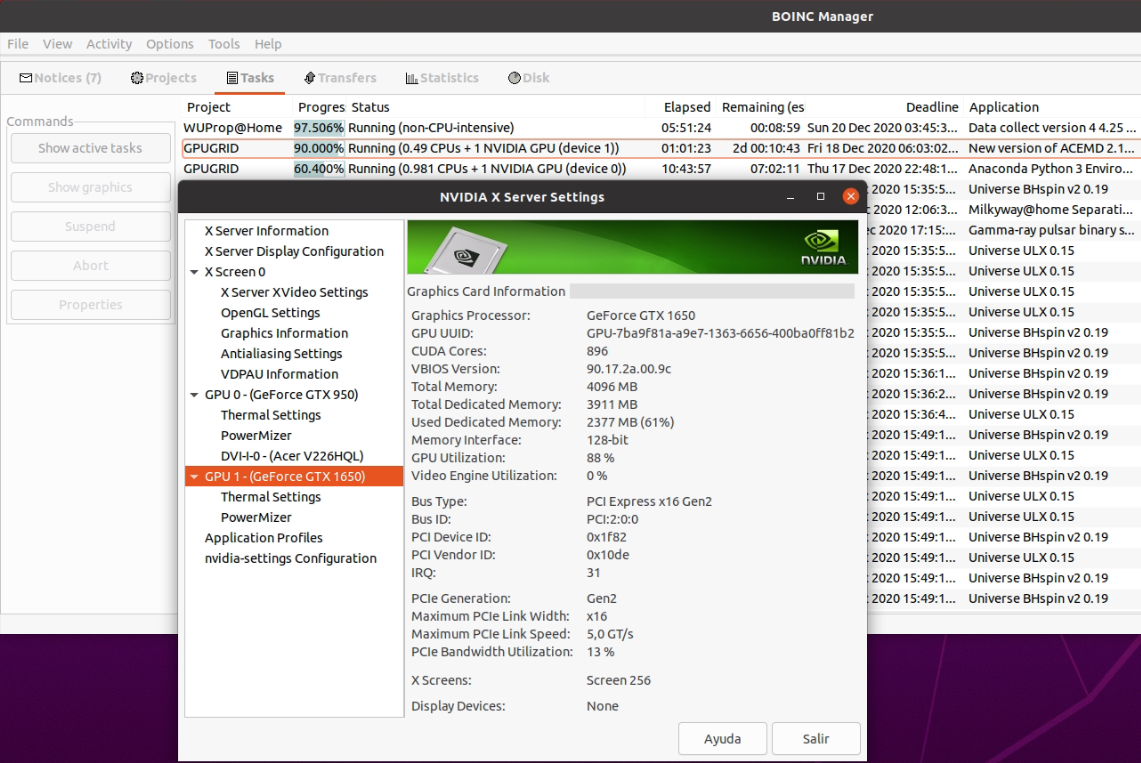
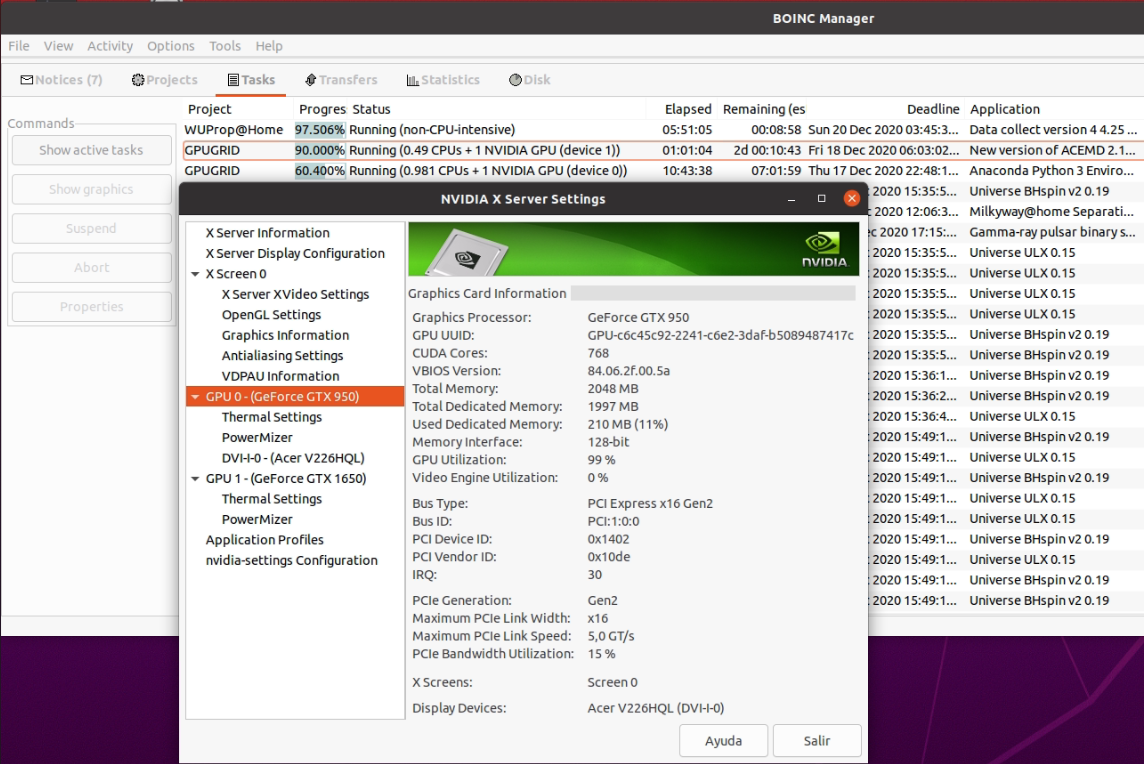
For those users waiting to receive these new Anaconda Python tasks: - They are currently available only for Linux OS based hosts, so they won't be sent to Windows OS based hosts. This can be seen at https://www.gpugrid.net/apps.php, and was announced by Toni at Message #55588. - And (to be confirmed): Not all GPUs currently processing ACEMD3 WUs under Linux environment are eligible for processing Python WUs. This second assertion is based in my own experience, and needs further confirmation. None of my 2 GB RAM Graphics cards have received Python WUs so far. I suspect that graphics card with more than 2 GB internal RAM is a requirement (?) The most clear example sustaining this theory: My Host #325908 received two Python tasks at the same time. It is a double GPU host, GPU #0 being a GTX 950 with 2 GB internal RAM, and GPU #1 being a GTX 1650 with 4 GB internal RAM. As soon as GPU #1 got free, it started processing the first Python task. As can be seen at previous image, more than 2 GB of internal memory (2377 MB) were in use. Compared to this, GPU #0 was processing an ACEMD3 task, requiring only 210 MB RAM for this. After finishing this ACEMD3 WU, GTX 950 did not start the waiting Python task, but it asked to scheduler for work and it started a new downloaded ACEMD3 WU. The waiting second Python WU was started at GTX 1650 GPU as soon as it finished the first one. Two more curiosities that can be gleaned from the images: - NVIDIA X Server Settings and BOINC Manager are reversely classifying both GPUs: GPU #0 for NVIDIA X Server Settings (GTX 950) is Device #1 in BOINC Manager, and vice versa. GTX 950 is installed at PCIE slot #0, the nearest one to the CPU, and it is the device delivering video to the connected monitor. - Mentioned DCF issue can be appreciated also: ACEMD3 WU 10% remaining was calculated to last two (2) days, while completed 90% fraction of it had been processed in about one only hour... |
|
ServicEnginIC Send message Joined: 24 Sep 10 Posts: 598 Credit: 13,083,686,510 RAC: 34 Level Scientific publications
|
I suspect that graphics card with more than 2 GB internal RAM is a requirement (?) This theory has been empirically rebated: My Host #557889 has received today its first Python task: 3pwd006012-RAIMIS_NNPMM-0-1-RND4045_1, WU #26416972. This system is based on a GTX 750 Ti graphics card with 2GB internal RAM. Pitifully, the mentioned task failed after its first computing stage. On the other hand, my Host #480458, having previously failed 39 Python tasks after few seconds past, is progressing apparently normal a new one after resetting GPUGrid project on this computer. |
|
Send message Joined: 4 Aug 14 Posts: 266 Credit: 2,219,935,054 RAC: 0 Level  Scientific publications 
|
I think it's more likely to be the /bin/bash which actually needs to write temporary files. I've now managed (with some difficulty) to separate the 569 lines of actual script from the 90 MB of payload. There's When using /bin/bash with -c, temporary files are not needed by bash. Within a script, there can be cases when temporary storage is required by /bin/bash. This is dependent on how the script is written. TMPDIR referenced in the link, refers to the option of using and specifying a temporary directory if desired. This practice is avoided where possible, mktemp is the safest method (but not used here). From what I can gather, wrapper starts the script successfully, miniconda folder is installed silently in /www.gpugrid.net/ directory, conda install starts the setup of the environment, unpacks files then initiates processes to compile the task.
/miniconda/etc/profile.d/ directory, /miniconda/lib/python3.7/<_sysconfigdata_> files
|
|
Send message Joined: 11 Jul 09 Posts: 1639 Credit: 10,159,968,649 RAC: 0 Level Scientific publications 
|
Curious observation. I've got a Python task running, with all the usual values - 3,000 GFLOPS size, progress rate 14.760% per hour - but BOINC is estimating over 13 days until completion. Normally it's the TONI tasks which are messed up by DCF = 87.8106. The event log was odd, too: (Python) estimated total NVIDIA GPU task duration: 1631149 seconds (TONI) estimated total NVIDIA GPU task duration: 731036 seconds Ah - the speed has dropped right down - <flops> 164,825,886 in <app_version>. Observing and investigating. (it was the other one they needed to change - <rsc_fpops_est> in <workunit>) Edit - my other machine still has <flops> 61,081,927,479, but it hasn't picked up any Python work since 22:00 last night. |
|
ServicEnginIC Send message Joined: 24 Sep 10 Posts: 598 Credit: 13,083,686,510 RAC: 34 Level Scientific publications
|
Returning to graphics card RAM size and Python tasks: My Host #567828 and Host #557889, both running acemd3 tasks fine on their 2GB RAM graphics cards, haven't been able to process none of the Python tasks that they have received. I gave up, and set their GPUGrid preferences for them not to ask for Python tasks any more. This way, they won't be delaying these tasks uselessly. |
|
trigggl Send message Joined: 6 Mar 09 Posts: 25 Credit: 102,324,681 RAC: 0 Level  Scientific publications
|
Returning to graphics card RAM size and Python tasks: Yeah, my GTX 1650 is running one of the Python tasks at the moment and it's using 2.6 GB |
|
Send message Joined: 22 May 20 Posts: 110 Credit: 115,525,136 RAC: 0 Level Scientific publications 
|
I happened to receive my first beta task today on a 750Ti (2GB VRAM). It started okay and the task progress bar advanced normally just to fail after ~800 sec. What I have seen so far on other hosts was that either the task seemed to fail immediately within seconds or it finished successfully, so it's strange that it did compute for quite some time. Saw that some of you reported >2GB VRAM used for the task so that could be an issue here as well, but I can't find in the stderr file what might have caused this error. Task 26520658 What is strange for my host is that normally for the ACEMD tasks that CPU time = runtime, but here CPU time was well below it. |
|
Send message Joined: 21 Feb 20 Posts: 1117 Credit: 40,876,970,595 RAC: 0 Level Scientific publications
|
I happened to receive my first beta task today on a 750Ti (2GB VRAM). It started okay and the task progress bar advanced normally just to fail after ~800 sec. What I have seen so far on other hosts was that either the task seemed to fail immediately within seconds or it finished successfully, so it's strange that it did compute for quite some time. Saw that some of you reported >2GB VRAM used for the task so that could be an issue here as well, but I can't find in the stderr file what might have caused this error. Task 26520658 this is the specific reason: Traceback (most recent call last): could be a bug in the task, or a consequence of not having enough memory. 
|
|
Send message Joined: 22 May 20 Posts: 110 Credit: 115,525,136 RAC: 0 Level Scientific publications
|
Thanks for the pointer Ian&Steve. Seems like this issue prevails. Just got another beta task that failed and gave me the same error message. |
|
Send message Joined: 16 Jul 07 Posts: 209 Credit: 6,054,860,456 RAC: 16 Level  Scientific publications 
|
I just read through this whole thread, and I am still not clear what changes I need to make to fix the permissions error. FWIW, I have the regular BOINC installation, not a service installation. Which file do I need to edit? What changed do I make to that file? TIA! Reno, NV Team: SETI.USA |
|
Send message Joined: 4 Aug 14 Posts: 266 Credit: 2,219,935,054 RAC: 0 Level Scientific publications
|
I just read through this whole thread, and I am still not clear what changes I need to make to fix the permissions error. FWIW, I have the regular BOINC installation, not a service installation. Apply this modification: Extracted from post by ServicEnginIC (https://www.gpugrid.net/forum_thread.php?id=5204&nowrap=true#55988 I executed the stated command: sudo systemctl edit boinc-client.service And I added to the file the suggested lines: [Service] PrivateTmp=true A reboot is recommended after applying this change. (Or at the least, restart the boinc-client service) |
|
Send message Joined: 16 Jul 07 Posts: 209 Credit: 6,054,860,456 RAC: 16 Level Scientific publications
|
I just read through this whole thread, and I am still not clear what changes I need to make to fix the permissions error. FWIW, I have the regular BOINC installation, not a service installation. Thanks. I wan't sure that applied to my situation, since my installation is not a service installation. And those instructions included "service". I added the lines, assuming I figured out the editor correctly. I know only vi. Anyway, just waiting for new tasks to try out now. Reno, NV Team: SETI.USA |
|
Send message Joined: 11 Jul 09 Posts: 1639 Credit: 10,159,968,649 RAC: 0 Level Scientific publications
|
It would help if you identified exactly which version you have now installed (by version number, not some relative generality like "the latest"), and who released it. Berkeley has not released a new version for Linux, and so far as I know every Linux distribution or repository version available is designed to install as a service. I find the newest versions publicly available are in Gianfranco Costamagna's (LocutusOfBorg) PPA. That's where my problem originated. |
|
Send message Joined: 16 Jul 07 Posts: 209 Credit: 6,054,860,456 RAC: 16 Level Scientific publications
|
I was running 7.9.3, which is what was in the default repository for mint. It had the other problem, with only 20 credits per task. Now I am running the version from ppa:costamagnagianfranco/boinc , which is version 7.16.14. This version had the permissions problem. The PrivateTmp=true change seems to have fixed the issue on the machines that have received work so far. Interesting to learn that all linux installations do it as a service install. I thought that caused a problem with GPU crunching? Maybe that is only for windows? Or maybe I am thinking of something else? In any case, good to know. Reno, NV Team: SETI.USA |
|
Send message Joined: 21 Feb 20 Posts: 1117 Credit: 40,876,970,595 RAC: 0 Level Scientific publications
|
I've never seen a Windows installation that WASN'T a service install. but for Linux, I prefer the standard non-service application, "install" is too strong a word for this, nothing is installed to the OS. that way I can keep all aspects of BOINC confined to a single folder in my Home folder, and moving or backing up the entire instance of BOINC is as easy as zipping the whole folder and copying it off to external media. very easy to preserve BOINC in cases where you have to maybe reinstall the OS, or simply want to move the BOINC stats between physical computers without a lot of headache. and upgrading the BOINC client or manager is as easy as replacing the core executables. It just works.
|
|
Send message Joined: 11 Jul 09 Posts: 1639 Credit: 10,159,968,649 RAC: 0 Level Scientific publications
|
Interesting to learn that all linux installations do it as a service install. I thought that caused a problem with GPU crunching? Yes, your statement is right. The "GPUs are not available to services" is a specific, Windows only, driver security matter. Mac and Linux have different ways of handling it. |
|
Send message Joined: 21 Feb 20 Posts: 1117 Credit: 40,876,970,595 RAC: 0 Level Scientific publications
|
Interesting to learn that all linux installations do it as a service install. I thought that caused a problem with GPU crunching? maybe we mean different things? When I've installed boinc on Windows in the past, it hooked into the OS the same way many installed Windows applications do, and ran at startup without user intervention. It did so also with GPU crunching and I never saw an issue with GPU crunching in this configuration. is that not a service install?
|
|
Send message Joined: 11 Jul 09 Posts: 1639 Credit: 10,159,968,649 RAC: 0 Level Scientific publications
|
Under Windows, the installer gives you the choice of how and where to install BOINC. There are defaults, which are designed to 'just work', or you can enter the 'advanced' page and choose your own. Any personal choice will be remembered and offered as the default the next time round. GPUs and service installs have been incompatible since the driver model was changed in (I think) Windows Vista. Certainly Windows XP could use GPUs in service mode, Windows 7 and later couldn't. You have a service install if BOINC is listed in the 'services' applet linked from "Control Panel\All Control Panel Items\Administrative Tools" - that location generated from Windows 7: 8 or 10 might be different. A service install will start running at machine startup: a non-service install will start running at user login. If you machine waits for a password, that might mean 'never'. A service install will never show a Manager icon in the system tray, unles you start the manager manually. A non-service install will try to show a manager icon in the system tray, but Windows will try to hide it. Windows 10 may refuse to show it at all. |
|
Send message Joined: 21 Feb 20 Posts: 1117 Credit: 40,876,970,595 RAC: 0 Level Scientific publications
|
ah, that might be the difference then. the past installs were all on windows 7 and I never did anything special or advanced for the install of BOINC. But since they were just crunchers I never bothered having a login prompt, and just let them login automatically at startup. guess that's why I never noticed any issues with GPU crunching this way. To me, if it's running automatically in any way without me actually manually executing the file, it's being run as some sort of service.
|
|
Send message Joined: 11 Jul 09 Posts: 1639 Credit: 10,159,968,649 RAC: 0 Level Scientific publications
|
When a user logs on, Windows Registry Editor Version 5.00 [HKEY_CURRENT_USER\Software\Microsoft\Windows\CurrentVersion\Run] "boincmgr"="\"D:\\BOINC\\boincmgr.exe\" /a /s" [HKEY_CURRENT_USER\Software\Space Sciences Laboratory, U.C. Berkeley\BOINC Manager] "DisableAutoStart"=dword:00000000 1) Open the BOINC Manager - automatically, silently [implies unconditionally, minimised] 2) If the user has not disabled startup, the Manager will start the client. If they have disabled startup, backout before anyone notices. All in user space - no service. |



©2026 Universitat Pompeu Fabra