General buying advice for new GPU needed!
Message boards :
Graphics cards (GPUs) :
General buying advice for new GPU needed!
Message board moderation
Previous · 1 · 2 · 3 · 4 · 5 · Next
| Author | Message |
|---|---|
 ServicEnginIC ServicEnginIC Send message Joined: 24 Sep 10 Posts: 598 Credit: 13,083,686,510 RAC: 37 Level  Scientific publications    
|
Might I ask what model you are running on? And at what % the GPU fans are running. Sure, The model I've talked about is an Asus TUF-GTX1650S-4G-GAMING: https://www.asus.com/Motherboards-Components/Graphics-Cards/TUF-Gaming/TUF-GTX1650S-4G-GAMING/ As Jim1348 confirms, I'm very satisfied with its performance, considering its power consumption. Regarding working temperature and fan setting, I usually let my cards to work at factory preset clocks and fan curves. 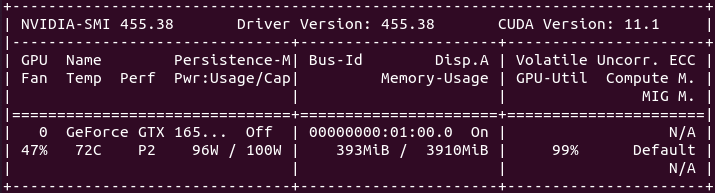 As can be seen in this nvidia-smi command screenshot, this particular card seems to feel comfortable at 72 ºC (161,6 ºF), since it isn't pushing fans beyond 47% at this temperature... It is installed at an standard ATX tower case, with a front 120 mm fan, two rear, and one upper 80 mm low noise chassis fans. Current room temperature is 25 ºC (77 ºF) |
|
Send message Joined: 22 May 20 Posts: 110 Credit: 115,525,136 RAC: 0 Level  Scientific publications 
|
Interesting to hear about your personal experiences, now about 3 different models already. Seems to be a very decent card overall! And I came up with the (maybe very naive) conclusion that at least for the combination low power + air cooled card, the differences in air cooling performance between the cards is negligent and it all comes down to fan curve customisation and airflow in the case. While this might be oversimplified, as some cards might have larger heatsinks and/or cooling capabilities, such as cooling pads or dedicated heatsinks, for their VRMs, I reckon that the competitive advantage of one air cooling solution over another, really plays a minor role in operating temps – again, at least at this rather low TDP rating. And for longevity and performance, Asus and MSI seem to often outperform their peers, including longer warranty, more and higher quality VRMs, larger overall heatsinks, larger fans, etc. While this naturally comes at a certain price premium, I reckon that this is money rather well spent. So I'll look for a Rog Strix Asus 1650 Super (larger fans than TUF) or MSI 1660 Super Gaming X, which should fall in the range in between 160-180€ according to the current retail prices that are available for me. Thanks for helping me come this process to a final decision finally! :) |
|
Send message Joined: 22 May 20 Posts: 110 Credit: 115,525,136 RAC: 0 Level Scientific publications
|
As can be seen in this nvidia-smi command screenshot, this particular card seems to feel comfortable at 72 ºC (161,6 ºF), since it isn't pushing fans beyond 47% at this temperature... Thanks again for pointing this out. As I wasn't aware of this command before, I was stoked to try it out with my card as well and was quite surprised with the output... Positively, as the card showed a much lower wattage than anticipated, but negatively as it did thereby obviously not reach its full potential. As NVIDIA specified the 750 Ti card architecture with 60W TDP, I suspected the card being very close to it. As it is additionally an OC edition, particularly an Asus 750 Ti OC, and it is powered with an additional 6 pin power adapter, in theory that command should theoretically output much more than the recommended 60W by NVIDIA. But to my surprise it was maxed out at 38.5W which was obtained by using nvidia-smi -q -d POWEREspecially as it should give 75W (6 pin) + 75W (PCIe) = 150W. What the heck do I need the additional power for if the card would only need ~25% of the available power? As I heard many times by now, that overclocked cards can easily go above their specified power limit as their PCB normally support up to 120-130% depending on make and model, I am honestly quite stumped by this. Is there a way to increase that specified power limit in the card's BIOS somehow? I feel like, even by increasing it a bit, but staying close to the 60W, I could increase performance while still operating with safe settings as cooling looks to be sufficient. Any idea on how to do this? Currently I am 64.2% of NVIDIA's TDP rating. That seems to be way too cautious... As discussed in the beginning of this thread, my card sometimes threw a compute error while it was overclocked and Zoltan suggested this might be the cause. I can now better verify this as the nvidia-smi -q -d CLOCKcommand now said that when tasks failed, I operated the card at a memory clock that was higher (2,845 MHz) than the maximum supported clock speed (2,820 MHz), while according to the output there is still some headroom with the core clock (~91 MHz to 1,466 MHz). This mainly happened due to me setting of mem OC = core OC, which might not have been tested long enough with MSI Kombustor to attain an accurate stability reading from the benchmarks that were running. |
 Send message Joined: 13 Dec 17 Posts: 1424 Credit: 9,189,946,190 RAC: 0 Level  Scientific publications 
|
You can't force a card to use more power than the application requires. It all depends on the application running.It will use as much as it needs and no more. You can only restrict the power used by the card with the -pl command. To increase the utilization of the card, you generally run two or more work units on the card. |
|
Send message Joined: 22 May 20 Posts: 110 Credit: 115,525,136 RAC: 0 Level Scientific publications
|
But in this case one single GPUGrid task utilises 100% of the CUDA compute ability and running into the power limit. It uses 38.5W out of the specified max wattage of 38.5W that can be read from the nvidia-smi -q -d POWER output. Isn't there a way to increase the max power limit on this card even if the application is demanding for it and the NVIDIA reference card design is rated at the much higher TDP of 60W? I just feel that is a lot of "wasted" compute potential. Or should I rather say "unaccessible" for now with the 38.5W power limit. To increase the utilization of the card, you generally run two or more work units on the card.That's what I did so far with GPU apps that demanded less than 100% CUDA compute capacity for a single task such as Milkyway (still rather poor F64 perf.) or MLC which usually use 60-70%. |
|
Send message Joined: 13 Dec 17 Posts: 1424 Credit: 9,189,946,190 RAC: 0 Level Scientific publications
|
To get more performance on a card, you overclock it. First thing to do with the higher stack Nvidia cards is to restore the memory clock to P0 power state that the Nvidia drivers deliberately downclock when a compute application is run. There isn't much point in overclocking the base clock on Nvidia because the firmware in the cards generally self overclock based on the thermal and power limits of the card. To get better base overclocks, cool the card better so it can boost higher. The lower stack Nvidia cards like the 1050 and such don't get penalized by the drivers when doing compute loads and we guess Nvidia figured nobody in their right mind would ever run compute loads on those cards so they don't get penalized. You can overclock the Nvidia cards by running the "coolbits" tweak script and rebooting and then use the Nvidia X Server Settings app to control the fan speeds, overclock the base clock and restore the memory clock to the stock P0 power state clocks and override the downclocking by the drivers. That would cause the card to consume more power due to the higher clocks. |
|
Send message Joined: 13 Dec 17 Posts: 1424 Credit: 9,189,946,190 RAC: 0 Level Scientific publications
|
This is what you can do with the coolbits set for the cards in the system. 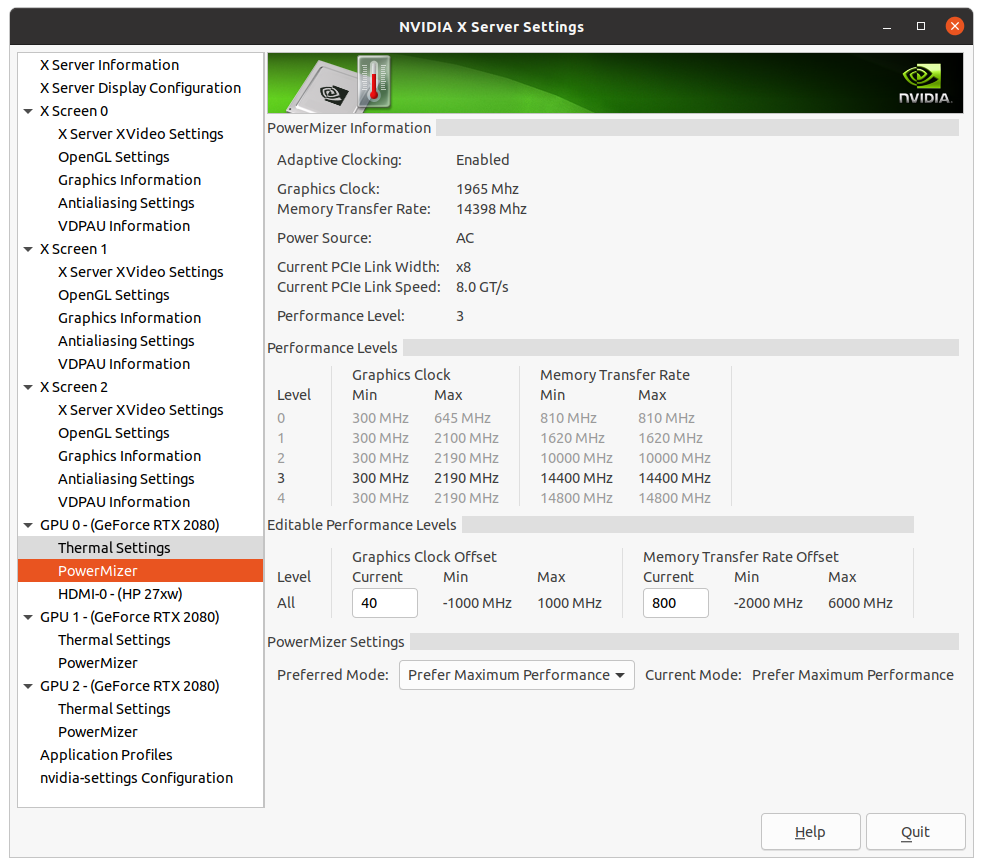  |
|
Send message Joined: 11 Jul 09 Posts: 1639 Credit: 10,159,968,649 RAC: 0 Level Scientific publications 
|
This is what you can do with the coolbits set for the cards in the system. Need to knock the s off the https for the img tags, with this old server software. |
|
Send message Joined: 13 Dec 17 Posts: 1424 Credit: 9,189,946,190 RAC: 0 Level Scientific publications
|
Thanks for the fix Richard. Couldn't figure out why it wasn't working. Was confused about how to post images with the method you have to use on Einstein's old software. Didn't realize the same applied here. Hope I remember the trick for future use. |
|
Send message Joined: 22 May 20 Posts: 110 Credit: 115,525,136 RAC: 0 Level Scientific publications
|
Thanks for those awesome tips Keith! I will definitely give it a try as soon as my currently running climate prediction tasks will finish and I can safely reboot into Linux on my system. Thanks also for making it so clear by attaching the screenshots! First thing to do with the higher stack Nvidia cards is to restore the memory clock to P0 power state that the Nvidia drivers deliberately downclock when a compute application is run.Will take that advice to heart in the future for the next card :) Curious about what improvement these suggested changes might result in, I made some changes in MSI afterburner on Windows. Might be the "beginner solution", but after having changed to a bit more aggressive fan curve profile, increasing core overclock to now 1.4 GHz, and maxing out the temp. limit to 100C, I already start to see some of the desired changes. Prior: - 1365 MHz core/2840 MHz mem clock - occasional compute errors thrown on GPUGrid - 60-63C - 55% fan @20C ambient or 65% @30C ambient - GPUGrid task load: (1) compute: 100%, (2) power: 100% (38.5W) - boost clock not sustained for longer time periods Now: - 1400 MHz core/2820 MHz mem clock - no compute errors so far - 63C constantly (fan curve adjust. temp. point) - 70% fan@20C ambient - GPUGrid task load: (1) compute: 100%, (2) power: ø ~102% (39.2) / max 104.5% (40.2W) --> got these numbers by running a task today and averaging out the wattage numbers that I obtained over a 10 min period while under load with the following command "nvidia-smi --query-gpu=power.draw --format=csv --loop-ms=1000". Maybe I should have done it for a shorter period but at a lower "resolution". - boost clock now sustained at 1391 MHz for longer periods. While this is already an easy way of improving performance slightly, I still haven't figured out how to circumvent the card to always run into the power limit or increase it altogether for that matter. According to what I found out so far, the PCB of this card is not rated to operate safely for longer periods at higher than stock voltages, but what I have in mind is rather a more subtle change in max. power. I would like to see how the card would operate at 110% of its current 38.5W and then see from there. The only way I have come is to modify the BIOS and then flash it to the card. I did the first step successfully and have now a modified BIOS version with a power limit of 42.3W besides a copy of the original version, but unfortunately no way to flash it to the card. - Even just for trying, as I don't want to fry the card... Nvflash is apparently not working on Windows and I would have to boot into DOS in order for the Nvflash software to work and deploy the new BIOS. That is way over my head, especially as I don't feel comfortable to not understand all of the technical specifications of the BIOS, even though I only touched the power limit. For now, I am hitting a roadblock and feel much more comfortable with the current card settings. Thanks for the quick "power boost". Definitely looking forward to take a closer look when booted into Linux |
|
Send message Joined: 13 Dec 17 Posts: 1424 Credit: 9,189,946,190 RAC: 0 Level Scientific publications
|
Well as I mentioned earlier, Nvidia doesn't usually hamstring the lower stack cards like your GTX 750Ti. So you don't need to overclock the memory to make it run at P0 clocks because it already is doing that. But you could try and bump it a bit above stock clocks and see if runs without errors. You can certainly increase the fan speeds and it will run faster because it is cooler. To get access to the overclocking mode in Linux you need to set the coolbits with a command line entry. sudo nvidia-xconfig --thermal-configuration-check --cool-bits=28 --enable-all-gpus That will un-grey the fan sliders and the entry boxes for core and memory clocks. Logout and log back in or reboot to enable the changes. Then open up the Nvidia X Server Settings application the drivers install and start playing around with the settings. |
|
Send message Joined: 13 Dec 17 Posts: 1424 Credit: 9,189,946,190 RAC: 0 Level Scientific publications
|
To flash card BIOS' you normally make a DOS boot stick and put the flashing software and the ROM file on it. Plenty of posts in various fora about how to do that. Try Google. |
|
Send message Joined: 22 May 20 Posts: 110 Credit: 115,525,136 RAC: 0 Level Scientific publications
|
I certainly will, just hadn't much today to do my research. But yeah, this is how far I have been already with my google research. I strongly plan on further researching this using google just out of curiosity on the weekend when I have more time. :) So you don't need to overclock the memory to make it run at P0 clocks because it already is doing that.I will scale it back to stock speed then and see how/whether it'll impact performance. That command line is greatly appreciated. I just wish to understand the rationale of the cardmaker (Asus) to include a 6-pin power plug requirement but then restricting it to a much lower value on the other hand at which the PCIe wattage supply would easily have sufficed. Just can't wrap my head around that... |
|
Send message Joined: 13 Dec 17 Posts: 1424 Credit: 9,189,946,190 RAC: 0 Level Scientific publications
|
If I remember correctly, the GTX 750 Ti was a transition product that straddled the Kepler and Maxwell families. It could very well have just inherited the PCB from a previous Kepler board that needed the 6 pin PCIe connector and they just plopped the new Maxwell silicon on it. Or the Nvidia engineers decided that the 60W TDP of the card was cutting it too close to the 66W 12V PCIE slot power limit and decided to bolster the card with the 6 pin connector which was barely needed. |
|
Send message Joined: 22 May 20 Posts: 110 Credit: 115,525,136 RAC: 0 Level Scientific publications
|
Well, thanks! Both are plausible explanations. I will let things rest now :) Cheers |
|
tito Send message Joined: 21 May 09 Posts: 22 Credit: 2,002,780,169 RAC: 0 Level  Scientific publications 
|
There is nice OC tool on Linux - GreenWithEnvy. Not powerful like MSI Afterburner on Windows, but still usable. And it has Windows look like apperance. |
|
Send message Joined: 13 Dec 17 Posts: 1424 Credit: 9,189,946,190 RAC: 0 Level Scientific publications
|
There is nice OC tool on Linux - GreenWithEnvy. Not powerful like MSI Afterburner on Windows, but still usable. And it has Windows look like apperance. I tried to run it when it first came out. Was incompatible with multi-gpu setups. I haven't revisited it since. Had to install a ton of precursor dependencies. Not for a Linux newbie in my opinion. |
|
Send message Joined: 22 May 20 Posts: 110 Credit: 115,525,136 RAC: 0 Level Scientific publications
|
Great! Didn't know that such a software alternative existed for Linux. Will take a closer look as soon as I get the chance. Thanks for sharing! Just having seen your comment Keith, I'll might reconsider. I'll definitely check out the GitLab page/manual and skim through the linked review articles. |
|
Send message Joined: 13 Dec 17 Posts: 1424 Credit: 9,189,946,190 RAC: 0 Level Scientific publications
|
Well I just revisited the GWE Gitlab repository and read through the changelogs. There still isn't any multi-gpu support working as of 1 month ago. Says it is still broken and doesn't have time to fix it. So not an option for me still. I always run multi-gpu hosts. Would not be a problem for you bozz4science with just your single GTX 750 Ti. Also the developer has simplified the installation greatly by dropping PyPi repositories. Even better he has a Flatpak image installation which is even simpler. I would just download the Flatpak installation image and run that. Read the readme.md file on the main page for the flatpak installation instructions. |
|
Send message Joined: 22 May 20 Posts: 110 Credit: 115,525,136 RAC: 0 Level Scientific publications
|
Recently I tried out to run some WUs of the new Wieferich and Wall-Sun-Sun Prime Grid subproject out of curiosity. Usually I don't run this project, but in my experience these math tasks are usually very power hungry. However, I was still very much surprised to see, that this was the the first task that did push well beyond the power limit of this card with a max wattage draw of 64.8W and and average of 55W while maintaining the same settings. Even GPUGrid can't push the card this far. Though, this is well above the 38.5W defined power limit for this particular card, it is now close to the reference card's TDP rating of 65W. All is running smoothly at this wattage draw and temps are very stable, so I reckon that this card could hypothetically demand much higher power if it wanted to. Interestingly, from what I could observe, the overall compute load was much lower than for GPUGrid (ø 70% vs. 100%) and similar strain on the 3D engine. What does/could cause the spike in wattage draw even though I cannot observe what is causing this? Any ideas? I just don't understand how a GPU can draw more power even though overall utilisation is down... What am I missing here? Any pointers appreciated |



©2026 Universitat Pompeu Fabra