General buying advice for new GPU needed!
Message boards :
Graphics cards (GPUs) :
General buying advice for new GPU needed!
Message board moderation
Previous · 1 · 2 · 3 · 4 · 5 · Next
| Author | Message |
|---|---|
 Send message Joined: 13 Dec 17 Posts: 1424 Credit: 9,189,946,190 RAC: 0 Level  Scientific publications    
|
Anybody found a RTX 3080 crunching GPUGrid tasks yet? Found one that crunched Einstein, Milkyway and Primegrid. 27% faster on GR tasks at Einstein. 30% slower on MW separation tasks because of FP64 being halved to 1:64 from Turing's 1:32 FP64 compute. 2X faster on PPSieve CUDA app at Primegrid compared to RTX 2080 Ti. 3X faster on PPSieve CUDA app at Primegrid compared to GTX 1080 Ti. |
 ServicEnginIC ServicEnginIC Send message Joined: 24 Sep 10 Posts: 598 Credit: 13,083,686,510 RAC: 37 Level  Scientific publications 
|
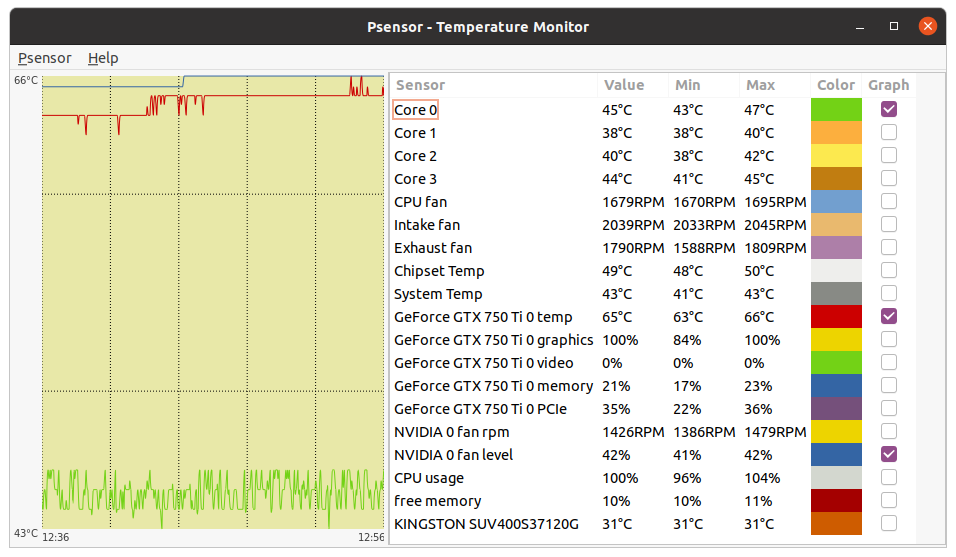
Question also to the other guys here who mentioned that they are running a GTX 50 Ti: which core clocks at which temperatures? On this 4-core CPU system, based on a GTX 750 Ti running at 1150 MHz, Temperature is peaking 66 ºC, as seen at this Psensor screenshot. At the moment of taking screenshot, there were in process three Rosetta@home CPU tasks, thus using 3 CPU cores, and one TONI ACEMD3 GPU task, using 100% of GPU and the remaining CPU core to feed it. Processing room temperature : 29,4 ºC PS: Some perceptive observer might have noted that in previous Psensor screenshot, Max. "CPU usage" was reported 104%... Nobody is perfect. |
|
Send message Joined: 22 May 20 Posts: 110 Credit: 115,525,136 RAC: 0 Level  Scientific publications 
|
Question also to the other guys here who mentioned that they are running a GTX 50 Ti: which core clocks at which temperatures? For starters keep in mind that I have a factory overclocked card, an Asus dual fan gtx 750 ti OC. Thus to achieve this OC, I don't have to add much on my own. Usually I apply a 120-135 MHz overclock to both core and memory clock that seems to yield me a rather stable setup. Minor hiccups with the occasional invalid result every week or so. This card is running in an old HP Z 400 workstation with bad to moderate airflow. See here: http://www.gpugrid.net/show_host_detail.php?hostid=555078 Thus, I adjusted the fan curve of the card slightly upwards to help with that. 11 out of 12 HT threads run, always leaving one thread overhead for the system. 10 run CPU tasks, 1 is dedicated to the GPU task. Cards is usually sitting between 60-63 ºC. Never seen temps above that range. When ambient temperatures are low to moderate between 18-25 ºC fans usually run at the 50% mark, for higher temps 25-30 ºC fans run at 58% and for above 30 ºC ambient temp, fans run usually at 66%. Running this OC setting at higher ambient temps means that it is harder to maintain the boost clock, so it rather fluctuates around it. Card is always under 100% CUDA compute load. Still hope that the card's fans will go slower into the autumn/winter season with ambient temps being great for cooling. The next lower fan setting is at 38% and you can't usually hear the card crunching away at its limit. Hope that helps. |
|
ServicEnginIC Send message Joined: 24 Sep 10 Posts: 598 Credit: 13,083,686,510 RAC: 37 Level Scientific publications
|
Thank you very much for your pleasant comments. Forums have gained with you an excellent explainer! |
Retvari Zoltan Send message Joined: 20 Jan 09 Posts: 2380 Credit: 16,897,957,044 RAC: 0 Level Scientific publications 
|
I have a factory overclocked card, an Asus dual fan gtx 750 ti OC. Thus to achieve this OC, I don't have to add much on my own. Usually I apply a 120-135 MHz overclock to both core and memory clock that seems to yield me a rather stable setup. Minor hiccups with the occasional invalid result every week or so.If there are any invalid results, you should lower the clocks of your GPU and/or its memory. An invalid result in a week could cause more loss in your RAC than the gain of overclocking. Overclocking the memory of the GPU is not recommended. Your card tolerates the overclocking because of two factors: 1. the GTX 750Ti is a relatively small chip (smaller chips tolerate more overclocking) 2. you over commit your CPU with CPU tasks, and this hinders the performance of your GPU tasks. This has no significant effect on the points per day of a smaller GPU, but a high-end GPU will loose significant PPD under this condition. Perhaps the hiccups happen when there are not enough CPU tasks running simultaneously making your CPU feed the GPU a bit faster than usual, and these rare circumstances reveal that it's overclocked too much. 11 out of 12 HT threads run, always leaving one thread overhead for the system. 10 run CPU tasks, 1 is dedicated to the GPU task.I recommend to run as many CPU tasks simultaneously as many cores your CPU has (6 in your case). You'll get halved processing times on CPU tasks (more or less depending on the tasks), and probably a slight decrease in the processing time of GPUGrid tasks. If your system had a high-end GPU I would recommend to run only 1 CPU task and 1 GPU task, however these numbers depend on the CPU tasks and the GPU tasks as well. Different GPUGrid batches use different number of CPU cycles, so some batches have higher impact of an over-committed CPU. Different CPU tasks utilize the memory/cache subsystem to a different extent: Running many single-threaded CPU tasks simultaneously (this is the most common approach in BOINC) is the worst case, as this scenario results in multiplied data sets in the RAM. Operating on those simultaneously need multiplied memory cycles, and this results in increased cache misses, and using up all the available memory bandwidth. So the tasks will spend their time waiting for the data, instead of processing it. For example: Rosetta@home tasks usually need a lot of memory, so these tasks hinder not just each other's performance, but the performance of GPUGrid tasks as well. General advice for building systems for crunching GPUGrid tasks: A single system cannot excel in both CPU and GPU crunching at the same time, so I build systems for GPU (GPUGrid) crunching with low-end (i3) CPUs, this way I don't mind if the CPU's only job is to feed a high-end GPU unhindered (by CPU tasks). |
|
Send message Joined: 25 Sep 13 Posts: 293 Credit: 1,897,601,978 RAC: 0 Level  Scientific publications
|
Broader statement to say small Maxwell chips don't last as long Pascal or Turing larger chips. In my experience equal chance they die. GTX 750 at 1450MHz dead in 18 months when Turing 2.0GHz dead in 24 hours. GPU are worthless random no matter the size of GPU die. Yes I overclock - the card going malfunction which the user settings choose - bunch of different GPU gen have problems. Turing had worst lasting lifetime for me than others. |
|
Send message Joined: 22 May 20 Posts: 110 Credit: 115,525,136 RAC: 0 Level Scientific publications
|
Thank you all for getting back to me! I guess I first had to digest all this information. Thanks as well ServiceEnginIC for your kind comment :) Thanks Zoltán for your detailed explanations! If there are any invalid results, you should lower the clocks of your GPU and/or its memory. An invalid result in a week could cause more loss in your RAC than the gain of overclocking. This thought has already crossed my mind, but I never thought this through. Your answer is very logical so I guess I will monitor my OC setting a bit more closely. Haven't had any invalid results for at least 1 week, so the successively lowered OC setting finally reached a stable level. Temps and fans are at a very moderate level. But it definitely makes sense that the "hiccups" together with a overcommitted CPU would strongly penalise the performance of a higher end GPU. I recommend to run as many CPU tasks simultaneously as many cores your CPU has (6 in your case). Thanks for this advice. I have read this debate about HT vs. not HT your physical cores and especially coming from the WCG forums of how to improve your speed in reaching runtime based badges, I thought by HT I don't only double my runtime as virtual core threads also count equally but also would see some efficiency gains. What I had seen so far was an improvement of throughput in points of roughly 2-5% over the course of a week based solely on WCG tasks. However I didn't consider what you outlined here very well explained and thus I have already returned to using 6 threads only. – One curious question though: Will only running 6 out of 12 HT threads while HT is enabled in the BIOS setting, effectively result in the same result as running 100% of cores while HT is turned off in the BIOS? So the tasks will spend their time waiting for the data, instead of processing it. This is what I could never really put my finger around so far. Because what I saw while HT was turned on was that some tasks more than doubled their average runtime while some stayed below the double average mark. What I want to convey here is that there was much more variability in the tasks what is consistent with what you describe. I guess some tasks got priority in the CPU queue while others were really waiting for data and those who skipped the line essentially didn't quite doubled while others did more than double by quite some margin. Also, having thought that the same WUs on 6 physical cores would generate the same strain on my system as running WUs on all 12 HT threads, I saw that CPU temps ran roughly 3-4 degrees higher (~ 4-6%) while at the same time my heatsink fan revved up about 12.5-15% to keep up with the increase in temps. A single system cannot excel in both CPU and GPU crunching at the same time. As I plan my new system build to be a one-for all solution, I won't be able to execute on this advice. I do plan however to keep more headroom for GPU related tasks. But I am still speccing the system as I am approaching the winter months. All I am sure of so far is that I want to base it on a 3700X. When I read Turing had worst lasting lifetime for me than others.I questioned my initial gut feeling as to go with a Turing based GTX 1660 Ti. For me it seemed like the sweet spot in terms of TDP/power and efficiency as seen in various benchmarks. Looking at the data I posted today from F@H, I do however wonder a GTX 1660 Ti will keep up with the pace of hardware innovation we currently see. I don't want to have my system basically rendered outdated in just 1 or 2 years. Keep in mind that this comes from someone running a i5 4278U as the most powerful piece of silicone at the moment. I don't mean to keep up with every gen and continually upgrade my rig and at the same time I know that no system will be able to maintain an awesome relative benchmark to the ever rising average compute power of volunteers' machines over the year, but want to build a solid system that will do me good for at least some years. And now, in retrospective a mere GTX 1660 Ti seems to be rather "low-end". Even an older 1080Ti can easily outperform this card. Something to think about, two GTX1660 Supers on a machine can potentially keep pace with a GTX2080. From what I see 2x 1660 Ti would essentially yield the same performance of a RTX 2060. That goes in the direction of what Pop Piasa initially also put up for discussion. Basically yielding the same performance but for a much more reasonable price. While power draw and efficiency is of concern to me, I do see a GTX 16xx / Super / Ti especially constrained on the VRAM side. And as discussed with Erich56, rod4X4 and Richard Haselgrove, I now know that while I have to pay attention to a few preliminary steps, running a system with 2 GPUs simultaneously is possible. Then I am coming back to the statement of Keith Myers who kindly pointed me in the direction of the GTX 1660 Ti, especially after I stressed that efficiency is a rather important issue for me. Have a look a the GPUFlops Theory vs Reality chart. The GTX 1660Ti is top of the chart for efficiency. That is what supported my initial gut feeling of looking within the GTX 16xx gen for a suitable upgrade. At least I am still very much convinced with my upgrade being a Ryzen chip! :) Maybe wrapping this up and apologies for this rather unconventional and long post. I have taken away a lot so far in this thread. 1) I will scale back to physical cores only and turn HT off. 2) OC a card will ultimately decrease its lifetime and there is tradeoff between performance improvement vs. stability issues. 3) OC a card makes absolutely no sense efficiency wise if this is a factor you consider. Underclocking might be a thing to reach the efficiency sweet spot. 4) Some consumer grade cards have a compute penalty in place that can potentially be solved by overclocking the memory clock to revert back to P0 power state. 5) An adapter goes a long into solving any potential PSU connectivity issues. 6) Planning a system build/upgrade is a real pain as you have so many variables to consider, hardware choices to pick from, leaving headroom for future upgrades etc... 7) There is always someone around here who has an answer to your question :) Thanks again for all your replies. I will continue my search for the ultimate GPU for my upgrade. I am now considering a RTX 2060 Super which currently retails at 350€ vs a GTX 1660 Ti at 260€. An RTX would sit at 175 TDP which would be my 750 Ti combined with a new 1660 Ti. So many considerations. |
|
Retvari Zoltan Send message Joined: 20 Jan 09 Posts: 2380 Credit: 16,897,957,044 RAC: 0 Level Scientific publications
|
Will only running 6 out of 12 HT threads while HT is enabled in the BIOS setting, effectively result in the same result as running 100% of cores while HT is turned off in the BIOS?Of course not. The main reason for turning HT off in the BIOS is to strengthen the system against cache sideband attacks (like spectre, meltdown, etc.). I recommend to leave HT on in the BIOS, because in this way the system still can use the free threads for its own purposes, or you can increase the number of running CPU tasks, if the RAC increase follows it. See this post. What I want to convey here is that there was much more variability in the tasks what is consistent with what you describe.That's true. Also, having thought that the same WUs on 6 physical cores would generate the same strain on my system as running WUs on all 12 HT threads, I saw that CPU temps ran roughly 3-4 degrees higher (~ 4-6%) while at the same time my heatsink fan revved up about 12.5-15% to keep up with the increase in temps.I lost you. The temps got higher with HT on? It's normal btw. Depending on the CPU and the tasks the opposite could happen also. As I plan my new system build to be a one-for all solution, I won't be able to execute on this advice.That's ok. My advice was a "warning". Some might get frustrated that my i3/2080Ti performs better at GPUGrid than an i9-10900k/2080Ti (because of its overcomitted CPU). When I readI run 4 pieces of 2080Tis for 2 years without any failures so far. However I have a second hand 1660Ti, which has stripes sometimes (it needs to be "re-balled").Turing had worst lasting lifetime for me than others.I questioned my initial gut feeling as to go with a Turing based GTX 1660 Ti. I do however wonder a GTX 1660 Ti will keep up with the pace of hardware innovation we currently see. I don't want to have my system basically rendered outdated in just 1 or 2 years.I would wait for the mid-range Ampere cards. Perhaps there will be some without raytracing cores. Or if not, the 3060 could be the best choice for you. Second hand RTX cards (2060S) could be very cheap considering their performance. |
|
Send message Joined: 22 May 20 Posts: 110 Credit: 115,525,136 RAC: 0 Level Scientific publications
|
Thanks Zoltán for your insights! Of course not. ... I recommend to leave HT on in the BIOSGreat explanation. Will do! I lost you. The temps got higher with HT on?Yeah, it got pretty confusing. What I tried to convey here was that when HT was off and I ran all 6 physical cores at a 100% system load as opposed to HT turned on and running 12 virtual cores on my 6 core system, the latter one produced more heat as the fans revved up considerably over the non-HT scenario. Running only 6 cores out of 12 HT cores, produces a comparable result as leaving HT turned off and running all 6 physical ones. Hope that makes sense. That's ok. My advice was a "warning". Some might get frustrated that my i3/2080Ti performs better at GPUGrid than an i9-10900k/2080Ti (because of its overcomitted CPU).Couldn't this be solved by just leaving more than 1 thread for the GPU tasks? What about the impact on a dual-/multi GPU setup? Would this effect be even more pronounced here? I run 4 pieces of 2080Tis for 2 years without any failures so far.Well that is at least a bit reassuring. But after all, running those cards 24/7 at full load is a tremendous effort. Surly the longevity decreases as a result of hardcore crunching. I would wait for the mid-range Ampere cards. Perhaps there will be some without raytracing cores. Or if not, the 3060 could be the best choice for you. Second hand RTX cards (2060S) could be very cheap considering their performance.Well, thank you very much for your advice! Unfortunately, I am budget constrained for my build at the ~1000 Euro mark and have to start from scratch as I don't have any parts that can be reused. Factoring in all those components (PSU, motherboard, CPU heatsink, fans, case, etc.) I will not be able to afford any GPU beyond the 300€ mark for the moment. I'll probably settle for a 1660 Ti/Super where I currently see the sweetspot between price and performance. I hope it'll complement the rest of my system well. I will seize the next opportunity then (probably 2021/22) for a GPU upgrade. We'll see what NVIDIA will deliver in the meantime and hopefully by then, I can get in the big league with you :) Cheers |
|
Retvari Zoltan Send message Joined: 20 Jan 09 Posts: 2380 Credit: 16,897,957,044 RAC: 0 Level Scientific publications
|
I'm talking about the performance of the GPUGrid app, not the performance of other projects' (or mining) GPU apps. The performance loss of the GPU depends on the memory bandwidth utilization of the given CPU (and GPU) app(s), but generally it's not enough to leave 1 thread for the GPU task(s) to achieve maximum GPU performance. There will always be some loss of GPU performance caused by the simultaneously running CPU app(s) (the more the worse). Multi-threaded apps could be less harmful for the GPU performance. Everyone should decide how much GPU performance loss he/she tolerates, and set their system accordingly. As high-end GPUs are very expensive I like to minimize their performance loss.Some might get frustrated that my i3/2080Ti performs better at GPUGrid than an i9-10900k/2080Ti (because of its overcomitted CPU).Couldn't this be solved by just leaving more than 1 thread for the GPU tasks? I've tested it with rosetta@home: when more than 1 instance of rosetta@home were running, the GPU usage dropped noticeably. The test was done on my rather obsolete i7-4930k. However, this obsolete CPU has almost twice as much memory bandwidth per CPU core than the i9-10900 has: CPU CPU #memory memory memory mem.bandwidth CPU cores threads channels type&freqency bandwidth per CPU core i7-4930k 6 12 4 DDR3-1866MHz 59.7GB/s 9.95GB/s/core i9-10900 10 20 2 DDR4-2933MHz 45.8GB/s 4.58GB/s/core(These CPUs are not in the same league, as the i9-10920X would match the league of the i7-4930k). My point is that it's much easier to saturate the memory bandwidth of a present high-end desktop CPU with dual channel memory, because the number of CPU cores increased more than the available memory bandwidth. What about the impact on a dual-/multi GPU setup? Would this effect be even more pronounced here?Yes. Simultaneously running GPUGrid apps hinder each other's performance as well (even if they run on different GPUs). Multi GPUs share the same PCIe bandwidth, that's the other factor. Unless you have a very expensive socket 2xxx CPU and MB, but it's cheaper to build 2 PCs with inexpensive MB and CPU for 2 GPUs. ...running those cards 24/7 at full load is a tremendous effort. Surly the longevity decreases as a result of hardcore crunching.It does, especially for the mechanical parts (fans, pumps). I take back the power limit of the cards for the summer, also I take the hosts with older GPUs offline for the hottest months (this year was an exception due to the COVID-19 research). |
|
Send message Joined: 22 May 20 Posts: 110 Credit: 115,525,136 RAC: 0 Level Scientific publications
|
Thanks Zoltán again for your valuable insights. The advice about the power limit lead me to limit it down and set the priority of temperature over performance in MSI afterburner. All GPU apps now run at night comfortably sitting at 50-55 degrees at 35% fan speed vs. 62/63 degrees at 55% fan speed which is now not audibly noticeable at all anymore. That comes along with a small performance penalty but I don't notice a radical slowdown. The power limit of this card is now set to 80 percent which corresponds to a maximum temp of 62 degrees. This had a tremendous effect on overall operating noise of my computer as prior to that adjustment with the card running at 62 degrees in my badly ventilated case and the hot air continually heated up the CPU environment (CPU ran only at 55-57 degrees) and the CPU heatsink fan had to run faster to compensate for the GPU's hot air exhaust. Now both components are running at similar temps and the heatsink fan is now working at a slower speed reducing the overall noise. This had me think once more about operating noise and airflow/cooling. With the new RTX 30xx series and the new AMD RX 6000 series which aren't compatible here on GPU Grid but offer similar performance at a competitive price level IMO, the GTX 1660 Super/Ti arguably seem less and less attractive to me. Sitting at comparatively similar prices to a RTX 2060 card now as prices reacted recently to the new GPU launches, seem now as a better investment to me. Looking at the current RTX 2060 universe, there seems to be good cards for ~315€ vs. ~280€ for a GTX 1660 Ti. Now to my question: Is a dual fan card at these high TDPs of the cards (1) sufficient for cooling and maintaining a comfortable operating temp and (2) have dual card fans an advantage over triple fans cards in terms of operating noise (due to less fans) or do triple fan cards run quieter due to every fan running at a lower RPM? (3) Is there any particular brand that anyone of you can recommend for superior cooling and/or low noise levels? Thx |
|
Send message Joined: 13 Dec 17 Posts: 1424 Credit: 9,189,946,190 RAC: 0 Level Scientific publications
|
Depends on the cooler design. Typically a 3 fan design cools better than a 2 fan design simply because the cooler heat sink is larger because of the need to mount 3 axial fans side by side onto the heat sink and thus has a larger amount of radiating surface area compared to a 2-fan heat sink. So you have more cooling capacity and don't need to ramp the fan speeds as high to get the required amount of heat dissipation. End effect is lower noise and lower temps. |
|
Retvari Zoltan Send message Joined: 20 Jan 09 Posts: 2380 Credit: 16,897,957,044 RAC: 0 Level Scientific publications
|
Is there any particular brand that anyone of you can recommend for superior cooling and/or low noise levels?Superior cooling is done by water, not air. You can build your own water cooled system (it's an exacting process, also expensive and needs a lot of experience), or you can buy a GPU with a water cooler integrated on it. They usually run at 10°C lower temperatures. I have a Gigabyte Aorus Geforce RTX 2080Ti Xtreme Waterforce 11G, and I'm quite happy with it. This is my only card crunching GPUGrid tasks at the moment: it runs at 250W power limit (originally it's 300W), 1890MHz GPU 64°C, 13740MHz RAM, 1M PPD. As for air cooling the best cards are the MSI Lightning (Z) and MSI Gaming X Trio cards. They have 3 fans, but these are large diameter ones, as the card itself is huge (other 3-fan cards have smaller diameter fans, as the card is not tall and long enough for lager fans). I have two MSI Geforce Gaming X Trio cards (a 2080 Ti and a 1080 Ti) and these have the best air cooling compared to my other cards. If you buy a high-end (=power hungry) card, I recommend to buy only the huge ones. (look at their height and width as well). |
|
Send message Joined: 22 May 20 Posts: 110 Credit: 115,525,136 RAC: 0 Level Scientific publications
|
Thank you both for your response. As always I really appreciate the constructive and kind atmosphere on this forum! After framing your answer in such a compact and logical statement Keith, I feel stupid to not having figured this one out myself... Definitely will be on the lookout for 3-fan cards now! And the general notion of more fans/larger card dimensions due to the larger heatsink size totally corresponds to Zoltan's advice as well. Your water-cooled 2080Ti sounds like a real beast... And all this at only 64°C. I hope to achieve the technical expertise and confidence to build my own custom water-cooled system in the future, but as for now neither budget nor skill level allow me to go forward with this. I meant to only refer to air-cooled cards, but thanks for providing me with the full picture here as well. Unfortunately, I only see MSI X Trio cards for RTX 20xx series models and upwards. For 1660 Ti/Super MSI only offers dual-fan designs as far as I can tell. Currently among the 1660 Ti/Super models, I like the ASUS Strix 3-fan models and the Gigabyte AORUS 3-fan model best, but everywhere I look the 3-fan ASUS cards are unavailable. I'll probably look now into the Gigabyte AORUS GTX 1660 Ti card. What really bothers me with the MSI cards (MSI Gaming X/Z 1660 Ti) is that their RGB feature cannot be permanently be disabled. Apparently, after every reboot they revert back to the default setting. I would also like to initially run the new system as a dual-GPU system with my 750Ti paired with the new 1660Ti and eventually retire/change the 750Ti to a RTX 3070 which seems to be priced rather reasonably once availability isn't an issue anymore sometime next year. Sorry that I kept annoying you all with my questions over the course of the last weeks. I feel like that I already learnt a lot about hardware in general and even more though about GPUs in particular thanks to your replies here. That's why I also changed my mind about the hardware selection about my new rig so often and had many conflicting thoughts about this. Thanks for bearing with me :) |
|
Send message Joined: 13 Dec 17 Posts: 1424 Credit: 9,189,946,190 RAC: 0 Level Scientific publications
|
I have been purchasing nothing but EVGA Hybrid cards since the 1070 generation. They have a water cooled gpu chip as well as radial fan cooled memory and VRM components. All based on a 120mm radiator. My current EVGA 2080 Hybrid cards run less than 55° C. on the GPUGrid tasks which are the most stressful and power hungry of all my project tasks. My other projects never break 50° C. and mainly stay between 40-45°C. The hybrid cards avoid the complexity and cost of a custom cooled loop for the gpus but give you the same temperatures as a custom loop. |
|
Send message Joined: 22 May 20 Posts: 110 Credit: 115,525,136 RAC: 0 Level Scientific publications
|
That's interesting. Didn't even know that hybrid cards existed up until now. Those temps definitely look impressive and are really unmatched compared to air cooling only solutions. Seems like a worthwhile option that I'll likely consider down the road but not for now as I am still very much budget constrained. The recent numbers that I have seen for GTX 1660 Ti cards also matched with what rod4x4 posted earlier today as well as with I have seen across many hosts here on GPUGrid. Efficiency wise this card seems to always be in the top 10% quantile even compared to newer cards and this is what I also take into consideration if crunching 24/7. Trying to have my electricity produced from sustainable sources if possible and trying to increase efficiency overall by considering these factors prior to the final hardware purchase. Sadly, in general the availability of EVGA cards here in Germany tends to be sparse at best. Only very few shops sell these cards and usually only offer a few models. Getting a hybrid EVGA card that is decently priced here is, as far as I can tell, almost impossible. From what I could read about the EVGA cards in the GPU Techpowerup database is that they usually tend to offer great value and are very competitively priced against the competition. Might try to get an EVGA branded RTX (hybrid) card in the future. |
|
Send message Joined: 13 Dec 17 Posts: 1424 Credit: 9,189,946,190 RAC: 0 Level Scientific publications
|
|
|
Send message Joined: 22 May 20 Posts: 110 Credit: 115,525,136 RAC: 0 Level Scientific publications
|
Now, I have narrowed it down further to finally go with a 1660 Super. The premium you end up paying beyond (1660Ti) is just not worth the additional marginal performance. The intention behind this is to now get an efficient card that still has adequate performance (~50% of RTX 2080Ti) at an attractive price point and save up more to invest in a latest gen low-end card (preferably a hybrid one) that will boost overall performance and stay comfortably within my 750W power limit. Don't want to make a science out of it, but my choice is now between 2 cards (Gigabyte vs Asus) and I would love to get your advice on some open questions that came up after further comparisons of the 2 models. I get that your consensus was that the bulkier the card, the cooler it'll run and the more headroom for overclocking the card will offer. Now to the following issues as the card compare as follows: Card 1 (Asus) / ASUS ROG Strix GeForce GTX 1660 SUPER OC - 2.7 slots (Triple) / 47mm for larger heatsink volume - 2 massive vertical heatpipes - 2 fans / 100mm - 1 continuous bulky heatsink - no dedicated metal plate contact with the VRMs - 1875 MHz boost clock Card 2 (Gigabyte) / Gigabyte GeForce GTX 1660 SUPER Gaming OC 6G - 2 slots (Dual) / 40mm - 3 horizontal heatpipes - 3 fans / 80mm - 3 separate heatsinks behind each fan - dedicated heatsink plate for VRMs - 1860 MHz boost clock Similarities, so these points don't differentiate them from one another in my final purchase decision. --> 3 yrs warranty / boost clock / GDDR6 6GB / price @ ~260$. And connectivity doesn't play a major role for me as I only connect it to one external monitor. Anyone has those cards and can share his/her own personal experiences with me? Any general advice on where you would lean to if you had to choose between these 2 air-cooled 1660 Super cards? Any pointer much appreciated |
|
Send message Joined: 13 Dec 17 Posts: 1424 Credit: 9,189,946,190 RAC: 0 Level Scientific publications
|
The ASUS ROG Strix cards have an overall well liked reputation for performance, features and longevity. The Gigabyte cards tend to be more mediocre from my observations. |
|
Send message Joined: 22 May 20 Posts: 110 Credit: 115,525,136 RAC: 0 Level Scientific publications
|
Thanks for your feedback! As always Keith, much appreciated. Definitely value your feedback highly. |



©2026 Universitat Pompeu Fabra