Ampere 10496 & 8704 & 5888 fp32 cores!
Message boards :
Graphics cards (GPUs) :
Ampere 10496 & 8704 & 5888 fp32 cores!
Message board moderation
Previous · 1 · 2 · 3 · 4 · 5 · 6 · Next
| Author | Message |
|---|---|
 Retvari Zoltan Retvari Zoltan Send message Joined: 20 Jan 09 Posts: 2380 Credit: 16,897,957,044 RAC: 0 Level  Scientific publications  
|
I arrived to this other interesting article about the new Nvidia 12 pin power connector.According to that paper, it has 80 µm tin plated high copper alloy terminals. Seriously, tin plated? It's not better than the present PCIe power connectors, it's just smaller. The SATA power connector has 15 gold plated pins: 3x +3.3V 3x GND 3x +5V 3x GND 3x +12V It has to deliver typically under 1A on each rails. (yes, it's distributed between the 3 terminals that rail has). Now the "revolutionary" 12-pin connector has to deliver 600 Watts (600W/12V) 50 Ampers on the 6 12V terminals, that's 8,33 Ampers on each terminal. If I take the typical load of 300W, it still has to deliver 4.17 Ampers on each tin plated terminal. Now, tin has 12 times higher contact resistance than gold: (note that the coordinates are logarithmic) 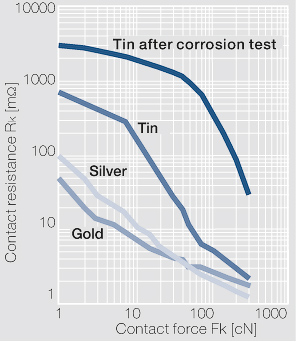 12 times higher contact resistance * 12 times higher current = 1728 times higher power converted to heat (compared to the SATA power connector) After a year of crunching 24/7, these connectors will burn like the good old PCIe power connectors did. |
|
Send message Joined: 21 Feb 20 Posts: 1117 Credit: 40,876,970,595 RAC: 0 Level Scientific publications 
|
They carry a higher power rating because the base wiring spec is that of a higher gauge than the old cables. The connector gets hot as a consequence of the small gauge wiring getting hot. I’ve been crunching a long time with many high power GPUs and never had a cable or connector melt. The 12-pin connector (or 2x 6-pin, or 2x 8-pin) is totally sufficient if you’re using a modern PSU that’s already built over spec with 16ga wire. if you’re using some cheap PSU with barely spec wiring, then yeah you might have issues. But most PSUs from a reputable brand like EVGA or Corsair or Seasonic, you’ll never have an issue unless you do something stupid like using cheap SATA or MOLEX to PCIe adapters 
|
 Send message Joined: 13 Dec 17 Posts: 1424 Credit: 9,189,946,190 RAC: 0 Level  Scientific publications  
|
Yes, the new 12 pin connector is using 16 ga. wire which reduces the circuit resistance and has higher ampacity. The main thing to avoid is heating either the wire or the pins up as that can cause a runaway thermal condition which just increases the contact resistance which increases the heating and it just keeps building until failure. Just moving from cheap 20 ga wire in typical power supply cables to the new 16 ga wire gains you an increase of 2X capacity. From 11A for 20 ga. to 22 A for 16 ga. I agree it would have been better to have silver, silver-cadmium or gold plating but contact mechanical grip also is a big factor. The more surface area in contact with the mating connector and the higher the gripping and insertion force there is, the lower the overall contact resistance and the lower amount of heating due to current transmission. |
ServicEnginIC Send message Joined: 24 Sep 10 Posts: 598 Credit: 13,083,686,510 RAC: 45 Level Scientific publications 
|
|
 Send message Joined: 12 Jul 17 Posts: 404 Credit: 17,412,649,587 RAC: 0 Level Scientific publications
|
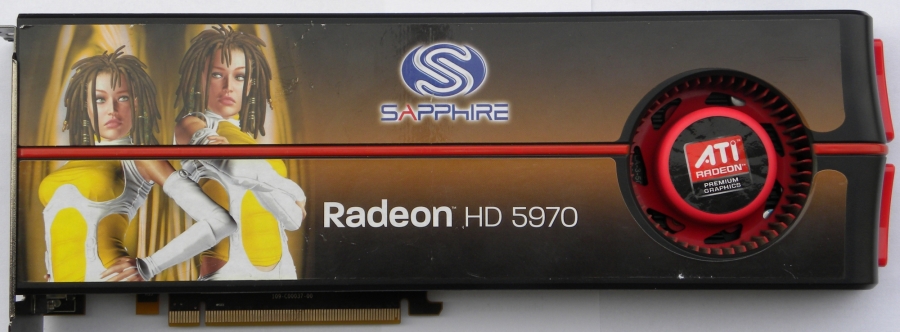
I've gone through hundreds of GPUs in the 20 years I've been doing this and I've had a fair number of PCIe cables burn up at both the PSU end and the GPU end. The biggest problem is due to the wimpy crimps. Sometimes you can use an extraction tool and remove the terminal pin from the plastic connector and the terminal pin is just flopping around on the wire. Heats up like Keith described and the plastic melts. I found examples that I hadn't thrown in the trash yet. I'll photograph them and post later. Also all my PSUs are Corsair AX1200s with a few AX860s and TX750s. I got the AX1200s back when I thought it was a good idea to run 4 GPUs on a single motherboard. I now use only one or two and they must be on 16x 3.0 sockets. I believe PSUs are most efficient at 80% load so I'm under loading them now but I use what I have. When I make cables this is the 16 gauge wire I use: https://mainframecustom.com/shop/cable-sleeving/lc-custom-16awg-cable-sleeving-wire-black-25ft/ This is my crimping tool: https://mainframecustom.com/shop/cable-sleeving/cable-sleeving-tools/mc-ratchet-crimper/ My terminal extraction tool: https://mainframecustom.com/shop/cable-sleeving/mainframe-customs-terminal-extractor/ I don't use sleeving as it seems it would just trap heat. Just an inch of heat shrink tube near each connector to bunch the wires together. Anyone remember the Sapphire Radeon HD 5970??? It was notorious for frying cables. http://www.vgamuseum.info/media/k2/items/cache/8dd1b15b07ee959fff716f219ff43fb5_XL.jpg Thanks for the links, I'll read those articles. I'm curious if one needs a new model PSU to use the 12-pin connector. |
|
Send message Joined: 21 Feb 20 Posts: 1117 Credit: 40,876,970,595 RAC: 0 Level Scientific publications
|
I got the AX1200s back when I thought it was a good idea to run 4 GPUs on a single motherboard. I now use only one or two and they must be on 16x 3.0 sockets. I believe PSUs are most efficient at 80% load so I'm under loading them now but I use what I have. I run upwards of 10 GPUs on the same board. no problems if you know what you're doing and plan it out correctly. 4 is a cakewalk. the biggest thing to be aware is that if you are using 3 or more high power GPUs on the same board, and you are getting power to them all from the motherboard, to make sure the motherboard has a dedicated power connection for the PCIe power. that's how you burn out the 24-pin 12v lines if you dont have that or dont plug it in. according to my PCIe bandwidth testing, GPUGRID (at current time) performs best on a PCIe 3.0 x8 or larger link. x16 isn't absolutely necessary. There's zero slowdown going from x16 to x8 on gen3. my previous 10-GPU (10x RTX 2070 pic: https://i.imgur.com/7AFwtEH.jpg?1) system ran on a board with 10x PCIe 3.0 x8 links (Supermicro X9DRX+-F) I ran this system for well over a year 24/7 mostly on SETI and moved to GPUGRID after it shut down. not a melted connector in sight. it was even getting slot power to each GPU from the motherboard (with the help of some power connections added via risers). x8 lanes to each GPU. this system ran on a Corsair 1000W PSU which powered the motherboard/CPUs, and 2x 1200W HP server PSUs providing all of the power connections to the GPUs (each PSU powering 5x GPUs). this system has since been converted to a 5x 2080ti system on an AMD epyc platform with CPU PCIe lanes to every slot. four(4) x16 slots, three(3) x8 slots). and every slot can be bifucated to x4 or x8. i'll probably expand it to 7x RTX 2080ti and leave it there (until I decide to update to 3080 or 3070 cards) I have another system (currently offline, pics: https://imgur.com/a/ZEQWSlw) with 7x RTX 2080, running at 200W each. all from a single EVGA 1600W PSU. it was running for months before I turned it off for some renovations in the room where the computer was running. again no melted connectors. even using single pigtail leads leads to each GPU (8-pin + 6-pin single cable). this is on an old X79 board with only 40 CPU based PCIe lanes, but the board uses several PCIe PLX switches to kinda sorta give more lanes. it works with minimal slowdown. ASUS P9X79E-WS mb. my 3rd system is currently 7x RTX 2070 (pic: https://i.imgur.com/136DaqP.jpg), again on the same AMD Epyc platform (AsrockRack EPYCD8 mb) as the 5x 2080ti system, but here all 7 slots filled. these particular RTX 2070 cards run a single 8-pin power plug, with the cards limited to 150W. 3x GPUs powered by the 1200W PCP&C PSU, and 4x GPUs powered from a 1200W HP server PSU I'm actually going to add an 8th card to this system by breaking one of the x16 slots to x8x8 and put two cards in one slot. I don't expect any issues. i have an x8x8 bifurcation riser on the way and the board fully supports slot bifurcation. if you plan it right, it works. this is much more energy efficient and simpler to manage not having 10 separate systems each with their own PSU(s) and CPU/mem sucking up power. you could go the USB riser "mining" route if GPUGRID wasnt so reliant on PCIe bandwidth. but "c’est la vie", and the wiring is cleaner with the ribbon cables anyway ;)
|
|
Send message Joined: 13 Dec 17 Posts: 1424 Credit: 9,189,946,190 RAC: 0 Level Scientific publications
|
Still using Corsair AX1200 power supplies running 3 gpus on two hosts. It is a good supply. Never ran AMD cards so far. The Nvidia cards I have owned have been moderate power consumers mainly. Never overheated a cable or connector yet. Good for you making your own cables. You are using good tools and wire it seems. I have all kinds of crimping tools myself. I build custom cables for telescope mounts. I believe you that you have examples of burnt wires and connectors. I have seen many posted examples of burnt connector myself. I have always used good cables and supplies and keep the loads within reason. I run two hosts with 4 gpus each on EVGA 1600T2 power supplies pulling over 1100W with no issues for years now. Lots of quality modular power supply makers are providing either a free upgrade 12 pin Nvidia cable or for a modest charge. |
|
Send message Joined: 25 Sep 13 Posts: 293 Credit: 1,897,601,978 RAC: 0 Level  Scientific publications
|
Never had burnt 8 pin or 6 pin but always mechanical stuff die. Pumps or fans plus the GPU die. Like I said I had 4 Turing go cold out of 6. Overclocking the core shouldn't kill it all. Other generations didnt bed so easy. I'd rather run a motherboard with 5 GPU or more. The mb lasted 5 years with 5 GPUs. Unexpectedly happens no matter what the best psus you run. I have 2 1200W psu on 1 motherboard. GPU maybe dont like win 8.1 The Turing that died should last offering a 3 year warranty. GPU Turing years lifespan length is lottery. Sometimes next generation better to wait for. (A few weeks past the first release.) Ampere release a mess. Worst in awhile. Good luck buying one today. |
|
Send message Joined: 13 Dec 17 Posts: 1424 Credit: 9,189,946,190 RAC: 0 Level Scientific publications
|
I have had only one gpu electrical death in probably 30 cards or so in ten years. But the pumps in the hybrid gpus die fairly regularly. Nine Turing cards in use and running well so far. Not too annoyed at the Ampere availability as they don't work here yet anyway. Once there is an app that will run Ampere properly I might start getting a little antsy. |
|
Send message Joined: 25 Sep 13 Posts: 293 Credit: 1,897,601,978 RAC: 0 Level Scientific publications
|
https://www.phoronix.com/scan.php?page=article&item=nvidia-rtx3080-compute&num=1 https://www.phoronix.com/scan.php?page=article&item=blender-290-rtx3080&num=1 The 3080 is faster at more power than 2080ti at various benchmarks. |
|
Send message Joined: 4 Aug 14 Posts: 266 Credit: 2,219,935,054 RAC: 0 Level  Scientific publications
|
https://www.phoronix.com/scan.php?page=article&item=nvidia-rtx3080-compute&num=1 Plenty of good information on the above links. The graph that really stood out for me was this (courtesy of Phoronix): https://openbenchmarking.org/embed.php?i=2010061-PTS-GPUCOMPU18&sha=d2fb7b5c9b53&p=2 It shows if you pump plenty of power into a gpu, you get results, but at the expense of efficiency. The graph highlights that the rtx3080 card is not very efficient. Lets hope we see more efficient cards from Ampere in the coming months. |
|
Send message Joined: 13 Dec 17 Posts: 1424 Credit: 9,189,946,190 RAC: 0 Level Scientific publications
|
Yes, not very efficient at all. On Windows at least with the standard gpu control utilities you can shove the power usage down and cut the boost clocks and save some power. |
|
Retvari Zoltan Send message Joined: 20 Jan 09 Posts: 2380 Credit: 16,897,957,044 RAC: 0 Level Scientific publications
|
Yes, not very efficient at all. On Windows at least with the standard gpu control utilities you can shove the power usage down and cut the boost clocks and save some power.You can do it under Linux as well. You know that. Judging by the relevant benchmarks: For MD simulations there's no point to upgrade the RTX 2080Ti to the RTX 3080. You get more performance in direct ratio of the power consumption. |
|
Send message Joined: 13 Dec 17 Posts: 1424 Credit: 9,189,946,190 RAC: 0 Level Scientific publications
|
I do know that. I was being terse and the main advantage of Windows utilities is the ability to undervolt. You can undervolt and save a lot of power and not have any appreciable drop in performance or increase in crunching times. |
|
Send message Joined: 21 Feb 20 Posts: 1117 Credit: 40,876,970,595 RAC: 0 Level Scientific publications
|
Yes, not very efficient at all. On Windows at least with the standard gpu control utilities you can shove the power usage down and cut the boost clocks and save some power.You can do it under Linux as well. You know that. these aren't entirely relevant since FAH bench is an OpenCL benchmark and the apps here use CUDA. there is a bit of overhead in the conversion from OpenCL to CUDA, which is why CUDA runs faster on nvidia GPUs. FAH bench might be doing the same kinds of research and underlying calculations, but since it's not using CUDA it's not directly comparable to the CUDA apps here. a properly made CUDA 11.1 app should see significant performance increases, leveraging the double FP32 core architecture. the OpenCL apps might not be able to do the same. i still believe that when such an app comes, the 3080 WILL be better "per watt" than the 2080ti.
|
|
Retvari Zoltan Send message Joined: 20 Jan 09 Posts: 2380 Credit: 16,897,957,044 RAC: 0 Level Scientific publications
|
i still believe that when such an app comes, the 3080 WILL be better "per watt" than the 2080ti.I don't doubt that you believe in it. I believe in it to some (much lower) extent as well. However the extra FP32 cores are aimed at rasterization and/or raytracing tasks, as their data set could be easily processed this way, while molecular dynamics simulations are (most likely) not. Therefore I strongly suggest that no-one should invest in RTX 2080Ti -> RTX 3080 upgrades (for crunching) before we can do a reality check on every detail (with a CUDA 11 app), as all that is revealed so far says that the costs of such an upgrade won't return in the form of lower electricity bills or higher performance at the same running costs. (If someone is interested, I can post my arguments (again...) but it's rather TLDR, plus I don't like to repeat myself.) |
|
Send message Joined: 13 Dec 17 Posts: 1424 Credit: 9,189,946,190 RAC: 0 Level Scientific publications
|
From my reading of tech deep-dive at AnandTech on the Ampere arch, the extra *new* FP32 register is just another generic register like the original in Turing. Not anything to do with rasterization or Tensor cores. The dual purpose INT32/FP32 register can do EITHER integer or floating point calcs. Not both at the same time. And since we don't do INT32 calcs for GPUGrid I believe, we are never going to use the INT32 function of the register. Rasterization on a gpu involves integer instructions. But we are not blitting pixels to a screen, so nothing to worry about. That statement is valid only for a card not driving a display. If you only have the single card doing both drive display and crunching, that register will be busy driving pixels. However, if you are running other projects on the card, Einstein for example, I believe it's tasks do a considerable amount of INT32 calcs at the beginning of the task. So trying to run both projects at the same time should hamper the performance of GPUGrid work. |
|
Send message Joined: 21 Feb 20 Posts: 1117 Credit: 40,876,970,595 RAC: 0 Level Scientific publications
|
FP32 is FP32. Doesn’t matter what they are used for. They can be used for that operation. Ampere has twice the number of FP32 cores than Turing. And if all you’re doing is FP32, all can be used at the same time. That’s where the 2x performance figures come from. If the workload is primarily FP32 operations, then you can expect to see major speed improvements. This has been widely reported. Half of the FP32 cores can be used every cycle (the same number as Turing) . Half of them are “extra” added in a separate data pipeline. These are the ones that are split between FP32/INT32. The only way you won’t be able to use them, is if your workload is using a significant percentage of INT32 operations, and/or your application isn’t compiled in a way to take advantage of the additional pipeline.
|
|
Retvari Zoltan Send message Joined: 20 Jan 09 Posts: 2380 Credit: 16,897,957,044 RAC: 0 Level Scientific publications
|
FP32 is FP32. Doesn’t matter what they are used for. They can be used for that operation.Provided that they are working on the same piece of the data. That’s where the 2x performance figures come from. If the workload is primarily FP32 operations, then you can expect to see major speed improvements. This has been widely reported.I would add: in the case of some special workloads. Half of the FP32 cores can be used every cycle (the same number as Turing).Actually quite the opposite: the "extra" FP32 cores are exactly in the same data pipeline, as the "original" FP32 cores. The "original" FP32 core and the "extra" FP32 core reside within the same CUDA core. Just like the FP32/INT32 in Turing: the same core can't do a FP32 and INT32 operation simultaneously; unless they operate on the same piece of the data, but it's highly unlikely that such an "combo" (FP32+INT32) operation is ever needed. But in some cases two simultaneous FP32 operation on the same piece of data could be useful. |
|
Send message Joined: 21 Feb 20 Posts: 1117 Credit: 40,876,970,595 RAC: 0 Level Scientific publications
|
Sorry to say, but you are misinformed or have misinterpreted the specs. The 2x FP32 is the new data path. FP32+INT32 performance is the same as Turing FP32+FP32 is where there is increased performance with Ampere. Pure FP32 loads will see the most benefit.  https://www.tomshardware.com/amp/features/nvidia-ampere-architecture-deep-dive You seem to be misinformed on Turing operation also. Turing absolutely can do FP32+INT32 simultaneously. That was the big feature of the Turing architecture when it was released. https://developer.nvidia.com/blog/nvidia-turing-architecture-in-depth/ The Turing architecture features a new SM design that incorporates many of the features introduced in our Volta GV100 SM architecture. Two SMs are included per TPC, and each SM has a total of 64 FP32 Cores and 64 INT32 Cores. In comparison, the Pascal GP10x GPUs have one SM per TPC and 128 FP32 Cores per SM. The Turing SM supports concurrent execution of FP32 and INT32 operations  Nvidia realized that having an entire path dedicated to INT32 was not necessary in most cases since INT operations were only needed about 30% of the time. So they combined FP32/INT into its own path, and added a dedicated FP32 path to get more out of it.
|





©2026 Universitat Pompeu Fabra