The hardware enthusiast's corner
Message boards :
Number crunching :
The hardware enthusiast's corner
Message board moderation
Previous · 1 . . . 10 · 11 · 12 · 13 · 14 · 15 · 16 · Next
| Author | Message |
|---|---|
|
Send message Joined: 21 Feb 20 Posts: 1118 Credit: 40,876,970,595 RAC: 0 Level  Scientific publications 
|
ASUS do have a UK centre with a direct RMA procedure. But it handles so many classes of equipment it's hard to navigate, and when you get there it says both barcodes aren't valid. And neither matches the serial number on the invoice. I'll leave it for tonight, and try again tomorrow. good luck with the RMA! I've only dealt with ASUS RMA a few times (and of course my experience is with their North America system) for a couple GPUs and a motherboard. all times were relatively painless, but they didn't give a lot of communication during the process. but hopefully you should get a replacement product instead of refund. 
|
 Retvari Zoltan Retvari Zoltan Send message Joined: 20 Jan 09 Posts: 2380 Credit: 16,897,957,044 RAC: 0 Level Scientific publications  
|
I thought that it works that way, but in this case what is the point of overclocking the GPU?Lowering the thermal limit would increase the fan speed (at the same GPU frequencies/voltages). Or maybe I'm missing something?You're missing something. In Windows overclocking with newer nvidia GPUs, you can set thermal limits for the overclock with certain software. it will limit the clock speeds based on temperatures. fan speeds are ONLY controlled by the fan curves that are set, whether it be the default or a custom user curve. Does the thermal limit not cancel the GPU frequency increase? (rhetorical question) We know nothing about the new app. This is intentional from the project's part.The GPUGrid app is constantly polling the GPU. When the GPU is in normal state, it will return some subresult to the CPU. The CPU does some Double Precision calculations with it, then puts it back to the GPU. When the GPU locks up, it doesn't return anything, so the polling is repeated at a much higher rate, which results in higher PCIe bus load.do you know for a fact that the application operates this way? However the previous app worked that way, and I have a strong feeling that the present one works the same way. In regards to the shuffling of data to the CPU for DP processing. that sounds like a waste of resources when any GPU that is capable of processing GPUGRID tasks, also are capable of DP processing. it would make a lot more sense to have the GPU do that, and it would be faster. Do you have information from the devs about this?Yes I have. Double Precision is intentionally crippled in the gaming GPUs. It was crippled by the driver software before, but in current GPUs it's done by the hardware. Can you link to it please?Sure. Here you are: https://www.gpugrid.net/forum_thread.php?id=4259&nowrap=true#42862 EDIT: note that different batches of workunits could behave different ways (i.e. tolerate different overclocking), regardless that the same app processes them. |
|
Send message Joined: 21 Feb 20 Posts: 1118 Credit: 40,876,970,595 RAC: 0 Level Scientific publications
|
Yes I have. maybe you didn't understand the question. what you linked states that certain calculations "can't be done by the GPU" and some loads are being sent to the CPU. absolutely nothing states that these calculations are double precision. this appears to be speculation on your part. as even GPUs from 5 years ago were more than capable of doing DP loads, and doing it on the GPU, even if crippled artificially by nvidia, is still faster than DP on a single CPU thread. CPUs from that time could do like 100-200GFlops of FP64 (multithreaded), but GPUs are on the order of TFlops. and at least as fast as a CPU on the lower end cards. unless the developer simply didnt have the knowledge to be able to code in GPU DP, but I doubt that's the case. and you're comparing the old apps, so I don't think you can logically compare to the new apps. they've made great efficiency improvements from those days if they've been able to get an app from 30-40% GPU utilization to up to 90+% on MUCH faster hardware.
|
ServicEnginIC Send message Joined: 24 Sep 10 Posts: 598 Credit: 13,098,875,510 RAC: 1,300,415 Level Scientific publications   
|
Anyway, please, note the first bold recommendation at Gpugrid's Performance tab, currently still broken. |
|
Send message Joined: 22 May 20 Posts: 110 Credit: 115,525,136 RAC: 0 Level  Scientific publications 
|
True! That's why I approached this very slowly and carefully, working myself upwards to find a stable clock rate. I first ran a couple WUs after slightly offsetting clock speeds to make sure there weren't any issues and continued only after the runs with the prior OC setting were successful. While my 750Ti has crunched many WU already in the past, my "newer" card only has crunched ~10 WU so far, due to the recent WU drought since the beginning of this year. But I must have scaled it upwards too quickly (probaly impatience after the long pause + way longer runtimes) as evident by 2 WUs having thrown errors in the past week. That's when I approached you all for advice. Since then, I scaled the OC way back as can be seen on the provided screenshots from GPU-Z in my prior post. |
|
Retvari Zoltan Send message Joined: 20 Jan 09 Posts: 2380 Credit: 16,897,957,044 RAC: 0 Level Scientific publications
|
You are right about that post, but the actual precision of the calculations done by the CPU makes no difference regarding the question in the OP (i.e. the reason behind the higher bus usage when there's no GPU usage).Sure. Here you are: https://www.gpugrid.net/forum_thread.php?id=4259&nowrap=true#42862 this [i.e. FP64 is done by the CPU] appears to be speculation on your part.Everything about the app is a speculation, as there's no available documentation of it. We speculate the way it works by the errors we encounter and by the way we fix / avoid those errors. as even GPUs from 5 years ago were more than capable of doing DP loads, and doing it on the GPU, even if crippled artificially by nvidia, is still faster than DP on a single CPU thread. CPUs from that time could do like 100-200GFlops of FP64 (multithreaded), but GPUs are on the order of TFlops. and at least as fast as a CPU on the lower end cards.They know how to do SP on the GPU and the ratio of the FP32 processing speed on GPU vs on CPU is way much higher than the FP64 processing speed on GPU vs on CPU. So it makes less likely that the calculations need to be done on the CPU are FP32. and you're comparing the old apps, so I don't think you can logically compare to the new apps. they've made great efficiency improvements from those days if they've been able to get an app from 30-40% GPU utilization to up to 90+% on MUCH faster hardware.The 30-40% GPU utilization was a rare and extreme exception. It was always in the 83-93% range (on a not CPU overcomitted system). I remember that many years ago some developer posted something like "FP64 is done on the CPU", but I couldn't find it, as I don't remember the exact wording. Maybe this post got hidden in the meantime. However there's a post by GDF from the GTX580->GTX680 times (it was 9 years ago): https://www.gpugrid.net/forum_thread.php?id=2776&nowrap=true#24089 |
|
ServicEnginIC Send message Joined: 24 Sep 10 Posts: 598 Credit: 13,098,875,510 RAC: 1,300,415 Level Scientific publications
|
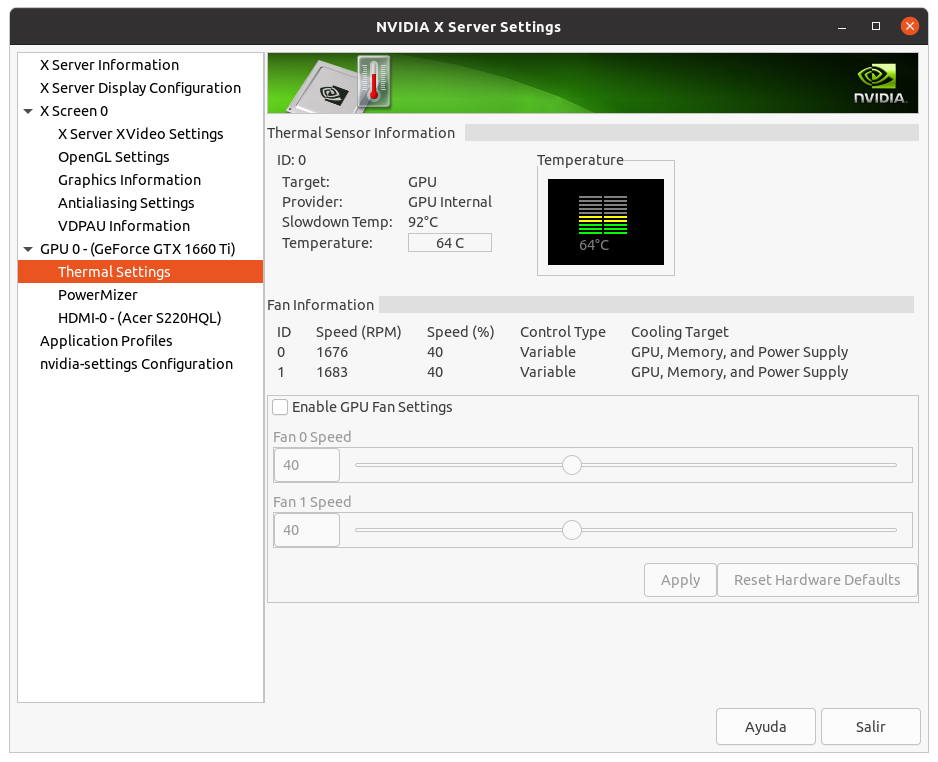
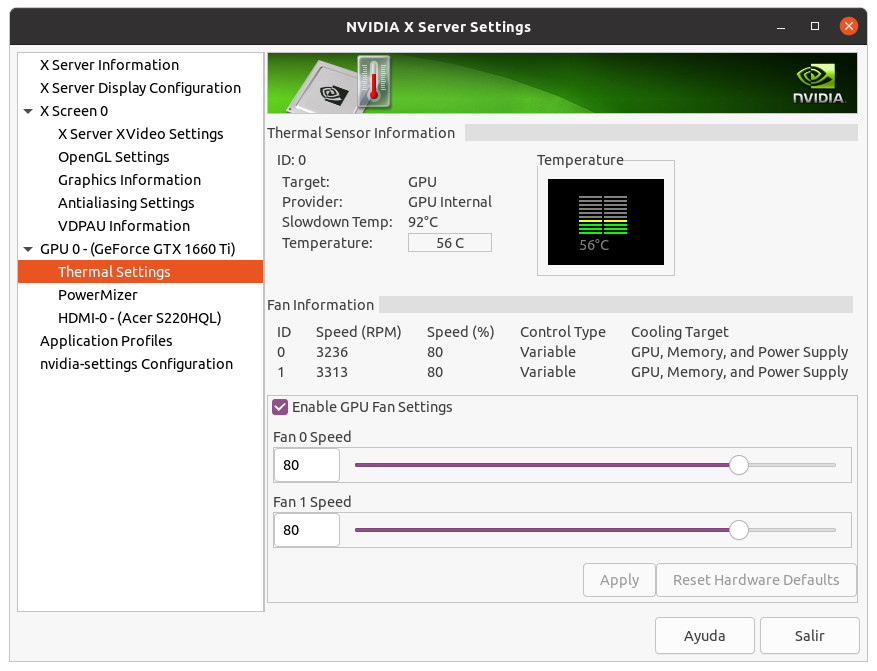
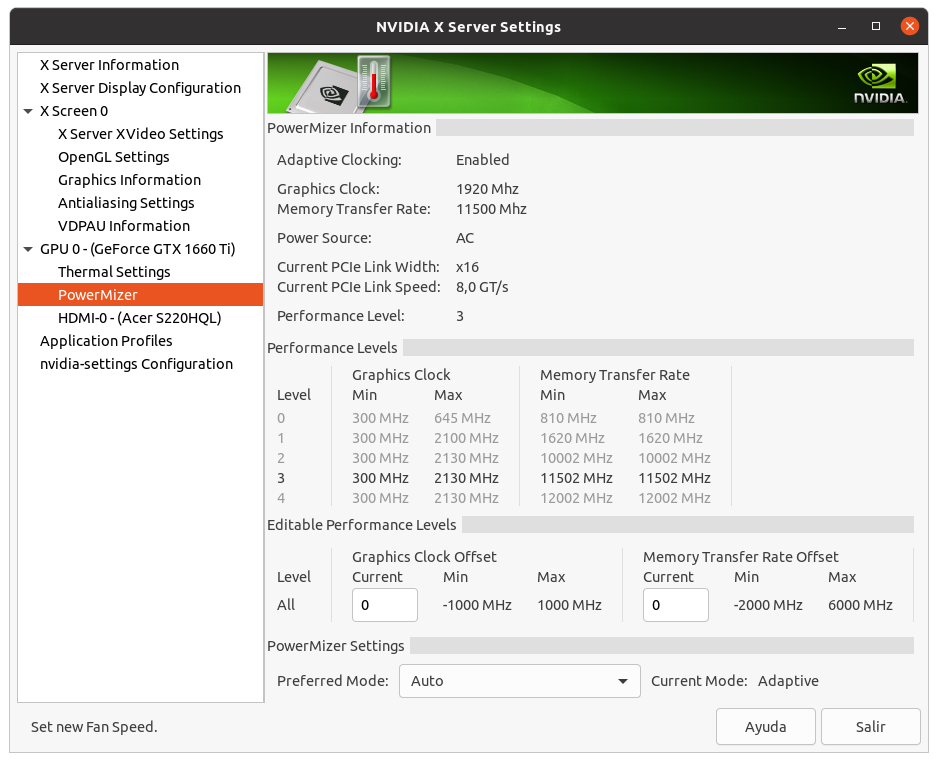
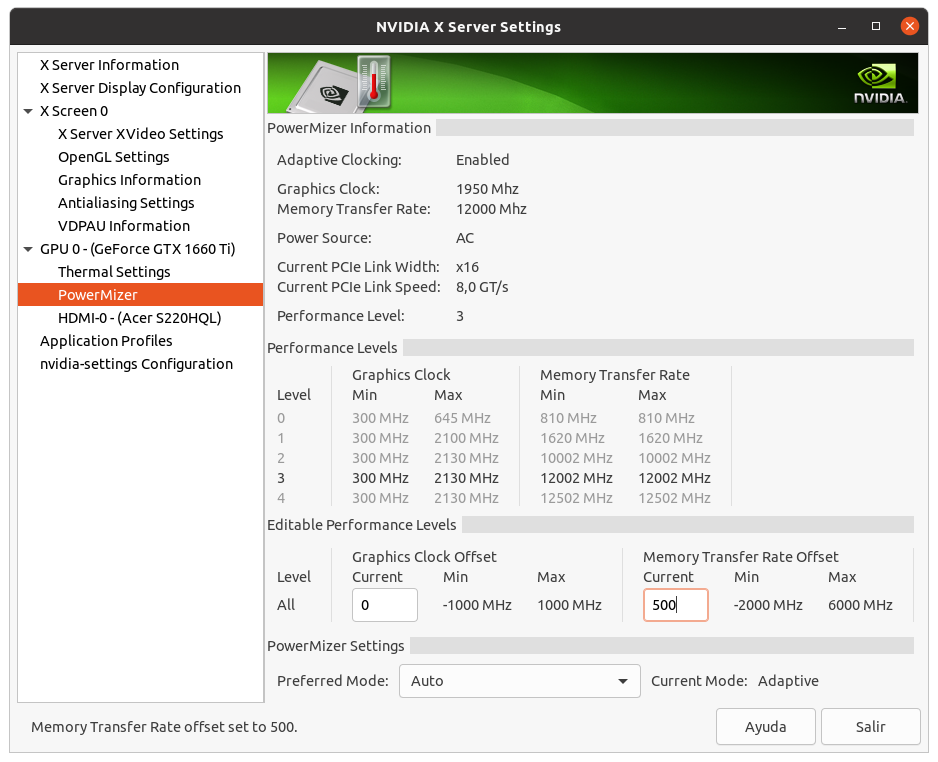
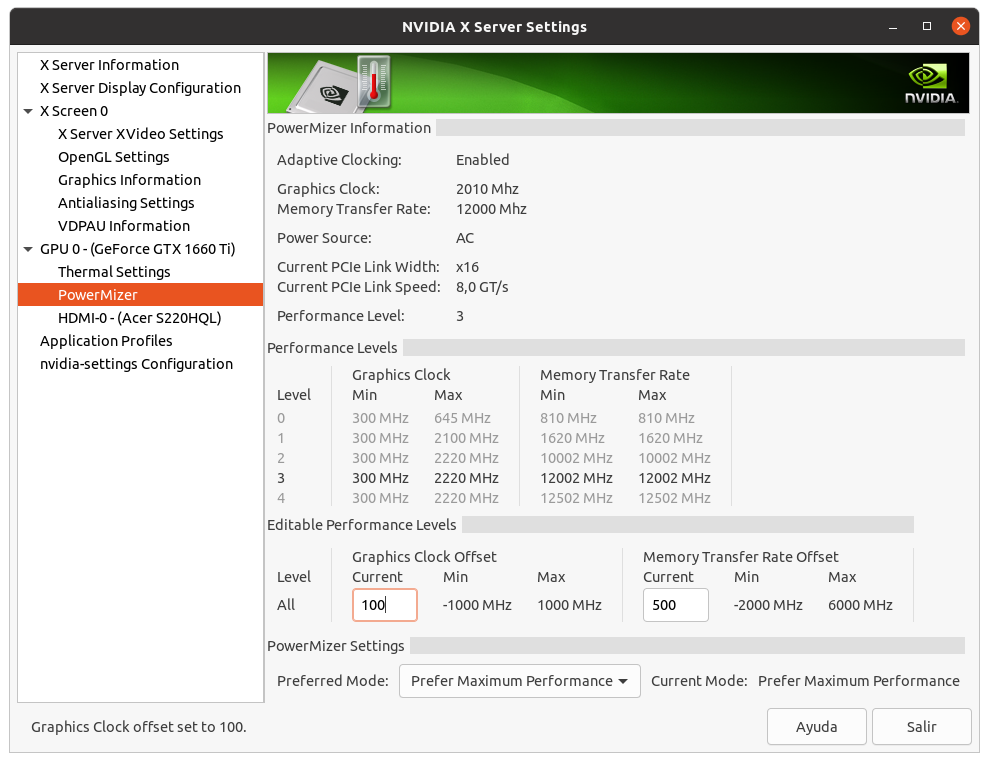
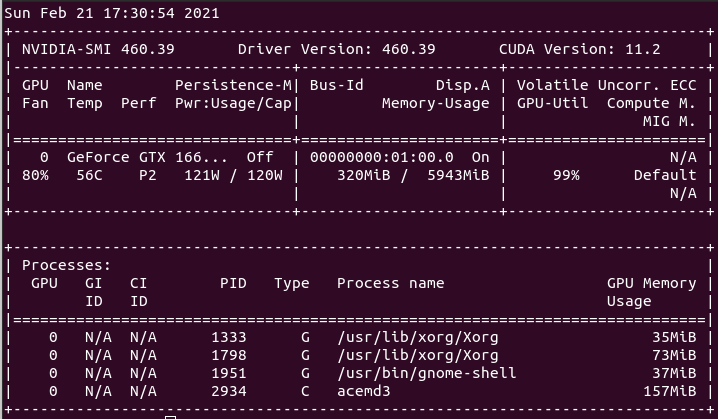
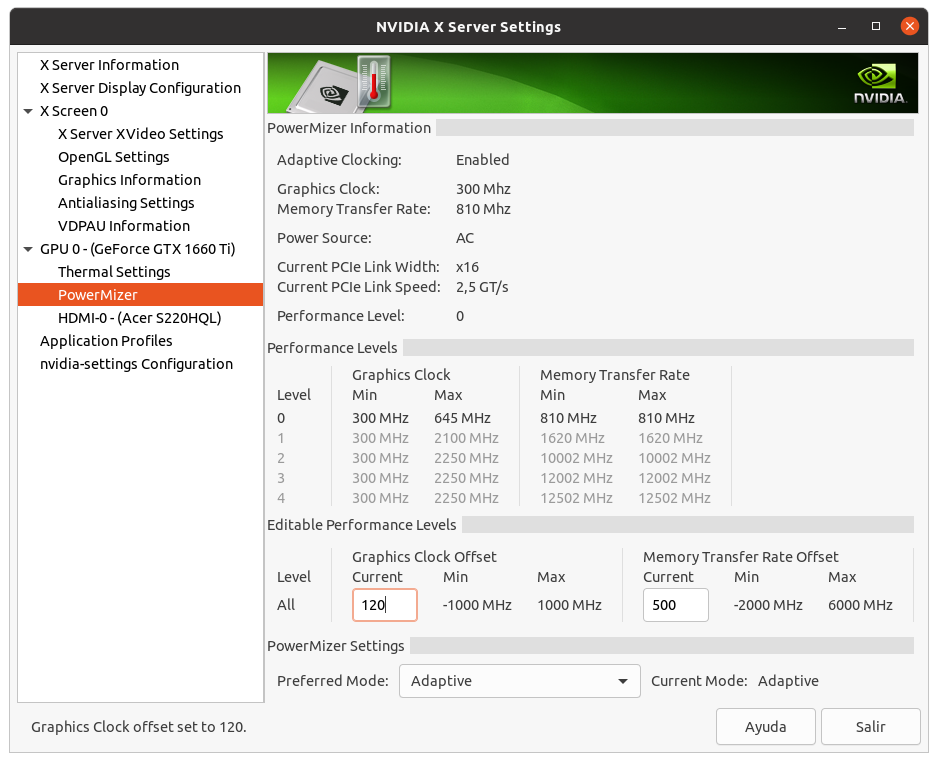
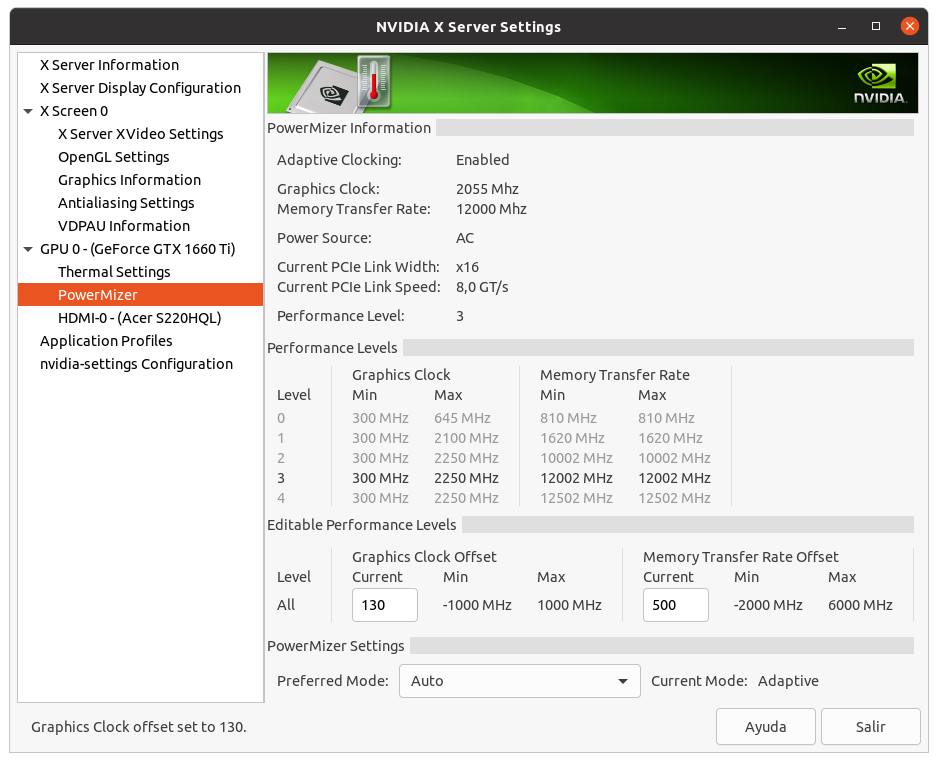
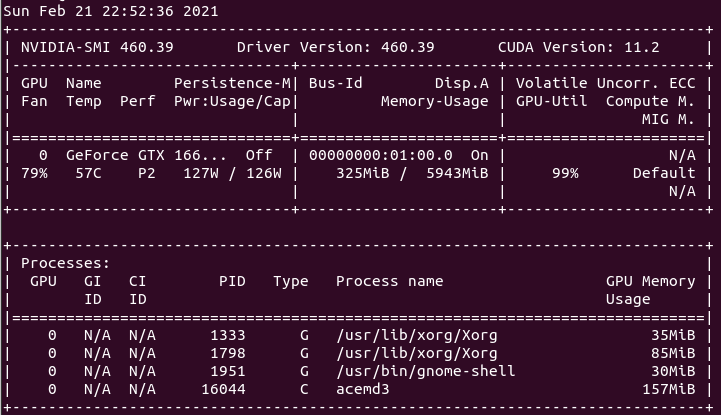
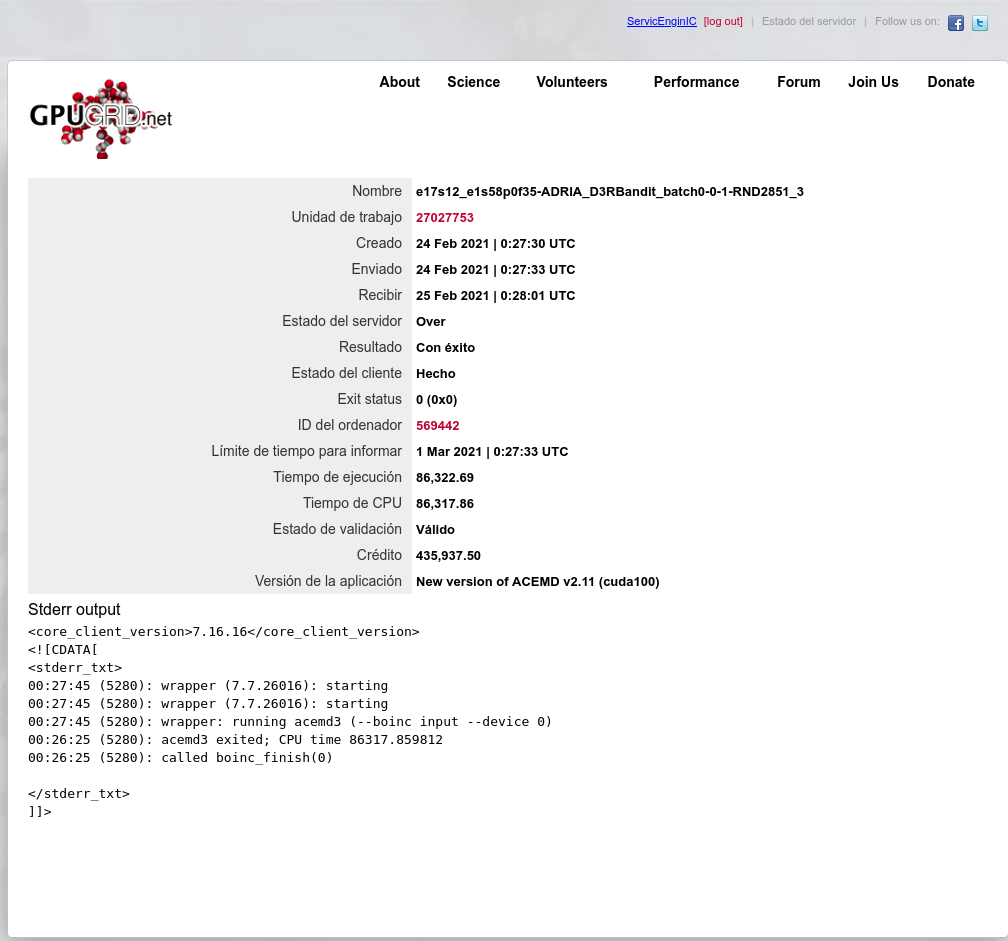
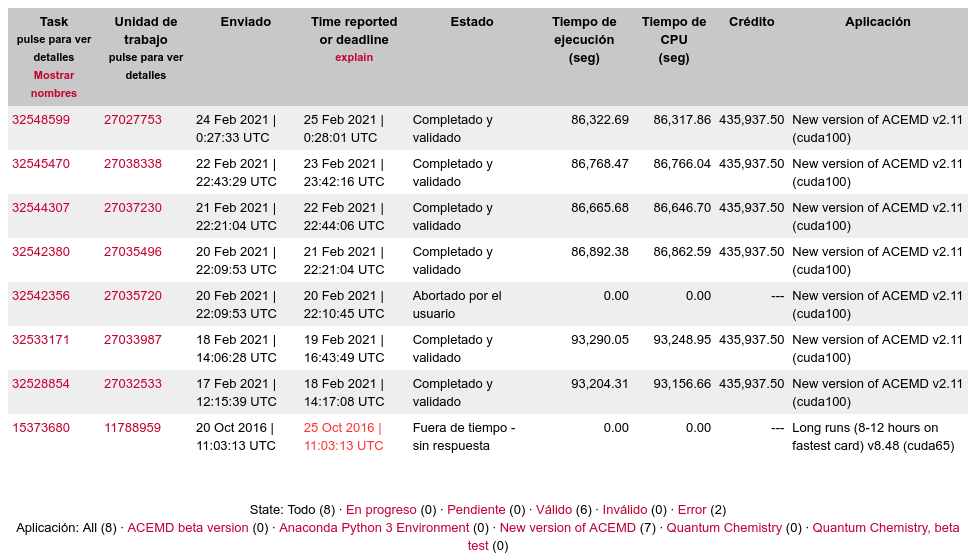
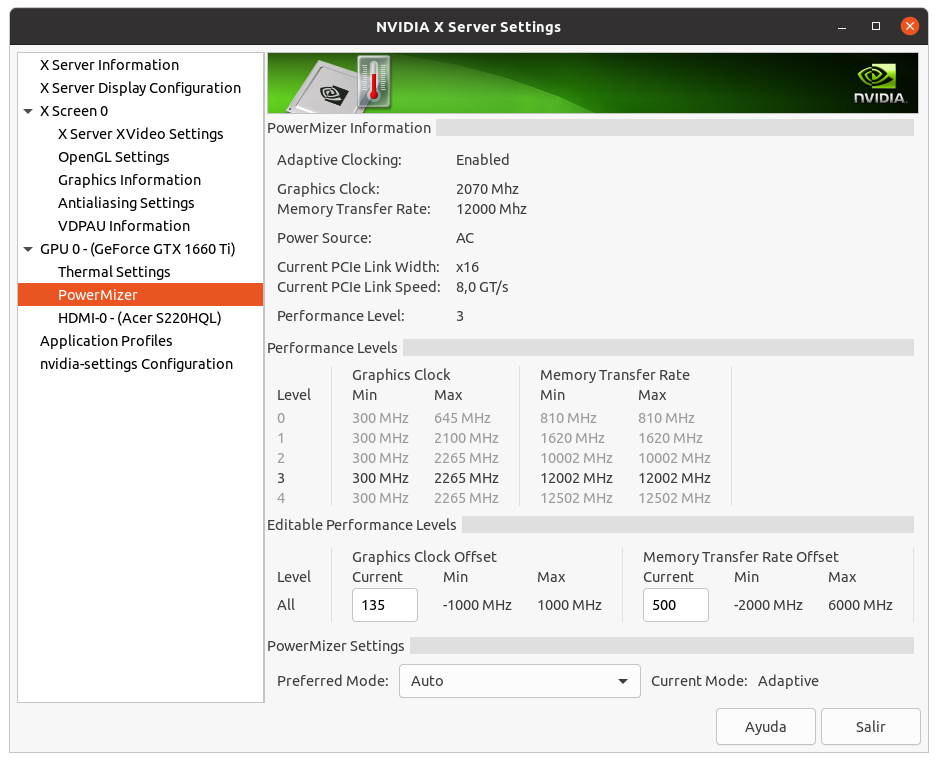
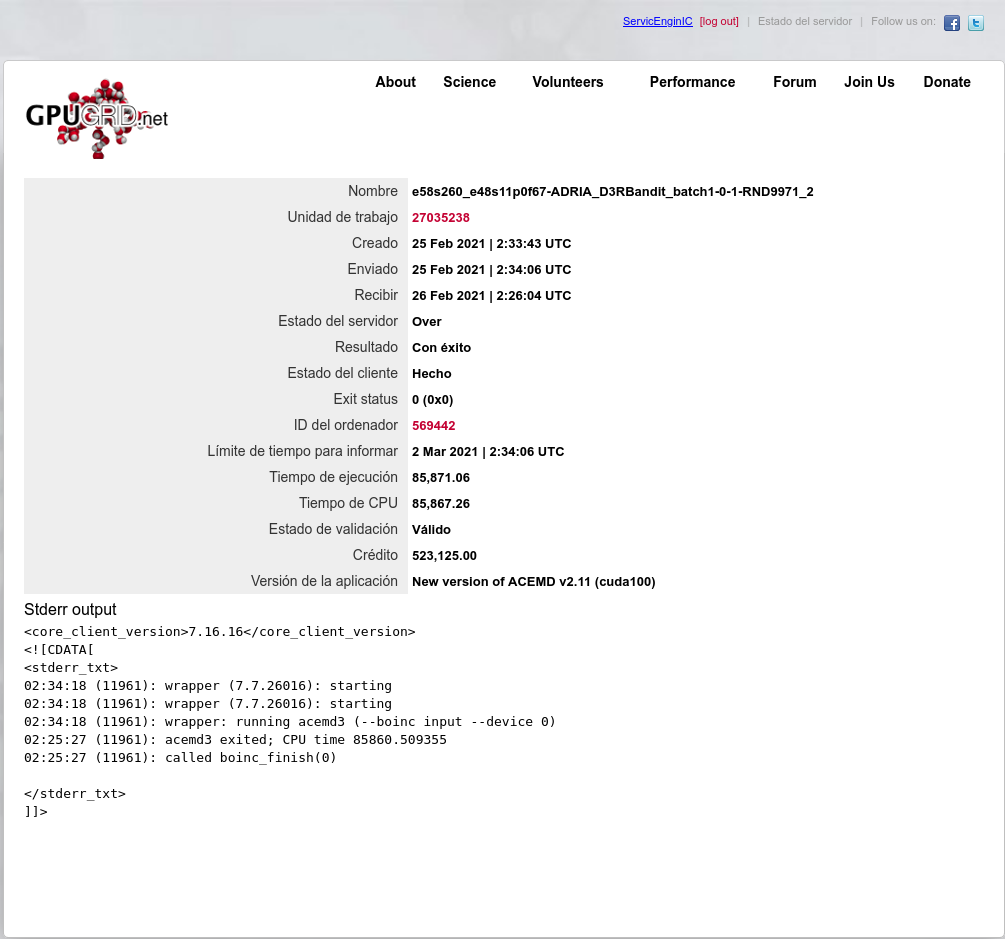
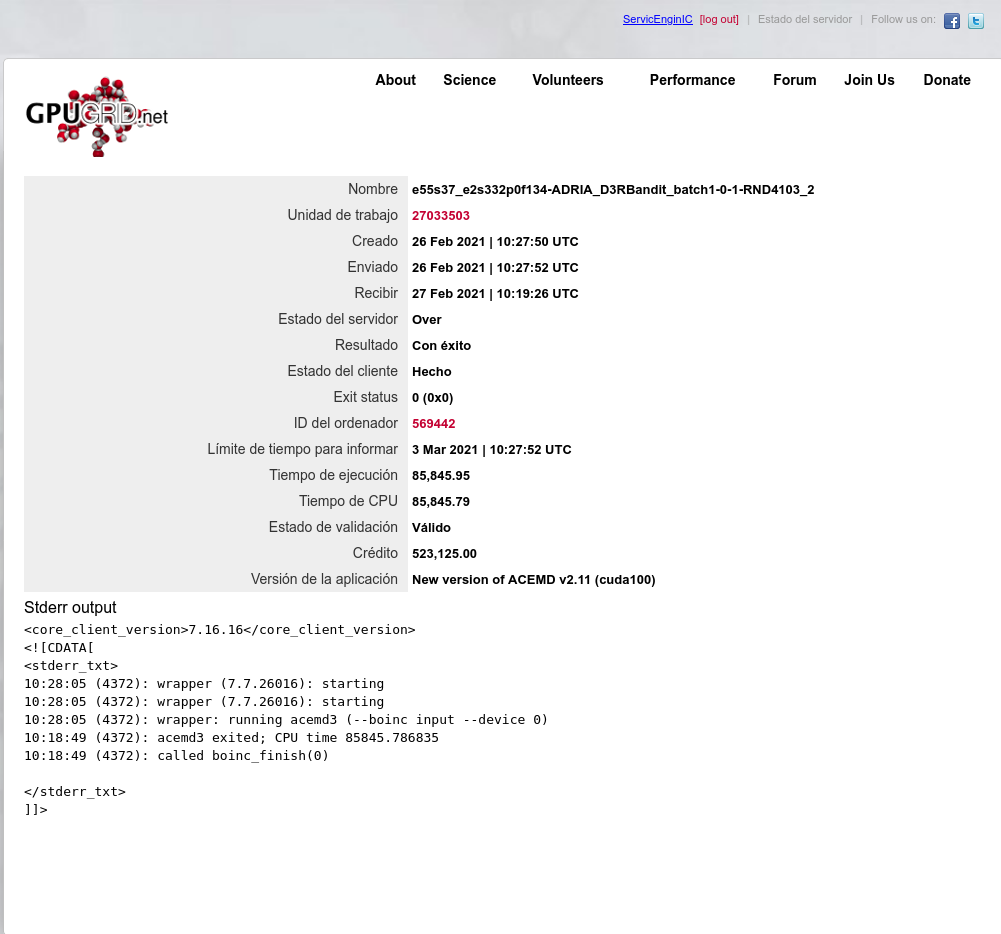
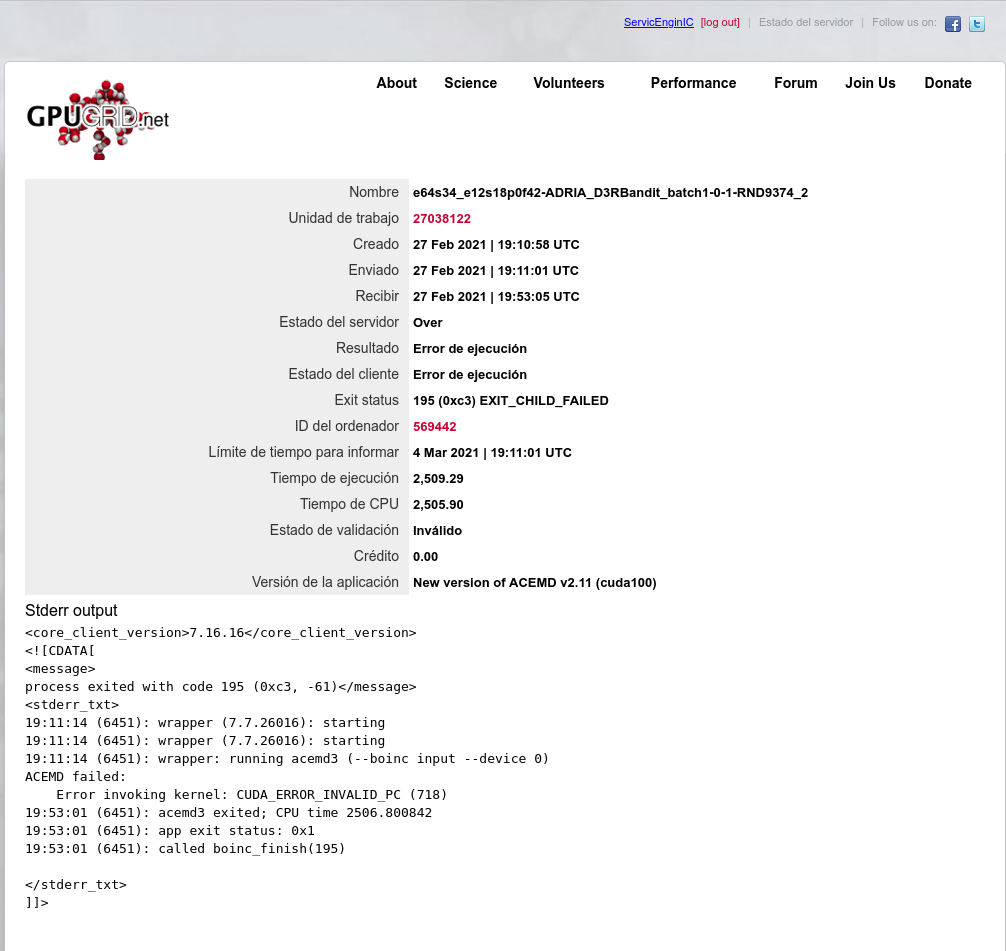
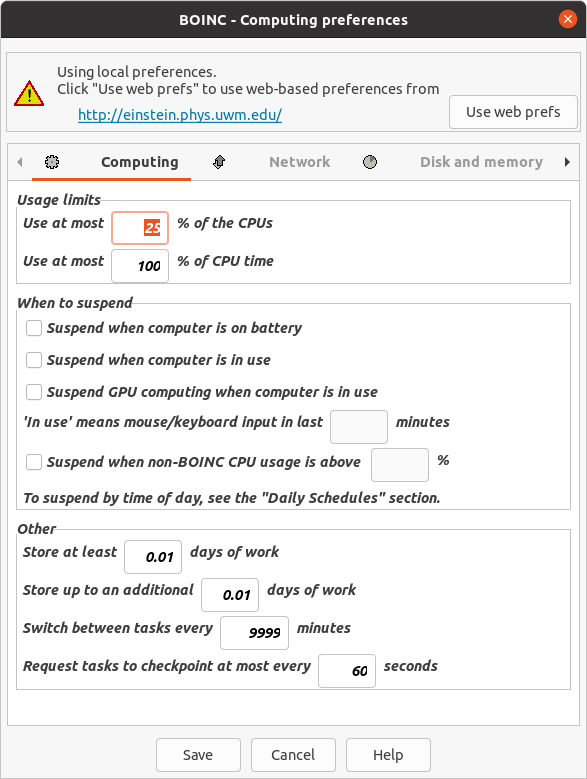
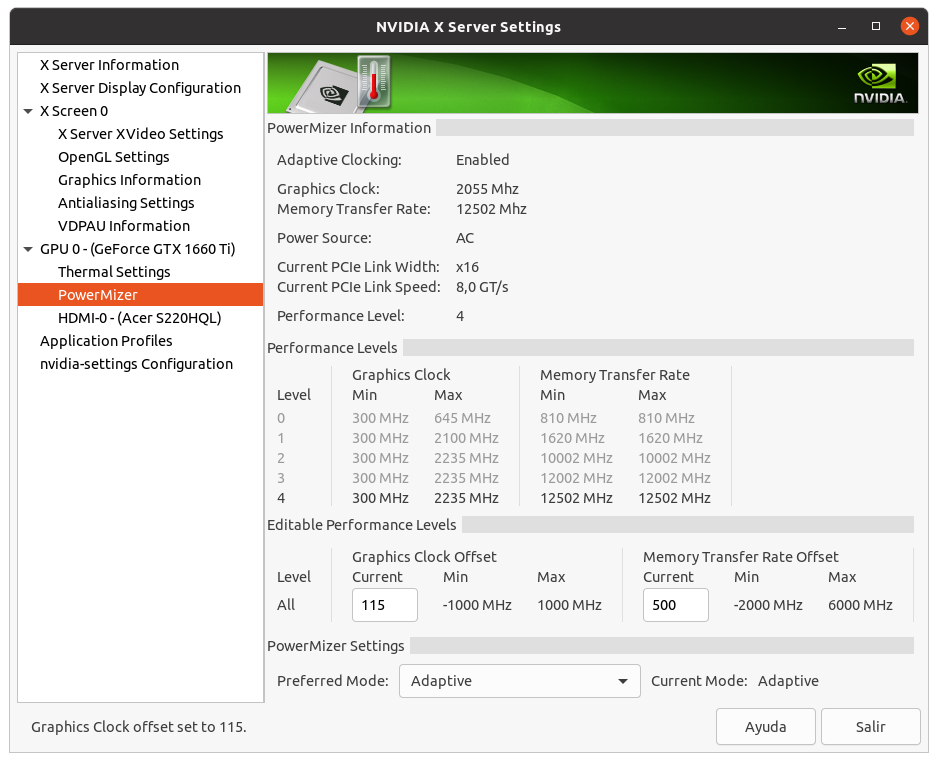
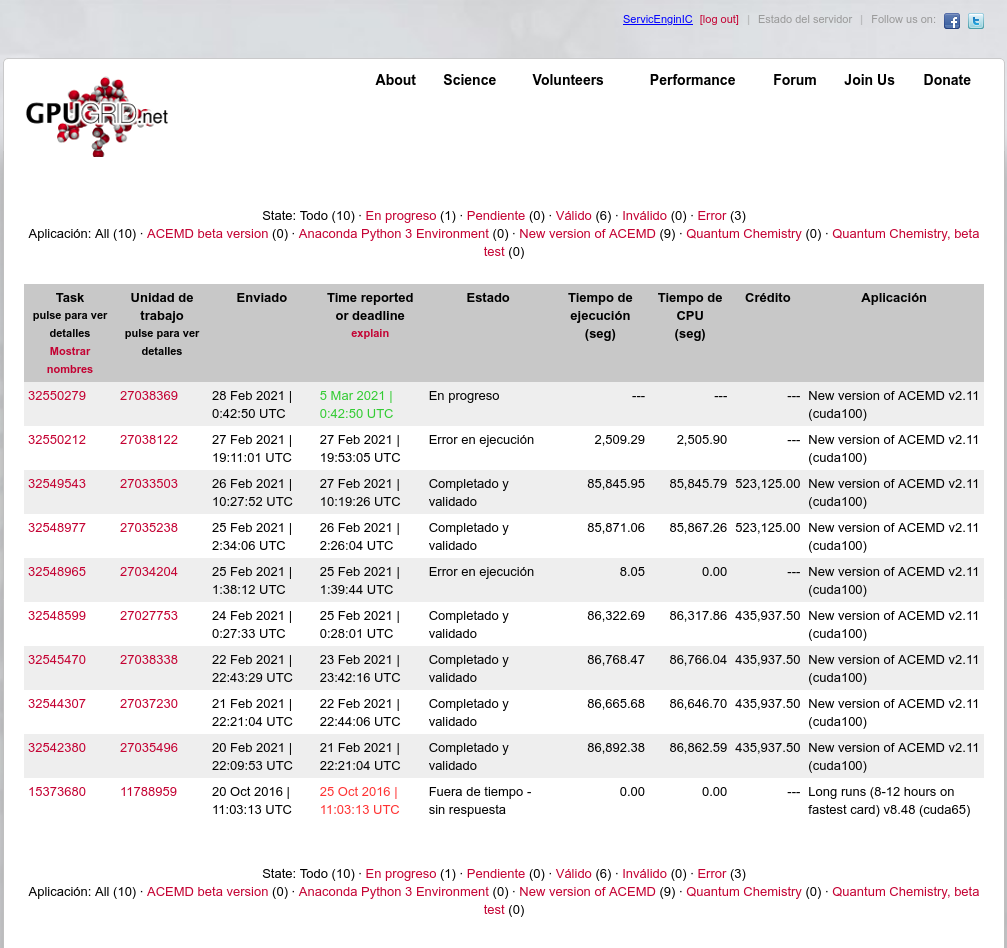
Experiences of a newbie overclocker A long time ago, I concluded that overclocking related activities were very time and effort consuming. Since then, I decided to get (if any) factory overclocked hardware, and yield all the related tests to the manufacturer. Well, I confess that I've suffered a relapse. Encouraged by the good results of reworking my GTX 1660 Ti graphics card, a challenge arised: To achieve this 120 Watts TDP, 1536 CUDA cores graphics card, getting full bonus with current batch of heavy ADRIA tasks. My special thanks to: Keith Myers for this post. OCNfranz for this post Ian&Steve C. for this post Retvari Zoltan for this post Medium times for this card on its first ten (10) ADRIA tasks of current batch was 93370 seconds. Full bonus right is got if time elapsed between the task is sent by the server and a valid result is uploaded and reported is less than 24 hours (86400 seconds). There is a difference of 6970 seconds in processing time (1.94 hours), plus download time, plus time to start task, plus time to upload result and report. A minimum 8.1 % performance increase must be achieved. Too much difference, it is impossible! :-(a regular mind thinking). Squeeze it to the maximum and give it a try! (an hardware enthusiast mind thinking otherwise ;-) As I related at mentioned previous "Recycling to win" post, My first attempt resulted in a processing time of 86892.38 seconds on this card, running under Linux Operating System. Actions taken for this: - I opened a Terminal window and executed the following command, as of Keith Myers suggestion: sudo nvidia-xconfig --thermal-configuration-check --cool-bits=28 --enable-all-gpus After that and a reboot, entering NVIDIA X Server Settings, a new option "Enable GPU Fan Settings" will be available at "Thermal Settings" section. - I enabled this option and and set both fans to 80%. An appreciable temperature decrease was observed, from 65 ºC to 56 ºC. This is a good starting point for temperature not to be a problem to start overclocking. Also, new options for applying frequency offsets to both GPU and memory clocks are now available at "PowerMizer" section. These offsets are set to "0" by default, and will return to this value every time that system is rebooted. - Following Ian&Steve C. advice, an offset of 500 MHz is applied to memory clock, thus raising from P2 11500 MHz default frequency to 12000 MHz. This is the default value for memory clock when working at P0 level, so it should be able to manage it without problems. - An offset of 100 MHz is applied to GPU clock. This results on GPU clock frequency rising from default 1920 MHz to 2010 MHz. At this point, GPU is hitting its rated TDP of 120 Watts, or even a bit more, as shown by nvidia-smi. At this conditions, one ADRIA task was processed, resulting in a process time reduction down to already mentioned 86892 seconds. Not enough to get full bonus. And if trying to raise GPU clock frequency to a value higher than 100, it causes to trip some kind of protection that lowers the frequencies to minimum values: 300MHz for GPU clock, and 810 MHz for memory clock. Well... This time, achieving the challenge is impossible... ...Or not? I had read the above mentioned OCNfranz post with the recipe to modify TDP limit value for the GPU. And I thought: Is it possible not only to lower this value, but also raise it? Rated TDP for GTX 1660 Ti GPU is 120 Watts. A good engineer should apply a minimum 5% margin for driver electronics and related circuitry. So let's bet for Nvidia and Asus engineers being good ones. 5% of 120 watts is 6 Watts. I raise my bet for 126 Watts by means of the following command: sudo nvidia-smi --power-limit=126 With the following response. It seems to work! Important note: Please, be careful I don't recommend doing this. It might cause the GPU or its associated electronics to get burnt with no way back! Will this allow to increase the GPU clock frequency offset without tripping the protections? Now it was possible to raise GPU clock offset by 130 MHz. A new Gpugrid ADRIA task was started processing, and nvidia-smi reported as this. This time, following also the Retvary Zoltan advice, the GPU task was being processed in exclusive, with no CPU tasks in execution. And the result: Task #32548599 was processed in 86322.69 seconds. Below 86400 for the first time!... ...But adding download and upload times for that task, full bonus was missed by... 29 seconds. One last fine tuning: I was made my tests by raising GPU clock offset in 10 MHz increments. An offset of 140 MHz was found to be unstable. Let's try 135 MHz... With this setup, Task #32548977 was processed and finished on 85871.06 seconds, getting full bonus for the first time, with a time margin of 8 minutes and one second left. Challenge completed! A new Task #32549543 was processed in the same conditions, resulting in a processing time of 85845.95 seconds. This is my absolute record for this card, and also received full bonus, with a time margin of 8 minutes and 25 seconds left. A third Task #32550212 was started to process, but it finished prematurely after 2509.29 seconds, with error "CUDA_ERROR_INVALID_PC (718)". This might indicate that this setup is at the very limit of hardware capabilities... (?) Conclusions: - I've performed those tests on a reworked graphics card, resulting in an overdimensioned heat dissipation capability, comparing to the original card. This make me feel reinforced on the work was worth it. The original DUAL-GTX1660TI-O6G Asus card is endowed wit an excellent electronics, but I've got the impression that the stock heatsink is not at the same level. My empirical tests seem to confirm some Retvari Zoltan assertions: - Overcommiting the CPU decreases the performance on highly demanding GPU tasks as are the Gpugrid ones. I've reduced to one only concurrent CPU task as my standard for this system, thus leaving available 75% of CPU cores. - The same overclocking setup is not necessarily valid for all kind of tasks. Testing with PrimeGrid tasks (currently Gpugrid tasks are very scarce), a maximum GPU clock frequency offset of 115 MHz was found to be stable. Higher offsets than this, caused the frequencies to drop down spontaneously as previously mentioned. I'm leaving 115 MHz offset as my standard for this graphics card, at least until an steady supply for Gpugrid tasks be available again. With this setup, a new Task #32550279 is started, and I'm waiting for it to finish. No hope for getting full bonus this time. Please, feel free to share your own experiences, or ask for any clarification. |
 Send message Joined: 13 Dec 17 Posts: 1424 Credit: 9,189,946,190 RAC: 0 Level  Scientific publications
|
Great post. Yes, tuning for overclocking does take time for the trial and error. Best outcome is a 100% stable OC for all the projects you are running for a set and forget configuration. BTW, you can set up a BASH script to automate your overclock. You can run it before you start BOINC and all your gpu overclocks will automatically be applied. Here is mine from this daily driver. Ask for clarification of anything you don't understand. #!/bin/bash /usr/bin/nvidia-smi -pm 1 /usr/bin/nvidia-smi -acp UNRESTRICTED nvidia-smi -i 0 -pl 200 nvidia-smi -i 1 -pl 200 nvidia-smi -i 2 -pl 200 /usr/bin/nvidia-settings -a "[gpu:0]/GPUPowerMizerMode=1" /usr/bin/nvidia-settings -a "[gpu:1]/GPUPowerMizerMode=1" /usr/bin/nvidia-settings -a "[gpu:2]/GPUPowerMizerMode=1" /usr/bin/nvidia-settings -a "[gpu:0]/GPUFanControlState=1" /usr/bin/nvidia-settings -a "[fan:0]/GPUTargetFanSpeed=100" /usr/bin/nvidia-settings -a "[fan:1]/GPUTargetFanSpeed=100" /usr/bin/nvidia-settings -a "[gpu:1]/GPUFanControlState=1" /usr/bin/nvidia-settings -a "[fan:2]/GPUTargetFanSpeed=100" /usr/bin/nvidia-settings -a "[fan:3]/GPUTargetFanSpeed=100" /usr/bin/nvidia-settings -a "[gpu:2]/GPUFanControlState=1" /usr/bin/nvidia-settings -a "[fan:4]/GPUTargetFanSpeed=100" /usr/bin/nvidia-settings -a "[fan:5]/GPUTargetFanSpeed=100" /usr/bin/nvidia-settings -a "[gpu:0]/GPUMemoryTransferRateOffset[4]=800" -a "[gpu:0]/GPUGraphicsClockOffset[4]=80" /usr/bin/nvidia-settings -a "[gpu:1]/GPUMemoryTransferRateOffset[4]=800" -a "[gpu:1]/GPUGraphicsClockOffset[4]=80" /usr/bin/nvidia-settings -a "[gpu:2]/GPUMemoryTransferRateOffset[4]=800" -a "[gpu:2]/GPUGraphicsClockOffset[4]=80" |
|
ServicEnginIC Send message Joined: 24 Sep 10 Posts: 598 Credit: 13,098,875,510 RAC: 1,300,415 Level Scientific publications
|
Thank you for sharing your knowledge. It is a condensed manual of overclocking related commands. I appreciate it very much. |
|
Send message Joined: 13 Dec 17 Posts: 1424 Credit: 9,189,946,190 RAC: 0 Level Scientific publications
|
The fan control interfaces changed from Pascal to Turing so you have to be aware of that. Two individual interfaces on Turing compared to one for Pascal Also the number of power levels changed from 3 to 4 so you have configure for that also. |
|
Send message Joined: 11 Jul 09 Posts: 1639 Credit: 10,159,968,649 RAC: 0 Level Scientific publications
|
good luck with the RMA! Despatched the parcel on Friday. Monday, 13:26 We have received the following items from you on RMA ... Tuesday, 14:49 Test Result: Tested Can't quibble with that for legal compliance, but where do I get a replacement card from ??!! |
|
Send message Joined: 13 Dec 17 Posts: 1424 Credit: 9,189,946,190 RAC: 0 Level Scientific publications
|
That's why I have been sitting on doing nothing for two cards that have one of the fans stop running. They still are able to keep fairly cool and the clocks don't drop too badly. Still within their warranty period for another year but without any replacement stock available, I don't need the cash, I need to keep using the cards. I'll revisit the issue when I get closer to the warranty period ending and hope there will be stock available for replacement. |
|
Send message Joined: 21 Feb 20 Posts: 1118 Credit: 40,876,970,595 RAC: 0 Level Scientific publications
|
That's why I have been sitting on doing nothing for two cards that have one of the fans stop running. They still are able to keep fairly cool and the clocks don't drop too badly. Keith, in your case, EVGA is a lot better about this. they will replace the card with the same thing, or something comparable (even giving upgrades to whatever they have).
|
|
Send message Joined: 13 Dec 17 Posts: 1424 Credit: 9,189,946,190 RAC: 0 Level Scientific publications
|
Yes, true in the past . . . but in this new reality, they have just been refunding your purchase. That is what I have been reading in the EVGA forums. Unless you have specific recent experiences within the last few months. |
|
Send message Joined: 21 Feb 20 Posts: 1118 Credit: 40,876,970,595 RAC: 0 Level Scientific publications
|
I've never seen EVGA refund on a one-time RMA. they always replace it with SOMETHING. I would call their support line to double check. I haven't seen any reports of them issuing refunds recently, at least not for a one-time RMA. i've seen some exceptions where someone RMA'd a 3080 or a 3090 recently like 3-4 times in a very short amount of time (1-2 months) and EVGA offered to just refund at that point. but that's an extraodinary situation. Their normal process is to always replace. their RMA info doesnt even mention giving refunds (outside of refunding collateral for advanced RMA) I sent in a 2080ti last month, they sent me the exact same model back. I guess they had it in stock. EVGA does keep many models on hand (not for sale) for RMA exchanges. I wouldnt be surprised if they have your model available too (but they wont tell you for sure if they do, they'll just tell you "if we don't have the exact model, we'll replace it with something comparable").
|
|
Send message Joined: 13 Dec 17 Posts: 1424 Credit: 9,189,946,190 RAC: 0 Level Scientific publications
|
I actually haven't started any RMA process. I have a RTX 2070 with the fan over the VRM's not running. I have the blower fan on a RTX 2080 Hybrid not running. |
|
Send message Joined: 21 Feb 20 Posts: 1118 Credit: 40,876,970,595 RAC: 0 Level Scientific publications
|
I know, I'm just saying that you shouldn't be all that scared about getting a refund instead of an actual replacement product with EVGA in the US. no need to really hold off. just make sure you send it in before the warranty expires lol.
|
|
Send message Joined: 28 Jul 12 Posts: 819 Credit: 1,591,285,971 RAC: 0 Level  Scientific publications
|
I know, I'm just saying that you shouldn't be all that scared about getting a refund instead of an actual replacement product with EVGA in the US. no need to really hold off. just make sure you send it in before the warranty expires lol. I sent in a bad EVGA GTX 980 and got a new GTX 1070 in return. I wish I could do it again. |
|
ServicEnginIC Send message Joined: 24 Sep 10 Posts: 598 Credit: 13,098,875,510 RAC: 1,300,415 Level Scientific publications
|
  |
|
ServicEnginIC Send message Joined: 24 Sep 10 Posts: 598 Credit: 13,098,875,510 RAC: 1,300,415 Level Scientific publications
|
Computer Gremlins I received today a whatsapp from my sister, reporting strange behavior of her home computer. She sent me the image that can be seen below, with an error regarding overcurrent at an USB device, while none devices were connected at that moment. I was writing a return message indicating that I couldn't help, when I realized that today is a local rainy day at Tenerife. It can be seen at the second image, taken directly from my home weather station. Problems like this, are typically caused by wetted dust at inconvenient places over motherboard electronics. In this case, most likely short circuiting the USB over current signal. Sometimes those errors mysteriously resolve themselves... until a new rainy day comes. If this was the problem, the true solution is a thorough motherboard cleaning. Error 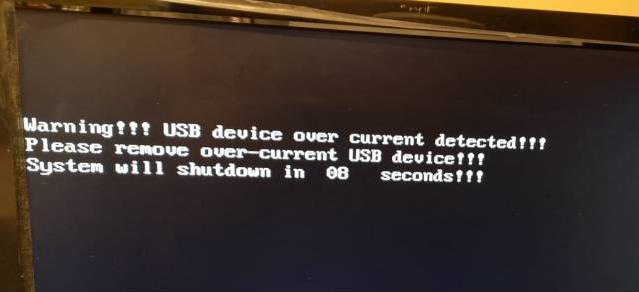 Weather 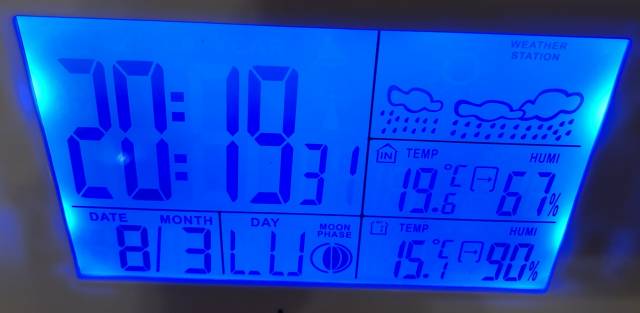 |




©2026 Universitat Pompeu Fabra