Low power GPUs performance comparative
Message boards :
Graphics cards (GPUs) :
Low power GPUs performance comparative
Message board moderation
Previous · 1 · 2 · 3 · 4 · Next
| Author | Message |
|---|---|
 ServicEnginIC ServicEnginIC Send message Joined: 24 Sep 10 Posts: 598 Credit: 13,083,686,510 RAC: 45 Level  Scientific publications    
|
I recently installed a couple of new Dell/Alienware GTX 1650 4GB cards and they are very productive... I heve also three GTX 1650 cards of different models currently running 24/7, and I'm very satisfied. They are very efficient according to their relatively low power consumption of 75W (max). On the other hand, all the GPU models listed on my original performance table are processing current ACEMD3 WUs on time to achieve full bonus (Result returned in <24H :-) |
 Send message Joined: 13 Dec 17 Posts: 1424 Credit: 9,189,946,190 RAC: 0 Level  Scientific publications 
|
Thanks very much for the info. There really isn't much point in overclocking the core clocks because GPU Boost 3.0 overclocks the card on its own in firmware based on the thermal and power limits of the card and host. You do want to overclock the memory though since the Nvidia drivers penalize all their consumer cards when a compute load is detected on the card and pushes the card down to P2 power state and significantly lower memory clocks than the default gaming memory clock and the stated card spec. The memory clocks can be returned to P0 power levels and the stated spec by using any of the overclocking utilities in Windows or the Nvidia X Server Settings app in Linux after the coolbits have been set. |
|
Send message Joined: 1 Jan 15 Posts: 1171 Credit: 12,662,148,501 RAC: 15 Level Scientific publications 
|
... the Nvidia drivers penalize all their consumer cards when a compute load is detected on the card and pushes the card down to P2 power state and significantly lower memory clocks than the default gaming memory clock and the stated card spec. why so ? |
|
Send message Joined: 13 Dec 17 Posts: 1424 Credit: 9,189,946,190 RAC: 0 Level Scientific publications
|
... the Nvidia drivers penalize all their consumer cards when a compute load is detected on the card and pushes the card down to P2 power state and significantly lower memory clocks than the default gaming memory clock and the stated card spec. Because Nvidia doesn't want you to purchase inexpensive consumer cards for compute when they want to sell you expensive compute designed Quadros and Teslas. No reason other than to maximize profit. |
 Send message Joined: 26 Feb 14 Posts: 211 Credit: 4,496,324,562 RAC: 0 Level  Scientific publications
|
... the Nvidia drivers penalize all their consumer cards when a compute load is detected on the card and pushes the card down to P2 power state and significantly lower memory clocks than the default gaming memory clock and the stated card spec. Well, they also say they can't guarantee valid result with the higher P state. Momentary drops or errors are ok with video games, not so with scientific computations. So they say they drop down the P state to avoid those errors. But like Keith says, You can OC the memory. Just be careful because you can do it too much and start to throw A LOT of errors before you know it and then you are in time out by the server.  
|
|
Send message Joined: 13 Dec 17 Posts: 1424 Credit: 9,189,946,190 RAC: 0 Level Scientific publications
|
Depends on the card and on the generation family. I can overclock a 1080 or 1080Ti by 2000Mhz because of the GDDR5X memory and run them at essentially 1000Mhz over official "graphics use" spec. And not generate a single memory error in a task. The Pascal generation really hamstrung the memory in P2 mode. The Pascal cards that used plain GDDR5 memory can not overclock as well as the GDDR5X memory cards. So you can't push the 1070 and such as hard. But the Turing generation family does not impose such a large deficit/underclock in the P2 state under compute load. The Turing cards only drop by 400Mhz from "graphics use" memory clocks. |
|
Send message Joined: 2 Jul 16 Posts: 339 Credit: 8,281,341,558 RAC: 12 Level Scientific publications
|
What happens when there is a memory error during a game? Wrong color, screen tearing, odd physics on a frame? The game moves on. So what. What happens when there is a memory error during compute? Bad calculations that are typically carried through in the task producing invalid results. Down clocking evidently can reduce some errors so that's what NV does. |
|
Send message Joined: 3 Sep 13 Posts: 53 Credit: 1,533,531,731 RAC: 0 Level  Scientific publications
|
What happens when there is a memory error during a game? Wrong color, screen tearing, odd physics on a frame? The game moves on. So what. In my opinion Nvidia does this not because of concern for valid results, it's because they don't really want consumer GPUs used for compute. They'd rather sell you a much more expensive Quadro or Tesla card for that. The performance penalty is just an excuse. Team USA forum | Team USA page Join us and #crunchforcures. We are now also folding:join team ID 236370! |
|
Send message Joined: 21 Feb 20 Posts: 1117 Credit: 40,876,970,595 RAC: 0 Level Scientific publications
|
What happens when there is a memory error during a game? Wrong color, screen tearing, odd physics on a frame? The game moves on. So what. exactly this. 
|
|
Send message Joined: 13 Dec 17 Posts: 1424 Credit: 9,189,946,190 RAC: 0 Level Scientific publications
|
What happens when there is a memory error during a game? Wrong color, screen tearing, odd physics on a frame? The game moves on. So what. +100 You can tell if you are overclocking beyond the bounds of your cards cooling and the compute applications you run by simply monitoring the errors reported, if any. Why would Nvidia care one whit whether the enduser has compute errors on the card. They carry no liability for such actions. Totally on the enduser. They build consumer cards for graphics use in games. That is the only concern they have whether the card produces any kind of errors. Whether it drops frames. If you are using the card for secondary purposes, then that is your responsibility. They simply want to sell you a Quadro or Tesla and have you use it for its intended purpose which is compute. Those cards are clocked significantly less than the consumer cards so that they will not produce any compute errors when used in typical business compute applications. Distributed computing is not even on their radar for application usage. DC is such a small percentage of any graphics card use it is not even considered. |
|
ServicEnginIC Send message Joined: 24 Sep 10 Posts: 598 Credit: 13,083,686,510 RAC: 45 Level Scientific publications
|
On Apr 5th 2020 | 15:35:28 UTC Keith Myers wrote: ...Nvidia drivers penalize all their consumer cards when a compute load is detected on the card and pushes the card down to P2 power state and significantly lower memory clocks than the default gaming memory clock and the stated card spec. I've been investigating this. I suppose this fact is more likely to happen with Windows drivers (?). I'm currently running GPUGrid as preferent GPU project on six computers. All these systems are based on Ubuntu Linux 18.04, no overclocking at GPUs apart from some factory-overclocked cards, coolbits not changed from its default. Results for my tests are as follows, as indicated by Linux drivers nvidia-smi command: * System #325908 (Double GPU) 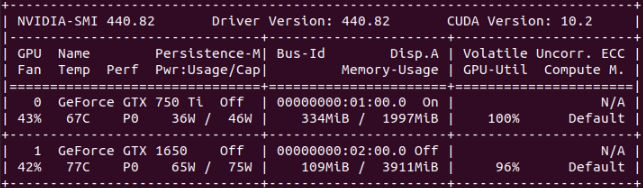 * System#147723 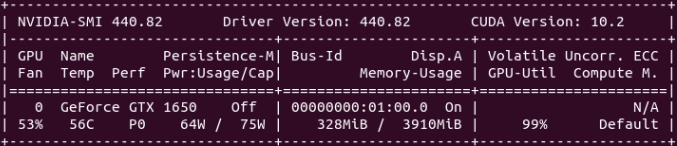 * System #480458 (Triple GPU) 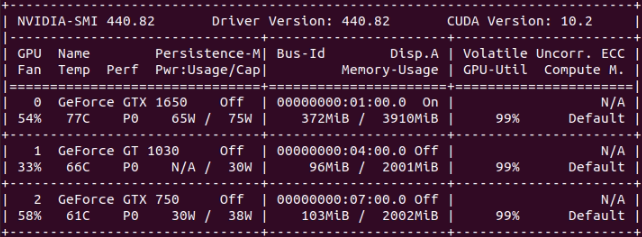 * System #540272 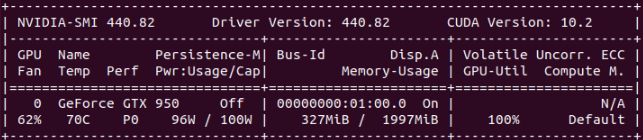 * System #186626 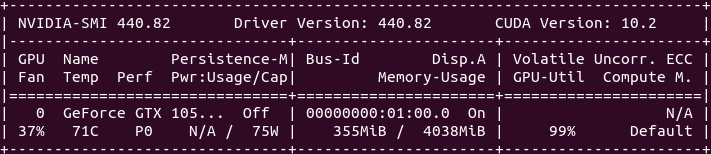 And the only exception: * System #482132 (Double GPU) 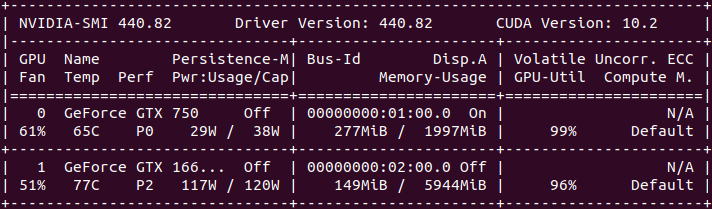 As can be seen at "Perf" column, all cards but the noted exception are freely running at P0 maximum performance level. On the double GPU system pointed as exception, GTX 1660 Ti card is running at P2 performance level. But on this situation, power consumtion is 117W of 120W TDP, and temperature is 77ºC, while GPU utilization is 96%. I think that increasing performance level, probably would imply to exceed recommended power consumption/temperature, with relatively low performance increase... |
|
Send message Joined: 21 Feb 20 Posts: 1117 Credit: 40,876,970,595 RAC: 0 Level Scientific publications
|
Keith forgot to mention that the P2 penalty only applies to higher end cards. low end cards in the -50 series or lower do not get this penalty and are allowed to run in the full P0 mode for compute. you cannot increase the performance level of the GTX 1660Ti from P2 under compute loads. it will only allow P0 if it detects a 3D application like gaming being run. this is a restriction in the driver that nvidia implements on the GTX cards -60 series and higher. there was a way to force the GTX 700 and 900 series cards into P0 for compute using Nvidia Inspector on Windows, but I'm not sure you could do it on Linux. The only thing you can do is to apply an overclock to the memory while in the P2 state to reflect what you would get in the P0 state. there is no other difference between P2 and P0 besides the memory clocks.
|
Retvari Zoltan Send message Joined: 20 Jan 09 Posts: 2380 Credit: 16,897,957,044 RAC: 0 Level Scientific publications
|
To sum up the above: when NV reduces the clocks of a "cheap" high-end consumer card for the sake of correct calculations it's just an excuse for that they want to make us buy overly expensive professional cards which are even lower clocked for the sake of correct calculations. That's a totally consistent argument. Oh wait, it's not!They simply want to sell you a Quadro or Tesla and have you use it for its intended purpose which is compute. Those cards are clocked significantly less than the consumer cards so that they will not produce any compute errors when used in typical business compute applications.Down clocking evidently can reduce some errors so that's what NV does.In my opinion Nvidia does this not because of concern for valid results, it's because they don't really want consumer GPUs used for compute. They'd rather sell you a much more expensive Quadro or Tesla card for that. The performance penalty is just an excuse. (I've snipped the distracting parts) |
 Send message Joined: 8 Aug 19 Posts: 252 Credit: 458,054,251 RAC: 0 Level  Scientific publications
|
Many thanks to all for your input. I Just finished a PABLO WU which took a little over 12 hrs on one of my GTX1650 GPUs. I guess long runs are back. |
|
Send message Joined: 8 Aug 19 Posts: 252 Credit: 458,054,251 RAC: 0 Level Scientific publications
|
I find myself agreeing with Mr Zoltan on this. I am inclined to leave the timing stock on these cards as I have enough problems with errors related to running two dissimilar GPUs on my hosts. When I resolve that issue I might try pushing the memory closer to the 5 GHz advertised DDR5 max speed on my 1650's. What I'd like to know is what clock speeds other folks have had success with before risking blowing WUs finding out. |
|
ServicEnginIC Send message Joined: 24 Sep 10 Posts: 598 Credit: 13,083,686,510 RAC: 45 Level Scientific publications
|
...I Just finished a PABLO WU which took a little over 12 hrs on one of my GTX1650 GPUs. I guess that an explanation about the purpose of these new PABLO WUs will appear in "News" section in short... (?) |
|
ServicEnginIC Send message Joined: 24 Sep 10 Posts: 598 Credit: 13,083,686,510 RAC: 45 Level Scientific publications
|
...I have enough problems with errors related to running two dissimilar GPUs on my hosts. This is a known problem in wrapper-working ACEMD3 tasks, already announced by Toni in a previous post. Can I use it on multi-GPU systems? Users experiencing this problem might be interested to take a look to this Retvari Zoltan's post, with a bypass to prevent this errors. |
|
Send message Joined: 8 Aug 19 Posts: 252 Credit: 458,054,251 RAC: 0 Level Scientific publications
|
Thanks, ServicEnginIC. I always try to use that method when I reboot after updates. I need to get myself a good UPS backup as I live where the power grid is screwed up by the politicians and activists and momentary interruptions are way too frequent. As soon as I can afford to upgrade from my 750ti I will put both my 1650's in one host. Am I correct that identical GPUs won't have the problem? I've noticed that ACEMD tasks which have not yet reached 10% can be restarted without errors when the BOINC client is closed and reopened. |
|
ServicEnginIC Send message Joined: 24 Sep 10 Posts: 598 Credit: 13,083,686,510 RAC: 45 Level Scientific publications
|
Am I correct that identical GPUs won't have the problem? That's what I understand also, but I can't check it by myself for the moment. I've noticed that ACEMD tasks which have not yet reached 10% can be restarted without errors when the BOINC client is closed and reopened. Interesting. Thank you for sharing this. |
|
Send message Joined: 13 Dec 17 Posts: 1424 Credit: 9,189,946,190 RAC: 0 Level Scientific publications
|
Yes you can stop and start a task at any time when all your cards are the same. I moved cards around so that all three of my 2080's are in the same host. No problem stopping and restarting. No tasks lost to errors. I can't do that on the other host because of dissimilar cards. |




©2026 Universitat Pompeu Fabra