NVidia-Linux Adjustments for heat
Message boards :
Number crunching :
NVidia-Linux Adjustments for heat
Message board moderation
| Author | Message |
|---|---|
 JStateson JStateson Send message Joined: 31 Oct 08 Posts: 186 Credit: 3,579,388,157 RAC: 47,357 Level  Scientific publications     
|
Not wanting to get banned or put on that Stop-Forum-Spam list (yes, it happened once) I started a new thread on cooling GPUS Reference Keith Myers post (thanks Keith!) http://www.gpugrid.org/forum_thread.php?id=4955&nowrap=true#52269 With the following GPU: +-----------------------------------------------------------------------------+ | NVIDIA-SMI 390.116 Driver Version: 390.116 | |-------------------------------+----------------------+----------------------+ | GPU Name Persistence-M| Bus-Id Disp.A | Volatile Uncorr. ECC | | Fan Temp Perf Pwr:Usage/Cap| Memory-Usage | GPU-Util Compute M. | |===============================+======================+======================| | 0 GeForce GTX 1070 Off | 00000000:01:00.0 On | N/A | |100% 52C P2 107W / 151W | 1520MiB / 8117MiB | 89% Default | +-------------------------------+----------------------+----------------------+ | 1 GeForce GTX 106... Off | 00000000:02:00.0 Off | N/A | |100% 74C P2 67W / 120W | 1292MiB / 3019MiB | 96% Default | +-------------------------------+----------------------+----------------------+ | 2 GeForce GTX 106... Off | 00000000:03:00.0 Off | N/A | |100% 62C P2 83W / 120W | 384MiB / 3019MiB | 90% Default | +-------------------------------+----------------------+----------------------+ | 3 GeForce GTX 106... Off | 00000000:04:00.0 Off | N/A | |100% 67C P2 98W / 120W | 1294MiB / 3019MiB | 97% Default | +-------------------------------+----------------------+----------------------+ | 4 GeForce GTX 106... Off | 00000000:05:00.0 Off | N/A | |100% 66C P2 84W / 120W | 1292MiB / 3019MiB | 91% Default | +-------------------------------+----------------------+----------------------+ | 5 GeForce GTX 1070 Off | 00000000:06:00.0 Off | N/A | |100% 54C P2 79W / 151W | 1322MiB / 8119MiB | 86% Default | +-------------------------------+----------------------+----------------------+ I ran the following script #!/bin/bash sudo nvidia-xconfig -a --cool-bits=4 /usr/bin/nvidia-settings -a "[gpu:0]/GPUFanControlState=1" /usr/bin/nvidia-settings -a "[fan:0]/GPUTargetFanSpeed=100" /usr/bin/nvidia-settings -a "[fan:1]/GPUTargetFanSpeed=100" /usr/bin/nvidia-settings -a "[gpu:1]/GPUFanControlState=1" /usr/bin/nvidia-settings -a "[fan:2]/GPUTargetFanSpeed=100" /usr/bin/nvidia-settings -a "[gpu:2]/GPUFanControlState=1" /usr/bin/nvidia-settings -a "[fan:3]/GPUTargetFanSpeed=100" /usr/bin/nvidia-settings -a "[gpu:3]/GPUFanControlState=1" /usr/bin/nvidia-settings -a "[fan:4]/GPUTargetFanSpeed=100" /usr/bin/nvidia-settings -a "[gpu:4]/GPUFanControlState=1" /usr/bin/nvidia-settings -a "[fan:5]/GPUTargetFanSpeed=100" /usr/bin/nvidia-settings -a "[gpu:5]/GPUFanControlState=1" /usr/bin/nvidia-settings -a "[fan:6]/GPUTargetFanSpeed=100" /usr/bin/nvidia-settings -a "[fan:7]/GPUTargetFanSpeed=100" Problem #1 (not sure a real problem) The assignments for fans 6 and 7 generated an error when the script was executed. However, as you can see above, all the fans are running %100. However, gpu0 and gpu5 are 1070 which have two fans but only one fan is shown by nvidia-smi. Compounding the problem is that gpu0 was an eVga with aftermarket (also eVga) hybrid cooler. The pump and radiator fan always ran at full speed but it was that rear fan, the "hybrid" that always caused problems. Anyway it seems that all the fans are running as I it is obvious by looking plus the output of nvidia-smi shows significant cooling along with high usage. Problem #2 (real problem) A reboot loses everything and I cannot ssh in to run that script. I have to put a terminal & keyboard on the system and bring up a terminal window and be sure to leave the terminal window open. Fortunately, this is not windows and thus not subject to rebooting on every update. Since the system has automatic login one would think that $DISPLAY was defined at the reboot but I cannot run the script from SSH (putty). However, I am looking at this. There is bound to be a way. |
|
Send message Joined: 4 Aug 14 Posts: 266 Credit: 2,219,935,054 RAC: 0 Level  Scientific publications
|
From what I have tried, nvidia-settings will only work if a monitor is physically attached, or a monitor dummy plug is fitted. If there are other ways would love to find out! To enable ssh server to start when booting the pc, use this command: Debian based distros: sudo systemctl enable ssh Redhat based distros: sudo systemctl enable sshd.service |
|
Send message Joined: 4 Aug 14 Posts: 266 Credit: 2,219,935,054 RAC: 0 Level Scientific publications
|
Also, forgot to mention, the first command in your script sudo nvidia-xconfig -a --cool-bits=4 only needs to be run once, so does not need to be in your script. |
|
JStateson Send message Joined: 31 Oct 08 Posts: 186 Credit: 3,579,388,157 RAC: 47,357 Level Scientific publications
|
Also, forgot to mention, the first command in your script You are correct. I put it in as the script did not work the first time I ran it and I thought that was the problem. Not sure what is going on (IANE on Linux) but every single fan control statement generated an error the first time the script is run after a reboot and the fans are not set to 100. The second time the script is run all the fans spin at the proper speed but fans 6 and 7 generate errors. I am guessing there has to be a delay between the "enable" and the "speed" /usr/bin/nvidia-settings -a "[gpu:0]/GPUFanControlState=1" /usr/bin/nvidia-settings -a "[fan:0]/GPUTargetFanSpeed=100" From what I have tried, nvidia-settings will only work if a monitor is physically attached, or a monitor dummy plug is fitted. I used putty on win10 to ssh into the 18.04 system but nvidia-settings does not work jstateson@tb85-nvidia:~/Desktop$ /usr/bin/nvidia-settings -a "[fan:7]/GPUTargetFanSpeed=100"
Unable to init server: Could not connect: Connection refused
ERROR: The control display is undefined; please run `/usr/bin/nvidia-settings
--help` for usage information.
jstateson@tb85-nvidia:~/Desktop$ echo $DISPLAY
jstateson@tb85-nvidia:~/Desktop$
Even though I enabled auto login when setting up 18.04 I see a login screen after a reboot. going to try something like the following: 1. get the script working so it does not need to be run twice 2. put the script someplace where it gets run automatically after either login or reboot 3. put dummy HDMI on one of the GPUS. |
|
JStateson Send message Joined: 31 Oct 08 Posts: 186 Credit: 3,579,388,157 RAC: 47,357 Level Scientific publications
|
OK, got it working at login First tested the following script #!/bin/bash
#sudo nvidia-xconfig -a --cool-bits=4
let NumGPU=6
let NumFAN=6
for (( n=0; n < NumGPU; n++))
do
/usr/bin/nvidia-settings -a "[gpu:$n]/GPUFanControlState=1"
/bin/ping -c 1 127.0.0.1
done
for (( n=0; n < NumFAN; n++))
do
/usr/bin/nvidia-settings -a "[fan:$n]/GPUTargetFanSpeed=100"
/bin/ping -c 1 127.0.0.1
done
Once I saw it was working I edited ".profile" and appended the script (except top two lines) When I rebooted that bash ".profile" ran and the fans all kicked in and I used my HDMI dummy plug. This worked under bash in 18.04 Ubuntu and I am not sure about others. Also, that login screen I saw was just the screensaver lockout. I was too slow going back into the garage to see it did login automatically. Also, it is possible that my original driver installation attempt of sudo sh ./NVIDIA-Linux-x86_64-430.34.run failed because I used "sh" instead of "bash" but that is a guess. pimping my system... 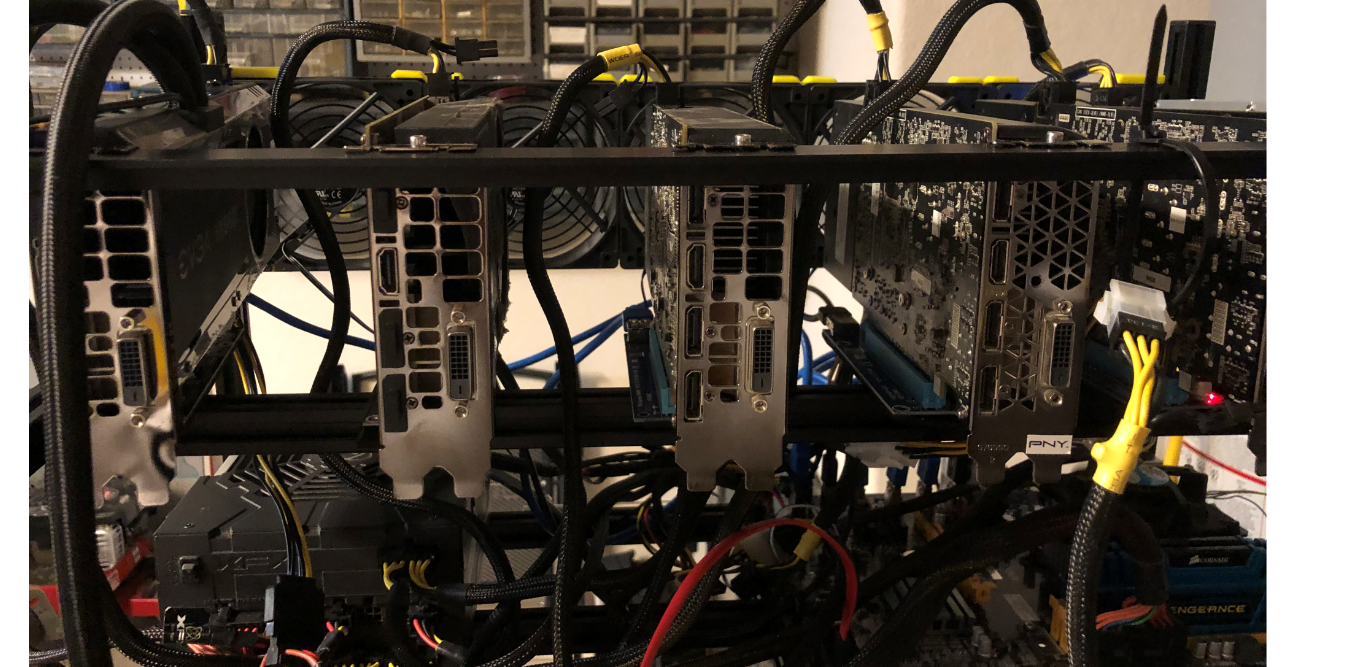 |
 Send message Joined: 13 Dec 17 Posts: 1424 Credit: 9,189,946,190 RAC: 0 Level  Scientific publications 
|
You only have one fan interface on Pascal cards. So you don't need to increment a fan designator for successive cards. Simply enabling the fan for each card and setting its speed is enough. Probably should have used my Pascal only machine as an example #!/bin/bash /usr/bin/nvidia-settings -a "[gpu:0]/GPUPowerMizerMode=1" /usr/bin/nvidia-settings -a "[gpu:1]/GPUPowerMizerMode=1" /usr/bin/nvidia-settings -a "[gpu:2]/GPUPowerMizerMode=1" /usr/bin/nvidia-settings -a "[gpu:3]/GPUPowerMizerMode=1" nvidia-smi -i 0 -pl 200 nvidia-smi -i 1 -pl 200 nvidia-smi -i 2 -pl 200 /usr/bin/nvidia-settings -a "[gpu:0]/GPUFanControlState=1" /usr/bin/nvidia-settings -a "[fan:0]/GPUTargetFanSpeed=100" /usr/bin/nvidia-settings -a "[gpu:1]/GPUFanControlState=1" /usr/bin/nvidia-settings -a "[fan:1]/GPUTargetFanSpeed=100" /usr/bin/nvidia-settings -a "[gpu:2]/GPUFanControlState=1" /usr/bin/nvidia-settings -a "[fan:2]/GPUTargetFanSpeed=100" /usr/bin/nvidia-settings -a "[gpu:3]/GPUFanControlState=1" /usr/bin/nvidia-settings -a "[fan:3]/GPUTargetFanSpeed=100" /usr/bin/nvidia-settings -a "[gpu:0]/GPUMemoryTransferRateOffset[3]=2000" -a "[gpu:0]/GPUGraphicsClockOffset[3]=40" /usr/bin/nvidia-settings -a "[gpu:1]/GPUMemoryTransferRateOffset[3]=1800" -a "[gpu:1]/GPUGraphicsClockOffset[3]=100" /usr/bin/nvidia-settings -a "[gpu:2]/GPUMemoryTransferRateOffset[3]=2000" -a "[gpu:2]/GPUGraphicsClockOffset[3]=40" /usr/bin/nvidia-settings -a "[gpu:3]/GPUMemoryTransferRateOffset[3]=1000" -a "[gpu:3]/GPUGraphicsClockOffset[3]=80" This host has a GTX 1080 Ti, 1080, 1080 and 1070 Ti. in it. Notice the fan designator matches the gpu number. Even if a Pascal card has two physical fans on it, it only has ONE fan interface. Only the newer Turing cards have TWO fan interfaces. So your script needs to be rewritten to get rid of the errors which are trying to manipulate a non-existing interface. Your script should look like this: #!/bin/bash /usr/bin/nvidia-settings -a "[gpu:0]/GPUFanControlState=1" /usr/bin/nvidia-settings -a "[fan:0]/GPUTargetFanSpeed=100" /usr/bin/nvidia-settings -a "[gpu:1]/GPUFanControlState=1" /usr/bin/nvidia-settings -a "[fan:1]/GPUTargetFanSpeed=100" /usr/bin/nvidia-settings -a "[gpu:2]/GPUFanControlState=1" /usr/bin/nvidia-settings -a "[fan:2]/GPUTargetFanSpeed=100" /usr/bin/nvidia-settings -a "[gpu:3]/GPUFanControlState=1" /usr/bin/nvidia-settings -a "[fan:3]/GPUTargetFanSpeed=100" /usr/bin/nvidia-settings -a "[gpu:4]/GPUFanControlState=1" /usr/bin/nvidia-settings -a "[fan:4]/GPUTargetFanSpeed=100" /usr/bin/nvidia-settings -a "[gpu:5]/GPUFanControlState=1" /usr/bin/nvidia-settings -a "[fan:5]/GPUTargetFanSpeed=100" As somebody else already stated you only need to invoke the coolbits tweak once. It rewrites xorg.conf to add the coolbits into the monitor section for each card. [Edit] You need to add a persistence invocation to the script if you are doing anything with nvidia-smi. It needs to be run as root when you invoke it. Adjusting fans with nvidia-settings does not need it though. Just a bit of info for later if you decide to overclock the cards to get back the performance penalty loss the drivers cause when they detect a compute load. /usr/bin/nvidia-smi -pm 1 You would also needs to change your coolbits bit mask to 28 for clock settings |
|
Send message Joined: 2 Jul 16 Posts: 339 Credit: 8,283,381,558 RAC: 200,402 Level Scientific publications
|
From what I have tried, nvidia-settings will only work if a monitor is physically attached, or a monitor dummy plug is fitted. Running the command manually? I've started up Linux PCs many times and used the GUI to set OC and fan speeds without a monitor plugged in. |
|
Send message Joined: 4 Aug 14 Posts: 266 Credit: 2,219,935,054 RAC: 0 Level Scientific publications
|
I've started up Linux PCs many times and used the GUI to set OC and fan speeds without a monitor plugged in. It would be nice to know how you do this, a couple of questions: Are you controlling the Linux PC from another Linux PC? (Controlling the host from another Linux PC, I suspect would be easier to setup.) Are you using X forwarding or enabling XDMCP server on the host? Do you invoke Nvidia Settings GUI remotely or via a script to set the OC and fan speeds? The underlying issue, as I understand, is how the Remote Display is setup in xorg.conf on the host. The X server needs to "think" it is outputting to a real display for nvidia-settings to work. Any tips you could offer would be most appreciated. |
|
Send message Joined: 4 Aug 14 Posts: 266 Credit: 2,219,935,054 RAC: 0 Level Scientific publications
|
OK, got it working at login Great to see you got it going. Always nice to see pics of custom setups! |
|
Send message Joined: 2 Jul 16 Posts: 339 Credit: 8,283,381,558 RAC: 200,402 Level Scientific publications
|
I've started up Linux PCs many times and used the GUI to set OC and fan speeds without a monitor plugged in. I've remotely controlled PCs with TeamViewer. Reboot for whatever reason, remote in with TV and set the OC via the GUI. It was obviously installed with a monitor attached but after that it hasn't been required, at least in more recent versions of Ubuntu. 18.04 is fine. Some older FAH guides at Overclock.net mention editing xorg to create a monitor maybe for the issue you're describing. 1 per GPU. |
|
Send message Joined: 4 Aug 14 Posts: 266 Credit: 2,219,935,054 RAC: 0 Level Scientific publications
|
Some older FAH guides at Overclock.net mention editing xorg to create a monitor I have done a bit more reading after viewing your post and came across a similar solution. One solution may be adding connected-monitor="DFP-0" to xorg.conf (and a few others steps). I wont be able to try this until next week. |
|
JStateson Send message Joined: 31 Oct 08 Posts: 186 Credit: 3,579,388,157 RAC: 47,357 Level Scientific publications
|
I've remotely controlled PCs with TeamViewer I just looked at TV but it is not applicable to what I need and I cannot justify the monthly subscription. Currently I use the Splashtop and RealVNC free personal versions but am paying that cheap yearly subscription for SplashTop's mobile connect. Both remote desktops are limited to 5 systems but only RealVNC strictly enforces that. Splashtop does not support Linux and RealVNC has problems, at least for me. I spent a long time trying to get RealVNC and TightVNC to work with 16 and tried an upgrade to 17 but finally gave up. I have not bothered with 18.04 after reading about Wayland compatibility and "Before we disable Wayland, we need to switch to open source linux video driver instead of Nvidia third party driver"I take that to mean I lose CUDA and OpenCL with opensource drivers. I used VNC on all my systems back about 2009: Win7, Dotsch_UX (Ubuntu 9) but converted my Linux boxes to win10 when I figured out how to upgrade to free win10 (Thanks Microsoft!). However, there are real advantages to running Linux especially on a BOINC farm. I have a pair of 18.04 systems. One is NVidia, the other AMD, and will be converting two more to Linux. These are all headless and I would like to use VNC for access instead of putty. |
|
Send message Joined: 21 Mar 16 Posts: 513 Credit: 4,673,458,277 RAC: 0 Level Scientific publications
|
You don't need to pay for a Teamviewer subscription if you are not a business. You can have as many computers as you want for free. I've used it for years. |
|
JStateson Send message Joined: 31 Oct 08 Posts: 186 Credit: 3,579,388,157 RAC: 47,357 Level Scientific publications
|
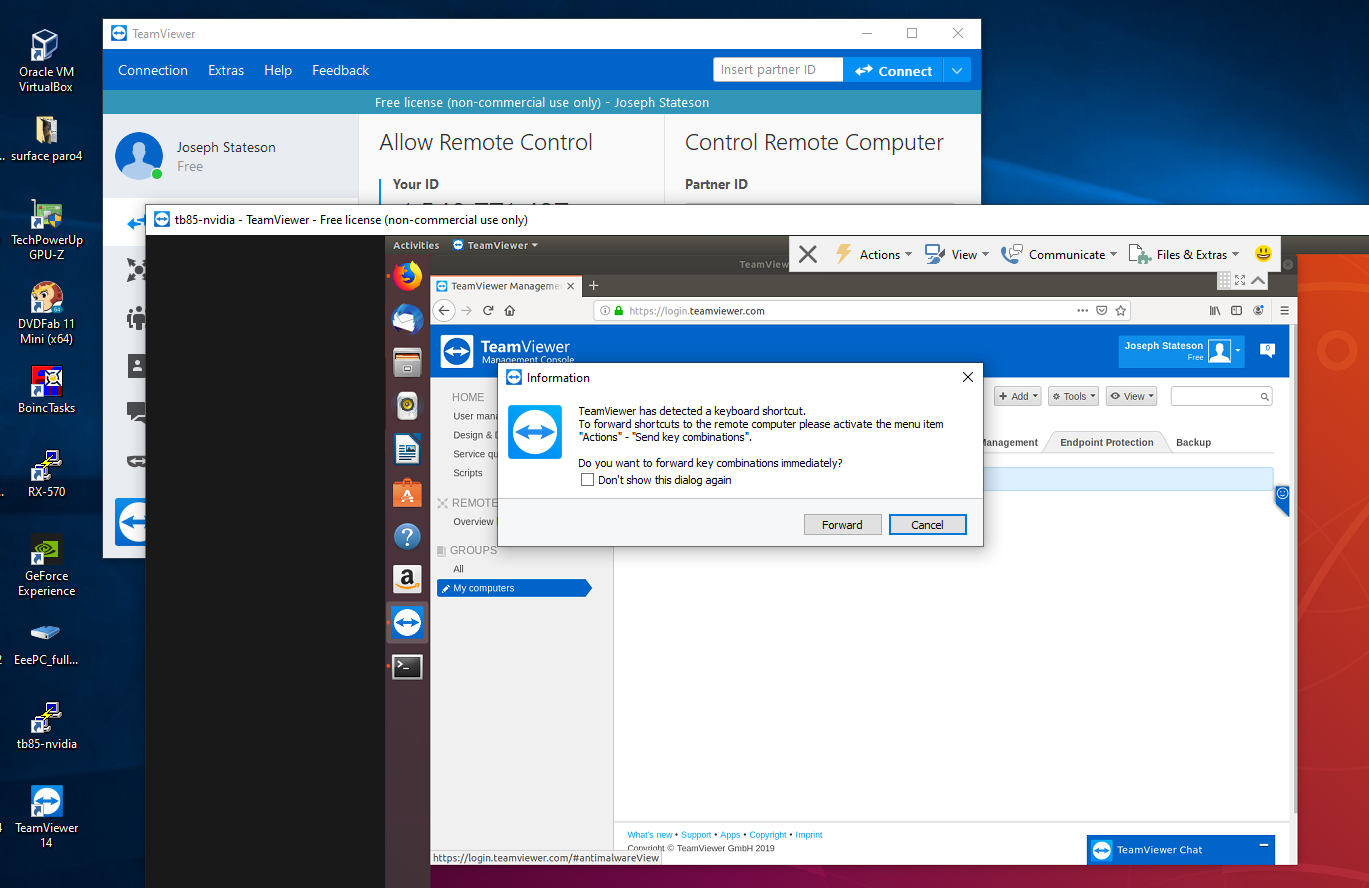
You don't need to pay for a Teamviewer subscription if you are not a business. You can have as many computers as you want for free. I've used it for years. My Bad, I assumed "free" meant free trial. I just scrolled down a lot further and now see it is free for students and personal use w/o limit which is nice. Can it access from a different subnet? That was why I signed up ($12 a year) for Splashtop so my iPhone and tablet could access my systems while out of town. However, I do not need that feature for my boinc farm systems. Just need to access occasionally using the GUI from my windows desktop at home. [EDIT] This Worked! http://stateson.net/images/tv_worked.png I took a picture of the dialog box on the Ubuntu monitor with my iPhone of the code and password and entered that info into my windows TV app. However, I need to bring this up w/o a monitor on the Linux system. I assume it can be done. It would have to be installed as a service and the passwords be persistent. |
|
Send message Joined: 21 Mar 16 Posts: 513 Credit: 4,673,458,277 RAC: 0 Level Scientific publications
|
As long as both computers (this means phones too) have an internet connection, the connection will be established. You can also teamviewer to a computer without a monitor attached. |
|
Send message Joined: 13 Dec 17 Posts: 1424 Credit: 9,189,946,190 RAC: 0 Level Scientific publications
|
18.04 after reading about Wayland compatibility and This is very outdated information that was only applicable to Ubuntu 17.04 and 17.10 when they had a brief dalliance with making Wayland the default DM. That went over like a lead balloon as too many application only work with X11. The default DM for Ubuntu 18.04 and later versions is X11. You can switch to Wayland on X11 at login via the config wheel if desired. The default Nvidia drivers in the Ubuntu 18.04.2 LTS distro is now proprietary Nvidia driver version 430.34. They have been added to the SRU or stable release now. So you get full CUDA and OpenCL support out of the box now. |
|
Send message Joined: 2 Jul 16 Posts: 339 Credit: 8,283,381,558 RAC: 200,402 Level Scientific publications
|
You don't need to pay for a Teamviewer subscription if you are not a business. You can have as many computers as you want for free. I've used it for years. Yup, until they decide your multiple computer setup is now a business and take weeks to respond to your request to re-activate it again. Some of our equipment at work use Radmin which everyone prefers over VNC for situations where the desktop account remains unlocked. Although it might have a GPU driver hook like RDP that would abort any GPU task. It's $50 but worth not having input lag like VNC/TV. |
|
tito Send message Joined: 21 May 09 Posts: 22 Credit: 2,002,780,169 RAC: 0 Level Scientific publications 
|
I had problems with TV as it fought I use it for commercial use. So I have switched to DWService - free to use and access is from any web browser. Win, Linux agents available. |
|
JStateson Send message Joined: 31 Oct 08 Posts: 186 Credit: 3,579,388,157 RAC: 47,357 Level Scientific publications
|
Added PCIe splitter to get 7 GPU on a 6 slot mombo and lost control of fans on two GPUs. If anyone has used splitters (4-in-1 etc) I would like to know if they got the coolbits working OK. My xorg looks fine and monitor works fine but instead of buss IDs of 1..6, I am seeing 1..4 then 9 and "A" on nvidia-smi. nvidia-settings missing sliders for temp for fans "4" and "6". Not going to post details here as I posted problem at AskUbuntu. https://askubuntu.com/questions/1161242/coolbits-missing-fans-after-adding-pcie-splitter All the boards work ok, just cant crunch gpugrid right now but seti works on all 7 just fine. |
 Send message Joined: 12 Jul 17 Posts: 404 Credit: 17,412,649,587 RAC: 0 Level  Scientific publications
|
You don't need to pay for a Teamviewer subscription if you are not a business. You can have as many computers as you want for free. I've used it for years.That was not my experience. TeamViewer constantly had popups accusing me of not playing fairly implying I was a commercial user. No provision to say I'm a charity. Now I use NoMachine 6.6.8 but it has problems making the served screen a reasonable size which is often smaller than popup windows so I can't push any buttons on the bottom. When it upgraded to 6.7.6 my Linux rigs got either the Blue or White Screen of Death on my screen. Had to revert back. TightVNC is the best I've tried but they don't do Linux. I'm looking for a better remote desktop program. Maybe x11vnc??? http://www.karlrunge.com/x11vnc/ My solution to the heat is to turn off everything from 1:00 until 6:00. I also have TOU electric rates that go up 7x during those hours. BOINC is programmed to do that and works great. But it's weird to walk around and hear all the fans still spinning since it's over 90°F. So I manually turn them off. I wish I knew how to write a script that would shutdown at 1:00 and power on at 6:00. 
|



©2026 Universitat Pompeu Fabra