2 GPU, not the same % of utilization
Message boards :
Graphics cards (GPUs) :
2 GPU, not the same % of utilization
Message board moderation
| Author | Message |
|---|---|
|
Send message Joined: 23 Mar 19 Posts: 13 Credit: 209,159,150 RAC: 0 Level  Scientific publications 
|
Hello, I installed 2 Nvidia 1070Ti on an Asus B250 motherboard working with GPUGrid on Ubuntu 18.04.2 LTS. Everything works fine, except about the % of use. The first GPU works around 90% of its capacity (normal). The second GPU works around 80%, which makes a big difference after 8 hours of computation. I switched the GPU in order to see if it was about the material, but it's the same thing. Is is about GPUGrip or Ubuntu ? thx |
|
Send message Joined: 21 Mar 16 Posts: 513 Credit: 4,673,458,277 RAC: 0 Level  Scientific publications   
|
Hello there is a setting you can enable on linux (and windows but it's more effective on linux) called SWAN_SYNC. I am not sure we have an official guide yet, I will get back to you. |
|
Send message Joined: 23 Mar 19 Posts: 13 Credit: 209,159,150 RAC: 0 Level Scientific publications
|
I found an interesting thing on this forum : http://www.gpugrid.net/forum_thread.php?id=4813#50180 the solution is : the SWAN_SYNC=1 setting should placed in it's own configuration file at /lib/systemd/system/boinc-client.service This file should be edited as 'root'. In the [service] section of that file there should be a line containing: Environment="SWAN_SYNC=1" After this change, my first GPU works around 99% and the second around 96% ....magic !! |
|
Send message Joined: 23 Mar 19 Posts: 13 Credit: 209,159,150 RAC: 0 Level Scientific publications
|
It is really better now, but still with a difference between GPUs.... |
|
Send message Joined: 9 May 13 Posts: 171 Credit: 4,739,796,466 RAC: 5 Level Scientific publications  
|
What is the Maximum PCIe Link Width and Maximum PCIe Link Speed of each of the two slots where the GPUs are inserted? |
|
Send message Joined: 23 Mar 19 Posts: 13 Credit: 209,159,150 RAC: 0 Level Scientific publications
|
here is : LnkCap: Port #0, Speed 5GT/s, Width x16 LnkSta: Speed 2.5GT/s, Width x1 LnkCap: Port #0, Speed 2.5GT/s, Width x16 LnkSta: Speed 2.5GT/s, Width x1 It's what I can see in the Nvidia X Server Settings too : GPU 0: Current PCIe Link Speed: 5,0 GT/s GPU 1: Current PCIe Link Speed: 2,5 GT/s both are in Preferred Mode Adaptive |
 Send message Joined: 26 Feb 14 Posts: 211 Credit: 4,496,324,562 RAC: 0 Level Scientific publications
|
Where do you have those GPUs connected at? Which slots? The B250 is a mining board. 1 PCIe x16 slot. the other 18 will vary depending on the number GPUs connected. The Intel® Pentium® Processor G4400 only has 16 lanes for the full size PCIe slot. The B250 provides lanes for the other 18 slots, which is interesting as it only has 12 lanes. On top of that, it shares those lanes for the USB and SATA connections. So my guess is the PCI slots of the 19 are only running at X1 if fully loaded. Doubtful it gets over x8. So that would explain why the second card is taking so long. Z  
|
|
Send message Joined: 23 Mar 19 Posts: 13 Credit: 209,159,150 RAC: 0 Level Scientific publications
|
You are right. Using another slot than the first one, I have exactly the same percentage of use per gpu. Your explanation is right. The thing to remember, is to activate the SWAN_SYNC to earn more than 10% more calculation. Thanks for your following along. |
|
Send message Joined: 30 Apr 19 Posts: 54 Credit: 168,971,875 RAC: 0 Level  Scientific publications
|
You are right.for my self to sum up. your build is asus b250 mining motherboard, with 2 gtx1070ti. am i right? are your both cards connected to b250-motherboard's x1 lane slots (via pcie - usb risers)? as i can see, you complete all your tasks very wel. your longest task was about 15hours. how do you manage this setup? display connected to onboard hdmi? maybe some pictures of your system? just how it looks on outside i am asking this because i would like to make similar build, using mining motherboard and connect 4-6 gpu's via pcie-x16-usb risers to x1-lane slots of motherbord B250. thanks in advance |
 Send message Joined: 13 Dec 17 Posts: 1424 Credit: 9,189,946,190 RAC: 0 Level  Scientific publications 
|
TBar discovered on that board that no matter the quality of the riser or USB cable, some slots will only run Gen.2 speeds. It is hardwired. He says to read the motherboard manual carefully to find which slots are Gen. 3 and which are Gen. 2. |
|
Send message Joined: 23 Mar 19 Posts: 13 Credit: 209,159,150 RAC: 0 Level Scientific publications
|
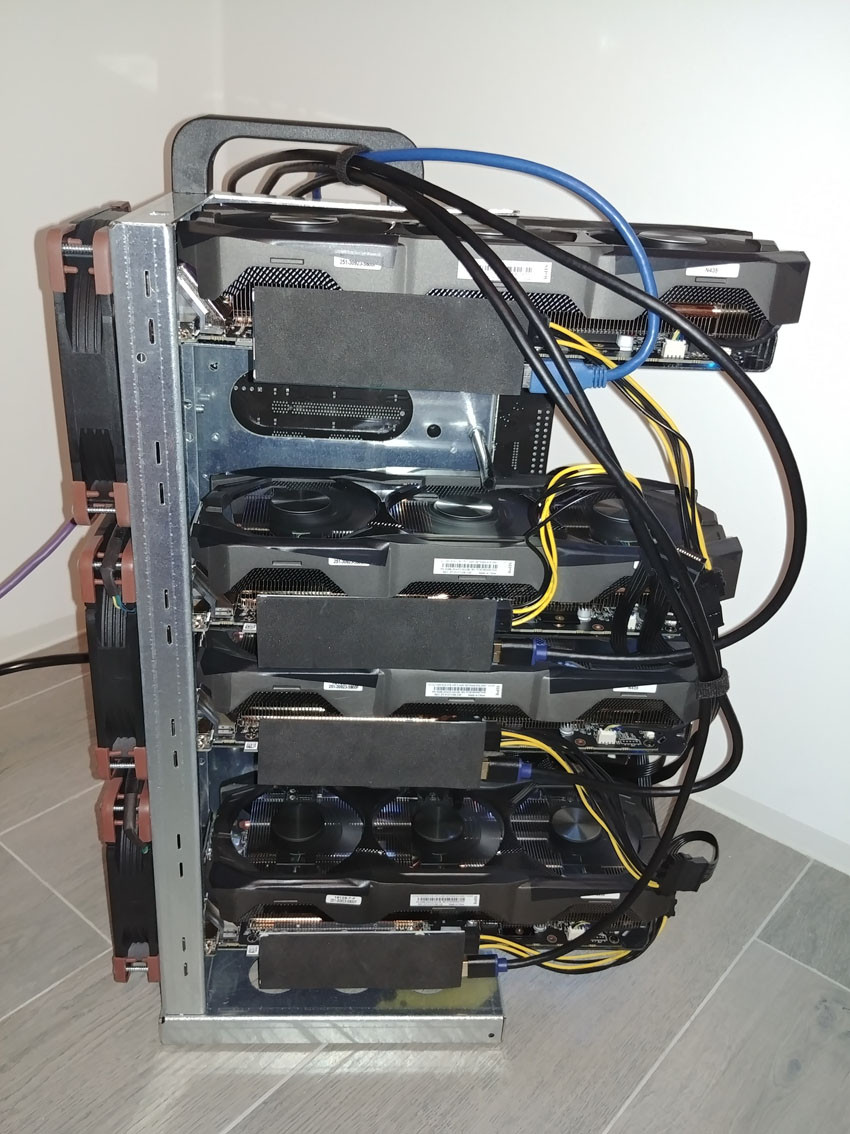
My build is actually an asus b250 mining motherboard with 4 gtx1070ti. Following the motherboard manual, the first gpu is on the x16 slot and the others on the x1 slots. Using an usb riser for each gpu, one gpu connected to an unique slot on the motherboard. The tasks are around 8 hours, the longest task was about 15 hours because I was "tunning" the system and worked on one gpu only during a while. To setup the system, I have connected a keyboard, mouse and display directly on the motherboard. When the setup looked ok, I have installed a remote control with Vino and used a usb display simulator on the onboard hdmi. The main "problem" with this system, is the fact that GPUGRID needs one core with one gpu. It means that if you have four gpus connected on your system, you must have a cpu with at least four cores. Otherwise, the computation capabilities of the gpu will drop a lot. Here are some pictures : My build is actually an asus b250 mining motherboard with 4 gtx1070ti. Following the motherboard manual, the first gpu is on the x16 slot and the others on the x1 slots. Using an usb riser for each gpu, one gpu connected to an unique slot on the motherboard. The tasks are around 8 hours, the longest task was about 15 hours because I was "tunning" the system and worked on one gpu only during a while. To setup the system, I have connected a keyboard, mouse and display directly on the motherboard. When the setup looked ok, I have installed a remote control with Vino and used a usb display simulator on the onboard hdmi. The main "problem" with this system, is the fact that GPUGRID needs one core with one gpu. It means that if you have four gpus connected on your system, you must have a cpu with at least four cores. Otherwise, the computation capabilities of the gpu will drop a lot. Here are some pictures : 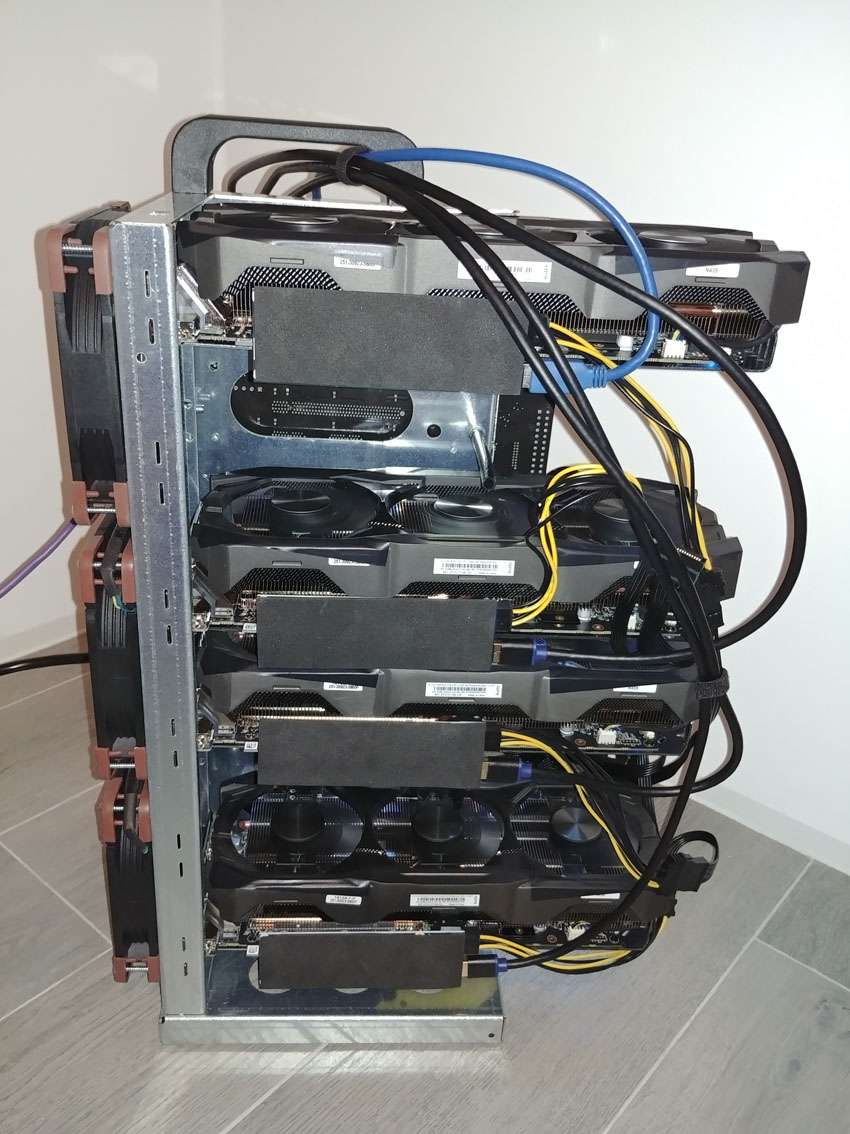 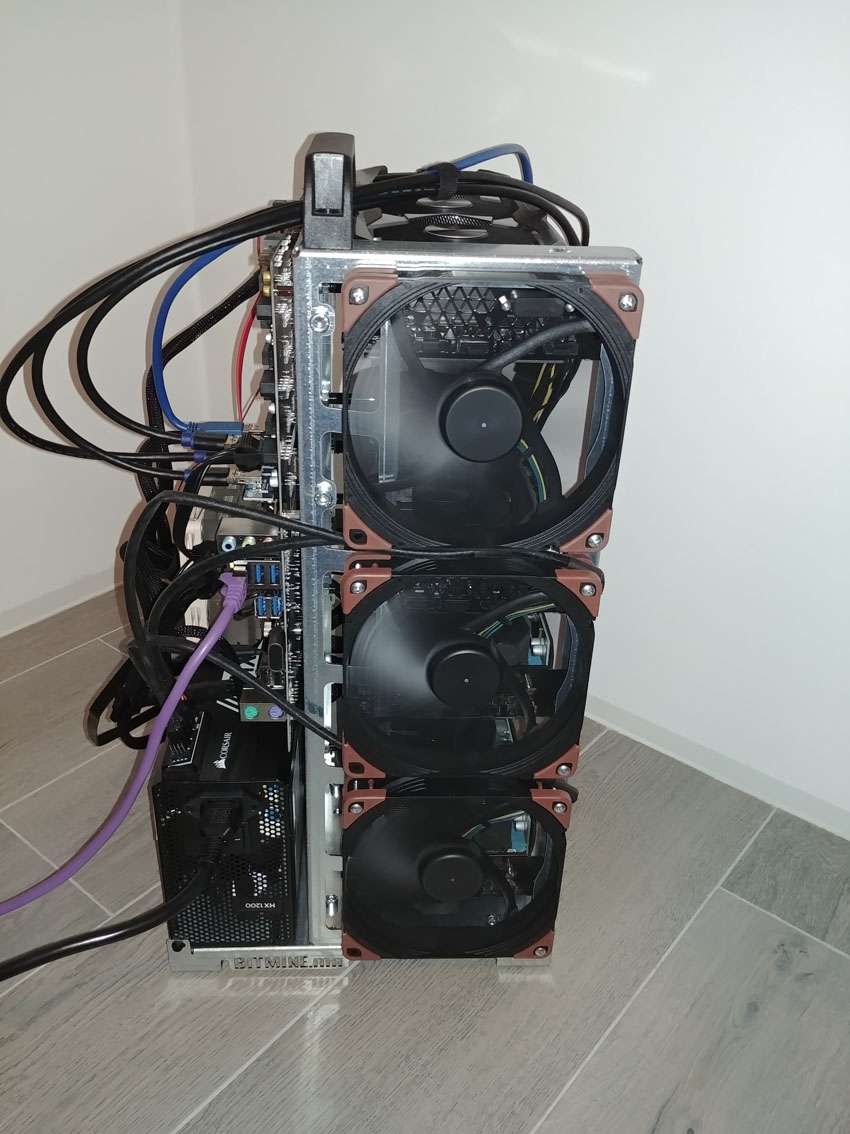 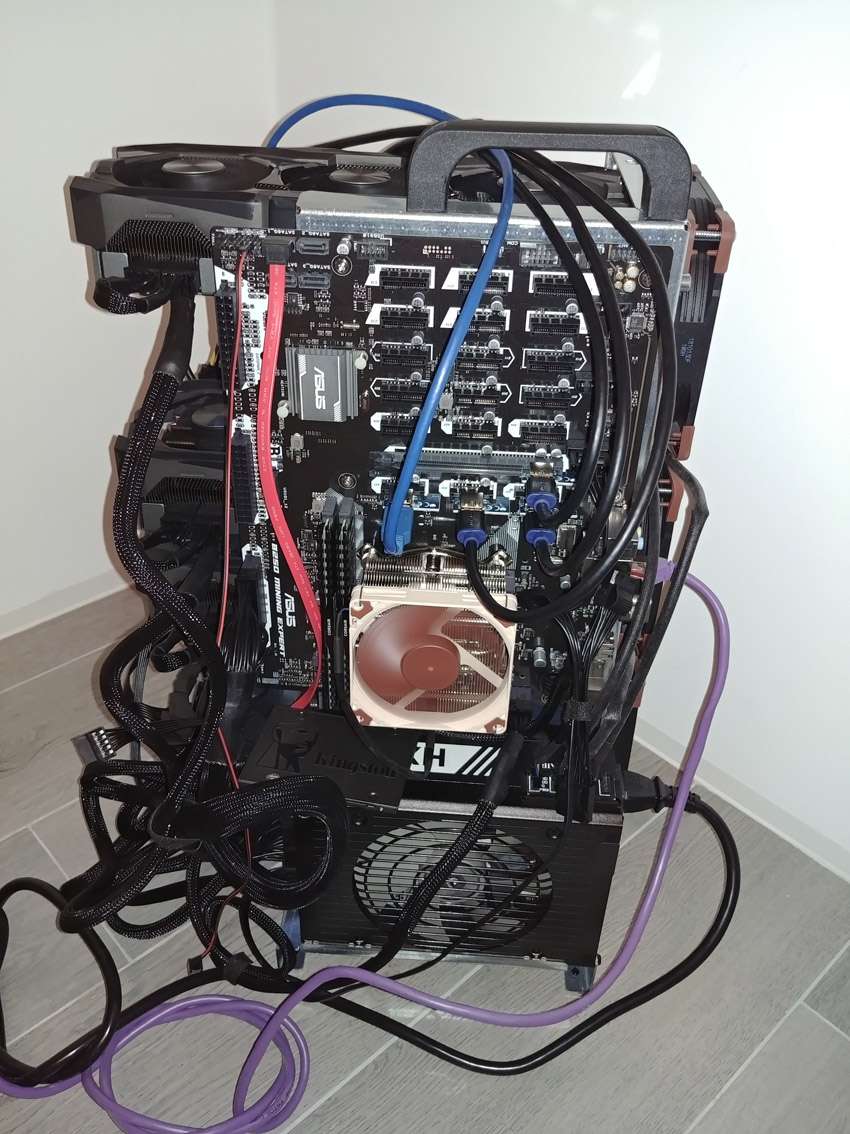 |
|
Send message Joined: 23 Mar 19 Posts: 13 Credit: 209,159,150 RAC: 0 Level Scientific publications
|
 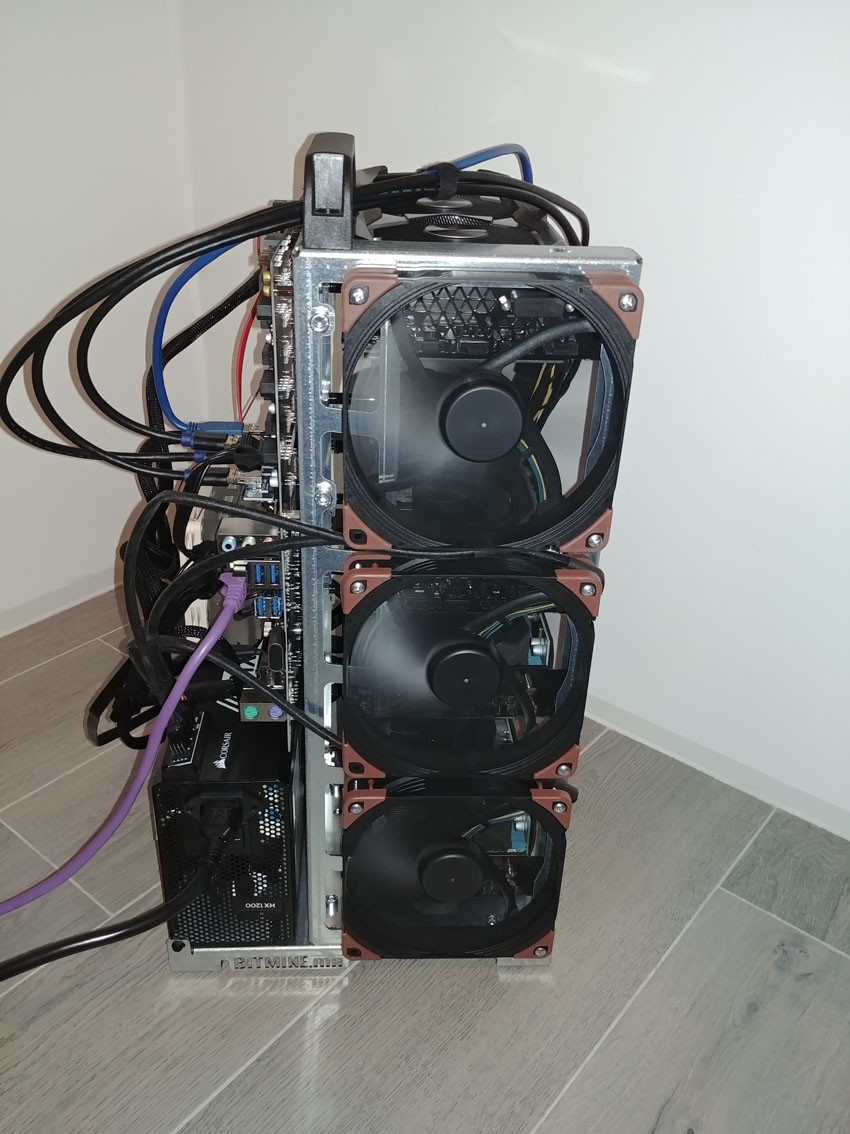 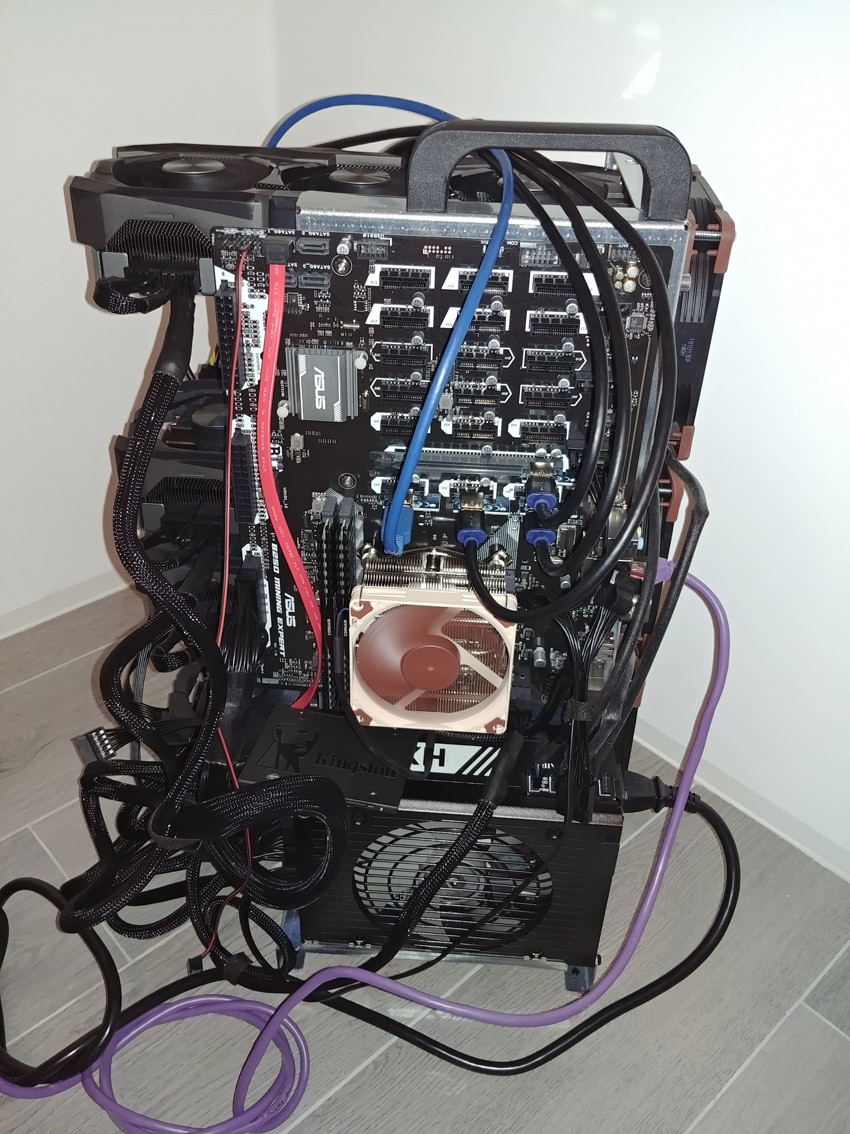 |
|
Send message Joined: 23 Mar 19 Posts: 13 Credit: 209,159,150 RAC: 0 Level Scientific publications
|
well, inserting images doesn't work. For a next time. |
|
Send message Joined: 4 Aug 14 Posts: 266 Credit: 2,219,935,054 RAC: 0 Level  Scientific publications
|
You don't necessarily need 1 CPU per GPU. You can run .5 of a CPU per GPU. There will only be a small drop in output. You can control this in app_config.xml eg... <app_config> <app> <name>acemdlong</name> <gpu_versions> <cpu_usage>.5</cpu_usage> </gpu_versions> </app> <app> <name>acemdshort</name> <gpu_versions> <cpu_usage>.5</cpu_usage> </gpu_versions> </app> </app_config> |
|
Send message Joined: 30 Apr 19 Posts: 54 Credit: 168,971,875 RAC: 0 Level Scientific publications
|
You don't necessarily need 1 CPU per GPU. You can run .5 of a CPU per GPU. There will only be a small drop in output.0.5 means 50%. and if you have 16 core (and 32 threads), then is 0.5 = 16 threads for 1 gpu. that is still more than 1 thread to 1 gpu. i have read here 1 gpu needs 1 thread cpu. not nessecarly 1 core cpu. for example my usage....threadripper 1950x 16 core (or 32 threads). the cpu-usage for 1 gpu i putted to 0.064 (or 6.4% of cpu threads. 6.4% * 32 threads = 2 cpu threads for 1 gpu without any drop in gpu-calculation in comparisson with the default 0.967 cpu-usage. my another threadripper 1920x (12 core and 24 threads) i putted gpu on 0.042 (or 4.2% * 24 threads = 1 cpu thread for 1 gpu). and yet, for both computers 1 gpu-calculation takes around 15-16 hour my gtx-1060_6GB is connected to x16 slot and pcie-bus load is around 27% with 2 cpu threads available for 1 gpu my gtx-1060_3GB is also connected to x16 slot, pcie-bus load aroun 28-29% with 1 cpu thread available for 1 gpu |
|
Send message Joined: 4 Aug 14 Posts: 266 Credit: 2,219,935,054 RAC: 0 Level Scientific publications
|
0.5 means 50%. and if you have 16 core (and 32 threads), then is 0.5 = 16 threads for 1 gpu. that is still more than 1 thread to 1 gpu. .5 means GPU task will use 50% of one thread (or one CPU core if not threaded) i have read here 1 gpu needs 1 thread cpu. not nessecarly 1 core cpu. Not necessarily true. If you have enabled SPIN mode, then 1 thread (or 1 CPU core) is dedicated to a GPU task. Otherwise the default is BLOCK mode which will use as much of a single thread (or single CPU core) as the task requests. On fast or efficient CPUs it will not use much of a single thread (or single CPU core). On slow or inefficient CPUs it will use more of a single thread. This depends on the GPU task. Each GPU task can vary. |
|
Send message Joined: 30 Apr 19 Posts: 54 Credit: 168,971,875 RAC: 0 Level Scientific publications
|
according to your saying, when i use 4.2% (=my second tr-1920x cpu build) of 1 cpu-core/thread for 1 gpu, then i should see drop in gpu-performance in comparison with 6.4% (=my first build with tr-1950x cpu) of 1 cpu/thread usage. but that is not the case. with both computers i have about the same calculation time.0.5 means 50%. and if you have 16 core (and 32 threads), then is 0.5 = 16 threads for 1 gpu. that is still more than 1 thread to 1 gpu. i dont think you are right when you say 0.5 is 50% usage of 1 core/thread. it is 50% of all cores/threads Not necessarily true. If you have enabled SPIN modewhat is SPIN mode? what is the effect of it? how to disable or enable this? |
|
Send message Joined: 4 Aug 14 Posts: 266 Credit: 2,219,935,054 RAC: 0 Level Scientific publications
|
i dont think you are right when you say 0.5 is 50% usage of 1 core/thread. it is 50% of all cores/threads If you check Task Manager in Windows 10 you will see on your computer(s), that the GPU is using only one CPU thread. Look for the ACEMD task. what is SPIN mode? what is the effect of it? how to disable or enable this? SPIN mode will dedicate 1 thread to the GPU task at 100%. On Win 10 there is a small improvement in performance. This can be enabled by adding swan_sync=1 in the System environment variables. |
|
Send message Joined: 30 Apr 19 Posts: 54 Credit: 168,971,875 RAC: 0 Level Scientific publications
|
      |
|
Send message Joined: 21 Mar 16 Posts: 513 Credit: 4,673,458,277 RAC: 0 Level Scientific publications
|
It's certainly fancy, but does it work with GPUGrid? |



©2026 Universitat Pompeu Fabra