Installing latest Nvidia Linux drivers, step-by-step
Message boards :
Number crunching :
Installing latest Nvidia Linux drivers, step-by-step
Message board moderation
Previous · 1 · 2
| Author | Message |
|---|---|
 ServicEnginIC ServicEnginIC Send message Joined: 24 Sep 10 Posts: 598 Credit: 13,098,215,510 RAC: 1,306,825 Level  Scientific publications    
|
Next time, I'll try your solution sudo dpkg --configure -a from a console when updating other hosts. I updated four more hosts this afternoon, every of them experiencing the same problem. Update seemed to progress as usual... 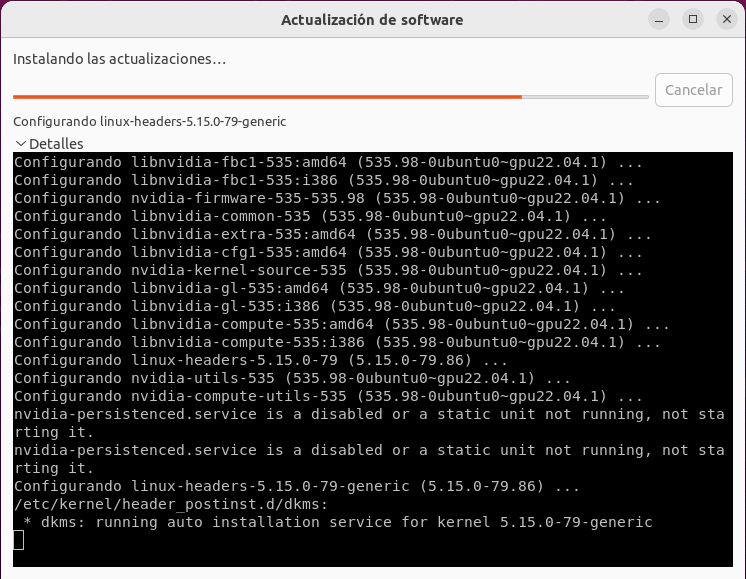 ...But screen went black and system irresponsive just at this point: 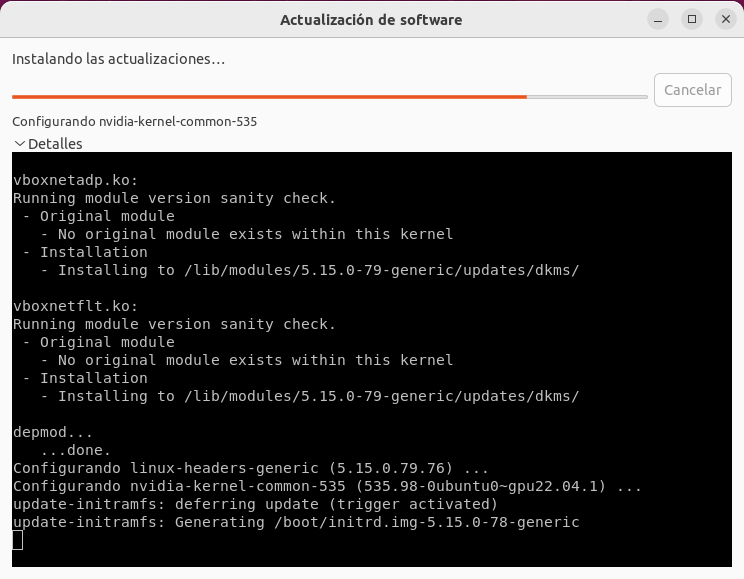 As of Keith Myers kind suggestion, I applied successfully sudo dpkg --configure -a solution at two of them. But it was necessary to reboot the systems first, because there was no response to CTRL-ALT-F5 when they become blocked during update process. I also Tried to apply sudo apt reinstall ubuntu-desktop command, but I was directly suggested to run sudo dpkg --configure -a, because of a previously failed dpkg process. To the remaining two hosts, I applied the previously mentioned Ubuntu recovery mode remedy. (I find it more comfortable, no need to log in, nor key in manual commands ;-) |
 Send message Joined: 13 Dec 17 Posts: 1424 Credit: 9,189,946,190 RAC: 0 Level  Scientific publications 
|
I find that the only thing that you can do with any certainty is just wait for the configuration process of installing the new Nvidia driver into the kernel has completed by watching your hard drive activity light. Depending on your cpu and storage speeds, the process completes after a few minutes at most. Then give the host the big reset button push and have the host reboot and you will find the new drivers installed with no problem. |
|
Send message Joined: 13 Dec 17 Posts: 1424 Credit: 9,189,946,190 RAC: 0 Level Scientific publications
|
Been researching the issue and can attribute it to a unintended bug caused by a patch for removing the frame buffer console during the driver update for kernels > 6.1 when using Nvidia drivers. Supposed to be fixed in 6.5 kernels but I still experienced the issue when using kernel 6.5-rc5 when upgrading from 535.86 to 535.98 https://bugzilla.kernel.org/show_bug.cgi?id=216303#c30 https://git.kernel.org/pub/scm/linux/kernel/git/torvalds/linux.git/commit/?id=5ae3716cfdcd286268133867f67d0803847acefc |
|
Send message Joined: 21 Feb 20 Posts: 1118 Credit: 40,876,970,595 RAC: 0 Level Scientific publications
|
the blackscreen issue must be something that the ubuntu devs are doing with the packaging of the drivers, not necessarily the drivers themselves. i didnt have that happen on any of my systems when upgrading to the 535 drivers on several of my systems via the nvidia runfile method that i have been using. 
|
|
Send message Joined: 13 Dec 17 Posts: 1424 Credit: 9,189,946,190 RAC: 0 Level Scientific publications
|
The problem is with the kernels and how they interact with the Nvidia drivers. I saw a post in the Nvidia forums from the Nvidia representative that if and when the situation of pulling the legacy frame buffer console away from the active installation becomes a problem in the future, that they would address the issue. The reason that you did not have any issues is that the driver direct from Nvidia do not contain anything other than the Nvidia driver. The distro package maintainers bundle in a ton of other stuff like the Mesa platform for generic video output and mainly the DRM components. Its the DRM components, specifically the drm_nvidia module that the bug report I linked is referring to. Its destroying the legacy frame buffer for the console that the installation of the drivers is using. Only when the compilation and insertion of the drivers into the kernel does the console output get destroyed. That is because of a earlier kernel commit in the 6.1 kernel branch that destroys all legacy frame buffers. They didn't think of the other frame buffers in use by multiple devices like wifi or video cards. So wifi can stop working and video output is lost typically. They supposedly reworked that commit for the 6.5 kernel branch but I am on the 6.5 kernels on two hosts and still had the issue when upgrading from 535.86 to 535.98. I haven't gone through the commits for my 6.5 kernels to verify that patch commit actually made it into the rc5 kernel I was using yet.
|



©2026 Universitat Pompeu Fabra