GTX 750Ti Questions
Message boards :
Graphics cards (GPUs) :
GTX 750Ti Questions
Message board moderation
| Author | Message |
|---|---|
|
Send message Joined: 21 Feb 09 Posts: 497 Credit: 700,690,702 RAC: 0 Level  Scientific publications    
|
My post to the Maxwell now thread yesterday got lost in the plethora of posts about high-end Maxwell problems. Please forgive me for opening a new thread. Time to replace my trusty GTX 460, which has been GPUGrid-ing for years! At ~£100 the GTX 750Ti fits my budget nicely but I need some guidance. 1. Is the power feed only from the mobo enough for 24/7 or should I go for one with a 6-pin connection? 2. One fan or two? 3. WHICH 750Ti do you recommend? 4. Having done some research today I'm leaning towards the Gigabyte Windforce, with its 6-pin connector and OC opportunity. Thanks. |
|
Send message Joined: 5 May 13 Posts: 187 Credit: 349,254,454 RAC: 0 Level  Scientific publications
|
Some answers: 1. The motherboard power feed should be more than enough. That said, some cards require an additional PCIE power feed. 2. I guess two fans would be less noisy 3. I back your preference towards the Gigabyte card, it's the one I should have bought myself, but didn't! I can definitely recommend to not get the ASUS card though. It doesn't handle high temperatures well. It's more of a gaming card. The 750Ti is definitely a worthy cruncher: sips power, produces low levels of noise and its work / cost ratio is high. Get one! :) 
|
|
Send message Joined: 25 Sep 13 Posts: 293 Credit: 1,897,601,978 RAC: 0 Level  Scientific publications 
|
My post to the Maxwell now thread yesterday got lost in the plethora of posts about high-end Maxwell problems. Please forgive me for opening a new thread. 1. 6-pin 2. Depends on type of Motherboard. 3. EVGA GeForce GTX 750 Ti Super clocked/ Part Number: 02G-P4-3753-KR/ Single Fan • 1176MHz Base Clock • 1255MHz Boost Clock EVGA GeForce GTX 750 Ti FTW w/ EVGA ACX Cooling/ Dual Fan Part Number: 02G-P4-3757-KR • 1189MHz Base Clock • 1268MHz Boost Clock 4. Both Evga cards I've listed have 6-pin connector. Currently 10usd difference between these two. One is out stock. There is another Evga ACX card with lesser Base/boost clocks in stock. Max Boost for Evga GTX750ti cards 1275-1350~ depending on silicon lottery. NVidia Inspector can set Max Boost clocks, and Evga Precision will allow fine tuning over fan, temp, etc.. Test with many Arithmetic/Random number benchmarks for both Float and Integers while fine tuning clocks. CUDA Dynamic Parallelism /OpenGL/OpenCL/ DirectX/Color compression/thread register/Memory/TMU/ROP/cache/frame buffer test(s) are readily available. |
|
Send message Joined: 21 Feb 09 Posts: 497 Credit: 700,690,702 RAC: 0 Level Scientific publications
|
Thank you Vagelis and eXaPower for your responses. The ASUS was my second choice but that's now crossed off, to be replaced by an EVGA. Need to check out prices... FWIW, here's my GPUGrid crunching trio: 1. Upstairs is my four-year-old i7 Dell, busy only with the 460. 2. 800 miles away my daughter has my old ASUS 660, busy crunching for GPUGrid. 3. My prime rig is an ASUS Sabertooth 990FX R2.0, with a 770 in PCIE-2, and a 660 in PCIE-1 which is attached to video. All of this summer I have had to watch the the temperature of PCIE-1, which has often gone over the 60C limit, according to ASUS's Thermal Radar. When it goes over I stop crunching on the 660. Frustrating! The plan is to install the 660 in the upstairs i7 and the to-be-acquired 750Ti in place of the 660. I hope that will cure the PCIE-1 temperature problem. |
|
Send message Joined: 25 Sep 13 Posts: 293 Credit: 1,897,601,978 RAC: 0 Level Scientific publications
|
Thank you Vagelis and eXaPower for your responses. I would suggest a Sabertooth 2.0/1.0PCE board replacement at some point-- if money permits in budget. I say this, because you have capable 3.0 PCIE-3 cards. If these cards are for GPUGRID and you're monitor- PCIE speeds matter. Maxwell GM107 display tech specs are more advanced than Kelper. With energy taxes being raised in most industrial world areas. Any motherboard with advanced energy management will have lower wattage and temps. You're GK104 board can/will be tuned up nicely. As the GK106 boards and GM107/GM204. You have many pieces to work with for a more efficient set-up(s). |
 Retvari Zoltan Retvari Zoltan Send message Joined: 20 Jan 09 Posts: 2380 Credit: 16,897,957,044 RAC: 0 Level  Scientific publications 
|
I'm using one ASUS GTX 750Ti OC (after Skgiven's advice). 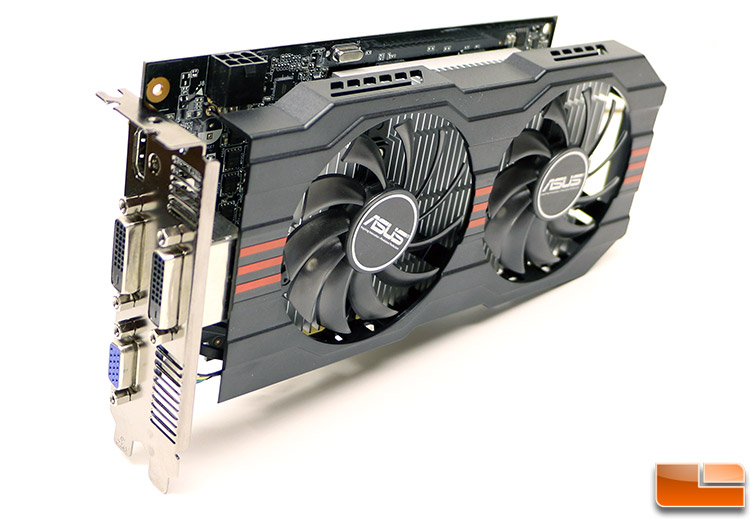 For crunching I recommend to use such card which have its own PCIe power connector - the manufacturer and the boost clock doesn't matter that much. If there's more than one GPU in the computer's case, the GPUs equipped with radial fan are better choice than the ones with axial fan (pictured above), as the latter emits the hot air into the PC's case, making the other GPU and the CPU hotter. |
|
Send message Joined: 28 Jul 12 Posts: 819 Credit: 1,591,285,971 RAC: 0 Level Scientific publications
|
I'm using one ASUS GTX 750Ti OC (after Skgiven's advice). I have several of the Asus GTX 750 Ti cards (not overclocked) and like them very much. All the Asus cards I have owned have been very reliable. But the Maxwells are so efficient at Folding, I use them there, and use the GTX 650Ti/660/660Ti on GPUGrid, depending on the season. |
|
Send message Joined: 26 Jun 09 Posts: 815 Credit: 1,470,385,294 RAC: 0 Level  Scientific publications 
|
Thank you Vagelis and eXaPower for your responses. MOBO is okay I have the same and has a GTX770 and a GTX780Ti FOC running 24/7. CPU and PCIe temps mostly around 60°C, sometimes over and then it turns red in Thermal Radar but that is no problem. The temps read by Thermal Radar are a bit to high, can be seen easily with other programs. Secondly the values are set in the BIOS, you can change that to 62 or 65 and then you don't see it being in red to often and your MOBO is still safe. Secondly I, but this is personal, will only buy EVGA cards and only with one radial fan that troughs hot air out of the box. The second fan troughs the heat into the box and that can be a problem. I have two of those cars with two fans, a 770 and a 780Ti. Both will be replaced in due course. Check thing out properly and take your time. Don't make any hasty decisions and buy hasty. You can spend your money only once. Greetings from TJ |
|
Send message Joined: 21 Feb 09 Posts: 497 Credit: 700,690,702 RAC: 0 Level Scientific publications
|
MOBO is okay I have the same and has a GTX770 and a GTX780Ti FOC running 24/7. CPU and PCIe temps mostly around 60°C, sometimes over and then it turns red in Thermal Radar but that is no problem. The temps read by Thermal Radar are a bit to high, can be seen easily with other programs. Secondly the values are set in the BIOS, you can change that to 62 or 65 and then you don't see it being in red to often and your MOBO is still safe. Thanks TJ for putting my fears to rest. On the subject of the ASUS Sabertooth 990FX R2.0, every couple of months I'm offered a BIOS update. I insert a data dongle, point to it, but nothing ever happens... Secondly I, but this is personal, will only buy EVGA cards and only with one radial fan that troughs hot air out of the box. Like Retvari, you recommend radial fans. I'll go along with that. My 770 and 660 both have them. But when it comes to the 750Ti the choice on Amazon UK, my fav supplier, is limited; just the EVGA or the Gainward. I found this single-slot 750Ti, just announced on the Japanese market. Seems to have a a radial fan but I see no slots for the exhaust. |
|
Send message Joined: 26 Jun 09 Posts: 815 Credit: 1,470,385,294 RAC: 0 Level Scientific publications
|
Hello Tom, Indeed I have also trouble with updating the BIOS, I use the AI Suite for that (where you find Thermal Radar too), but the first time it always get stuck after a few minutes. The I wait a bit longer and boot the system and then do it again and then it works. Is a bit weird. But I only update the BIOS when really needed have don it only twice yet. So when it works then it works. Secondly, I don't know about the Japanese market, if you can get it. I also have never heart of that brand. Seems nice though and small as it is single slot. More will fit in one rig. Could be interesting. Perhaps someone else knows about this brand. If you look here http://eu.evga.com/products/prodlist.asp, and you have to scroll down a bit, you find several 750Ti's with one radial fan. They ship with UPS and you pay 8.50 euri for shipment. And afterwards you register your card for warranty. This is where I buy my EVGA stuff, but I am huge EVGA fan, my next MOBO and PSU will also from them. You have to decide yourself. Please see my recommendations only as advice/help. Greetings from TJ |
Beyond Send message Joined: 23 Nov 08 Posts: 1112 Credit: 6,162,416,256 RAC: 0 Level  Scientific publications
|
I've been running 8 750TI cards for quite a while. Only 1 has a PCIe power connector (an EVGA ACX superclocked) That one has 2 fans and runs at 50-53C. The other cards are 3 EVGA superclocked and 4 PNY OC. The single fan cards run at 55-62C with very moderate fan speeds. A nice thing about the PNY cards is that the speed is factory set to 1202MHz before boost and 6008MHZ memory. They also have the smallest fans but cooling is fine, also quiet. I boost the memory speed of the EVGA cards to 6000MHz via Afterburner. The 750Tis draw about the same power as my 650Tis but are 45-50% faster. Pretty much happy with all of them and see no real advantage to either the 2 fan models or the PCIe power connector. All my boxes use modest Antec 300 cases and have 2 GPUs (mostly 1 NV and 1 AMD). Heat isn't a problem with any of them. By far the warmest running is the 1 EVGA card (a 670) that vents heat out the back. BTW FWIW while I use a few ASUS MBs I stay away from their GPUs because of some bad experiences with them in the past. |
|
Send message Joined: 25 Sep 13 Posts: 293 Credit: 1,897,601,978 RAC: 0 Level Scientific publications
|
I've been running 8 750TI cards for quite a while. Only 1 has a PCIe power connector (an EVGA ACX superclocked) That one has 2 fans and runs at 50-53C. The other cards are 3 EVGA superclocked and 4 PNY OC. The single fan cards run at 55-62C with very moderate fan speeds. A nice thing about the PNY cards is that the speed is factory set to 1202MHz before boost and 6008MHZ memory. They also have the smallest fans but cooling is fine, also quiet. I boost the memory speed of the EVGA cards to 6000MHz via Afterburner. The 750Tis draw about the same power as my 650Tis but are 45-50% faster. Pretty much happy with all of them and see no real advantage to either the 2 fan models or the PCIe power connector. All my boxes use modest Antec 300 cases and have 2 GPUs (mostly 1 NV and 1 AMD). Heat isn't a problem with any of them. By far the warmest running is the 1 EVGA card (a 670) that vents heat out the back. BTW FWIW while I use a few ASUS MBs I stay away from their GPUs because of some bad experiences with them in the past. You're U series Ivy bridge/ Maxwell set up(s) (all) have excellent runtime/wattage ratio. Top notch. |
|
MJH Send message Joined: 12 Nov 07 Posts: 696 Credit: 27,266,655 RAC: 0 Level  Scientific publications
|
The power from the motherboard is aequate. Some boards have have additional power connectors that you should use if you have several directly powered cards.
EVGA or PNY, single fan, stock cooler. Matt |
 Send message Joined: 17 Aug 08 Posts: 2705 Credit: 1,311,122,549 RAC: 0 Level Scientific publications |
As many have already said: GTX750Ti uses so little power (TDP=60W, should run slightly below that crunching GPU-Grid) that the cooling does not really matter. Those radial fans are nice for having several tightly spaced cards within one case. The axial fans can achieve a better "cooling per noise" ratio, if you can supply them with fresh air, i.e. you've got the case cooling to remove the heat they pump your case. For 200 W cards this is a very important decision, but for 60 W not as much. And since a PCIe slot must be able to supply 75 W, having a constant ~55 W drain should not pose a problem. However, having that additional power connector won't hurt either. If you don't want to OC and tweak your cards yourself I'd spend a little more for a factory-overclocked one. Otherwise GTX750/Ti are extremely clock-friendly, so you can hardly go wrong tweaking things yourself :) Regarding your temperature problem with the GTX660 in summer: you can eco-tune the card by lowering the power limit. This way the boost will automatically scale back and reduce clock speeds, power consumption and heat output. And best of all: it also lowers the voltage, which lets the card work in a more efficient operating point. This can easily reduce power by e.g. 20% for a 10% performance loss. Better than not crunching at all :) MrS Scanning for our furry friends since Jan 2002 |
|
Send message Joined: 21 Feb 09 Posts: 497 Credit: 700,690,702 RAC: 0 Level Scientific publications
|
The plan is to install the 660 in the upstairs i7 and the to-be-acquired 750Ti in place of the 660. I hope that will cure the PCIE-1 temperature problem. This morning I retired the upstairs 460, replaced it with the 660 and installed the new EVGA non-SC 750Ti in place of the 660. Thermal Radar reports PCIE-1 running at a steady 51C vs. the previous 60C-62C with the 660, and Precision X reports the 750Ti at 71C vs. 83C for the 660. The overheating problem is solved! Initial impression is that the 750Ti is crunching at about 80% of a 660. That's pretty good price-performance. |
|
Send message Joined: 21 Feb 09 Posts: 497 Credit: 700,690,702 RAC: 0 Level Scientific publications
|
Initial impression is that the 750Ti is crunching at about 80% of a 660. That's pretty good price-performance. One swallow does not make a summer but, comparing credits per hour on two like WUs (NOELIA_5MG-1-3), the 750Ti did 90.6% of the 660 where only the 750Ti does video too. And, 2x750Ti will do 111% of a 770. |
|
Beyond Send message Joined: 23 Nov 08 Posts: 1112 Credit: 6,162,416,256 RAC: 0 Level Scientific publications
|
Initial impression is that the 750Ti is crunching at about 80% of a 660. That's pretty good price-performance. Glad you solved your overheating problem. The 750Ti rums pretty cool. For some reason my 750Ti cards are running as fast to perhaps a bit faster than your 660s. Also in Win7-64, these are all factory OCed models, maybe that's the difference. |
|
Send message Joined: 21 Feb 09 Posts: 497 Credit: 700,690,702 RAC: 0 Level Scientific publications
|
For some reason my 750Ti cards are running as fast to perhaps a bit faster than your 660s. Also in Win7-64, these are all factory OCed models, maybe that's the difference. I read somewhere that these cards can take serious overclocking so I thought I'd have a go (never done that before...). The pic below is my current status. Any thoughts about what my target OC numbers should be? Thanks, Tom  |
|
Beyond Send message Joined: 23 Nov 08 Posts: 1112 Credit: 6,162,416,256 RAC: 0 Level Scientific publications
|
For some reason my 750Ti cards are running as fast to perhaps a bit faster than your 660s. Also in Win7-64, these are all factory OCed models, maybe that's the difference. My factory OCed models (PNY & EVGA) are mostly running at 1307 - 1320 MHz core with memory at 6000 MHz. Of the 8 750Ti cards I run, 2 (1 PNY and 1 EVGA) are downclocked to 1281 MHz by setting the power limit to 80%, otherwise they occasionally would throw an error. I've got 2 more on the way, another PNY OC and an EVGA ACX OC (couldn't resist the price: $114 for the PNY OC & $125 for the EVGA ACX OC). I don't OC the core on any of them other than the factory OC setting. I do bump the memory speed to 6000 MHz on the EVGAs (standard setting for the PNY). The 2 at the 80% power limit don't seem to lose much speed at that setting and the power draw should be a bit lower (but at the 60 watts that the full speed ones run [kill-o-watt measured] I have no complaints at all). Also the 2GB memory of most 750Ti cards will make them more future proof. |
|
Send message Joined: 4 Oct 12 Posts: 53 Credit: 333,467,496 RAC: 0 Level Scientific publications
|
Suprisingly I have found mem OC on the 750ti to have negligable impact (due to the large 2MB cache) - was only something in the order of 120sec per 100Mhz increase for long runs of 45k secs. Understand as mem does not 'idle' - OC cuts into the limited power budget available - hence suggest the core is mildly OCed instead. Able to run the Gigabyte OC card completely passively with factory OC due to large heat sink |



©2026 Universitat Pompeu Fabra