Tesla K40 & System Upgrade?
Message boards :
Graphics cards (GPUs) :
Tesla K40 & System Upgrade?
Message board moderation
| Author | Message |
|---|---|
 @tonymmorley @tonymmorleySend message Joined: 10 Mar 14 Posts: 24 Credit: 1,215,128,812 RAC: 0 Level  Scientific publications    
|
Good morning team. I am currently running the below mentioned system configuration. I have just acquired a third GTX OC 770, however, although I have heaps of room in the case I don't believe I'm going to be able to fit all three cards in SLI on the board. So for starters I will upgrade to a much larger motherboard and then have all the cards in SLI. I have a few important questions, firstly I'm seriously considering the Nvidia Tesla K40, I don't know how I would bank roll it but that's another matter. Could I drop this card into the computer out of SLI and if so will this type of card make a serious dent in my Boinc projects? Would the K40 be the last word in Boinc graphic upgrade? Will I need to do any additional programming to get gpugrid and boinc to work with the K40? Would I be better off simply putting 5k into another system? Lastly, I'm open to cost effective ideas to take this build to another level. As an entry level Boinc operator I'm grasping at straws with respect to bumping up this system without building another computer. I know you all work very hard and I greatly appreciate all your assistance in advance. Best Regards, Intel i7-4470 Corsair Obsidian 900D Seasonic XP-1000 Platinum 1000W Power Supply Sabertooth- Z87 TUF Intel Z87 G-Skill 16GM Ram Kit 1866 Speed G-Skill 16GM Ram Kit 1866 Speed Intel 355 SATA3-SSD 240GB WD Black SATA 1TB 7500 HDD WD Black SATA 1TB 7500 HDD Gigabyte GTX OC 770 4GB Gigabyte GTX OC 770 4GB Samsung 22x DVD RW Corsair H60 CPU Cooler NetGear WND4100 Wireless N900 Dual Band USB Adapter Windows 8 64 |
Mumak Send message Joined: 7 Dec 12 Posts: 92 Credit: 225,897,225 RAC: 0 Level  Scientific publications
|
First, you don't need SLI for GPU computing. That's useful only for graphics rendering. Second, Teslas are extremely expensive. The K40 for example has a pretty high double-precision performance, which you won't find useful here, since GPUGrid tasks don't use DP. Other parameters are comparable to mainstream high-end GPUs. Teslas on the other hand are extensively tested and should be of high quality... There was a recent discussion here about a machine with 2xTitan + 2xTesla and the performance was disappointing (due to unknown reasons yet). You can check it here: http://www.gpugrid.net/forum_thread.php?id=3548 If you want to crunch for GPUGrid, I suggest you better buy a 780 Ti. |
|
Send message Joined: 16 Mar 11 Posts: 509 Credit: 179,005,236 RAC: 0 Level  Scientific publications
|
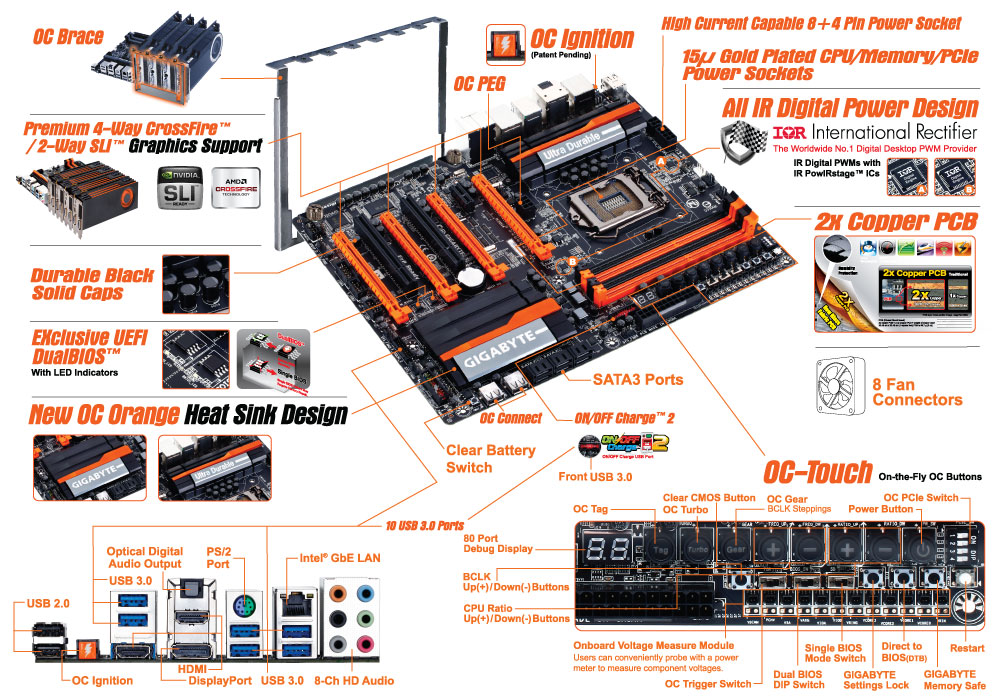
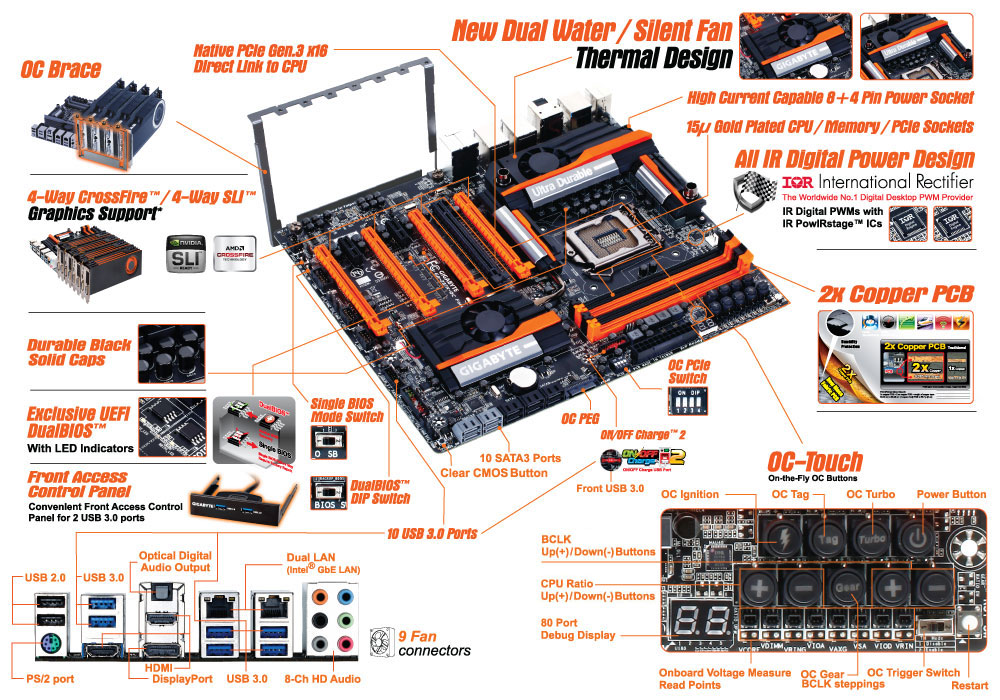
I doubt the K40 will give you the performance you expect here. IIRC, it's a pro-level card that's great at double-precision floating point (DPFP) maths. This project needs only single-precision floating point not DPFP so consumer level cards targeted at gamers are all you need. Some mof the more experienced users here can elaborate on that. Also, I recall something about SLI causing problems but that might apply only to Linux? Or maybe NVIDIA fixed that a while back with a driver upgrade? You don't need to put $5K into another system. I have less than $2K into mine and I think it might be close to what you're looking for. I'm trying to cram 4 cards onto 1 mobo too so I can speak to the many issues you'll encounter with that. They are: 1 Limits on current (amps) through the PCI bus and 24-pin connector Only the better (say more expensive) mobos can handle the current that 4 cards will draw on the mobo. If you don't get the right mobo it will fry and possibly (probably?) take 1 or more cards with it. You definitely want a mobo that has an additional +12V connector and is designed to carry the load. After advice from the gurus here I chose the GA-Z87X-OC Force and I think it was an excellent choice but there are cooling issues you need to consider. The OC Peg feature on the GA-Z87X-OC Force or something similar on other brands is something you cannot live without if you want 4 cards on 1 mobo. It was a $419 CDN purchase from Newegg but I was lucky and got a $100 manufacturer's rebate. Would be worth it even at $419. I have it up and running with 2 GTX 670 and a GTX 660Ti at the moment and have a 4th card arriving soon to fill the 4th slot. It is a marvelous board!! 2 Cooling Read this thoroughly and carefully. With 4 cards on 1 board they are so close together they partially block each other's fans plus, even worse, certain models blow their hot air directly into the fan intakes of the card beside it. Those models are usually OC models and you list of components states you have 2 of them. They will cause a problem for you and I know because 1 of mine is an OC model too. Fortunately there are a number of solutions for this and other issues but you definitely want to know and understand all the issues and options before you make any move. 2.1 OC not desirable for 2 reasons OC cards are great for gaming but not for crunching. They produce errors that you don't notice in games but those errors cause BOINC tasks to fail. In the end a lot of users end up down clocking their card or carefully tuning voltage and clocks but it seems the voltage and clock settings that work for 1 type of task don't necessarily work for another type of task. There are at least 3 different types of tasks being issued at this project at any given time and you cannot select which ones you receive so that solution is not an option. The easiest solution is install non-OC cards, for 2 reasons. Non-OC cards almost always have axial fans and a design that blows the hot air out the rear of the case rather than into the fan intake of the card beside it. That tends to reduce ambient case temperature as well as the temps of individual cards, the CPU and other components. I consider radial fans a must in a 4 card host. It's either radial fans or liquid cooling. IMHO, liquid cooling is a huge expense and it creates as many issues at it solves. And it's totally unnecessary if you can keep the case temp and intake air temp down. Read that again and know that if you ignore that point your cards will operate above the desirable 70 Celsius mark at which cards seem to downclock themselves. There are plenty of ways to stay below 70 C mark. I'm using a combination of ducts, very high volume fans and pulling cold air in from outdoors and exhausting the hot air to the outdoors. If I were to spill the hot exhaust into the room and draw room air back into the case it absolutely would not work without cooling the room with air conditioning. 2.2 Axial fans too close together As mentioned above, 4 cards on 1 board have very little space between them and airflow into the fan intakes is restricted. At this point in time I am just staying below the 70C mark but with summer coming on and outdoor temps going from below 0 to well above 0 I'm going to have to either run the fans on the cards considerably faster or modify them extensively. The third alternative is to add a small AC unit in front of the case intake but I want to avoid that expense. The problem with increasing the card fan speed is that they are already at 80% and that's the maximum the BIOS on the cards allows. I think I might have re-programmed the BIOS on one of the cards to allow 95% but I'm not sure. It definitely will run at 95% but due to some confusion as to which card I was actually re-programming, I'm not sure whether I increased the max speed or the card was manufactured with a 95% limit. Regardless, I plan to remove the 4 existing fans on the cards and replace them with 1 high volume fan that pushes air into all 4 cards. It will take some custom duct but I prefer that to running the fans faster. They're radial fans and radial fans are inherently noisy. They're hydraulic bearing fans so no worries about them wearing out, it's just a noise issue. 3 Alternatives Prior to purchasing the GA-Z87X-OC Force I was considering going with 4 ITX boards ( mini ATX boards). I think I'm going to try that before purchasing another GA-Z87X-OC Force board for the simple reason that I could easily arrange them inside a custom case in a geometry that would prevent any of the 4 cards from stifling airflow into the other cards or blow hot air directly into the other cards. There are concerns that none of the ITX boards on the market can supply the current a high end card requires but nobody has specs to prove it. So I intend to experiment and prove it one way or another. You might consider it too but be forewarned that not just any old ITX board will suffice. Tread very carefully if you go this route. 4 Summary Plenty of options. Which one(s) work for you depends on what you can do with a screwdriver, a drill, tin snips and a saw. The only limits are your imagination, ambition/time and disposable income. BOINC <<--- credit whores, pedants, alien hunters |
 Send message Joined: 17 Aug 08 Posts: 2705 Credit: 1,311,122,549 RAC: 0 Level Scientific publications |
Tony, you posted the same request over at Einstein. That in itself is not bad, but when discussing such a serious configuration it's important to know which project or project-mix to aim for. What do you want your system to run? (also posting this at Einstein, I'm sure anyone reading there also wants to know this) MrS Scanning for our furry friends since Jan 2002 |
|
MJH Send message Joined: 12 Nov 07 Posts: 696 Credit: 27,266,655 RAC: 0 Level  Scientific publications
|
There's absolutely no reason to buy a K40 for GPUGRID. The fastest card for our application is the GTX780Ti. Matt |
|
Send message Joined: 26 Jun 09 Posts: 815 Credit: 1,470,385,294 RAC: 0 Level Scientific publications  
|
There's absolutely no reason to buy a K40 for GPUGRID. The fastest card for our application is the GTX780Ti. Yes, you can buy about 7 or 8 GTX780Ti's for one K40 and with Linux those 780Ti's rock! My advice: buy only 780Ti's at this time and wait for the "real" Maxwell's later this year. Greetings from TJ |
|
@tonymmorley Send message Joined: 10 Mar 14 Posts: 24 Credit: 1,215,128,812 RAC: 0 Level Scientific publications
|
Those are some outstandingly useful thoughts. I am currently working on the following projects and as you can see I'm a relatively humble player in the online grid computing game. I greatly appreciate all your assistance in inputting your comments and thoughts and I appreciate your toleration of my level of ongoing ignorance. With that being said I already have the third GTX 770, so heat management is going to be an issue even given the fact that I have one of the largest cases on the market. It was outstanding to get the feedback on the K40, I just assumed it would be the end all in processing for Boinc, I was obviously incorrect. So given my current system specs and case dimensions I was thinking to employ a motherboard upgrade to the ASUS P9X79-E WS Motherboard, then drop all three cards into the system. A final thought, is there any Boinc advantage to running in SLI? Can I run two or three cards in SLI and a forth card out of SLI or two cards in SLI and a third card out of SLI. Lastly can I run two or three 770 GPU's in SLI and a 780 out of SLI? I think once the mother board is upgraded and the third card is dropped in, that will be about as far as I can take this system without being an expert on the subject. GPUGRID 1,178,400 10 Mar 2014 MilkyWay@home 4,039,660 4 Mar 2009 Einstein@Home 2,257,269 5 Sep 2013 Asteroids@home 1,798,080 10 Aug 2013 |
|
Send message Joined: 16 Mar 11 Posts: 509 Credit: 179,005,236 RAC: 0 Level Scientific publications
|
I checked out the Asus mobo you're considering and I have 3 thoughts on it. 1) It's an LGA 2011 socket board which means your i7-4770 won't fit onto it as it's an LGA 1150 CPU. So you'll need a new CPU too. 2) It doesn't have an additional +12V power connector as does the Gigabyte board I mentioned in my previous post. You might get away without that extra connector if you run only 3 GTX 770 cards but you might not. I mentioned the consequences in my previous post. You did mention you doubt you can go more than 3 cards but if you should decide to go for 4 or if you decide to go for 3 GTX 780Ti then you need that extra connector. 3) I didn't check prices at Australian outlets but at my favorite Canadian retailer the Asus board costs more than the Gigabyte model I mentioned in my previous post. The Asus board doesn't have everything you need; the Gigabyte board has everything you need and more. It will accommodate 4 cards if you decide to go for 4 in the future and I have a hunch you will want to, it's not that difficult. I think your question on SLI was answered by 2 other responders already. BOINC <<--- credit whores, pedants, alien hunters |
|
@tonymmorley Send message Joined: 10 Mar 14 Posts: 24 Credit: 1,215,128,812 RAC: 0 Level Scientific publications
|
Excellent point, it would be more cost effective to keep the same processor. Drop the cards out of SLI as I have been advised and consider a top of the line board supporting 1150 processor. Gigabyte GA-Z87X-UD7 TH Motherboard ? http://www.pccasegear.com/index.php?main_page=product_info&cPath=138_1491&products_id=26846 |
|
Send message Joined: 26 Jun 09 Posts: 815 Credit: 1,470,385,294 RAC: 0 Level Scientific publications
|
More then two GPU's in one box is most of the time a problem with heat. If you buy that Gigabit MOBO and you put four GPU's in, there will be no space between the cards as they are double cards, which means 2 PCIe slots are occupied. Advise is to have at least 1 "slot space" between a GPU, but some want two slots free and that is not possible with about 95% of the MOBO's (for 3 or more GPU's). Oh and with four (4) 780Ti's the PSU of 1000Watt is not sufficient. My suggestion would be two build a second system with two GPU's. Then the PSU, the case and the MOBO can be smaller and thus cheaper. Moreover you have more CPU power to crunch with. Greetings from TJ |
|
Send message Joined: 16 Mar 11 Posts: 509 Credit: 179,005,236 RAC: 0 Level Scientific publications
|
Excellent point, it would be more cost effective to keep the same processor. Drop the cards out of SLI as I have been advised and consider a top of the line board supporting 1150 processor. Gigabyte GA-Z87X-UD7 TH Motherboard ? Wow! That is a nice board but what a price! How does it compare in price in Australia to the Gigabyte board I mentioned? As far as I can see the only features it has that the board I am suggesting doesn't have is the onboard audio amplifier and the "2X copper" thing. Depending on exactly what that feature is it might be a very good thing to have for high-performance GPU computing as double thickness copper traces will carry considerably more current. On the other hand it says the 2X copper feature is intended for overclocking so I'm not sure it would be of benefit to a high-perf GPU application. Furthermore, it's not entirely certain you will ever reach the high-perf level. Some would say the 3 cards you already have is high-perf, others would say not quite high-perf but close. I would wait for Retvari Zoltan to give his thoughts on that board compared to the one I'm recommending. I wouldn't want to see you spend more than you need to but I think maybe you're the kind of guy who would rather have a little more than he needs at the moment so he has some room to upgrade or add additional performance later. I intend to have 4 GTX 780Ti cards (or maybe 3 780Ti and a Black Titan) on my less expensive Gigabyte board and I think it will handle it as far as power requirements go. Zoltan does too. A feature my board has that the one you're considering does not have is the OC Brace feature which I really like. It's a bracket you can attach to the mobo if you want to put the mobo in a custom built case or just set on a shelf beside a PSU and HDD. The bracket holds up to 4 video cards firmly upright as a case normally would. It's vital for my configuration because I built a custom case so I could have enormous air-cooling power and not have to resort to liquid cooling. If you think you might want to go the same route some time in the future then you might consider getting the board with OC brace. As I mentioned above, that board might be a little cheaper. Again, wait for thoughts from the gurus around here. I'm just a wanna be. TJ makes a good point. If you want 4 GPUs/cards going then 2 machines with 2 GPUs each is probably easier and cheaper. Eventually I want 16 GPUs crunching here so I want to start learning how to conserve space now rather than when I start running out of space. The whole computing industry, even the race to the moon, was based on jamming as many transistors as possible into the smallest package possible. That and keeping them all running at optimal temperature ( below 70C ) all year round is my objective. Where in Australia are you located? Are you going to allow all the heat from your GPUs to heat the room they're in? How do you plan to handle that? Asking because I know it can be bloody hot in most parts of Australia in the summer. BOINC <<--- credit whores, pedants, alien hunters |
Retvari Zoltan Send message Joined: 20 Jan 09 Posts: 2380 Credit: 16,897,957,044 RAC: 0 Level  Scientific publications
|
Excellent point, it would be more cost effective to keep the same processor. Drop the cards out of SLI as I have been advised and consider a top of the line board supporting 1150 processor. Gigabyte GA-Z87X-UD7 TH Motherboard ? This is a very nice high-end motherboard, but it has a couple of features which are completely useless from the cruncher's point of view: 1. (Dual) Thunderbolt 2. WiFi / Bluetooth PCIe card 3. Extra USB3 ports 4. Dual Intel Gigabit LAN with teaming 5. Sound Blaster X-Fi MB3 software suite (6. the PEX8747 PCIe 3.0 switch chip) These features cost a lot, and that could be spent on an extra GPU instead, or a second motherboard to avoid cooling issues caused by 4 GPUs in a single system. The optimal choice would be the Gigabyte GA-Z87X-OC (I'm using this one), or the Gigabyte GA-Z87X-OC Force motherboard (but this one costs almost as much as the Gigabyte GA-Z87X-UD7 TH). Both of these also have the 2x copper PCB feature. The main difference between these motherboards (from the cruncher's point of view) is the presence of the PEX8747 PCIe 3.0 switch chip, which allows two PCIe slots run at 16x speed on the GA-Z87X-OC Force (and on the Gigabyte GA-Z87X-UD7 TH). This chip could make the GPUs crunch faster when there are more than one GPU in a single system, but you can achieve even better results by simply using the right OS (Linux, or Windows XP). So I wouldn't pay that extra $354 for that features. |
|
Send message Joined: 16 Mar 11 Posts: 509 Credit: 179,005,236 RAC: 0 Level Scientific publications
|
I passed on the Gigabyte GA-Z87X-OC when Zoltan recommended it to me and went for the improved version of that board which is the GA-Z87X-OC Force because I read that the former has stability problems when there are more than 2 video cards on the board. I read that the stability problem(s) was fixed by the OC Peg feature on the Force model. Looking at the pictures just now, I discover the non-Force model has OC Peg too which makes me think the people talking about the instability problem were misinformed. I kind of wish I had bought the less expensive non-Force model. Mind you I saved $100 via the manufacturer's rebate so I didn't do too bad in the end. I'll change my recommendation and give the GA-Z87X-OC thumbs up. It has everything you need and very little you don't need. It doesn't have the snazzy OC features but it's still OCable if you really want to. OC isn't advisable for crunching anyway. Linux or XP are the best OS options. Vista, 7 and 8.x have problems with GPU crunching. BOINC <<--- credit whores, pedants, alien hunters |
|
Send message Joined: 6 Feb 10 Posts: 38 Credit: 274,204,838 RAC: 0 Level  Scientific publications
|
I have the two GTX Titans and two Tesla K40 and due to driver conflict I am not getting the numbers that I should. I would not mix these or any other graphic card with the tesla cards together. I am going to get another motherboard with integrated video and install there the Teslas and then see what happens. My rac right now is above 1M and I have been crunching 24/7 for about a week constantly. Before I was just crunching in the daytime. The increase in RAC has been steady going up. Lets see. |
|
Send message Joined: 26 Jun 09 Posts: 815 Credit: 1,470,385,294 RAC: 0 Level Scientific publications
|
Linux or XP are the best OS options. Vista, 7 and 8.x have problems with GPU crunching. Small correction: Windows versions after XP have no problems with GPU crunching. Only when using cards higher then GTX770, there will be a performance loss due the WDDM. Greetings from TJ |
|
Send message Joined: 16 Mar 11 Posts: 509 Credit: 179,005,236 RAC: 0 Level Scientific publications
|
My mistake. Performance loss with cards faster than GTX 770 on Vista/7/8 is not a problem, it's a feature called "Built in Crunching Handicap" (BiCH) so that people with slower cards can compete for credits on a more even playing field and you don't have to pretend to lose to slower cards anymore while gaming. With the BiCH on your side you're losing for real, no more need to pretend your mouse glitched or your eyes aren't what they used to be. TJ, the default for BiCH seems to be ON. Is there a setting in Control Panel that allows one to set it to OFF or does one have to edit the registry? BiCH has been very well received. One review I read at Refublic of Ganers says, "It's well worth the cost of upgrading from XP just to get BiCH'd ON." BOINC <<--- credit whores, pedants, alien hunters |
|
Send message Joined: 17 Aug 08 Posts: 2705 Credit: 1,311,122,549 RAC: 0 Level Scientific publications |
Damn it, Dagorath! My sarcasm detector went through the roof again.. those repairs are getting costly! On a more serious note: the performance hit from Win vista and newer is real for all cards, but its effects are stronger the faster your card is. And the smaller the simulated system (e.g. short queue WUs). Running Win XP 64 bit edition to get around this still works, but at some point there won't be any driver updates for newer cards. Running Linux instead works, but has the obvious side effect of.. well, running Linux. I can't stand it, so for me that's not an option for any machine which is not a dedicated cruncher. MrS Scanning for our furry friends since Jan 2002 |
skgiven Send message Joined: 23 Apr 09 Posts: 3968 Credit: 1,995,359,260 RAC: 0 Level  Scientific publications |
Linux or XP are the best OS options. Vista, 7 and 8.x have problems with GPU crunching. Under W7 there is a loss of about 11% compared to XP or Linux due to the WDDM. This applies to all NVidia card types (while crunching here). It's actually about 11% for cards such as a GTX650TiBoost and GTX660. For a GTX770 the loss is 12.5%. FAQ's HOW TO: - Opt out of Beta Tests - Ask for Help |
|
Send message Joined: 16 Mar 11 Posts: 509 Credit: 179,005,236 RAC: 0 Level Scientific publications
|
You can't Off the BiTCH even at a registry (laws may vary by country). Lol^2 Apologies to TJ, please don't take it personal. The whole topic of GPU crunching at ANY project is so complicated it's hard to remember all the details and gotchas. I don't know how the gurus do it, I certainly cannot. Sorry about your roof, MrS, but just the thought of Windows revs my sarcasm pump. Suffer me one final bash... For Vista and up Microsoft ought to make the tune played at boot time or return from hibernation a jaunty rendition of Elton John's "The BiCH is Back". OK, done and sorry for the thread hijack, Tony, but every good drama needs an occasional pause for humor. BOINC <<--- credit whores, pedants, alien hunters |
|
Send message Joined: 22 Nov 12 Posts: 72 Credit: 14,040,706,346 RAC: 0 Level Scientific publications
|
3 Alternatives I was also curious and decided to experiment on this point. I have been running a Gigabyte GTX 680 factory overclocked video card crunching GPUGRID tasks running Ubuntu 12.04 on a ASUS Maximus VI impact, a mini ITX board. So far, 47 tasks have been completed and validated and the sole error was I believe due to a power disruption issue and not a GPUGRID or the ITX boards fault. |



©2026 Universitat Pompeu Fabra