New driver for nvidia
Message boards :
Graphics cards (GPUs) :
New driver for nvidia
Message board moderation
Previous · 1 · 2 · 3
| Author | Message |
|---|---|
 Send message Joined: 11 Jan 13 Posts: 216 Credit: 846,538,252 RAC: 0 Level  Scientific publications    
|
I run Precision X but mostly just for monitoring the cards. I've tried using it in the past to overclock my GTX 680s, but that tends to cause tasks to fail on this project. |
|
Send message Joined: 6 Jan 09 Posts: 4 Credit: 151,278,745 RAC: 0 Level  Scientific publications  
|
I'm going back to 332.21 and I suggest others do the same if the clocks drop for you too. I concur with both (especially after having to revert kernel to get old driver and the first WU failed). Thanks for the all the info! On my Linux system (GTX 780) I found that while the new driver (or beta) dramatically dropped CPU usage there was a sufficient increase in times and my credit rate suffered. The difference between reporting times of 2 adjacent WUs with different drivers was 4 hours! The downside is that the system with the old driver is louder than new ones but I don't have the tools in place to see what is going on. Under old driver: http://www.gpugrid.net/workunit.php?wuid=5202339 536x-SANTI_MARwtcap310-12-32-RND6877_0 Run time 22,237.18 CPU time 22,016.17 Credit 115,650.00 Under the new driver: http://www.gpugrid.net/workunit.php?wuid=5222500 579x-SANTI_MAR422cap310-15-32-RND3745_0 Run time 35,427.61 CPU time 3,789.13 Credit 115,650.00 |
|
Send message Joined: 7 Jun 12 Posts: 112 Credit: 1,140,895,172 RAC: 0 Level  Scientific publications 
|
Exactly the same result I have too. worsened's about four hours, the card gtx titanium and also the gtx 680.On the gtx Titan time I have run about 29,000 seconds, which is very wrong. needs urgently to be to find solutions for all |
|
Send message Joined: 4 Apr 09 Posts: 450 Credit: 539,316,349 RAC: 0 Level  Scientific publications
|
335.23 WHQL released today ... I'll post back later on Win7 CPU usage Thanks - Steve |
|
Send message Joined: 11 Oct 08 Posts: 1127 Credit: 1,901,927,545 RAC: 0 Level  Scientific publications
|
335.23 WHQL released today ... I'll post back later on Win7 CPU usage Thanks for the heads up! I have confirmed that, on Windows 8.1 x64, 335.23 uses the same "low CPU usage" on my Kepler device, as the 334.89 and 334.67 drivers. Also, I'm doing testing on whether it will fall back from Max Boost for reason "Util" when the load doesn't meet a certain threshold. I suspect it will fall back. Therefor, I recommend using the following 2 posts to "Force Max Boost" on any Kepler system: http://www.gpugrid.net/forum_thread.php?id=3647&nowrap=true#35410 http://www.gpugrid.net/forum_thread.php?id=3647&nowrap=true#35562 Edit: Yup, I confirmed that the behavior where it can downclock from Max Boost and stay downclocked, still exists. I completed a task, there was a brief 15 second pause between tasks (so it downclocked to 3D Base Mhz), then a new task started. Even at solid 82-84% GPU Usage, the GPU is not boosting back up at all. It's probably not considered a bug by NVIDIA, since in their eyes, there's not enough demand on the GPU to warrant boosting. So... I recommend forcing Max Boost, per the links I posted. Regards, Jacob |
 Send message Joined: 17 Aug 08 Posts: 2705 Credit: 1,311,122,549 RAC: 0 Level Scientific publications |
I didn't read the other thread yet.. does the performance with these newer drivers still degrade when you force max clocks? Because on my GT640 GPU load is a constant 99% (-> max boost with any driver) and yet I was seeing a severe performance drop with the previous WHQL. MrS Scanning for our furry friends since Jan 2002 |
 skgiven skgiven Send message Joined: 23 Apr 09 Posts: 3968 Credit: 1,995,359,260 RAC: 0 Level Scientific publications |
The GT640 doesn't Boost, so it shouldn't be impacted the same way. Perhaps using less CPU for the GPUGrid WU's is in some way to blame. Maybe you ran more CPU tasks (as an extra CPU core was free), or found that the Bus became more bottlenecked than before (GPU task related). Sometimes what's running on the CPU can greatly impact upon the GPU performance (some CPU apps run at higher priorities than others), and then there is the HD Graphics 4000 - if you ran Einstein (or other iGPU tasks) there is a chance that started gobbling up all the resources. I'm running the 335.23 drivers (about 16h). So far no drop in Boost, but I have OC'ed both GPU's (just using MSI Afterburner) - 770@1254 & 670@1202. GPU usage varies by task; ~80% for SANTI_MAR and 92% for the latest GIANNI WU's. FAQ's HOW TO: - Opt out of Beta Tests - Ask for Help |
|
Send message Joined: 2 Jan 09 Posts: 303 Credit: 7,387,800,090 RAC: 2 Level  Scientific publications
|
335.23 WHQL released today ... I'll post back later on Win7 CPU usage Have you tried playing a game pausing it, then resuming it and seeing if the same thing happens? Because if it does then that WOULD be a major problem for all role playing gamers and Nvidia would be interested in fixing it. If it is only Boinc then maybe the Boinc programmers need to learn how to make their software trigger the speed back up feature like the games do. If on the other hand the card never slows down when the game is paused then that is a whole other kettle of fish. |
|
Send message Joined: 11 Oct 08 Posts: 1127 Credit: 1,901,927,545 RAC: 0 Level Scientific publications
|
skgiven: For one of those ~80% tasks... After it's been running for a while, suspend BOINC for about 6 minutes. Then resume BOINC. See if the clocks go back up to Max Boost. For me, if I recall, they generally didn't boost back up. That's why I had to force Max Boost. |
|
Send message Joined: 17 Aug 08 Posts: 2705 Credit: 1,311,122,549 RAC: 0 Level Scientific publications |
The GT640 doesn't Boost, so it shouldn't be impacted the same way. Right. That's why I asked whether you guys also see a performance drop even after you fix the boost clock. Perhaps using less CPU for the GPUGrid WU's is in some way to blame. Yes, that's the most obvious explanation. Maybe you ran more CPU tasks (as an extra CPU core was free), or found that the Bus became more bottlenecked than before (GPU task related). Sometimes what's running on the CPU can greatly impact upon the GPU performance (some CPU apps run at higher priorities than others), and then there is the HD Graphics 4000 - if you ran Einstein (or other iGPU tasks) there is a chance that started gobbling up all the resources. I ran one more CPU task, saw the result, then reverted back to the same CPU load as before (80-90%) and still didn't see performance where it used to be. In fact, there was next to no difference between +1 and +0 CPU tasks if I remember correctly. The HD4000 ran Einstein tasks just as it did before (and no performance change here either). The mix of other CPU projects didn't change either. And why would the bus suddenly become a bottleneck when the GPU is doing less work? The GT640 is a special card in the way that it's more memory bandwidth-limited than any other current card. It could be that nVidia changed some functions so that they require more bandwidth, which wouldn't impact cards not yet limited. But memory controller utilization did not really change either (didn't check for a few % difference). Or it could be that the new sync'ing mechanism between CPU and GPU just costs some performance and you guys should also see it when you fix that boost clock. If this is true I'd expect the impact to increase with GPU speed. MrS Scanning for our furry friends since Jan 2002 |
|
skgiven Send message Joined: 23 Apr 09 Posts: 3968 Credit: 1,995,359,260 RAC: 0 Level Scientific publications |
skgiven: I have suspended several times for varying amounts of time (few minutes to a few hours) and my clocks go back up to my OC values, now 1254 and 1202MHz. FAQ's HOW TO: - Opt out of Beta Tests - Ask for Help |
|
Send message Joined: 11 Oct 08 Posts: 1127 Credit: 1,901,927,545 RAC: 0 Level Scientific publications
|
Well, thanks for testing. I wish I knew what my particular problem is. It's most obvious, for me, when a GPUGrid task completes. Due to my BOINC settings, it then begins downloading the new task, so there is a "lull" where there's no GPU activity, and then a couple minutes later, the new task kicks in, often not at Max Boost. |
|
skgiven Send message Joined: 23 Apr 09 Posts: 3968 Credit: 1,995,359,260 RAC: 0 Level Scientific publications |
MrS, I found that the last 2 drivers were slightly faster on my W7 system with 2 GPU's than the 331.40 drivers, without changing any Boinc settings (use 75% of the CPU's). I'm not using the iGPU to crunch. I expect that the lack of polling is exasperated due to crunching on your iGPU. Maybe a CPU cache issue. I've noticed that running high kernel work on the CPU (VM) causes my GPU's utilization to be more erratic, though some of this might be due to the recent drivers. FAQ's HOW TO: - Opt out of Beta Tests - Ask for Help |
|
Send message Joined: 17 Aug 08 Posts: 2705 Credit: 1,311,122,549 RAC: 0 Level Scientific publications |
Actually I tried the 335 yesterday and have completed 1.8 WUs since then - at normal crunching times, approximately within the margin of error! 34000 - 35000s per short task, whereas 334 WHQL landed at over 36000s. It could be that they fixed whatever was happening last time or that something just went wrong with my system last time... although that test lasted several days & WUs, with different settings. MrS Scanning for our furry friends since Jan 2002 |
|
skgiven Send message Joined: 23 Apr 09 Posts: 3968 Credit: 1,995,359,260 RAC: 0 Level Scientific publications |
If there isn't Gold at the end of a Rainbow, we can always hope there is... Viel Glück! FAQ's HOW TO: - Opt out of Beta Tests - Ask for Help |
|
Send message Joined: 17 Aug 08 Posts: 2705 Credit: 1,311,122,549 RAC: 0 Level Scientific publications |
I stand corrected - I don't see any performance drop any more with 335 WHQL on 2 hosts (GT640 and GTX660Ti)! The Boost state is a TDP-limited ~1.10 GHz at ~1.07 V just as before. MrS Scanning for our furry friends since Jan 2002 |
|
Send message Joined: 13 Apr 13 Posts: 61 Credit: 726,605,417 RAC: 0 Level Scientific publications
|
Finally had some time to work on testing GPU Utilization under a few different situations tonight. First things. Last week had my computer start downclocking the GPU after trying the 335.23 drivers. Even after switching back to the 331.82 drivers still had the issue. The following sequence (strange as it may be) seems now for a week to work and prevent the downclocking. 1) In EVGA Precision, hit default and apply to cards. 2) Downclock 100 (-100) mhz for GPU speed. 3) Power computer down for a minute 4) Start back up, let BOINC start, and then load my favorite profile in EVGA Precision (Power Target = 105%, Prioritze Temp to 72C, +50Mhz Overclock). Have not had the issue since. Cross fingers, knock on wood, etc. Previously in this thread I discussed the reboots and resulting GPU Utilization was all over the place. The above reboot sequence also gets me a high steady utilization. Based on feedback skgiven says about extra cpu tasks, I wanted to see. So the following test is 331.83 vs 335.23 drivers; CPU Speed of 3.6 vs 4.1 Ghz (could not down clock any further), and then from 2 to 8 threads running. Two threads minimum due to two GPU's. Added one thread at a time which were SETI or Eninstein units. The plotted data is GPU Usage as logged by EVGA Precision with 1 second polling. Polled each setup for one minute. Discarded 4 data points before and after the change in BOINC to increase threads (Use at most % of CPUs: 25, 38, 50, 63, 75, 88, 100%). Powered down between driver/CPU speed changes for one minute. App_config gives one full thread to each GPU. 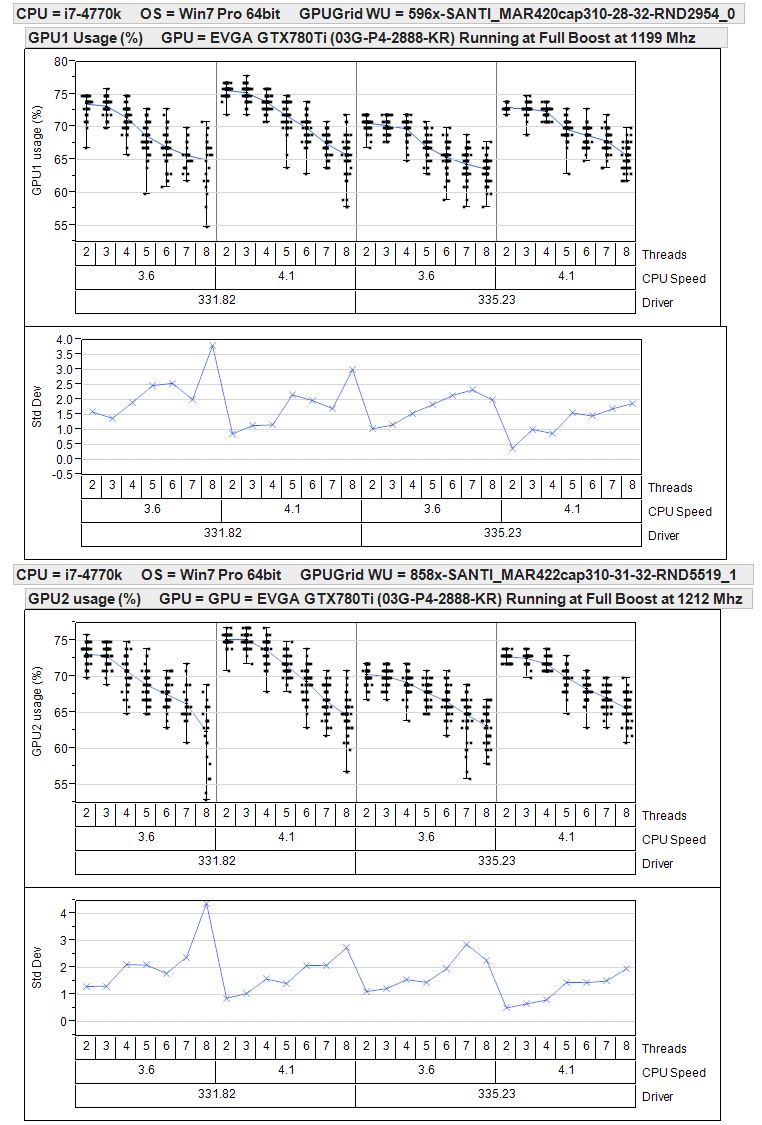 So on my computer setup with Santi WU's * 331.82 gives better GPU utilization over 335.23 * GPU Utilization drops after adding a 5th thread (third extra CPU task) * Faster I can run the CPU the better 4.1Ghz was better than 3.6Ghz Testing was with the following two WU's. You can see the restart driver version and temperatures. http://www.gpugrid.net/result.php?resultid=7950990 http://www.gpugrid.net/result.php?resultid=7950534 End result is that the Santi WU's are processing around 18000-18500 seconds pretty consistantly now with 331.82, 50% CPU Usage, and 4.1ghz. |



©2026 Universitat Pompeu Fabra