Maxwell now
Message boards :
Graphics cards (GPUs) :
Maxwell now
Message board moderation
Previous · 1 . . . 9 · 10 · 11 · 12 · 13 · 14 · Next
| Author | Message |
|---|---|
|
Send message Joined: 25 Sep 13 Posts: 293 Credit: 1,897,601,978 RAC: 0 Level  Scientific publications    
|
L2 cache KB amount/ total number of core ratio for Maxwell and Kepler (desktop) cards from best to worse 1. GM107- GTX750 (2048KB/512cores) 4-1 2. GM107- GTX750Ti (2048KB/640cores) 3-1 3. GM204- GTX970 (2048KB/1664cores) 1.23- 1 4. GM204- GTX980 (2048KB/2048cores) 1-1 5. GK110- GTX780 (1536KB/2304cores) 0.66-1 5. GK107- GTX650 (256KB/384cores) 0.66-1 6. GK110- Titan (1536KB/2688cores) 0.57-1 7. GK110- GTX780ti (1536KB/2880cores) 0.53-1 8. GK106- GTX650tiB (384KB/768cores) 0.50-1 9. GK104- GTX760 (512KB/1152cores) 0.44-1 10. GK106- GTX660 (384KB/960cores) 0.40-1 11. GK104- GTX670 (512KB/1344cores) 0.38-1 12. GK106- GTX650Ti(256KB/768cores) 0.33-1 12. GK104- GTX680 (512KB/1536cores) 0.33-1 Top end Maxwell and Kelper Mobile GTX970m (2048KB/1280cores) 1.6-1 GTX980m (2048KB/1356cores) 1.33-1 GTX880m 9512KB/1536cores) 0.33-1 |
|
Send message Joined: 26 Jun 09 Posts: 815 Credit: 1,470,385,294 RAC: 0 Level  Scientific publications  
|
I have some more numbers from my hardware GK104-GTX770 (2048KB/1536shaders) 1.33-1 GK110-GTX780Ti (3072KB/2880shaders) 1.06-1 However the GTX780Ti is a lot faster then the 770 despite its better ratio. Greetings from TJ |
|
Send message Joined: 25 Sep 13 Posts: 293 Credit: 1,897,601,978 RAC: 0 Level Scientific publications
|
L2 cache KB amount/ total number of core ratio for Maxwell and Kepler (desktop) cards from best to worse (added the percent of GTX 980 total cores) I neglected to mention the best GPUGRID Kelper Power usage/runtime ratio card-- GTX660ti-- 384KB/1344cores=0.28-1 Current cards with best runtime/power usage ratio for GPUGRID. (eco-tune) Amount of core Compared to a GTX 980 (2048cores) 1. GTX970 [81.2%] 2. GTX750ti [31.2%] 3. GTX980 [100%] 4. GTX660ti [65.6%] 5. GTX780 [112.5%] I think the reason for Kelper memory controller unit is lower (20-40%MCU usage is being reported by GPUGRID users depending upon task type) - the Maxwell GPC (4SMM/512cores/256integer/32TMU/16ROP) is revised- compared to the Kelper GPC differences (3SMX/576cores/96interger/48TMU,16ROPS) When more Maxwell GPC are being processed- the cache set up changed how info transfers. A GTX 660ti has 3GPC/7SMX/112TMU/24ROP. A GK106/2GPC/ 3GPC/768c/64TMU/24ROP/192bitMemorybus 650ti boost has SMX disabled in different GPC. These two cards have configured GPC that shut SMX off in different GPC rather than the same GPC. Nvidia hasn't yet revealed how disabled SMM in GPC are shut off. (Anand tech wrote about this in their GTX660ti review and GTX650tiboost.) The way an SMX/SMM is disabled in GPC and how this affects GPGPU processing is not fully understood. Nvidia Current programming Guide is included in newest CUDA toolkit release. Depending upon OS- for windows Located in Program File/Nvidia Corporation/Installer2/CUDAtoolkit6.5[ a bunch of number and letters] files can be read as html or pdf. For custom install- a option is available to install only Samples or just the Documents instead of whole tool kit. Maxwell C.C5.0 has 64KB- C.C5.2 96KB for Maximum amount of shared memory per multiprocessor while Kelper C.C 3.0/3.5 Max amount is 48KB. Cache working set per multiprocessor for constant memory is same for C.C 3.0/3/5 at 8KB. Maxwell C.C5.0/5.2 is 10KB. Cache working set per multiprocessor for texture memory-- C.C3.0 is 12KB. C.C3.5/5.0/5.2 is 12KB-48KB. If someone could post what AIDA64 is reporting for cache or memory prosperities- maybe we can discern why Maxwell MCU for GM204 is higher than GM107/GK110/GK106/GK104/GK107 GDDR5 128/192/256/384bit memory buses Variations are seen though as AIDA64 reports for my [2] GK107-- L1 Cache / Local Data Share is 64 KB per multiprocessor L1 Texture Cache is 48 KB per multiprocessor. (GK110 has read only 48KB cache) Here is CUDA report for GK107 by AIDA64- Memory Properties: Memory Clock 2000 MHz Global Memory Bus Width 128-bit Total Memory 2 GB Total Constant Memory 64 KB Max Shared Memory Per Block 48 KB Max Shared Memory Per Multiprocessor 48 KB Max Memory Pitch 2147483647 bytes Texture Alignment 512 bytes Texture Pitch Alignment 32 bytes Surface Alignment 512 bytes Device Features: 32-bit Floating-Point Atomic Addition Supported 32-bit Integer Atomic Operations Supported 64-bit Integer Atomic Operations Supported Caching Globals in L1 Cache Not Supported Caching Locals in L1 Cache Supported Concurrent Kernel Execution Supported Concurrent Memory Copy & Execute Supported Double-Precision Floating-Point Supported ECC Disabled Funnel Shift Supported Host Memory Mapping Supported Integrated Device No Managed Memory Not Supported Multi-GPU Board No Stream Priorities Not Supported Surface Functions Supported TCC Driver No Warp Vote Functions Supported __ballot() Supported __syncthreads_and() Supported __syncthreads_count() Supported __syncthreads_or() Supported __threadfence_system() Supported 64-bit Integer Atomic Operations (64-bit version of atomicMin-64-bit version of atomicMax-64-bit version of atomicAnd-64-bit version of atomicOr-64-bit version of atomicXor) are suppose to be only supported for C.C3.5/5.0/5.2 boards. A theory- Nvidia harvested GK110 core to put into unknown low power Kelper- while keeping some features locked (Dynamic Parallelism/funnel shift/64DPSMX) on some GK107/GK108 cards- but allow others to have C.C 3.5 compute feature (GT730m/GT740m/GT640/GT635/Gt630) Atomic functions operating on 64-bit integer values in shared memory are supported for C.C2.0/2.1/3.0/3.5/50/5.2 [url]http://images.anandtech.com/doci/8526/GeForce_GTX_980_Block_Diagram_FINAL_575px.png[url] [/url]http://images.anandtech.com/doci/8526/GeForce_GTX_980_SM_Diagram_FINAL_575px.png [/url] [/url]http://images.anandtech.com/doci/8526/GM204DieB_575px.jpg[url] [/url] http://images.anandtech.com/doci/7764/GeForce_GTX_680_SM_Diagram_FINAL_575px.png[url] [/url]http://images.anandtech.com/doci/7764/GeForce_GTX_750_Ti_SM_Diagram_FINAL_575px.png[url] [/url]http://images.anandtech.com/doci/7764/SMX_575px.png[url] [/url]http://images.anandtech.com/doci/7764/SMMrecolored_575px.png[url] New high and low level optimizations- NVidia secret sauce is certainly being held close to the chest. Anandtech is suppose to investigate Maxwell's GPC in future article due GTX970 64ROPS not being fully utilized. If someone with GTX970 computing a GPUGRID task could comment on MCU usage and share any other information(cache amounts/CUDA) to compare. Once a GTX960 (12SMM/3GPC?) is released more info about the Higher GM204 MCU usage could understood more. |
 Retvari Zoltan Retvari Zoltan Send message Joined: 20 Jan 09 Posts: 2380 Credit: 16,897,957,044 RAC: 0 Level  Scientific publications
|
There is a new application (v8.47) distributed since yesterday. I'd like to have some information about the changes since the previous version. It's not faster than the previous one. |
|
MJH Send message Joined: 12 Nov 07 Posts: 696 Credit: 27,266,655 RAC: 0 Level  Scientific publications
|
RZ, No significant changes - 847 just rolls up sm13 support into the cuda64 build, so that i can simplify the logic in the work scheduler. MJH |
|
Send message Joined: 25 Sep 13 Posts: 293 Credit: 1,897,601,978 RAC: 0 Level Scientific publications
|
http://techreport.com/blog/27143/here-another-reason-the-geforce-gtx-970-is-slower-than-the-gtx-980 Information about SMM disabling for GM204 GPC partitions is scarcely available. Looking at SMM/SMX issue/dispatch/crossbar differences and L1 cache/texture cache/L2cache could reveal answers - until a program that can measure/read out warp scheduler/TMU/ROP/cache(s)/[32]Core subset usage is created- most everything is pure speculation. Although- being clearly established: Nvidia does have different die configuration options for GK106/GK104/GK110. Notable performance differences haven't been seen with an SMX GPC. |
skgiven Send message Joined: 23 Apr 09 Posts: 3968 Credit: 1,995,359,260 RAC: 0 Level Scientific publications |
With a 970, I’ve seen Memory Controller loads from 27% for short NOELIA_SH2 tasks to 50% for several different long task types. Running a NOELIA_SH2 WU the reference 970 boosted to 1265MHz straight out of the box and hit 27% load with the CPU being over used (100%), with less CPU usage MC load went up to 31%. With the GPU clocked @1354MHz MC load reached 50% running long NOELIA_20MG2, SDOERR_BARNA5 and NOELIA_UNFOLD WU's. Unfortunately I cannot OC the GDDR using Afterburner! When the CPU was completely saturated (100%) my stock GPU performance was 29% less than with the CPU at 50%. @1354MHz my 970 is ~30% faster than my 770 was at stock on the same system. So I would expect 970's to generally be about 20 to 30% faster than 770's at reference. FAQ's HOW TO: - Opt out of Beta Tests - Ask for Help |
|
Send message Joined: 25 Sep 13 Posts: 293 Credit: 1,897,601,978 RAC: 0 Level Scientific publications
|
Nvidia Inspector 1.9.7.3 supports GM204 boards.(release notes) Inspector shows the brand name of GDDR5. I suggest a clean uninstall of afterburner so driver doesn't become conflicted by having two program settings. I wish a way existed to monitor non-standard internal working's of GPU- other than typical reading all monitoring programs show. http://www.guru3d.com/files-details/nvidia-inspector-download.html Given that a GTX970 has 6% more cores than a GTX770- a 20-30% GPUGRID performance increase at reference or above speeds is certainly a decent generational improvement with less power consumption than a GTX770. What was the improvement for GTX 680 compared to GTX580? Similar to Kelper GK104~~~> Maxwell GM204? |
|
skgiven Send message Joined: 23 Apr 09 Posts: 3968 Credit: 1,995,359,260 RAC: 0 Level Scientific publications |
What was the improvement for GTX 680 compared to GTX580? The 680 was eventually ~42% faster and had a TDP of 195W vs 244W for the 580. Overall that jump improved performance slightly more whereas this jump has improved performance/Watt more. FAQ's HOW TO: - Opt out of Beta Tests - Ask for Help |
|
Send message Joined: 25 Sep 13 Posts: 293 Credit: 1,897,601,978 RAC: 0 Level Scientific publications
|
Reference rated TDP Wattage per Fermi 32coreSM/ Kelper 192coreSMX/ Maxwell 128coreSMM GTX580-244TDP [16SM/512cores] 15.25 watts per SM @ 0.47 watt per core GTX680-195TDP [8SMX/1536cores] 24.37 watts per SMX @ 0.126 watt per core GTX780-225TDP [12SMX/2304cores] 18.75 watts per SMX @ 0.097 watt per core GTX780Ti-250TDP [15SMX/2880cores] 16.66 watts per SMX @ 0.086 watt per core GTX750Ti-60TDP [5SMM/640cores] 12 watts per SMM @ 0.093 watt per core GTX970-145TDP [13SMM/1664cores] 11.15 watts per SMM @ 0.087 watt per core GTX980-170TDP [16SMM/2048cores] 10.62 watts per SMM @ 0.829 watt per core GDDR5/VRM variations not included. |
|
skgiven Send message Joined: 23 Apr 09 Posts: 3968 Credit: 1,995,359,260 RAC: 0 Level Scientific publications |
Reference rated TDP Wattage per Fermi 32coreSM/ Kelper 192coreSMX/ Maxwell 128coreSMM Reflects efficiency (GFlops/Watt) quite accurately and goes some way to explaining the design rational. Can boost the 970 core to 1400MHz but just cant shift the GDDR5 which for here would be more productive (with most tasks)! Can lower core and week for efficiency; dropping the Power and Temp target results in an automatic Voltage drop. Even @1265 can drop the Power and Temp target to 90% without reducing throughput. FAQ's HOW TO: - Opt out of Beta Tests - Ask for Help |
|
Send message Joined: 25 Sep 13 Posts: 293 Credit: 1,897,601,978 RAC: 0 Level Scientific publications
|
Do you have a GTX970 reference or custom partner board? From you're card core clocks (3858-4128GFLOPS) and power targets- efficiency is excellent @ 29.67-33 S/GFLOPS/watt depending upon clock/temp target/voltage. I knew GM204 were capable of 30~35 single/GFLOPS/watt if tuned properly. Even with a WDDM tax of ~6% the work unit completion is still at lower tier runtime of GTX780ti (59% more cores) and top tier times of GTX 780. (looking at top host list- you're 970 is faster than GTX 780 by 1%) with 31% less cores. I'd say Maxwell for GPUGRID is proven- being the runtime/power consumption winner.(further app refinement could help depending upon work unit step length and step amounts) As mentioned by ETA earlier in this thread- even an eco-tuned GK110 can't match (or come close) to runtime/power consumption ratio of GM204 Maxwell. BTW- thanks for editing the zero I left out. |
|
Send message Joined: 26 Aug 08 Posts: 183 Credit: 10,085,929,375 RAC: 0 Level Scientific publications 
|
With a 970, I’ve seen Memory Controller loads from 27% for short NOELIA_SH2 tasks to 50% for several different long task types. I see very similar numbers for my 980. The memory clock seems "locked" at 6000 MHz when running GPUGrid tasks. It doesn't respond to overclocking inputs. It does jump to 7000 MHz when running Heaven stress testing however. |
|
skgiven Send message Joined: 23 Apr 09 Posts: 3968 Credit: 1,995,359,260 RAC: 0 Level Scientific publications |
It's a Palit NE5X970014G2-2041F (1569) GM204-A Rev A1 with a default core clock of 1051MHz. It uses an exhaust fan (blower), so while it's a Palit shell it's basically of reference design. Don't know of any board alterations from reference designs. My understanding is that Palit support GDDR5 from Elpida, Hynix and Samsung. This model has the Samsung GDDR5 and like other Palit models is supposed to operate at 3505MHz (7000MHz effectively). However it seems fixed at 3005MHz. While I can set the clock to 3555MHz the current clock remains at 3005MHz. Raising or lowering it does not change the MCL (so it appears that my settings are being ignored). So while it can run at ~110% power @ 1.212V (1406MHz) @64C Fan@75% I cannot reduce the MCL bottleneck (53% @1406MHz) which I would prefer to do. http://www.palit.biz/palit/vgapro.php?id=2406 PN : NE5X970014G2-2041F Memory : 4096MB / 256bit DRAM Type : GDDR5 Clock : 1051MHz (Base) / 1178MHz (Boost) Memory Clock : 3500 MHz (DDR 7000 MHz) mHDMI / DVI / DisplayPort biodoc, thanks for letting us know you are experiencing the same GDDR5 issue. Anyone else seeing this (or not)? FAQ's HOW TO: - Opt out of Beta Tests - Ask for Help |
|
Retvari Zoltan Send message Joined: 20 Jan 09 Posts: 2380 Credit: 16,897,957,044 RAC: 0 Level Scientific publications
|
It's a Palit NE5X970014G2-2041F (1569) GM204-A Rev A1 with a default core clock of 1051MHz. The same applies to my Gigabyte GTX-980. So while it can run at ~110% power @ 1.212V (1406MHz) @64C Fan@75% I cannot reduce the MCL bottleneck (53% @1406MHz) which I would prefer to do. Is 53% MCL really a bottleneck? Shouldn't this bottleneck lower the GPU usage? Did you try to lower the memory clock to measure the effect of this 'bottleneck'? I've tried Furmark, and it seems to be limited by memory bandwith, while GPUGrid seems to be limited by GPU speed:  The history of the graph is: GPUGrid -> Furmark (1600x900) -> Furmark (1920x1200 fullscreen) -> GPUGrid biodoc, thanks for letting us know you are experiencing the same GDDR5 issue. Anyone else seeing this (or not)? It's hard to spot, (3005MHz instead of 3505MHz), but my GTX980 does the same, but I don't think that this is an error. |
|
Send message Joined: 25 Sep 13 Posts: 293 Credit: 1,897,601,978 RAC: 0 Level Scientific publications
|
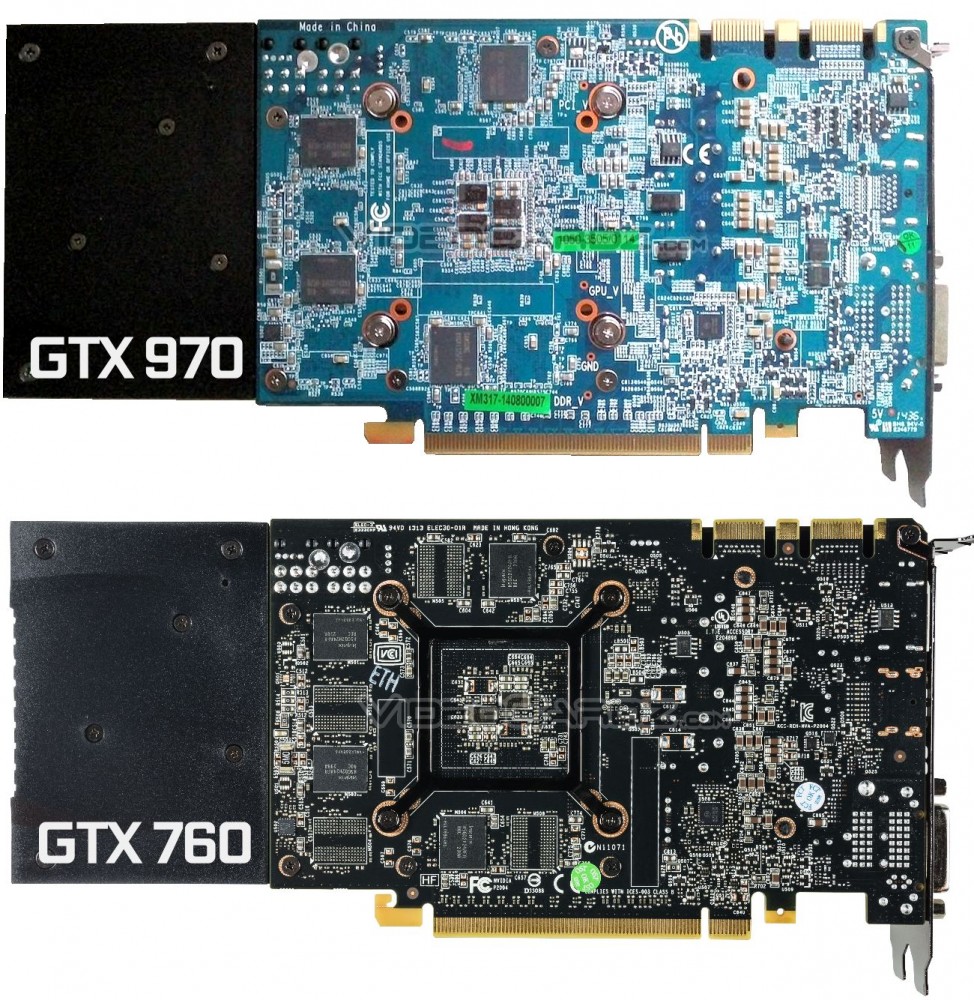
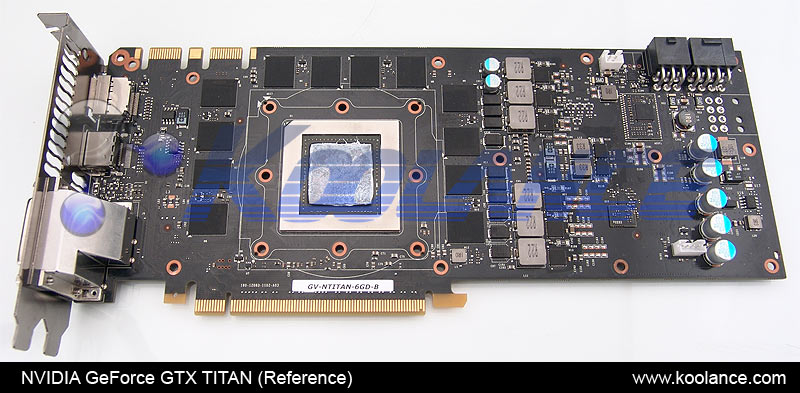
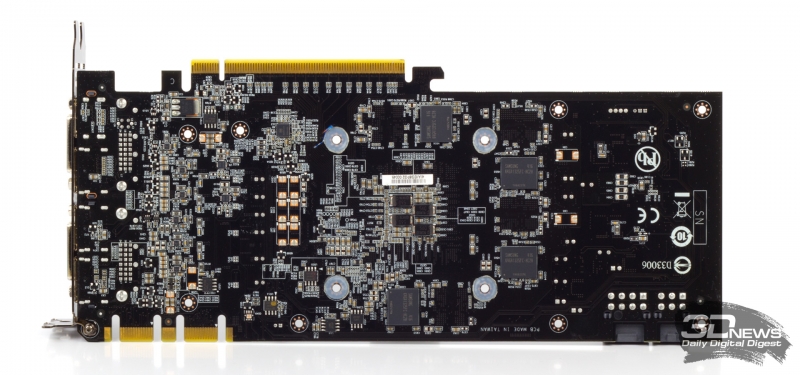
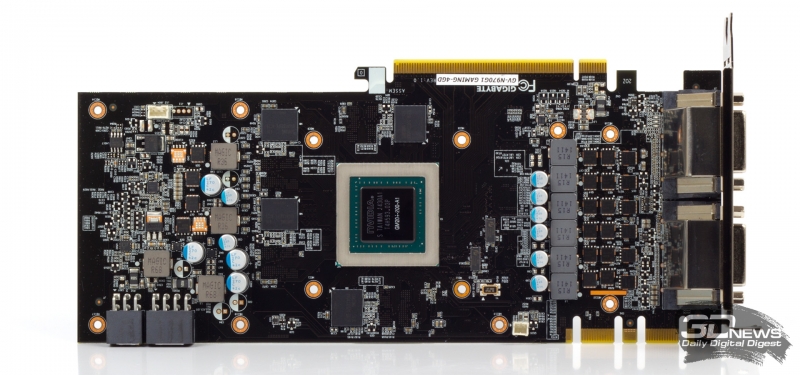
Mysteries of Maxwell continue- Here are some GTX970/980 board layout photos. Note: not all are reference. Maybe something changed concerning the GDDR5 circuitry or overclocking utilities haven't accounted all Maxwell PCB's ? http://cdn.videocardz.com/1/2014/09/GeForce-GTX-970-vs-GTX-760-974x1000.jpg http://koolance.com/image/content_pages/product_help/video_card_pcb_layouts/pcb_nvidia_geforce_gtxtitan_reference.jpg http://www.3dnews.ru/assets/external/illustrations/2014/09/30/902762/sm.board_back.800.jpg [url]http://forums.evga.com/EVGA-GTX-970-ACX-20-quality-concerns-m2219546.aspx[url] http://www.3dnews.ru/assets/external/illustrations/2014/09/30/902762/sm.board_front.800.jpg |
|
skgiven Send message Joined: 23 Apr 09 Posts: 3968 Credit: 1,995,359,260 RAC: 0 Level Scientific publications |
Is 53% MCL really a bottleneck? That's the question I started out trying to find the answer to - is the increased MCL really a bottleneck? Our point of reference is that we know it was with some Kepler's. While that picture was complicated by cache variations the GTX650TiBoost allowed us to determine that cache wasn't the only bottleneck and the MCL was definitely a bottleneck in itself (for some other cards). Shouldn't this bottleneck lower the GPU usage? Depends on how GPU usage is being measured, but MCL should rise with GPU usage, as more bandwidth is required to support the GPU, and it appeared to do just that: When I reduced CPU usage from 100% to 55% the GPU usage rose from 89% to 93% and the MCL increased from ~46% to 49%. At 100% CPU usage both the GPU usage and MCL were also more erratic. Also, when I increased the GPU clock the MCL increased: 1126MHz GPU - 45% MCL 1266MHz GPU - 49% MCL 1406MHz GPU - 53% MCL So the signs are there. Being able to OC or boost the GDDR5 should offset the increase in MCL (it did with Kepler's). Did you try to lower the memory clock to measure the effect of this 'bottleneck'? I tried but I cant change the memory clock - the Current Clock remains at 3005MHz (the default clock). It appears that NVidia Inspector, GPUZ (and previously MSI Afterburner) recognised that I've asked that the GDDR5 clocks are increased, but they don't actually rise. I've tried Furmark, and it seems to be limited by memory bandwith, while GPUGrid seems to be limited by GPU speed: I'm wondering if the measured MCL is actually measuring usage of the new compression system and if this actually reflects a bottleneck or not. Increasing the GDDR5 would be the simple test, but that's a non-starter, which is another question in itself. The only way to confirm if the MCL increase is really a bottleneck is to run similar WU's at different GPU frequencies and plot the results looking for diminishing returns. You would still expect to gain plenty from a GPU OC, but should see less gain as a result of MCL increases at higher GPU frequencies. Even with a frequency difference of 1406 vs 1126 (280MHz) the MCL difference is just 18% (53% vs 45% load), but six or seven points down to around 1051MHz might be enough to spot the effect of a MCL bottleneck, if it exists. FAQ's HOW TO: - Opt out of Beta Tests - Ask for Help |
|
skgiven Send message Joined: 23 Apr 09 Posts: 3968 Credit: 1,995,359,260 RAC: 0 Level Scientific publications |
Using NVIDIA Inspector you can make sure the Current GDDR5 clocks are high, but you have to match the P-State value on the Overclocking panel to the state shown on the left. For me the P-State is P2, so in order to ensure 3505MHz is used I have to set the overclocking Performance Level to P2. Then I can push the Memory CLock Offset to 3505MHz. When I did this with the GPU clock at 1406MHz-ish, the MCU load dropped to 45% While I can select to unlock the clocks I cannot increase past 3505MHz - it just reverts. Hopefully this will allow for better performance and tuning... For those with this issue, you might want to create a batch file setting your required (command line) values, and getting it to run at startup or by create a clocks shortcut from NVIDIA Inspector and either just double-clicking on it every time you restart or get it to automatically run at startup. FAQ's HOW TO: - Opt out of Beta Tests - Ask for Help |
|
Send message Joined: 26 Aug 08 Posts: 183 Credit: 10,085,929,375 RAC: 0 Level Scientific publications
|
Using NVIDIA Inspector you can make sure the Current GDDR5 clocks are high, but you have to match the P-State value on the Overclocking panel to the state shown on the left. For me the P-State is P2, so in order to ensure 3505MHz is used I have to set the overclocking Performance Level to P2. Then I can push the Memory CLock Offset to 3505MHz. Thanks skgiven. Do you see an increase in performance on GPUGrid WUs when the memory clock is increased to 3500 MHz? |
|
skgiven Send message Joined: 23 Apr 09 Posts: 3968 Credit: 1,995,359,260 RAC: 0 Level Scientific publications |
Thanks skgiven. Do you see an increase in performance on GPUGrid WUs when the memory clock is increased to 3500 MHz? I think so but I don't have much to go on so far. I was really just looking for a MCL drop, which I found (~53% to ~45%). To confirm actual runtime improvement (if any) that results solely from the memory freq. increase I would really need to run several long same type WU's at 3505MHz, then several at 3005MHz, all with the same GPU clock and Boinc settings. Ideally others would do the same to confirm findings. That will take two or three days as there are a mixture of Long task types and each take 5 or 6h to run... I think you would be less likely to spot a small performance change from running short WU's as those only have a MCL of around about 27%; it's not like we are overclocking here, just making sure the GDDR5 runs at the speed it's supposed to. Most of us run the Long WU's anyway, so that's what we should focus on. FAQ's HOW TO: - Opt out of Beta Tests - Ask for Help |



©2026 Universitat Pompeu Fabra