Poor times with 780 ti
Message boards :
Graphics cards (GPUs) :
Poor times with 780 ti
Message board moderation
| Author | Message |
|---|---|
|
Send message Joined: 27 Nov 11 Posts: 11 Credit: 1,021,749,297 RAC: 0 Level  Scientific publications      
|
Hi guy's, similar to TJ's post (GTX 770 vs GTX780Ti) I'm getting quite poor times for a 780 ti. (compared to other's) Other than the 780 ti running poor times everything else seems normal.(logs ect) I notice no throttling or any suspicious behaviour, temps are kept under control ect, it's just slow. After reading TJ's thread & seeing Retvari's stunning times (17,000sec's & under)I may see if I can find a copy of WinXP. My times are between 5000-7000 sec's longer(22,000-24500sec's)then Retvari's 780 ti. That's a massive amount of difference. This is my host: http://www.gpugrid.net/show_host_detail.php?hostid=112153 Specs: Win x64 Gigabyte 780 ti. Driver ver 331.82 MB: Asus x79 Deluxe i7 4930k Boinc 7.2.33 SWAN_SYNC is on. Anyone else having similar issues? Thanks for reading. PS: Does anyone know what effect turning on "KBOOST" would have for Boinc? KBOOST is a setting available in EVGA presisionX that locks the card in boost mode. |
|
Send message Joined: 27 Nov 11 Posts: 11 Credit: 1,021,749,297 RAC: 0 Level Scientific publications
|
Sorry wrong host :) This host in question with the 780 ti in it. http://www.gpugrid.net/show_host_detail.php?hostid=164132 Thanks again.. |
|
Send message Joined: 26 Jun 09 Posts: 815 Credit: 1,470,385,294 RAC: 0 Level Scientific publications 
|
Hi JugNut, The name you give on the thread is better than I choose. However my 780Ti is slightly faster then my 770 that's why I chose that name. Perhaps we get more response here. Anyhow your times are better than mine. One Noelia WU pushed the card to 1033MHz with a usage of 91%. Now it is back to 875MHz. But the card can run faster, that has now been proven. At what frequency is your GPU Core Clock running and at what frequency did you set it? What is the temperature? Greetings from TJ |
|
Send message Joined: 16 Mar 11 Posts: 509 Credit: 179,005,236 RAC: 0 Level  Scientific publications
|
I have a Win XP disc that came with a used Dell computer I bought from a friend. I have no use for the disk, you can have it if you want it, it comes with a legal/valid key. I'll mail it to you on my dime. Or I can make it and the key available for download to anyone who wants a copy if someone can tell me how to scrape the bits off the disk and store them in an ISO or whatever format is most convenient. But rather than get "imprisoned" by an antiquated OS that will soon be unsupported, why not install Linux and get the same performance from your 780ti as you would with XP, some say even slightly better. You could install it once on any machine on your LAN then install a boot image on that machine. All the other machines on your LAN could then boot from that image. The only catch is that the BIOS on your mobo needs to support boot over LAN. The advantage is that you need to update and maintain only the "master" because the "slaves" boot whatever is on the master. The slaves can also run "diskless" and use a partition created on the master's disk or any disk on the LAN. You can probably do all that on Windows too with freeware or it might be proprietary, not sure. The thing is support for it could be dropped at anytime if it's XP based. With Linux the support will be forever as it's an integral part of the OS, always has been and always will be. BOINC <<--- credit whores, pedants, alien hunters |
|
Send message Joined: 27 Nov 11 Posts: 11 Credit: 1,021,749,297 RAC: 0 Level Scientific publications
|
Thanks for your post guy's. The 780 ti is at stock clocks. IE Clock: 876MHz (Boost: 928MHz) Memory 7000MHz. (1749mhz) But it's boosts speed has always been 1019mhz for some reason. After my post I increased the power target & temp target to (max). I'll see how that goes for 24hrs. But the boost has stayed the same so I guess that's it's limit, so WU times are unlikely to get any better, but who knows? it's worth a shot. @ Dagorath: Thanks for your kind offer. I have an OEM copy of XP somewhere but I think it's locked to whatever PC it came with years ago.(a laptop I think) Like most PC enthusiasts i've tried a few different flavors of Linux over the years but but I never stuck at it. So my Linux-ease is severely lacking as a result. All my PC's are dedicated boinc rigs & also have mixed GPU's (both AMD & Nvidia) & the last time I tried installing linux I had all kind of trouble installing both video drivers for boinc to use. And when your boinc addicted every second of down time seams like years, it wasn't long before windows was back up & running again:) Although I wonder if my problem is OS specific at all? Next I may give the KBOOST setting in EVGA presisionX a try. Any other thoughts for TJ or myself guy's? |
|
Send message Joined: 26 Jun 09 Posts: 815 Credit: 1,470,385,294 RAC: 0 Level Scientific publications
|
Hmm you have the same settings I have. I tried that as well indeed, switch everything to maximum but no extra speed yet. Temperature goes quick to 82-83°C then but GPU load remains around 81%. We have both Win7, thus that could be a factor as Zoltan is suggesting. Greetings from TJ |
|
Send message Joined: 13 Apr 13 Posts: 61 Credit: 726,605,417 RAC: 0 Level  Scientific publications
|
Built a new machine with Win7 and a pair of 780Ti. http://www.gpugrid.net/show_host_detail.php?hostid=165832 A little surprised on the difference between XP and Win7 for processing times. Yes, I read it on many a thread, but sometimes one needs to see things up and close before getting smacked in the face extra hard. A week or so ago when batch of NOELIA_DIPEPT1 came through, the cards were only running at ~45-55% utilization. Decided it would be good to try to run two WUs at once. Up till then, the cards were getting 70-80% utilization pulling 750W according to APC PowerChute off of Seasonic Platinum 1000W PSU. So searched through old threads to figure out how to write the app_config file. http://www.gpugrid.net/forum_thread.php?id=3319&nowrap=true#29216. Since I already like to be smacked hard, I thought so many cores on the 780ti, that surely I would get some benefit out of running two! So I ran for a couple of days with 2 WU per GPU, and switched back to start looking at new batch. Like to test on again off again especially since I seemed to be between batches by luck. Switching back to 1 WU per GPU, I simply removed the App_config. Well, now my times were similar to a GTX680 and utilization is mostly around 50%-60%. Now only pulling 650W. So I have looked at the usual suspects... * I like to keep a thread free to keep it snappy since this is my main use rig. So not CPU restricted. acemd keeps 12-13% in task manager per acemd WU. * Restarted Boinc Manger a few times. * Warm reboot a few times. * Cold reboot (~5 minutes off). * Temps are fine on cards. Like to keep <75°C and are typically 65-70. * Cards are not downclocking. Well actually, when the load goes closer to 40%, I see the card clock drop and GPU-Z says Performance Cap is limited by "Util" (card utilization). * I have not changed drivers during this or installed anything new. * After switching back to 1 WU per GPU, I did add the Intel GPU drivers, but the problem existed before and stayed the same after. * Looked in client_state and even though they should only indicate time estimates, I tried changing <duration_correction_factor> and <flops>, but they were just corrected back after a couple hours. <avg_ncpus> stayed 0.5 at removing app_config so I made it equal to the <max_ncpus>, but no change in performance. Besides deleting the project and reattaching or installing new drivers....thoughts on what file has become hung up on wanting to not utilize the cards as much as before? Other Info: cc_config <cc_config> <options> <use_all_gpus>1</use_all_gpus> <start_delay>30</start_delay> <skip_cpu_benchmarks>1</skip_cpu_benchmarks> </options> </cc_config> app_config (that was originally run for 2 WU per GPU) <app_config> <app> <name>acemdlong</name> <max_concurrent>9999</max_concurrent> <gpu_versions> <gpu_usage>0.5</gpu_usage> <cpu_usage>0.001</cpu_usage> </gpu_versions> </app> </app_config> app_config (trying new version to "fix" the issue) <app_config> <app> <name>acemdlong</name> <max_concurrent>2</max_concurrent> <gpu_versions> <gpu_usage>1.0</gpu_usage> <cpu_usage>0.5</cpu_usage> </gpu_versions> </app> </app_config> Startup Event Log 2/9/2014 10:47:56 PM | | Starting BOINC client version 7.2.33 for windows_x86_64 |
 skgiven skgiven Send message Joined: 23 Apr 09 Posts: 3968 Credit: 1,995,359,260 RAC: 0 Level  Scientific publications |
Different types of work unit utilize the GPU to different extents. The NOELIA_DIPEPT WU's don't use the GPU as much. The boost will reduce when this is the case. To stop downclocking set the NVIDIA settings to Prefer Maximum Performance. To slightly improve performance of the GPUGrid WU you can reduce the amount of CPU you allow Boinc to use. When 4 threads (50%) are allowed it's about as beneficial to the GPUGrid task as you can make it. Note that even a GPU usage improvement from say 45% to 56% means the task will complete 24% faster. With a 780Ti it's definitely worth the loss of a CPU thread or two. Can I also suggest you try <cpu_usage>1.0</cpu_usage> rather than 0.5. With the last WHQL drivers your GPU's are likely to use more than 0.8 of a CPU each FAQ's HOW TO: - Opt out of Beta Tests - Ask for Help |
|
Send message Joined: 13 Apr 13 Posts: 61 Credit: 726,605,417 RAC: 0 Level Scientific publications
|
Thank you for the suggestion. I have put app_config back in place and set it with <cpu_usage>1.0</cpu_usage>. I do not think this is the issue since the CPU times are on par with GPU time, task manager is running 12-13% solid, and I have spare CPU cycles. Will see tonight if any differences. |
|
Send message Joined: 13 Apr 13 Posts: 61 Credit: 726,605,417 RAC: 0 Level Scientific publications
|
Times do seem to be stabilizing on WU's with the change, but same speed as a 680 still. Previously, it was saying 0.87 CPU for WU. Still seems odd, and will watch if the daily work volume increases. GPU utilization is still low at 50% for both GPU's and only pulling 630W currently. |
|
skgiven Send message Joined: 23 Apr 09 Posts: 3968 Credit: 1,995,359,260 RAC: 0 Level Scientific publications |
Jeremy, I'm running SANTI_MAR tasks on a 770 and 670 under W7 and seeing 80% GPU utilization while running 6 CPU tasks. Is SLI on? What are the GPU clocks and what are you using to control the fan speed (MSI Afterburner for example)? Might be worth adding a modest OC on the GPU and saving the profile; just in case the GPU's are going into a reduced power state and not recovering properly (say the GDDR5 stays low). Did you set Prefer Maximum Performance in NVidia Control Panel; right click on desktop, open NVidia Control Panel, select Manage 3D settings (top left), under Global Settings (right pain) scroll down to Power Management Mode and select Prefer Maximum Performance. If there isn't a desktop context menu,
FAQ's HOW TO: - Opt out of Beta Tests - Ask for Help |
|
Send message Joined: 13 Apr 13 Posts: 61 Credit: 726,605,417 RAC: 0 Level Scientific publications
|
skygiven, Thank you for your time and thoughts. This is just an odd situation. See below responses. See below responses. Jeremy, I'm running SANTI_MAR tasks on a 770 and 670 under W7 and seeing 80% GPU utilization while running 6 CPU tasks. I am running 4 CPU tasks, 2 GPU Grid Tasks, 1 Intel GPU task, and then leave a core free. Is SLI on? No. What are the GPU clocks and what are you using to control the fan speed (MSI Afterburner for example)? 1st card is boosting to 1200mhz at 1.161V with 55% utilization at 63°C and second card is boosting to 1187mhz at 1.174V with 55% utilization at 59°C. Using EVGA Precision for fan speed control. 1st Card on http://www.gpugrid.net/result.php?resultid=7769186 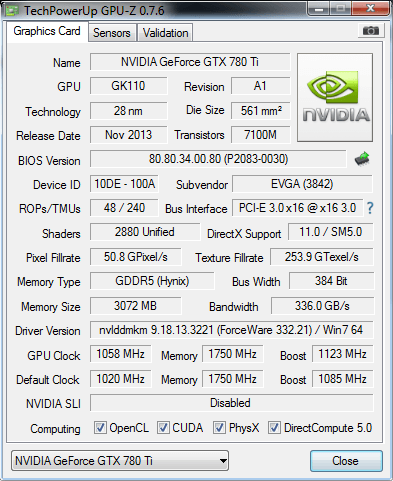 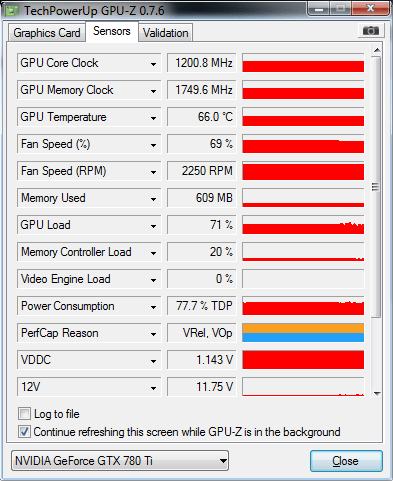 2nd Card on http://www.gpugrid.net/result.php?resultid=7769298 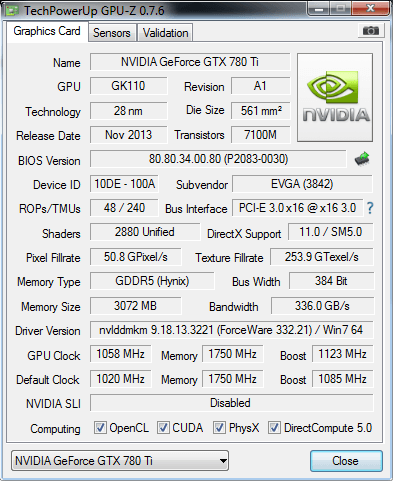 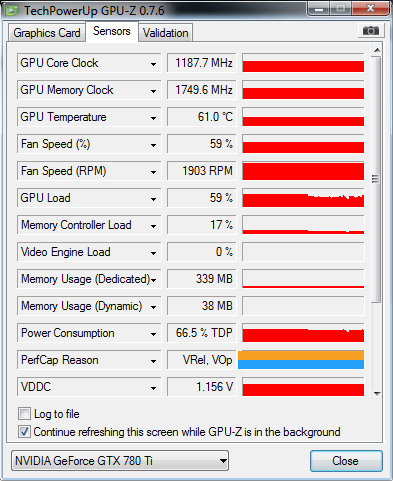 Might be worth adding a modest OC on the GPU and saving the profile; just in case the GPU's are going into a reduced power state and not recovering properly (say the GDDR5 stays low). I have only added 38mhz boost with 105% Power Target. Left the memory alone since it is at 7000mhz. [url]Did you set Prefer Maximum Performance in NVidia Control Panel; right click on desktop, open NVidia Control Panel, select Manage 3D settings (top left), under Global Settings (right pain) scroll down to Power Management Mode and select Prefer Maximum Performance.[/url] Yes, currently at Max Performance. Have tried it both ways. |
|
skgiven Send message Joined: 23 Apr 09 Posts: 3968 Credit: 1,995,359,260 RAC: 0 Level Scientific publications |
Stop using the Intel GPU and compare. It's not the drivers, it's the use of the Intel GPU that's to blame. It competes with GPUGrid's CPU requirements. Ditto for other GPU projects. PS. Not Sky, just initials :) FAQ's HOW TO: - Opt out of Beta Tests - Ask for Help |
|
Send message Joined: 13 Apr 13 Posts: 61 Credit: 726,605,417 RAC: 0 Level Scientific publications
|
skgiven, had to check your name a little closer. Sorry about that, you have been skygiven in my head the whole time reading the forums. :) Disabled the Intel GPU projects, and restarted and the Santi_MARwtcap's running jumped up from 50% to 70% utilization. Will continue to watch, but it looks like that may have been the issue. Not exactly sure why this would be the case since I have the CPU running at 4.1ghz and the acemd were each getting 12-13% shown in task manager. I'll take it though. I'll report back to see if this holds. Thank you. |
|
Send message Joined: 13 Apr 13 Posts: 61 Credit: 726,605,417 RAC: 0 Level Scientific publications
|
The times are back normal for 780Ti's under Win7. The times are the Santi_MAR422 and Santi_MARwtcap are 19,850 - 20,750 seconds for last 5 WUs. The times before the switch were 23,450 - 24,650 seconds for previous 5 WUs. So using the iGPU on the i7-4770k on Win7 cost 21% performance drop on the 780Ti GPUGrid processing for at least the Santi MAR422/wtcap WUs. This is even with a free thread being left on the CPU. Interesting. skgiven, thank you for helping me find the issue. |
|
Send message Joined: 26 Jun 09 Posts: 815 Credit: 1,470,385,294 RAC: 0 Level Scientific publications
|
The times are back normal for 780Ti's under Win7. Hello Jeremy, that are great times you are reporting under win7 with the 780Ti. Can you please give some details about how you achieve this. I am looking since last November to get run times low. Now WU's (Santi) run around 24000 seconds and that is almost as fast as my 770. I have an Asus not the OC version. Have down clocked per advice here to achieve better times. The iGPU is not hampering me as I can not get it working at Einstein@home. What is you clock speed, memory, temp etc. Do you use MSI afterburner or something else? Greetings from TJ |
|
Send message Joined: 13 Apr 13 Posts: 61 Credit: 726,605,417 RAC: 0 Level Scientific publications
|
TJ, I use the EVGA Precision app for monitor/control, and try to keep ~<70C. My app_config and cc_config files are short. cc_config <cc_config> <options> <use_all_gpus>1</use_all_gpus> <start_delay>30</start_delay> <skip_cpu_benchmarks>1</skip_cpu_benchmarks> </options> </cc_config> app_config <app_config> <app> <name>acemdlong</name> <max_concurrent>2</max_concurrent> <gpu_versions> <gpu_usage>1.0</gpu_usage> <cpu_usage>1.0</cpu_usage> </gpu_versions> </app> </app_config> The swan_sync env variable is setup. Boinc is now set to use 99% of the CPU's (7 threads where 2 are for GPUGrid), 100% of CPU Time. While computer is in use is checked, and use CPU while computer is in use is checked. Activity menu has Run Always and Use GPU Always both checked. Even though both cards were purchased in one order directly from EVGA, they are performing a little bit different. In the tower case, the lower card is always at max voltage 1.175v. If I sync the card settings (precision feature) to 100% power target, 0 GPU Clock Offset and 0 Memory offset, the lower card will boost to 1150Mhz at 64C at 1.175v and the upper card will boost to 1162mhz at 69C at 1.161v. I have to take the time to switch the card positions in the board to ensure it is a card difference some day, but for now, it is just interesting. Still seeing how far I can boost them, but currently having good success with 1188 and 1212mhz. These cards are on air so working rather well for winter. Probably will change when summer gets here. I hope this info helps. |
|
Send message Joined: 26 Jun 09 Posts: 815 Credit: 1,470,385,294 RAC: 0 Level Scientific publications
|
Thank you for the information Jeremy. It gives me information to fiddle with my card. I see you have the card run at higher clock speed then I have. Mine is running at 875MHz. We have more or less the same cc-config but I don't use an app_config. I will first try to boost the clock and see what happens. To my opinion EVGA are the best cards, but last year they where not available when I wanted an 780Ti. I have two GTX660's from EVGA in another rig and they slightly differ as well. If I sync the cards, the clock speed and temperature of the second card, in the slot further away from the CPU, is little lower and a few degrees lower. Greetings from TJ |
|
Send message Joined: 26 Jun 09 Posts: 815 Credit: 1,470,385,294 RAC: 0 Level Scientific publications
|
I have increased to GPU core clock and also the voltage little to try to achieve same times as Jeremy. However if a WU has run for a few seconds the GPU clock goes to 875.7MHz, very occasionally to 920-930MHz for a few minutes. GPU load is 78% with Santi's. Temperature is 72°C. Do I need to set the voltage lower or higher? Greetings from TJ |
|
Send message Joined: 16 Mar 11 Posts: 509 Credit: 179,005,236 RAC: 0 Level Scientific publications
|
I have increased to GPU core clock and also the voltage little to try to achieve same times as Jeremy. However if a WU has run for a few seconds the GPU clock goes to 875.7MHz, very occasionally to 920-930MHz for a few minutes. GPU load is 78% with Santi's. Temperature is 72°C. I don't think the clock drops down because the voltage is too low. It drops because the temperature is too high. If you want the clock to stay at 920-930MHz you need to keep the temperature at or below 70*C. Increasing the voltage will increase the temperature so if you want the clocks to stay high then you have to cool the GPU better if you increase the voltage. You can decrease the voltage to help reduce the temperature but lower voltage might make it unstable. If you can get away with lowering the voltage then OK but I would try to improve the cooling solution somehow (more fans, lower the ambient, open the case and put a big fan to blow lots of air in, duct cold air into the case, whatever works). BOINC <<--- credit whores, pedants, alien hunters |



©2026 Universitat Pompeu Fabra