Building a Desktop for GPUGrid
Message boards :
Number crunching :
Building a Desktop for GPUGrid
Message board moderation
Previous · 1 . . . 6 · 7 · 8 · 9
| Author | Message |
|---|---|
|
Send message Joined: 28 Jul 12 Posts: 819 Credit: 1,591,285,971 RAC: 0 Level  Scientific publications   
|
18th January I reported that one of my two PNY 660s appeared to have gone on the blink, it running very slowly. I replaced it. Try increasing the "Power Target" to something like 110%. That has fixed it for me for two GTX 660s on one PC running Win7 64-bit (331.65 drivers), and another PC running one GTX 660 on WinXP (332.21 drivers). Otherwise, the card hits its power limit on difficult work units, and down-clocks to protect itself. In hard cases you might have to increase the core voltage a little and downclock some (reduce the GPU core frequency by 50 MHz or so). As long as the temperature does not get too high, you should not have a problem. |
|
Send message Joined: 11 Oct 08 Posts: 1127 Credit: 1,901,927,545 RAC: 0 Level Scientific publications  
|
Jim, 5 posts up, he shows that the power % is at something like 24%. He's not hitting the 100% power limit. |
|
Send message Joined: 28 Jul 12 Posts: 819 Credit: 1,591,285,971 RAC: 0 Level Scientific publications
|
Jim, OK, thanks. Maybe his card is bad as he suspects. I was wondering how long they last on average; Maxwell may be delayed a little, and we are running them harder than the average gamer would. |
|
Send message Joined: 26 Jun 09 Posts: 815 Credit: 1,470,385,294 RAC: 0 Level  Scientific publications 
|
Jim, Tomba needs to reboot his system to get the cards at clock speed again, run in down clocked mode now! Greetings from TJ |
|
Send message Joined: 21 Feb 09 Posts: 497 Credit: 700,690,702 RAC: 0 Level  Scientific publications 
|
I removed the offending PNY 660. Switched on and the second PNY ran full belt. Removed the ASUS 660 from my old rig and installed the "offending" PNY. It is running full belt:  Conclusion? Problem with PCIe slot #1 in the new rig. To prove it I installed the ASUS 660 in that slot. Wrong conclusion! Both 660s are running full belt!! So - I'm back in full production but I've no idea how!! |
|
Send message Joined: 26 Jun 09 Posts: 815 Credit: 1,470,385,294 RAC: 0 Level Scientific publications
|
So - I'm back in full production but I've no idea how!! Simply by rebooting the system. That is what you should do at once when you have a down clocked GPU. All other work is unnecessary. Greetings from TJ |
|
Send message Joined: 11 Oct 08 Posts: 1127 Credit: 1,901,927,545 RAC: 0 Level Scientific publications
|
Rebooting the system is a workaround, not a fix. The real problem is ??? .... Drivers? |
|
Send message Joined: 28 Jul 12 Posts: 819 Credit: 1,591,285,971 RAC: 0 Level Scientific publications
|
Rebooting the system is a workaround, not a fix. Yes, the problem will reoccur when he hits another difficult portion of the work unit. But I don't see that he has reduced the GPU clock yet. The clock is set to 1110 MHz, and running at 1123 MHz as I read it; most 660s won't run stably when the base is set much above 1000 MHz in my experience (though the boost will increase it above that, but I would let the on-chip circuitry handle that). And the voltage might have to go up a little; 1175 mV should be about right. |
|
Send message Joined: 21 Feb 09 Posts: 497 Credit: 700,690,702 RAC: 0 Level Scientific publications
|
So - I'm back in full production but I've no idea how!! TJ - in the couple of days since the problem arose I must have rebooted six times... |
|
Send message Joined: 21 Feb 09 Posts: 497 Credit: 700,690,702 RAC: 0 Level Scientific publications
|
But I don't see that he has reduced the GPU clock yet. A couple of times in this thread I've asked what app to use for doing just that... |
|
Send message Joined: 11 Oct 08 Posts: 1127 Credit: 1,901,927,545 RAC: 0 Level Scientific publications
|
You can use Precision-X to change the "GPU Clock Offset" to not only raise it... but lower it. |
|
Send message Joined: 16 Mar 11 Posts: 509 Credit: 179,005,236 RAC: 0 Level  Scientific publications
|
So - I'm back in full production but I've no idea how!! What do you mean by reboot? Do you mean a shutdown->poweroff->restart or simply shutdown the OS and restart without a poweroff? Those are 2 different things. Your last reboot when everything started working must have involved a poweroff, IIUC, as it sounds like you switched some cards around. If previous reboots were not from a powered off condition then that's probably why they did not make any difference. Also, powering off and letting it sit for 15 minutes sometimes makes a difference too. Some components fail when warm but work again after they are powered off and allowed to cool. They fail again when they run for a while and warm up again but that pattern is a clue to the solution. Also, certain settings and/or conditions in some hardware components don't reinitialize unless you leave the power off long enough for the capacitors to drain down (lose their charge). That can take a few minutes. So if all else fails do an OS shutdown and poweroff for 30 minutes, everything, even the monitor and modem. BOINC <<--- credit whores, pedants, alien hunters |
|
Send message Joined: 28 Jul 12 Posts: 819 Credit: 1,591,285,971 RAC: 0 Level Scientific publications
|
But I don't see that he has reduced the GPU clock yet. As Jacob said, you should be able to use Precision-X, though I have never used it. But MSI Afterburner also works on any card, with a little learning curve on how to save your settings and how to automatically re-enable them after a reboot (it is slightly obscure). My favorite for Nvidia cards, since that is all we are talking about here anyway, is Nvidia Inspector http://www.guru3d.com/files_details/nvidia_inspector_download.html Just select "Show Overclocking", and change the Base Clock, Voltage Offset and Power Target as you wish. Then, click on "Apply Clocks & Voltage", and finally save your settings by right-clicking on the "Create Short Cuts" button, and create a Clock Startup Task for Win7 (the "Create Clocks Shortcut" is for WinXP, and you then move that shortcut from the desktop to the startup folder). Occasionally I find a card where one or the other of these parameters can't be controlled by software and I have to modify the BIOS, but that is another subject that hopefully you can avoid. |
|
Send message Joined: 22 Feb 14 Posts: 26 Credit: 672,639,304 RAC: 0 Level Scientific publications
|
Until three weeks ago I had a very old computer, so I hadn’t thought about joining the BOINC projects and still less GPUGRID. As I’m not a gamer when I bought a new computer for a general use I stand with a GTX630 graphic card. After a couple of days being in GPUGRID I decided to upgrade to a better card for crunching. So I’ve changed to a GTX660 OC. Now a couple of weeks later I’m impressed. If my calculations are correct my computer (mostly my graphic card!!!) have done more than 1.3 x 10^18 floating point operations (3 million credits). I want to help more in biological investigations, and for me GPUGRID is a good choice, so I’m thinking in buying a second graphic card but I need advice. Any help will be welcome because I am a novice in these matters. Mother board: GIGABYTE B85M-D3H (socket 1150. In specs says “Multi-GPU Support”) CPU: Intel I5 4570; 8 Gb DDR3; 1 Tb hard drive; 1 DVD; 1 card reader Cooler Master 600 W Windows 7 64bits Is possible with my actual computer to add a second graphic card? 600W are enough? Is worth? Would I double my capacity of crunching? Another GTX660 OC is a good choice or there are better cards for crunching at similar prices? And finally, is necessary to change the software configuration? Is automated or I’ve to do it manually (because I don’t know how to do it)? Thank you for your attention, Lluis |
|
Send message Joined: 2 Jan 09 Posts: 303 Credit: 7,387,800,090 RAC: 0 Level  Scientific publications
|
Until three weeks ago I had a very old computer, so I hadn’t thought about joining the BOINC projects and still less GPUGRID. As I’m not a gamer when I bought a new computer for a general use I stand with a GTX630 graphic card. After a couple of days being in GPUGRID I decided to upgrade to a better card for crunching. So I’ve changed to a GTX660 OC. Now a couple of weeks later I’m impressed. If my calculations are correct my computer (mostly my graphic card!!!) have done more than 1.3 x 10^18 floating point operations (3 million credits). When I looked at what Newegg said is a picture of your motherboard I did not see a second pci-e slot, just some pci slots. If that is true then NO a 2nd 660 will not work. The older computers often advertised multi gpu slots, but often MEANT multi pci slots as that is what the older gpu's were. In truth very few pci gpu's can crunch, I personally only know of one, and it is VERY hard to find as they haven't made it in years. |
|
Send message Joined: 22 Feb 14 Posts: 26 Credit: 672,639,304 RAC: 0 Level Scientific publications
|
Thank you for your quick answer. I’ve checked also with the technical service where I bought the computer and they told me more or less the same. As in the specifications says: 1 x PCI Express x16 slot, running at x16 (PCIEX16) * For optimum performance, if only one PCI Express graphics card is to be installed, be sure to install it in the PCIEX16 slot. (The PCIEX16 slot conforms to PCI Express 3.0 standard.) 1 x PCI Express x16 slot, running at x4 (PCIEX4) 2 x PCI slots They told me something like that the second PCI-e is 4 and is necessary a minimum of 8. I don't understand but it seems very similar at what you say. It's a pity, but better to know before to act. I repeat. Thank you very much. |
 Retvari Zoltan Retvari Zoltan Send message Joined: 20 Jan 09 Posts: 2380 Credit: 16,897,957,044 RAC: 0 Level  Scientific publications
|
There is a second PCIe slot on the GA-B85M-D3H motherboard: 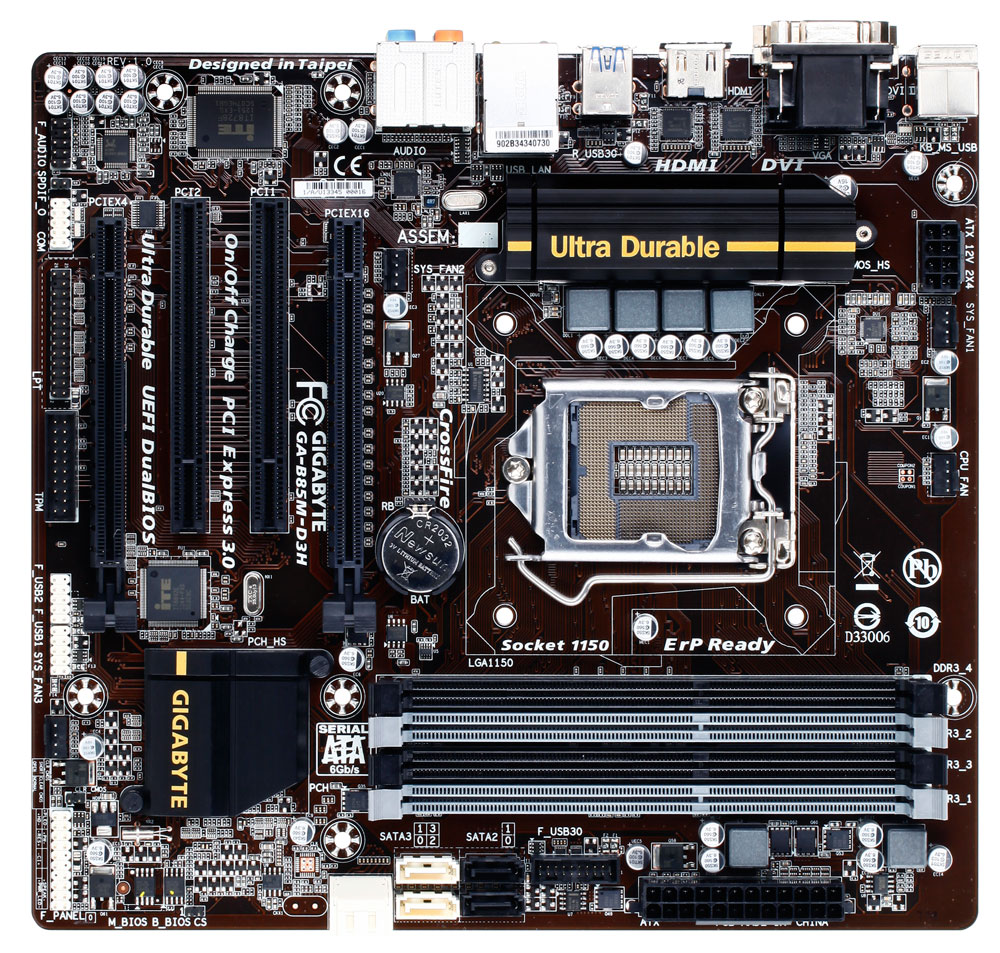 However it's limited to PCIe 2.0 x4 This is motherboard can accommodate a second graphic card, but it's not the best choice to do so, as there is only 3 slot separation between the two PCIe slots, so there will be only 1 slot space left between the two GPUs, so the upper one will get hotter. It is always better to have one faster GPU than to have more slower ones. Overclocked cards usually have such cooling which dissipates the heat into the case, while standard cards' cooling vents the heat directly out from the case through the rear grille. The latter is better when there are more than one GPU inside the PC's case. Overclocked cards are also more prone to crunching errors, as these cards are made for gaming, and gaming has lower stability standards than crunching. |
|
Send message Joined: 16 Mar 11 Posts: 509 Credit: 179,005,236 RAC: 0 Level Scientific publications
|
Hi Lluis and welcome to GPUgrid, One of the biggest problems with GPUs is keeping them cool. As Zoltan said, if you put 2 cards on your motherboard you could have a problem keeping the top one cool due to heat rising into the card from the lower card. There are ways to overcome that problem but it requires some work on your part. And since you live in Spain where it can be very hot in the summer, cooling issues are worse for you. The easiest for you would be to sell your 660 and replace it with a single 670, 680 or 690 to avoid having 2 cards in the computer. Unfortunately that is also the most expensive solution. If you want to do some work customizing and modifying your computer there are ways you could add a second card and have a good chance they will both run cool but there are no guarantees. Your 660 OC probably has axial fans which look like this or like this. As Zoltan said, those cards dissipate the heat into the case which adds to the cooling problem. Cards with radial fans like this blow the heat out of the rear grill instead of into the case. If a card like yours with axial fans is in the lower slot it will blow heat into the fan of the card in the upper slot and cause it to run hotter. That would not a problem for me in Canada because here the ambient air temperature (the temperature of the air in the room) is much lower than for you in Spain. One solution is to put the card with axial fans in the upper slot but then the hot air blows into the CPU fan. You can solve that by putting a very large heatsink and fan on the CPU which is additional work and expense. A cheaper solution is to make a barrier from cardboard or other other non-conducting material and place it above the card with axial fans. The barrier would direct the hot air away from the other GPU or the CPU. Another solution is to add a high volume fan to blow or suck the hot air from the radial fans out of the case before it reaches the other GPU or CPU. You can remove the side of the case and place a mains powered fan to blow air into the case or you can cut a hole in the case side and install a 12 volt fan. You can make 12 volt fans much more effective by adding ducts to put the airflow exactly where you want it. You can make ducts with a little work or you can buy ducts that have the correct hole dimensions for attaching easily to computer fans. Ducts are very effective and relatively inexpensive. So the choice is add a second mid-range card and do some additional work or replace your mid-range card with a single high-end card. BOINC <<--- credit whores, pedants, alien hunters |
|
Send message Joined: 23 May 09 Posts: 121 Credit: 404,050,664 RAC: 0 Level  Scientific publications
|
As Zoltan said, if you put 2 cards on your motherboard you could have a problem keeping the top one cool due to heat rising into the card from the lower card. One way to solve this proplem is to use a SILVERSTONE Raven case. Google for that and check the pictures. The MB is mounted 90° turned cw. This avoids overheating of the 'top' cards because there is no top card. Alexander |
|
Retvari Zoltan Send message Joined: 20 Jan 09 Posts: 2380 Credit: 16,897,957,044 RAC: 0 Level Scientific publications
|
As Zoltan said, if you put 2 cards on your motherboard you could have a problem keeping the top one cool due to heat rising into the card from the lower card. Not all SilverStone Raven cases have such arrangement, only the RV03, the RV02-E, and the RV01, but the latter one can accomodate only 3 double wide GPUs, as there is only 7 expansion slots at the top. You have to be careful when choosing the PSU for the RV03, as not all high powered PSUs can be fit sideways (PSU depth limit is 180mm). However, these three are excellent choice (especially the RV03 and the RV02-E). |



©2026 Universitat Pompeu Fabra