Building a Desktop for GPUGrid
Message boards :
Number crunching :
Building a Desktop for GPUGrid
Message board moderation
Previous · 1 . . . 5 · 6 · 7 · 8 · 9 · Next
| Author | Message |
|---|---|
|
Send message Joined: 21 Feb 09 Posts: 497 Credit: 700,690,702 RAC: 0 Level  Scientific publications    
|
I'm beginning to think my GPU1 has lost it and needs to be replaced. It's still running at 10% of its potential. Tomorrow I'll install it on my old rig and see what happens... |
|
Send message Joined: 16 Mar 11 Posts: 509 Credit: 179,005,236 RAC: 0 Level  Scientific publications
|
I wouldn't plan on putting 4 GPUs on that mobo. They'll fit but I've been reading reports and info that indicate those mobos can't supply the current required by some video cards through the PCIe slot. Check out the thread titled "What to build in 2014". Retvari explains. The PCIe bus itself (separate from the GPU) requires power too. I'm not sure exactly why it requires that many amps but I know from other reading that it does and I am confident Retvari has done the calculations in that other thread correctly. The pins on the 24 pin connector can supply that much amperage for a little while but they will run hot and eventually deteriorate due to the high temperature to the point that they melt and/or catch fire. Remember the connector is only a mechanical connection not a soldered connection therefore it cannot carry as much current as the wires leading to and from it. Hmmm. That makes me think a good upgrade would be to cut the connector off and solder the wires directly to the mobo/pins but that marries the PSU to the mobo, not convenient. BOINC <<--- credit whores, pedants, alien hunters |
 Retvari Zoltan Retvari Zoltan Send message Joined: 20 Jan 09 Posts: 2380 Credit: 16,897,957,044 RAC: 0 Level  Scientific publications  
|
I'm beginning to think my GPU1 has lost it and needs to be replaced. It's still running at 10% of its potential. That's a good idea. If the card is OK in your old rig, I suggest you to try this card in the original PC, but remove the second card for a day. |
skgiven Send message Joined: 23 Apr 09 Posts: 3968 Credit: 1,995,359,260 RAC: 0 Level  Scientific publications  |
Tomba, NVidia control panel - Prefer maximum performance. If that doesn't work tweak the clocks slightly (to try to force them to stick), suspend CPU work (in case the CPU is saturated and preventing the GPU using enough power - which causes it to run in low power mode), shut down and check the power connectors/do a cold restart. If it does start running normally, work out what caused the downclock, make sure the GPU fans are working properly... FAQ's HOW TO: - Opt out of Beta Tests - Ask for Help |
|
Send message Joined: 21 Feb 09 Posts: 497 Credit: 700,690,702 RAC: 0 Level Scientific publications
|
I'm beginning to think my GPU1 has lost it and needs to be replaced. It's still running at 10% of its potential. Removed the offending PNY GPU and replaced it with the ASUS GPU from my old rig. Both are running full speed ahead. Put the offender into my old rig. The Nvidia driver kept stalling and the rig died. Tried a few times. Nada. Printed the Amazon returns doc and parcelled it up. Bye-bye tomorrow... |
|
Send message Joined: 21 Feb 09 Posts: 497 Credit: 700,690,702 RAC: 0 Level Scientific publications
|
Tomba, NVidia control panel - Prefer maximum performance. Thanks for responding, skgiven. There was a time when I had the Nvidia control panel on the task bar, but those days are gone. And I could not find it anywhere else:  |
|
Send message Joined: 11 Jul 09 Posts: 1639 Credit: 10,159,968,649 RAC: 0 Level Scientific publications
|
It's a control panel: 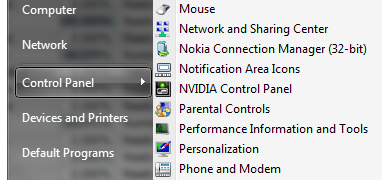 You may have to switch the main Control Panel off categorised view in order to see it - that's why I like that handy alphabetical menu from the Start button. |
|
skgiven Send message Joined: 23 Apr 09 Posts: 3968 Credit: 1,995,359,260 RAC: 0 Level Scientific publications |
|
|
Send message Joined: 21 Feb 09 Posts: 497 Credit: 700,690,702 RAC: 0 Level Scientific publications
|
Thread starter here again! The last time I posted I reported that I had disconnected the side and top case fans, and was running all eight CPU cores; two for GPUGrid and six for Rosetta. For a couple of days I've seen this:  I run two identical, unclocked, PNY GTX 660s, but it looks like the 16C difference in temperature between PCIE-1 and PCIE-2 could be an issue. What, if anything, to do? |
|
Send message Joined: 26 Jun 09 Posts: 815 Credit: 1,470,385,294 RAC: 0 Level  Scientific publications
|
I have the same MOBO same CPU two EVGA 660's but 5 fans and case closed despite what others are saying and have all temperatures lower than yours. Nothing is over 56°C. Running 24/7 ambient temperature 23.4°C. So I would close the case and connect more fans, if you have to the MOBO and let the Asus software manage to fan speed. Greetings from TJ |
|
Send message Joined: 21 Feb 09 Posts: 497 Credit: 700,690,702 RAC: 0 Level Scientific publications
|
I have the same MOBO same CPU two EVGA 660's but 5 fans and case closed despite what others are saying and have all temperatures lower than yours. Nothing is over 56°C. Running 24/7 ambient temperature 23.4°C. Thanks for responding TJ :) I connected the two missing fans and closed the case, as always (broke a top fan blade with my finger some time ago with one side off...). That got rid of the PCIe warning:  This morning found an ASUS warning "CPU at 65C". In fact it was at 67C, with it's fan on turbo. Stopped two Rosetta threads, which brought the CPU temp down to 63C. Looks like I cannot keep all my CPU cores busy... What case are you using? |
|
Send message Joined: 21 Feb 09 Posts: 497 Credit: 700,690,702 RAC: 0 Level Scientific publications
|
18th January I reported that one of my two PNY 660s appeared to have gone on the blink, it running very slowly. I replaced it. It's happened again:  I powered off and waited 30 minutes. No change. I don't see a way with EVGA Precision X to attempt to breath new life into this GPU. Is there other software I could try to do that? |
|
Send message Joined: 11 Oct 08 Posts: 1127 Credit: 1,901,927,545 RAC: 0 Level Scientific publications
|
Tomba: Have you tried: 1) The latest drivers? 334.67 were recently released 2) Setting change (as skgiven previously recommended): Right click Desktop -> NVIDIA Control Panel -> Manage 3D settings -> Global Settings tab -> Power management mode -> Set to "Prefer Maximum Performance" -> Click Apply -> Restart computer -> Reopen NVIDIA Control Panel to verify setting stuck -> Verify results Those are all I can think of. Remember to restart the PC after changing that setting in suggestion 2. Any luck? |
|
Send message Joined: 21 Feb 09 Posts: 497 Credit: 700,690,702 RAC: 0 Level Scientific publications
|
Tomba: Thanks for responding Jacob :) 1) I've been running 334.67 for four days. 2) Did that previously. Just cheked it stuck. It did. 3) No luck!! |
|
Send message Joined: 11 Oct 08 Posts: 1127 Credit: 1,901,927,545 RAC: 0 Level Scientific publications
|
Hmph. You might consider opening a ticket with NVIDIA support, while you continue researching it. Could very well be a driver bug. |
|
Send message Joined: 26 Jun 09 Posts: 815 Credit: 1,470,385,294 RAC: 0 Level Scientific publications
|
Hmph. You might consider opening a ticket with NVIDIA support, while you continue researching it. Could very well be a driver bug. Could be, but almost once a day a Santi WU down clocks my 660. After a half year of experimenting I came to the conclusion that Santi WU's and 660's don't work well together. So I have to boot that system once a day. @ Tomba: it is an older and smaller case you have. I have to check what type exactly but it is about similar to a Cooler Master 6xx series. I don't have the CPU-fan in turbo mode and it is using 7 cores continuously at 54-55°. Greetings from TJ |
|
Send message Joined: 21 Feb 09 Posts: 497 Credit: 700,690,702 RAC: 0 Level Scientific publications
|
Here's another view of my problem, courtesy of ASUS GPU Tweak. I show the two GPUs side by side. Perhaps there's a clue in there somewhere?...  |
|
Send message Joined: 21 Feb 09 Posts: 497 Credit: 700,690,702 RAC: 0 Level Scientific publications
|
I just submitted a problem report to PNY. Let's see what happens... |
|
Send message Joined: 11 Oct 08 Posts: 1127 Credit: 1,901,927,545 RAC: 0 Level Scientific publications
|
It's more likely to be an NVIDIA driver problem. You should contact NVIDIA. |
|
Send message Joined: 21 Feb 09 Posts: 497 Credit: 700,690,702 RAC: 0 Level Scientific publications
|
It's more likely to be an NVIDIA driver problem. You should contact NVIDIA. OK! Did that... |



©2026 Universitat Pompeu Fabra