GPUGRID and Linux
Message boards :
Number crunching :
GPUGRID and Linux
Message board moderation
| Author | Message |
|---|---|
|
Send message Joined: 26 Jun 09 Posts: 815 Credit: 1,470,385,294 RAC: 0 Level  Scientific publications      
|
Hello, I am planning to do a bit of GPUGRID with Linux in the future (as I know how ti install BOINC in the way that I have control over it and have access to the directories and files (which I have not when let Linux instal BOINC automatically)), but I see that the stderr file with all information MJH made is only available in Windows. Are there no programs in Linux to measure system temperature and such? Greetings from TJ |
 skgiven skgiven Send message Joined: 23 Apr 09 Posts: 3968 Credit: 1,995,359,260 RAC: 0 Level  Scientific publications |
Generally there is a lack of such sensor readers on Linux, however there is just about enough to get by on. FAQ - Useful Tools On Ubuntu, you can use System Monitor to see the CPU usage (core by core) - It comes with the OS. You can install Psensor to see the temperature of the CPU and GPU's. NVidia X Server (installed with the NVidia drivers) tells you the GPU temperature, how fast the GPU fan is, and allows you to change the fan speed and set to prefer maximum performance - if you can convince it to work using coolbits. Matt indicated in the forum that he would do some work on the Linux app to enhance the stderr output in the future. FAQ's HOW TO: - Opt out of Beta Tests - Ask for Help |
Carlesa25 Send message Joined: 13 Nov 10 Posts: 328 Credit: 72,619,453 RAC: 0 Level  Scientific publications 
|
Hello: One of the best ways to control the system possibly be "Gkrellm" capable of displaying all values; processor usage, Temperatures (CPU and GPU) fans, Processes etc. .. I have it installed on Ubuntu but it sure works with any distribution. Greetings. |
|
skgiven Send message Joined: 23 Apr 09 Posts: 3968 Credit: 1,995,359,260 RAC: 0 Level Scientific publications |
How do you get it to show GPU temperature or fan speed? Can it be used to control GPU fan speed? FAQ's HOW TO: - Opt out of Beta Tests - Ask for Help |
|
Carlesa25 Send message Joined: 13 Nov 10 Posts: 328 Credit: 72,619,453 RAC: 0 Level Scientific publications
|
Hello: control fan speed on the GPUs is through "Coolbits" in Nvidia-Settings, the new version shows the fan speed of the GPU if it is supported. Gkrellm not show fan speed of the GPUs but if their temperatures naturally first run "lm-sensors" to detect all sensors and well plate Gkrellm (or any other monitoring utility) can read them. If anyone is interested I can detail the steps to activate "Coolbits" run "lm-sensors" and mount "Gkrellm". all this for Ubuntu 13.10 but I guess it is for other distributions. Greetings. |
|
skgiven Send message Joined: 23 Apr 09 Posts: 3968 Credit: 1,995,359,260 RAC: 0 Level Scientific publications |
Carlesa, that would be useful. I created a new thread called coolbits, within the Number crunching area. Kindly post your How To use coolbit with Ubuntu 13.10 there. Others can add their methods for using coolbits with different versions of Linux, under different conditions (like a headless setup), tips and experiences using coolbits with single or multiple cards... COOLBITS Thanks, FAQ's HOW TO: - Opt out of Beta Tests - Ask for Help |
 Send message Joined: 17 Aug 08 Posts: 2705 Credit: 1,311,122,549 RAC: 0 Level Scientific publications |
I've seen reports at Einstein that the latest 331 linux beta drivers finally report some more diagnostic information, even listing GPU usage. MrS Scanning for our furry friends since Jan 2002 |
|
Carlesa25 Send message Joined: 13 Nov 10 Posts: 328 Credit: 72,619,453 RAC: 0 Level Scientific publications
|
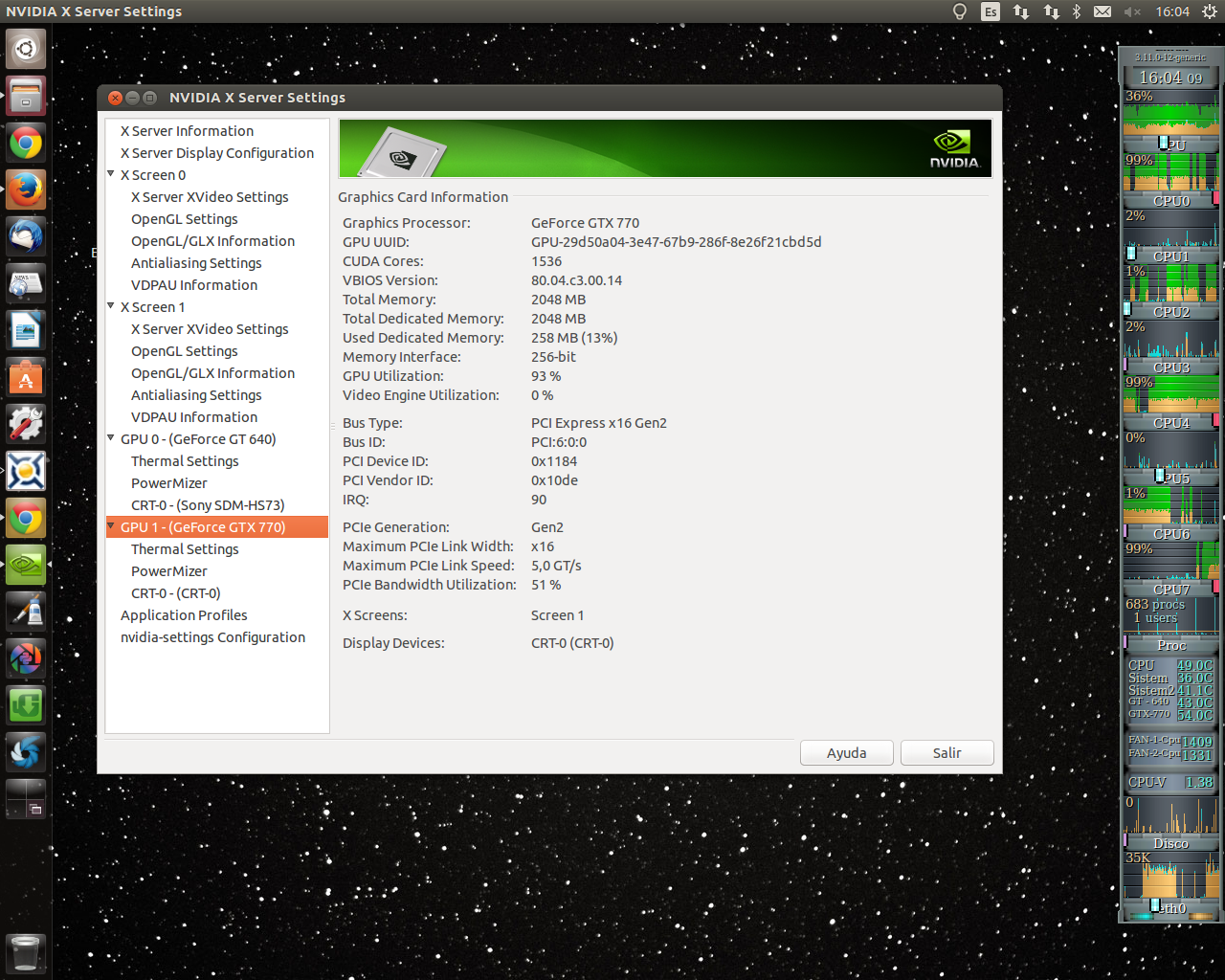
Hello: I'm using Nvidia 331.17 for days and the basic difference with the above is that it shows the fan speed of the GPU and this supports it. No information about the load or use in% of the GPUs, if the frequency of the graphics and memory, I can post images of Nvidia-Settings if interested. |
|
Carlesa25 Send message Joined: 13 Nov 10 Posts: 328 Credit: 72,619,453 RAC: 0 Level Scientific publications
|
Hello: I'm using Nvidia 331.17 for days and the basic difference with the above is that it shows the fan speed of the GPU and this supports it. Hello: Sorry I had misunderstood. If that information is the use of GPUs. % Use of the GPU % Use of PCIe Bandwidth % Use video engine At the moment I can not represent you in an outer panel GKrellm type. Greetings. Nvidia-Settings- Use % GPU... etc. |
|
Send message Joined: 16 Mar 11 Posts: 509 Credit: 179,005,236 RAC: 0 Level  Scientific publications
|
Hello, I run GPUgrid exclusively on Linux so I'm afraid I have no idea what information MJH makes available in stderr. Linux has apps for measuring system temp and the Linux nvidia drivers provide, IMHO, all the info one could possibly want about nvidia GPUs running in the system. The nvidia-settings binary is the interface to driver. It reads and reports state (temp, %usage, freq, etc.) and allows altering parameters such as fan speed, freq, etc. The problem with nvidia-settings is that it is pretty much a CLI application. If you run it with no command line parameters it pops up a GUI interface but that interface is rather limited, IMHO. If you run it with command line parameters it does not invoke the GUI interface and stays in CLI mode. You could say it has a split-personality disorder. Also, the CLI mode is extremely cryptic. I'm not sure how everybody else feels about it but IMHO the biggest problems with the nvidia drivers on Linux and the nvidia-settings interface are: 1. You can use the interface to either overclock or control fan speed but not both. If you setup to overclock (with Coolbits 1) then nvidia takes away the fan speed part of the interface and runs the fan speed on auto. You can read the fan speed but not adjust it. If setup for manual fan speed adjustment (with Coolbits 4) then you can read freqs and volts but you cannot adjust them. 2. When the fan speed is in auto mode (i.e. you have used Coolbits 1 or have not set Coolbits at all) the user has no control over the threshold temperature (aka target temp). In auto mode the driver keeps the temp hovering between 82C to 85C and sometimes it spikes to 88C on my system. I would like it to run cooler, somewhere closer to 70C. To overcome 1, you can hack the card and remove the PWM control line to make the fan run at 100% all the time. Then you can set Coolbits 1, overclock, and hopefully not go above 80C temperature. Another way to overcome 1 is to build a programmable PWM fan speed controller and use it to control fan speed the way YOU want it controlled. I've been checking that out and it's doable for about $20 (parts only, no labor). The fixed threshold temperature I mention in 2 above can be overcome by setting Coolbits 4 and setting the fan to a high speed. That works if the extra noise is not a problem. If the noise is a problem then it is possible to write a front end to the nvidia-settings app that allows you to specify whatever threshold temp you wish and auto adjusts fan speed to maintain that threshold. I wrote such a front end in Python, it worked very well, but later I simply detached the fan from the onboard speed controller and let it run at 100%. I don't know what MJH has planned. Tell me what kind of info you would like to see and I might program it for you. Or, if you can code and want to roll your own then I might be able to get you pointed in the right direction re: tools, docs, etc. BOINC <<--- credit whores, pedants, alien hunters |
|
[VENETO] sabayonino Send message Joined: 4 Apr 10 Posts: 50 Credit: 650,142,596 RAC: 0 Level  Scientific publications
|
Hi latest nvidia-settings (331.17) and drivers provide more informations about your graphic card nvidia-settings  see $ nvidia-settings --help nvidia-smi (CLI-Mode)  see $ nvidia-smi --help regards |
|
Carlesa25 Send message Joined: 13 Nov 10 Posts: 328 Credit: 72,619,453 RAC: 0 Level Scientific publications
|
Hello Dagorath, in these times the last driver 331.17 Linux (Beta) and Nvidia-Settings set to "Coolbits 4" you have access to the necessary information from the GPU and a very good manual fan control with nothing to envy options in Windows. Automatic programming missing fan according to the temperature forcing some temperatures monitor the GPUs we can get screen continuously and scheduled alarms, for example com GKrellm, as I said at another time. The issue I Coolbits widely discussed in this section in another thread. Greetings. |
|
Send message Joined: 16 Mar 11 Posts: 509 Credit: 179,005,236 RAC: 0 Level Scientific publications
|
Hi Carlesa, I installed the 331.17 (beta) driver and yes there is more information in the nvidia-settings GUI. There is also the new rules and profile section. I have Coolbits 4 working and I have the manual fan speed control working. Maybe I missed something but the manual fan speed control has not improved since earlier drivers and the auto fan speed control still does not allow setting a lower target temperature. Maybe I'm doing it wrong. Thanks for your suggestion about GKrellM. I didn't know about it until you mentioned it. I like it and the alarms are nice but it seems to me the alarms only issue a warning and that is all. If the alarms could also trigger an action such as a fan speed increase they would be more useful. BOINC <<--- credit whores, pedants, alien hunters |
|
Carlesa25 Send message Joined: 13 Nov 10 Posts: 328 Credit: 72,619,453 RAC: 0 Level Scientific publications
|
Hello: The manual fan control by Coolbits 4 works perfectly, you can look at the thread "Coolbits" to review how to install. The problem is that it only allows you to set the fan manually % but is not able to control automatically change according to temperature, you have to monitor possible changes in temperature and manually reset. It works whether you have one or more GPUs installed, but see problem connected monitor. GKrell have visual alarms but can not control the fans that I know. For GKrell (actually any monitor utility) works well and read all the sensors on your motherboard first install and run "lm-sensors". Greetings. |
|
Send message Joined: 16 Mar 11 Posts: 509 Credit: 179,005,236 RAC: 0 Level Scientific publications
|
Hello: The manual fan control by Coolbits 4 works perfectly, you can look at the thread "Coolbits" to review how to install. You can manually reset or you can run a script that specifies a target temperature (eg. 70C) and calls nvidia-settings --query localhost:0[thermalsensor:0]/ThermalSensorReading to query the current temp. If current temp > target temp then call nvidia-settings --assign localhost:0[fan:0]/GPUCurrentFanSpeed=X where X = an interger > current fan speed If current temp < target temp then call nvidia-settings --assign localhost:0[fan:0]/GPUCurrentFanSpeed=X where X = an interger < current fan speed. You can programatically switch from manual fan control to auto fan control with nvidia-settings --assign localhost:0[gpu:0]/GPUFanControlState=1 Pass 0 instead of 1 to the above command to switch back to auto fan control. Run the commands in a loop for continuous auto temp control to your target temp not nvidia's target temp. edit: spelling correction, localhst to localhost BOINC <<--- credit whores, pedants, alien hunters |
|
Carlesa25 Send message Joined: 13 Nov 10 Posts: 328 Credit: 72,619,453 RAC: 0 Level Scientific publications
|
Hello Dagorath thanks for the interesting information new to me, I will try to use it if I can. My GTX770 for now works great and fresh as I have configured with a load of 93% <60 ° C and <65% fan speed, but it is interesting to try to automate the process, we'll see. Greetings. |
|
Send message Joined: 16 Mar 11 Posts: 509 Credit: 179,005,236 RAC: 0 Level Scientific publications
|
Hi Carlesa, I already have it automated with a bash script. Unfortunately I lost that script but I'll rewrite it as a Python script and make it available. The nice thing about automating it with a script is that you can specify the target temp plus a maximum fan speed. If the current temp exceeds the target temp and current fan speed = max fan speed then the script can reduce % usage or clock speed to reduce the running temp. BOINC <<--- credit whores, pedants, alien hunters |
|
Carlesa25 Send message Joined: 13 Nov 10 Posts: 328 Credit: 72,619,453 RAC: 0 Level Scientific publications
|
Hi Carlesa, Hello: It would be great facilitates things, be good to use their experience, I will watch thanks. Greetings. |



©2026 Universitat Pompeu Fabra