NVidia GTX 650 Ti & comparisons to GTX660, 660Ti, 670 & 680
Message boards :
Graphics cards (GPUs) :
NVidia GTX 650 Ti & comparisons to GTX660, 660Ti, 670 & 680
Message board moderation
Previous · 1 . . . 3 · 4 · 5 · 6 · 7 · 8 · Next
| Author | Message |
|---|---|
 skgiven skgiven Send message Joined: 23 Apr 09 Posts: 3968 Credit: 1,995,359,260 RAC: 0 Level  Scientific publications       |
I think this 'dual PCIE splitter/riser' is what you are interested in, 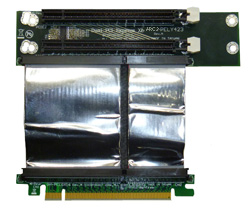 A bifurcation capable motherboard would be required! http://www.ameri-rack.com/ARC2-PELY423-C7_m.html The risers I have are fairly basic, something like this one I'm using one in a 3 slot motherboard. The bottom slot is so close to the base of the system that I can't physically install a card directly. There are more adaptable risers (for mounting), http://www.logicsupply.com/images/photos/accessories/pelx16-c11_big.jpg You can see a few in use in this image, 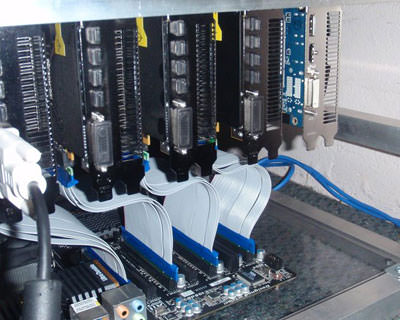 - www.moddiy.com A 1 to 16 slot converter might also interest some,  http://www.amfeltec.com/products/x1x16pcie-riser.php With all these risers you need to understand the power consequences! A PCIE2.1 X16 slot can deliver up to 75W of power to the GPU. An X1 slot cannot, therefore all the power would need to be delivered through the PCIE power connector(s). Some interesting PCIE products, http://www.ameri-rack.com/PCI-EXPRESS.htm http://www.cyclone.com/products/expansion_backplanes/ FAQ's HOW TO: - Opt out of Beta Tests - Ask for Help |
|
skgiven Send message Joined: 23 Apr 09 Posts: 3968 Credit: 1,995,359,260 RAC: 0 Level Scientific publications |
My first WU using a riser failed after 7h 55min :( I was opening and closing application windows at the time, so I expect that had something to do with it. Outcome Computation error Client state Compute error Exit status -1 (0xffffffffffffffff) Unknown error number I'll try some short WU's... FAQ's HOW TO: - Opt out of Beta Tests - Ask for Help |
|
Send message Joined: 21 Feb 09 Posts: 497 Credit: 700,690,702 RAC: 0 Level  Scientific publications 
|
I've spent all day looking at how to add my redundant GTX 460 to my GTX 660 crunching effort. Thanks, skgiven, for the leads! I'm not technical in any way, shape, or form, but I've come up with the following: A 1 to 16 slot converter might also interest some, Note that, for Europe (me), the link is: http://www.thedebugstore.com/acatalog/SKU-074-01.html With all these risers you need to understand the power consequences! A PCIE2.1 X16 slot can deliver up to 75W of power to the GPU. An X1 slot cannot, therefore all the power would need to be delivered through the PCIE power connector(s). That looks like a possibility for me. Love the plug 'n' play bit. I have an almost-4-year-old Dell XPS 435, whose performance still amazes me! First question: do I have any PCIe x1 slots. I found I have two:  Good start! Next, is there room in the case? Amfeltech don't give the dimensions of their card, but I reckon I have five cm of height before it becomes a problem and I need to run with the cover off. Finally, do I have power? Previously I posted I had four PCIe power connectors. Not true. I have two, but one of these, for the 460 (it needs two), should be enough: http://tinyurl.com/mkmof9g And... I have 620W of power:  Enough? * |
|
Send message Joined: 12 Dec 11 Posts: 34 Credit: 86,423,547 RAC: 0 Level  Scientific publications
|
I wouldn't do it. There's a reason your PSU didn't come with 4 PCIe connectors. I would get a new motherboard and a new PSU if I was going to run dual GPUs having that setup. You don't want to be at the limitations of your hardware when it comes to power supply. You want some headroom. |
|
Send message Joined: 21 Feb 09 Posts: 497 Credit: 700,690,702 RAC: 0 Level Scientific publications
|
Might you be a tad pessimistic? Here's the way I see it. My (new) 620 watts PSU has two PCIe connectors so it can run two GPUs. I need the splitter to run the (legacy) GTX 460 since it requires two feeds. The (new) GTX 660 requires just one. Nvidia's Web site tells me that the minimum system power requirement for each of these GPUs, separately, is 450 watts. That means I have 170 watts spare to run a second GPU. Surely that's enough? |
|
Send message Joined: 5 May 13 Posts: 187 Credit: 349,254,454 RAC: 0 Level  Scientific publications
|
Personally, I say go ahead! It will either work, or it won't, you don't have much to lose! Just keep an eye (and your nose) on the system when you start crunching, observe its temps* for a few hours, don't let it unattended. You'll want to stop it before the motherboard starts burning in flames! * including motherboard temperature 
|
|
Send message Joined: 9 May 13 Posts: 171 Credit: 4,739,796,466 RAC: 4 Level  Scientific publications
|
Tomba, You should be able to find some power supply wattage calculators around the internet. I use the one at Newegg frequently. You can put in your system configuration and it will tell you how many watts you need. http://images10.newegg.com/BizIntell/tool/psucalc/index.html?name=Power-Supply-Wattage-Calculator When Nvidia says that you need 450 watts, that is for the whole system, not just the video card. The two cards that you mentioned use ~150-200 watts per card. Hope that helps. |
|
skgiven Send message Joined: 23 Apr 09 Posts: 3968 Credit: 1,995,359,260 RAC: 0 Level Scientific publications |
Finally, do I have power? Previously I posted I had four PCIe power connectors. Not true. I have two, but one of these, for the 460 (it needs two), should be enough: That splitter won't make any difference to power delivery! It would just split 75W into two - not give you two times 75W. This is what you would need, 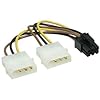 http://www.amazon.co.uk/Neewer-PCI-E-Splitter-Power-Adapter/dp/B005J8DGTU/ref=pd_sim_computers_10 The PSU should be powerful enough. A GTX460 has a TDP of 150W or 160W depending on the model. Two PCIE 6pin power connectors can supply 150W, which should be sufficient for crunching here (actual usage is likely to be ~115W on the GPU). I'm not convinced it would work, but there is nothing obvious to prevent it so I would give it a try, if only to advise others that it doesn't work. Since I started using my riser cable I've had lots of errors. In part these may be due to using the iGPU on my i7-3770K (display is a bit less responsive) and down to some CPU tasks, however I think I was having a power issue; the card being raised was a GeForce GTX650TiBoost which only has one 6-pin PCIE power connector. That would have been delivering 75W, but the TDP is 134W for a reference card. The card works at 1134MHz rather than 1033, so it might have had a higher bespoke TDP/needed more power. It's also on a PCIE2 slot, unlike the other slots. Anyway, there is likely to be some loss of power delivery from the cable and it might have caused a problem. I've swapped GPU's around now, so that my GTX660Ti (with two PCIE 6-pin power cables supplying 150W). That's actually enough for a reference model on its own, without any power from the PCIE slot. FAQ's HOW TO: - Opt out of Beta Tests - Ask for Help |
|
Send message Joined: 21 Feb 09 Posts: 497 Credit: 700,690,702 RAC: 0 Level Scientific publications
|
Tomba, Great link! Thank you!! I spent the afternoon there. I started with my Dell XPS 435 as delivered, four years ago, with a GeForce 210. 386 watts for a 475 PSU. No problem. I then gave the calculator my three-year-old GTX 460; 553 watts vs. 475 PSU!! That sure is one power-hungry device. And I ran GPUGrid 24/7, under-watted, for three years! Immediate conclusion? Give the GTX 460 to my grandson for gaming (making sure he has enough watts). And I would still like to keep in the range of my new 610 PSU (should have done the sums before I bought it). The bottom of the Nvidia range today is the GTX 650. One takes 429 watts, two take 512. One GTX 660 takes 527 watts, two take 709 watts. Unfortunately the Newegg calculator does not allow for more than one GPU but, given these numbers, I reckon one of each - 650 and 660 - will be fine for a 610 watts PSU. Or am I dreaming? Your thoughts will be most welcome! Thank you, Tom |
|
Send message Joined: 21 Feb 09 Posts: 497 Credit: 700,690,702 RAC: 0 Level Scientific publications
|
That splitter won't make any difference to power delivery! It would just split 75W into two - not give you two times 75W. This is what you would need, Many thanks for the heads-up. Ordered... The PSU should be powerful enough. I shall certainly try the GTX 460 in the riser, with that molex power supply. Tom |
|
Send message Joined: 5 May 13 Posts: 187 Credit: 349,254,454 RAC: 0 Level Scientific publications
|
I think that newegg calculator is only taking into account the Nvidia PSU recommendations, not the cards' actual power draw. For example, my stock-clocked 650Ti has a "Maximum Graphics Card Power" rating of 110W, but the PSU recommendation is 400W! Nvidia is obviously being cautious and factoring in power consumption by the rest of the computer, but equally obviously, it is being overly cautious! A 110W graphics card does not require a PC that consumes 290W without the card by no means! A typical CPU will consume less than 100W, a typical spinning disk something like 10W, adding up to 110W. Let's be overly pessimistic and say that the rest of the components will consume 50W, it all adds up to 160W, way less than the 290W assumed by Nvidia! Together with the 650Ti, the power draw gets up to ~270W. One could get along just fine with a 350W PSU. And I'm adding Watts pretty aggressively here... TL/DR: Don't buy too big PSUs without reason! Find the power draw of your major components, add a safety margin (something like 10%), factor in PSU efficiency (80-90%) and THEN buy the PSU you need.
|
|
Send message Joined: 21 Feb 09 Posts: 497 Credit: 700,690,702 RAC: 0 Level Scientific publications
|
Just keep an eye (and your nose) on the system when you start crunching, observe its temps* for a few hours, don't let it unattended. You'll want to stop it before the motherboard starts burning in flames! Thanks for your response. Re "motherboard temperature" - I found a Win 7 app that measures the CPU core temps. Is that what you mean, or is it something else? Tom |
|
Send message Joined: 9 May 13 Posts: 171 Credit: 4,739,796,466 RAC: 4 Level Scientific publications
|
Motherboard temperature is different from CPU temperature. Just found and installed SPECCY http://www.piriform.com/speccy a Windows tool which will tell you both (and a whole lot more information about your system). They have a free version and a pay version, I used the free version. Just so you know, there is also a Windows tool called GPU-Z that will tell you quite a bit of real-time information about your GPU(s) including temperature and % utilization. I use that one frequently. |
|
skgiven Send message Joined: 23 Apr 09 Posts: 3968 Credit: 1,995,359,260 RAC: 0 Level Scientific publications |
Since I started using my riser cable I've had lots of errors. In part these may be due to using the iGPU on my i7-3770K (display is a bit less responsive) and down to some CPU tasks, however I think I was having a power issue; the card being raised was a GeForce GTX650TiBoost which only has one 6-pin PCIE power connector. That would have been delivering 75W, but the TDP is 134W for a reference card. The card works at 1134MHz rather than 1033, so it might have had a higher bespoke TDP/needed more power. It's also on a PCIE2 slot, unlike the other slots. Anyway, there is likely to be some loss of power delivery from the cable and it might have caused a problem. I've swapped GPU's around now, so that my GTX660Ti (with two PCIE 6-pin power cables supplying 150W). That's actually enough for a reference model on its own, without any power from the PCIE slot. Just an update, Since I moved the GTX660Ti onto the PCIE Riser (instead of the GTX650TiBoost) I have been getting fewer errors. All cards are returning completed results and the GTX660Ti despite being in a PCIE2 @X2 slot (going by GPUz) is doing very well. If anything it's the most stable of the cards. On the other hand the GTX650TiBoost is running @98% power, 95% GPU usage, and 69C (which is surprisingly high for that card and probably causing issues). Relative performances (GTX660Ti, GTX660, GTX650TiBoost): I397-SANTI_baxbim1-2-62-RND5561_0 4536452 21 Jun 2013 | 13:03:04 UTC 21 Jun 2013 | 17:21:28 UTC 10,299.97 10,245.68 20,550.00 I693-SANTI_baxbim1-1-62-RND4523_0 4535331 21 Jun 2013 | 5:50:58 UTC 21 Jun 2013 | 16:32:07 UTC 12,587.32 12,434.03 20,550.00 I538-SANTI_baxbim1-2-62-RND4314_0 4535821 21 Jun 2013 | 9:54:01 UTC 21 Jun 2013 | 17:49:17 UTC 14,005.43 13,897.61 20,550.00 Even on PCIE2 @X2 the GTX660Ti is 36% faster than the GTX650TiBoost and 22% faster than the GTX660. For these WU's and on this setup (Intel HD Graphics 4000 being used for display) PCIE width is irrelevant. This confirms what Beyond and dskagcommunity reported. Update - 23 valid from last 26, with all cards completing tasks. Reasonably stable... FAQ's HOW TO: - Opt out of Beta Tests - Ask for Help |
 Send message Joined: 17 Aug 08 Posts: 2705 Credit: 1,311,122,549 RAC: 0 Level  Scientific publications |
TL/DR: Don't buy too big PSUs without reason! Find the power draw of your major components, add a safety margin (something like 10%), factor in PSU efficiency (80-90%) and THEN buy the PSU you need. Vagelis is right here, and with the rest of his post. The only points I'd change are these: 1. For power supplies you want way more than 10% safety margin under sustained load. Drive the PSU too hard and it will fail earlier. And maximum PSU efficiency is achieved around 50% load. The historical guideline has been to shoot for ~50% load. However, with more efficient PSUs I think it's no problem to aim for 50 - 80% load, as the amount of heat generated inside the PSU (which kills it over time) is significantly reduced by the higher PSU efficiency, and by now we've got 120 mm fans instead of 80 mm (it's easier to cool things this way). And modern PSU have flatter power responce curves, so efficiency doesn't drop much if you exceed 50% load. To summarize: I'd want more than 20% safety margin between the maximum power draw of the system and what the PSU can deliver. Typical power draw under BOINC will be lower than whatever you come up with considering maximums. 2. PSU efficiency determines how much power the PSU draws from the wall plug. For the PC a "400 W" unit can always deliver 400 W, independent of its efficiency. At 100% load and 80% efficiency you'd be paying for 500 W, whereas at 90% efficiency you'd be paying for 444 W from the wall plug. MrS Scanning for our furry friends since Jan 2002 |
|
Send message Joined: 5 May 13 Posts: 187 Credit: 349,254,454 RAC: 0 Level Scientific publications
|
I agree completely, ETA! Very valid points! The good thing these days is, that we can find very good quality PSUs at good prices. Of course, there's always the junk that's sold with cases or as an accessory (together with the screws, nuts and bolts I guess!), but if one is willing to look around a little, good PSUs are there to find.
|
dskagcommunity Send message Joined: 28 Apr 11 Posts: 463 Credit: 1,077,516,958 RAC: 3 Level Scientific publications
|
Because you wrote about the pcie x1->x16 adapters. There are some with Molex power to get the needed power. But not easy to get them shipped to austria in my case :( In Germany they are available over several shops. I found one too for UK people. ---------- 24/7 Crunching since 2011 ----------- DSKAG Austria: http://www.dskag.at 
|
|
Send message Joined: 21 Feb 09 Posts: 497 Credit: 700,690,702 RAC: 0 Level Scientific publications
|
Because you wrote about the pcie x1->x16 adapters. There are some with Molex power to get the needed power. But not easy to get them shipped to austria in my case :( In Germany they are available over several shops. I found one too for UK people. I bought one here. |
|
Send message Joined: 21 Feb 09 Posts: 497 Credit: 700,690,702 RAC: 0 Level Scientific publications
|
Just found and installed SPECCY http://www.piriform.com/speccy a Windows tool which will tell you both (and a whole lot more information about your system). They have a free version and a pay version, I used the free version. That's a "Bingo!". Thank you. Right now, before I install the second GPU, the room temperature is 26.5C and Speccy shows my Dell/Intel mobo between 63C and 67C. When I install the second GPU, what is the max mobo temperature I should be looking for to avoid it bursting into flames?? Thanks, Tom |
|
Send message Joined: 17 Aug 08 Posts: 2705 Credit: 1,311,122,549 RAC: 0 Level Scientific publications |
That's difficult to say if we don't know what is actually measured here. Usually reported mainboard temperatures in well ventilated cases are in the range of 35 - 45°C. So >60°C would already be really hot. But if that temperature only applies to the VRM circuitry then you're fine, as these can usually take 80 - 100°C. Do you have any case ventilation? How hot does the fair feel inside your case, if you quickly open it after sustained crunching? MrS Scanning for our furry friends since Jan 2002 |



©2026 Universitat Pompeu Fabra