Marathon WU
Message boards :
Number crunching :
Marathon WU
Message board moderation
Previous · 1 · 2
| Author | Message |
|---|---|
|
Send message Joined: 8 Mar 12 Posts: 411 Credit: 2,083,882,218 RAC: 0 Level  Scientific publications   
|
No issue with 7.0.25 as far as i know. Would highly, highly recommend increasing your fan speed though for starters. |
 Sid Sid Send message Joined: 15 Jan 10 Posts: 26 Credit: 335,524,408 RAC: 0 Level  Scientific publications   
|
No issue with 7.0.25 as far as i know. Would highly, highly recommend increasing your fan speed though for starters. Went to the Nvidia site and downloaded System Tools with ESA Support 6.05 but have it hung up with Data Execution Prevention. Got to the Turn on DEP for all programs and services except those I select: I can't seem to find how to get the NTUNE, NVMonitor and System Update added to the list. Help anyone? 
|
|
Send message Joined: 19 Jan 11 Posts: 13 Credit: 294,225,579 RAC: 0 Level  Scientific publications
|
Sid, or you using multiple log in's on your PC? Whenever I timeshare my Windows 7 Ultimate, Core i3 530, GTX 480; with my grandson, and he logs into this PC with his account name and password, and then later on logs back out, I always have to do a reboot on this machine, for it will never ever revert back to it's full GPU speed. However, if he uses my default log in, then everything is fine, and the GTX 480 remains at full speed, multitasking GPUGRID, while still playing his games on line. |
|
Sid Send message Joined: 15 Jan 10 Posts: 26 Credit: 335,524,408 RAC: 0 Level Scientific publications
|
Sid, or you using multiple log in's on your PC? Yes, and he suspends activity to make his BF3 run better. Right now, I'm running Einstein, and this is my GPUZ: 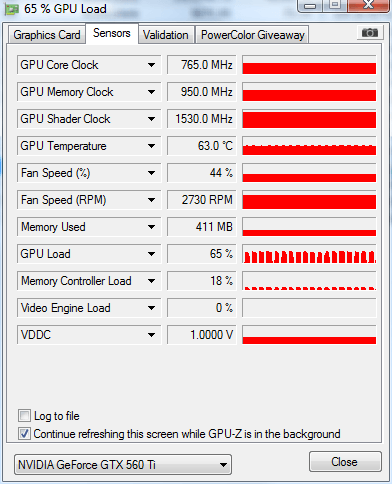 . . .the GPU Load is fuller, but still choppy. My next move is to do a dustout.
|
skgiven Send message Joined: 23 Apr 09 Posts: 3968 Credit: 1,995,359,260 RAC: 0 Level  Scientific publications  |
Is it really a PCIE1.1 motherboard? Perhaps it's just not up to the rigors of feeding a GTX570, though it should be a bit better than that. Guess it depends what else is plugged in. Anything not installed in device manager? Maybe there is a chipset update for the motherboard or a Bios update to make that board work better with a Fermi. Have you got Aero installed/enabled per chance? Does the GPU crunch when the user is active? - Also look in task manager to see if some process is starting and stopping repeatedly, search engine or antivirus... FAQ's HOW TO: - Opt out of Beta Tests - Ask for Help |
|
Send message Joined: 8 Mar 12 Posts: 411 Credit: 2,083,882,218 RAC: 0 Level Scientific publications
|
If it was a pcie issue I would expect einstein to look worse, not better, since Einstein uses more cpu than gpugrid. Dusting may help. At a loss honestly, give me some time to wake up and I'll post again. |
|
Sid Send message Joined: 15 Jan 10 Posts: 26 Credit: 335,524,408 RAC: 0 Level Scientific publications
|
Dusting may help. Looks like a good dustout has helped much. [running a long GPUGrid - roughly 3% in 20 minutes] 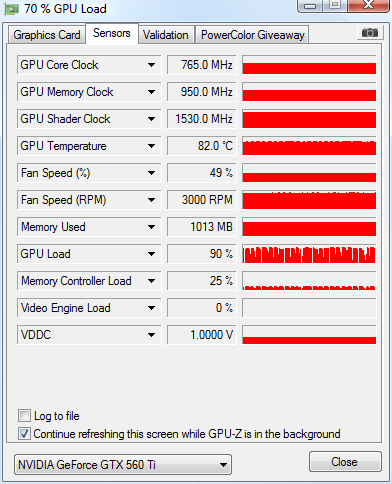 Haven't been able to workaround my problem getting System tools running. . . . will deal with that later. Thanks all for the help, it has been a learning experience.
|
|
Send message Joined: 8 Mar 12 Posts: 411 Credit: 2,083,882,218 RAC: 0 Level Scientific publications
|
Wow. If all you did was dust. Your temps dropped quite a bit!! Looking better. |
|
skgiven Send message Joined: 23 Apr 09 Posts: 3968 Credit: 1,995,359,260 RAC: 0 Level Scientific publications |
Did you dust the CPU too? How many cores are you using now? Your earlier posts show GPU temp at 66°C. I would still suggest you increase the GPU fan speed so that the GPU temps are no more than 70°C. 82°C is a bit high for long term crunching. FAQ's HOW TO: - Opt out of Beta Tests - Ask for Help |
|
Send message Joined: 8 Mar 12 Posts: 411 Credit: 2,083,882,218 RAC: 0 Level Scientific publications
|
Not sure on your technical background. but if you were trying to download those tools to increase your fan speed here's a link for EVGA Precision http://downloads.guru3d.com/downloadget.php?id=2611&file=4&evp=0a465c6080d2aa1be0bdf995f597acbb Really easy to use. Once downloaded, just open up the program de-select "Auto" fan speed, and increase it yourself until you hit, as skgiven stated max 70C. I prefer to stay under this, around 60-65C. Depending on your tolerance for noise I guess. Don't crank it up all the way though, since you want to make sure your fan lasts as long as possible. Anymore questions, just ask. Cheers. |
|
Sid Send message Joined: 15 Jan 10 Posts: 26 Credit: 335,524,408 RAC: 0 Level Scientific publications
|
Not sure on your technical background. but if you were trying to download those tools to increase your fan speed here's a link for EVGA Precision http://downloads.guru3d.com/downloadget.php?id=2611&file=4&evp=0a465c6080d2aa1be0bdf995f597acbb I am only an advanced beginner as far as the tech goes, but the download was slick and easy, set fan speed at 65% to get the GPU temp in the mid '60s. Currently running I2R60-NATHAN_RPS1120528-0-166-RND5857_0 Workunit 3457153 so far, almost 22% in 2:50. . . on track for about 12 hours. 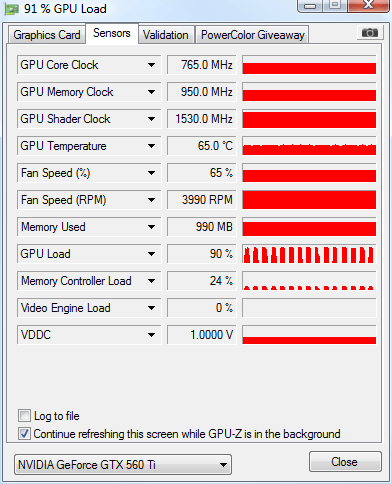
|
|
Sid Send message Joined: 15 Jan 10 Posts: 26 Credit: 335,524,408 RAC: 0 Level Scientific publications
|
Did you dust the CPU too? How many cores are you using now? Did the CPU also, running two CPU WUs [C2D6700] Resolved the fan speed and temp issue. [previous post] Thanks for all the help, hope others will find this thread helpful or at least interesting. . . .
|
|
Send message Joined: 5 Dec 11 Posts: 147 Credit: 69,970,684 RAC: 0 Level  Scientific publications
|
That GPU load bouncing around is not right. In your Boinc Manager, go to Advanced -> Preferences down the bottom there is the option Use At Most {100%} CPU time Make sure the number is 100%. I think it's at a lower number and that is why the usage is bouncing. Bad for your GPU and bad for your CPU doing that. If it isn't 100%, change it to 100%. Check your temps after you do - especially your CPU and it will apply a bit more load on it. Good Luck |
|
Sid Send message Joined: 15 Jan 10 Posts: 26 Credit: 335,524,408 RAC: 0 Level Scientific publications
|
The permissions are set for using 100% of CPU time. Currently running some Einstein with the GPU downclocked about 20%. . . . temps just fine with fan on auto, GPU load in the mid 60s flatline. Son played BF3 with it as is and didn't notice much difference. Beginning to wonder if the CPU [C2D6700] just isn't up to this GPU. 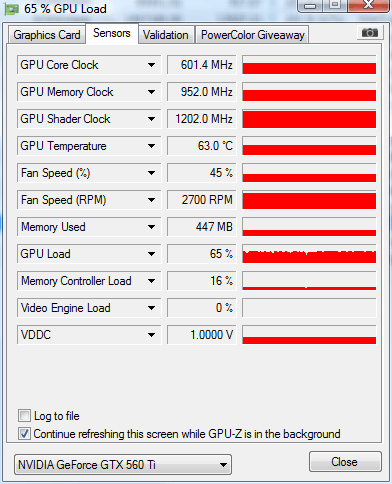 After the SIMAP Scramble, will come back to GPUGrid and give an update.
|
|
Send message Joined: 5 Dec 11 Posts: 147 Credit: 69,970,684 RAC: 0 Level Scientific publications
|
CPU throttling makes sense actually, especially if you are running other projects at the same time. try running GPUGrid on it's own with no other projects running - allow it full use of the CPU. If that GPU usage graph changes, you'll know it's the cpu that is crippling the GPU. |
|
Send message Joined: 20 Jan 11 Posts: 6 Credit: 10,705,495 RAC: 0 Level  Scientific publications
|
The NATHAN long runs typically take 20 to 40 hours on my GTX 260s, with most taking about 25 hours. Occasionally I get one that takes 40 to 50 hours. |



©2026 Universitat Pompeu Fabra