Marathon WU
Message boards :
Number crunching :
Marathon WU
Message board moderation
| Author | Message |
|---|---|
 Sid Sid Send message Joined: 15 Jan 10 Posts: 26 Credit: 335,524,408 RAC: 0 Level  Scientific publications     
|
I'm crunching with a 560-448 and have been doing the long runs in 10-14 hours. . . . I'm now crunching 36 hours on one and barely 1/2 done. Anyone else having experience with an apparent marathon? 
|
ritterm Send message Joined: 31 Jul 09 Posts: 88 Credit: 244,413,897 RAC: 0 Level  Scientific publications
|
. . . I'm now crunching 36 hours on one and barely 1/2 done. Anyone else having experience with an apparent marathon? No unusual run times for me with my 570 and the long queue. Which WU are you talking about? |
|
Sid Send message Joined: 15 Jan 10 Posts: 26 Credit: 335,524,408 RAC: 0 Level Scientific publications
|
Name 3EKO_20_10-PAOLA_3EKObis-4-20-RND3442_0 Workunit 3444842
|
|
ritterm Send message Joined: 31 Jul 09 Posts: 88 Credit: 244,413,897 RAC: 0 Level Scientific publications
|
Which WU are you talking about? Yeah, I've run a few of those PAOLA's but none took longer than about 15 hours (Task 5416553). The researcher introduces them in her thread "3EKObis another conformation". A couple of recent messages in "New task on long queue, significantly longer than traditional tasks" mention results. |
|
Send message Joined: 26 Aug 11 Posts: 100 Credit: 2,933,903,686 RAC: 53,081 Level  Scientific publications 
|
Has your GPU downclocked? My GTX460 was completing the 3EKO units within 24Hrs. |
|
Sid Send message Joined: 15 Jan 10 Posts: 26 Credit: 335,524,408 RAC: 0 Level Scientific publications
|
I don't think so: 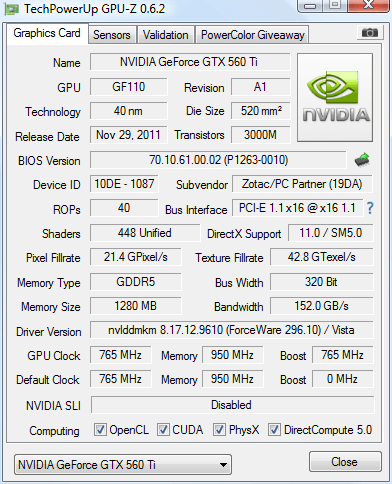
|
|
Send message Joined: 26 Aug 11 Posts: 100 Credit: 2,933,903,686 RAC: 53,081 Level Scientific publications
|
What's the GPU speed showing on the sensors tab? Even my GTX550Ti completed a 3EKO in 32 hours and that is in a 4X slot, not a 16X |
|
Sid Send message Joined: 15 Jan 10 Posts: 26 Credit: 335,524,408 RAC: 0 Level Scientific publications
|
Finally finished in roughly 52 hours. Going to Nvidia 301.42 WHQL driver. . . . taking a break, will crunch Einstein for a while.
|
|
Send message Joined: 26 Aug 11 Posts: 100 Credit: 2,933,903,686 RAC: 53,081 Level Scientific publications
|
That definitely looks like your 560 downclocked after erroring out a WU. Sometimes a GPU clock will drop to around 405MHz if you suffer a ACEMD crash and it needs a reboot to get back to the correct speed. |
|
Sid Send message Joined: 15 Jan 10 Posts: 26 Credit: 335,524,408 RAC: 0 Level Scientific publications
|
Thanks, I'll be GPUGriding again soon.
|
|
Send message Joined: 5 Dec 11 Posts: 147 Credit: 69,970,684 RAC: 0 Level  Scientific publications
|
If you open up GPU-Z again, click on the sensors tab. take a screenshot and post that to the forum. I'm certain that the other posters are correct and that your card is running at half speed for some reason. To simplify, Graphics cards have 3 'speeds' 1. idle - when they are doing nothing, generally around 50Hz 2. 2D - not to be confused with a 2D picture or anything. This is half speed, when under moderate load, or if the driver has crashed, it limits the top speed of the card to this - normally 405/450Mhz to protect it from damage 3. 3D - again, not to be confused with a 3D picture, this is maximum performance mode - for your card, that's 765Mhz. If under the sensor tab, you see 405/450 next to the GPU core clock reading, you know your driver has crashed. Easy fix, just re-boot your computer. There is a bug with the current nVidia drivers that causes this. You need to go into your power profile in windows and disable the automatic screen shut-off. Just remember to turn your screen off manually and you should be good. IF you need specific instructions, post back and I or someone else will be able to direct you. Crunch on! |
skgiven Send message Joined: 23 Apr 09 Posts: 3968 Credit: 1,995,359,260 RAC: 0 Level  Scientific publications  |
It might have downclocked to ~100MHz, going by the GPU run time. Prefer Maximum performance from NVidia control panel is recommended. FAQ's HOW TO: - Opt out of Beta Tests - Ask for Help |
|
Sid Send message Joined: 15 Jan 10 Posts: 26 Credit: 335,524,408 RAC: 0 Level Scientific publications
|
If you open up GPU-Z again, click on the sensors tab. 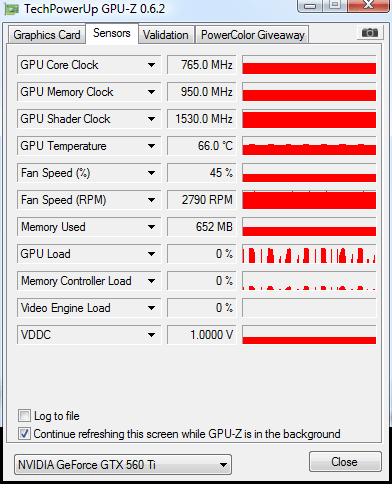 I also turned off the auto screen turn off. Hopefully that will solve my problem. Thanks all for all the help!
|
|
Zydor Send message Joined: 8 Feb 09 Posts: 252 Credit: 1,309,451 RAC: 0 Level  Scientific publications
|
Seeing the screenshot ..... a thought .... the GPU has been running at a fair speed, but the graph alongside the 0% with the even on/off stop/start nature of the output graph could indicate the "while processor useage is less than" option in BOINC Local Preferences has returned to a 25% setting. It should be set to zero percent to stop it kicking in. Worth a quick check. Regards Zy |
|
Sid Send message Joined: 15 Jan 10 Posts: 26 Credit: 335,524,408 RAC: 0 Level Scientific publications
|
Seeing the screenshot ..... a thought .... the GPU has been running at a fair speed, but the graph alongside the 0% with the even on/off stop/start nature of the output graph could indicate the "while processor useage is less than" option in BOINC Local Preferences has returned to a 25% setting. It was at the 25% setting, reset it to 0. .. The choppy nature of the GPU load graph remains: 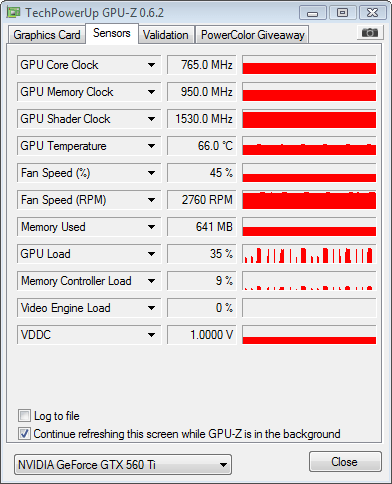 Currently running Name 31zx54-MJHARVEY_MJH120523-0-5-RND3527_0 Workunit 3447296 Progress 57% at 17:45, to go est. 14:53. . . . better, but still apparently running with the handbrake on. BTW enjoying learning these things. . . . Please, any other ideas?
|
|
Send message Joined: 26 Dec 10 Posts: 115 Credit: 416,576,946 RAC: 0 Level  Scientific publications
|
Some of these PAOLA workunits take a long time. I have over clocked 570s and 580s and they take 40,000 seconds. Is your CPU distracted at all? I noticed my CPU based projects required far more time once these workunits started. Can you check to see if anything other processes are consuming your CPU or if you CPU is maxed at 100% maybe you could overclock it a bit. Please let us know what you discover. Thx - Paul Note: Please don't use driver version 295 or 296! Recommended versions are 266 - 285. |
|
Zydor Send message Joined: 8 Feb 09 Posts: 252 Credit: 1,309,451 RAC: 0 Level Scientific publications
|
Treat my next comment with great caution, its a long while since I ran NVidia cards - however the GPU Memory load at 641Mb seems a hell of a lot for a WU, I didnt think they were that chunky .... needs verifying by an NVidia cruncher, dont do anything until you get similar comment from an experienced NVidia cruncher. It does seem high though .... maybe worth checking to see if inadvertently there are other GPU tasks running, whilst you await confirmation or otherwise of the suspicion. Regards Zy |
|
skgiven Send message Joined: 23 Apr 09 Posts: 3968 Credit: 1,995,359,260 RAC: 0 Level Scientific publications |
641Mb is fine for these tasks here, in fact it helps make them fast. Anyway that GPU has 1.2GB, and is a good GPU BTW. Sid, I'm guessing what you are doing, but I suggest you stop crunching on the CPU (or just use 1 core), and see if that changes the choppy graph; that's still a decent CPU but your GPU is relatively massive. If that's not it then look at your advanced Power settings. FAQ's HOW TO: - Opt out of Beta Tests - Ask for Help |
|
Sid Send message Joined: 15 Jan 10 Posts: 26 Credit: 335,524,408 RAC: 0 Level Scientific publications
|
Treat my next comment with great caution, its a long while since I ran NVidia cards - however the GPU Memory load at 641Mb seems a hell of a lot for a WU, I didnt think they were that chunky .... needs verifying by an NVidia cruncher, dont do anything until you get similar comment from an experienced NVidia cruncher. Checking Task Manager/Processes, the CPU load from the acmd.win.2352 is almost non-existent. No sign that I can see of anything else running on the GPU. This might help diagnose this issue: I time share this with my game playing son, is there anything he could have done with the permissions, etc. that would screw this up? I have crunched about 20 long GPUGrids in normal timeframes in the past month and now it seems like I'm winding out in second gear. . . I went to the Nvidia control panel and tried to set back to defaults, but I might have missed something.
|
|
Sid Send message Joined: 15 Jan 10 Posts: 26 Credit: 335,524,408 RAC: 0 Level Scientific publications
|
641Mb is fine for these tasks here, in fact it helps make them fast. Anyway that GPU has 1.2GB, and is a good GPU BTW. I suspended one core and this is what I'm getting: 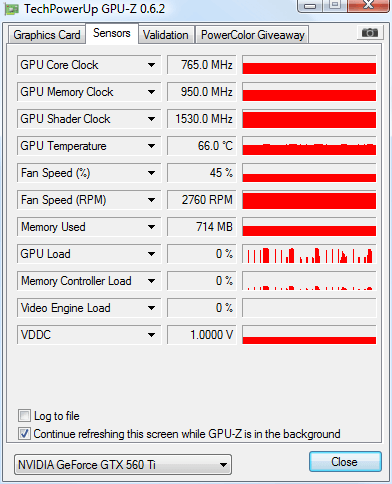 I have been to power management and overridden auto display. Could there be some issue with M$ Vista? . . . or with BOINC client version 7.0.25 for windows_intelx86?
|



©2026 Universitat Pompeu Fabra