HOW TO - Full installation Ubuntu 11.10
Message boards :
Frequently Asked Questions (FAQ) :
HOW TO - Full installation Ubuntu 11.10
Message board moderation
| Author | Message |
|---|---|
 Damaraland DamaralandSend message Joined: 7 Nov 09 Posts: 152 Credit: 16,181,924 RAC: 0 Level  Scientific publications    
|
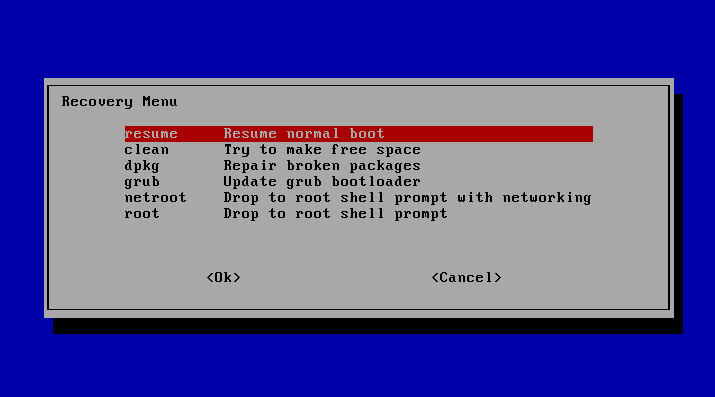
I just reinstalled my Cruncher, and it's woking fine. So I developed this guide to help in a full installation with Ubuntu 11.10. I hope this guide can be of help to expert and non-expert Linux users. I will put on green every shell command. First I recommend you to unplug all the NVIDIA cards, If you don't you might get a black screen as It happened to me. Maybe you don't have that problem, but I wouldn't risk. You will read everywhere how wonderfull Linux is, but nobody talks about how frustrating can be when you have hardware problems. Installation of Ubuntu 11.10 Go to Download Ubuntu Choose 64 bit Download (ubuntu-11.10-desktop-amd64). 64 bits needed for GPUGrid! Burn your CD or create a bootable USB stick Try it or Install it directly Upgrade Instructions to update are here Instead of using this program you can do the same with the shell: sudo apt-get update sudo apt-get upgrade Download Drivers Download latest nvidia drivers (don't forget to write down the path where you download them) Blacklist video drivers You can do this later in the shell, but it's easier do it with gedit, so I recommend doing it now. sudo gedit /etc/modprobe.d/blacklist.conf Add these lines at the end of the file and save: blacklist vga16fb blacklist nouveau blacklist rivafb blacklist nvidiafb blacklist rivatv Recovery mode as root Plug in your card Restart your computer. When it startsup leave 'SHIFT' key pressed. You will see the GRUB loader like this Over the 'recovery mode' line press 'e' Chage 'ro recovery' to 'rw recovery' Remove 'vga=XXX splash' Press 'F10' Now you shoud see this screen Start in root mode Installation of NVIDIA drivers As you are in read and write superuser recovery mode 'rw' you don't have to use the sudo command on the following lines: Uninstall nouveau apt-get --purge remove xserver-xorg-video Uninstall the older drivers apt-get --purge remove nvidia-* Goto the path you downloaded the NVIDIA drivers cd xxxxxxxx Install NVIDIA drivers sh NVIDIA....pkg.run Answer yes to all questions from the installer, but be really carefull to read any advice BOINC instalation (you still at root, but you can do this once you have restarted your computer) apt-get install boinc-client boinc-manager 64 Bit Considerations To allow 32 bit applications to run on 64 bit Linux you must install 32 bit versions of certain shared libraries. apt-get install ia32-libs libstdc++6 libstdc++5 freeglut3 Now you can restart and configure BOINC and Ubuntu as you wish. If BOINC don't recognize your GPU card put a delay in the start up More info about GRUB NvidiaTroubleshooting ID: 23648 · Rating: 0 · rate:
 / /   |


©2026 Universitat Pompeu Fabra