Problem with GTX 260 and Nvidia 177.13 drivers
Message boards :
Graphics cards (GPUs) :
Problem with GTX 260 and Nvidia 177.13 drivers
Message board moderation
| Author | Message |
|---|---|
 Stefan Ledwina Stefan Ledwina Send message Joined: 16 Jul 07 Posts: 464 Credit: 298,573,998 RAC: 0 Level  Scientific publications    
|
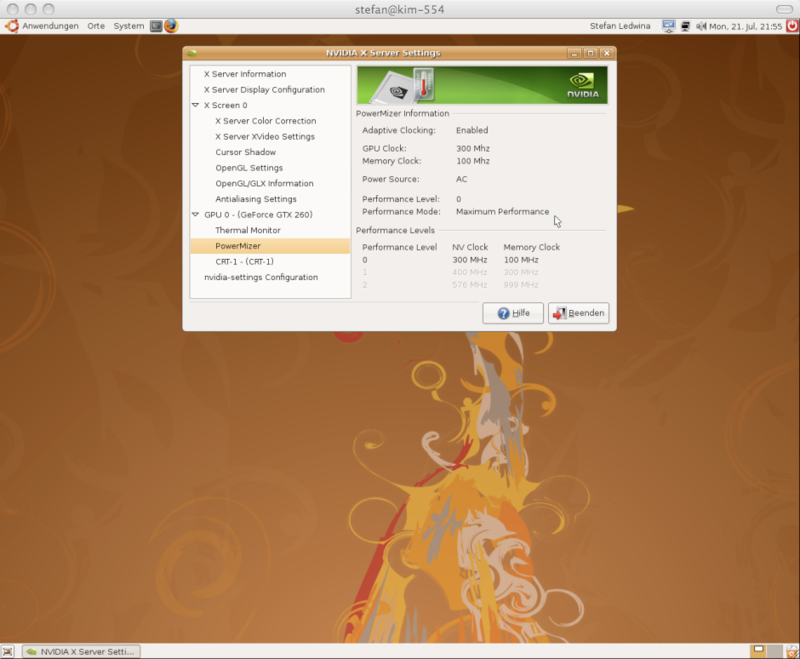
Does someone of you know how I can disable the adaptive clocking in the nvidia drivers? My GTX 260 is only running at a core clock speed of 300Mhz and a memory clock speed of 100 Mhz! In the Power Mizer settings in the Nvidia control pannel I can only see adaptive clocking is enabled, performance mode is actually set to maximum performance, but performance level is set to 0 instead of two which would be the right core clock speed of 576 Mhz. But I can't find a way to change these settings!? Thanks!  pixelicious.at - my little photoblog |
|
Stefan Ledwina Send message Joined: 16 Jul 07 Posts: 464 Credit: 298,573,998 RAC: 0 Level Scientific publications
|
Hmm... A reboot a new start of BOINC fixed the problem. I'll have a closer look at this computer if it happens again. pixelicious.at - my little photoblog |
Mr.Fishy Send message Joined: 18 May 08 Posts: 5 Credit: 16,502 RAC: 0 Level  Scientific publications 
|
Does someone of you know how I can disable the adaptive clocking in the nvidia drivers? I don't know if this applies to linux, but with windows I was able to download an addition to the nvidia control panel, ntune performance pack. It gave me new controls to tune, adjust gpu settings (core bus/memory bus), perform stability test and NVmonitor which pops up a window that monitors the gpu/memeory usage and temperature. Some of these things can be dangerous to play with so be careful. I can over or under clock. I haven't tried these. There is a default factory settings in case use mess up. I forget all that it added, since they appear in with other settings in the control panel. Don't ask me where I got it, it must of been on the nvidia site somewhere. Now as far as Power Mizer, I don't have that. Maybe it is specific to the board series type. |
|
Stefan Ledwina Send message Joined: 16 Jul 07 Posts: 464 Credit: 298,573,998 RAC: 0 Level Scientific publications
|
Thanks for your reply, but in Linux things are a little bit different... ;-) The PowerMizer is actually only a tool in the nvidia setting panel that shows the current GPU and memory clock speed, but there's no setting to adjust it. Actually I have found a tool called nvclock to adjust the clock settings under Linux, but it doesn't support the new GTX cards yet. pixelicious.at - my little photoblog |
|
GDF Send message Joined: 14 Mar 07 Posts: 1958 Credit: 629,356 RAC: 0 Level  Scientific publications  |
Does someone of you know how I can disable the adaptive clocking in the nvidia drivers? Humm, your Geforce 260 should work fine. But, we cannot test it locally, because we don't have any card of the series 200 yet. gdf |
|
Stefan Ledwina Send message Joined: 16 Jul 07 Posts: 464 Credit: 298,573,998 RAC: 0 Level Scientific publications
|
I think I have fixed the PowerMizer problem with the 177.13 drivers. I'm just running the second WU in a row, and the card is still running at full speed! Let's see if it stays this way... For all who also have problems with those drivers and the PowerMizer slowing down your card, this is what I did - I just added the line options nvidia NV_Registry_Dwords="PerfLevelSrc=0x2222" to /etc/modprobe.d/nvidia-kernel.nkc This applies to Ubuntu 8.04 and the 177.13 driver, I don't know if it works the same with other Linux OS... pixelicious.at - my little photoblog |
|
Stefan Ledwina Send message Joined: 16 Jul 07 Posts: 464 Credit: 298,573,998 RAC: 0 Level Scientific publications
|
It hasn't worked... After about 15 minutes the PowerMizer slowed down the card again - screenshot After a reboot it is back to the original clock speeds... I start to hate these drivers... ;-) pixelicious.at - my little photoblog |
|
[AF>HFR>RR] Jim PROFIT Send message Joined: 3 Jun 07 Posts: 107 Credit: 31,331,137 RAC: 0 Level  Scientific publications 
|
Have you try this:
I will try this tonight. |



©2026 Universitat Pompeu Fabra