budget crunsher for 500€ with 2 gpu's?
Message boards :
Number crunching :
budget crunsher for 500€ with 2 gpu's?
Message board moderation
Previous · 1 · 2
| Author | Message |
|---|---|
 skgiven skgiven Send message Joined: 23 Apr 09 Posts: 3968 Credit: 1,995,359,260 RAC: 0 Level  Scientific publications       |
It was a good idea. They are basically guaranteeing that their card clocks well, and with a dual fan it will run cooler, quieter and probably clock quite a bit higher too ;) |
|
Send message Joined: 19 Aug 10 Posts: 19 Credit: 830,540 RAC: 0 Level  Scientific publications
|
hmm it seems i need a new CPU Cooler... my cpu is currently throttled cause of heat, my cores are at around 65% avg load and 74,8°C accoridng to BonicTasks/TThrotle. (set a max of 75°C) :-( or cleaning the current one... think will look tomorrow for dust and order pherhaps a new one... the temp seems me to high for only 65% avg load. /me loves BoincTasks xD finally get it also to connect to my linux machine :)  Uploaded with ImageShack.us 
|
liveonc Send message Joined: 1 Jan 10 Posts: 292 Credit: 41,567,650 RAC: 0 Level  Scientific publications
|
Have you tried disabling "Smart Fan", or other features that would throttle down the fan. I run all my fans at 100% regardless of requirement, as I'm not bothered by the sound (anymore), & if everything runs 100% more air is moved so temps never get the chance to rise. If that's not the problem, try opening your windows, if your home is being heated by your PC(s), or removing the dust as you said yourself. If it's still not enough, try cleaning & then applying new thermal paste. But if what you want is a bigger CPU Cooler, it's usually only a requirement if you OC your CPU. It "could" also be a bad PC case, the lack of additional (optional) fans, or cable-mess within the PC case. 
|
|
Send message Joined: 19 Aug 10 Posts: 19 Credit: 830,540 RAC: 0 Level Scientific publications
|
disable smart fan in BIOS seemed to help a bit, at least cpu's are at 70% avg with same WU's since restart, so a 5% gain before TThrottle hit :) need to check dust and cables as you mentioned tomorrow, now i rlly need to go to bed, need to work in 6 hours :-/
|
|
Send message Joined: 19 Aug 10 Posts: 19 Credit: 830,540 RAC: 0 Level Scientific publications
|
ok.. i just saw (when building in a artic cpu cooler btw heat problem solved, ~50-55°C at full load xD) that my mainboard of my main machine has 2 PCIe x16 slots xD so i think i can run my 9800gt and the new orderd gtx460, is there something i should consider when doing that ? (beside the PSU) can i do run both without problems or shoudn't i do that cause its so different cards?
|
|
skgiven Send message Joined: 23 Apr 09 Posts: 3968 Credit: 1,995,359,260 RAC: 0 Level Scientific publications |
I don't think it will work. Your GTX460 runs 6.11 apps and a 9800GT can only run 6.05 apps. |
|
liveonc Send message Joined: 1 Jan 10 Posts: 292 Credit: 41,567,650 RAC: 0 Level Scientific publications
|
I inquired about the same once in this thread. Even if BOINC will detect your GPU's correctly, GPUGRID will see them as the GPU in the first PCIe slot or the one you've set your BIOS to be the default GPU & send WU's according to the two GPU's it's sees as the same type (even though they aren't).
|
|
Send message Joined: 19 Aug 10 Posts: 19 Credit: 830,540 RAC: 0 Level Scientific publications
|
k will only replace the 9800 in this machine, seems its not worth the efford as long i can't bind projects to a specific gpu in boinc (would set SETI cuda to the 9800 cause that are WU which it can handle nicely.. pherhaps one day...)
|
|
liveonc Send message Joined: 1 Jan 10 Posts: 292 Credit: 41,567,650 RAC: 0 Level Scientific publications
|
ralle030583, I see you have so many failed WU's. Do you OC your GPU or CPU, run your RAM too fast, have high temps, use your PC while you run BOINC, or can it be the driver you use?
|
|
Send message Joined: 19 Aug 10 Posts: 19 Credit: 830,540 RAC: 0 Level Scientific publications
|
havent anything overclocked anymore. i tried it a bit with the gpu but reverted it cause thaught the failed task could be came from that. things i did today to solve the prob: 0) had gpu overclocked a bit but resettet to default again 1) new cpu cooler + 1 new 120mm case fan , so CPU dont run hot anymore and gpu is also a bit cooler (and the best thing is, i dont hear the pc anymore at night cause the new fans are sooo quiet *happy*) 2) set cpu usage to 3 cores so one core is free for gpugrid 3) updated my driver today to latest beta drivers (just to try it) current task is at 58%, i hope it get finished this time.. need to think how the tasks behave the next days.. but think its not worth the afford also.. cause the gtx460 should arrive tomorrow xD
|
|
Send message Joined: 19 Aug 10 Posts: 19 Credit: 830,540 RAC: 0 Level Scientific publications
|
the GT460 arrived and is build in, im only dont understand the clock rates it shows.. NVIDEA Control Panel Factory Settings: Graphics clock: 405MHz Memory Clock: 1800MHz Prozzesor Clock: 810 MHz are that settings rights??? on my GT9800 i had Core: xyz Memory: xyz Shader: xyz
|
|
skgiven Send message Joined: 23 Apr 09 Posts: 3968 Credit: 1,995,359,260 RAC: 0 Level Scientific publications |
That is about half the speed it should be. I expect it was not running anything at the time (power save mode). Use GPUZ to tell you what the speeds are when you are crunching. |
|
Send message Joined: 19 Aug 10 Posts: 19 Credit: 830,540 RAC: 0 Level Scientific publications
|
oh thx you are right: 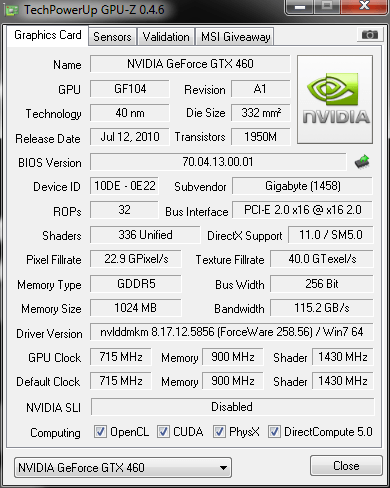 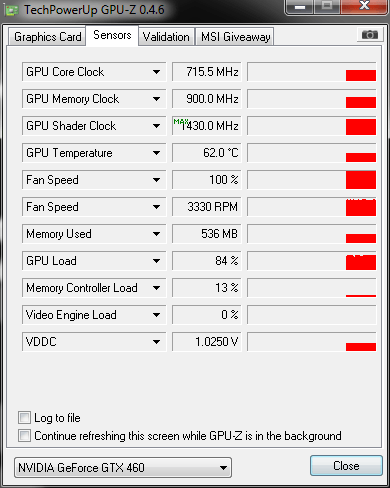 wondering that GPU is only at ~85% :-/ i want 100% xD
|
 Send message Joined: 17 Aug 08 Posts: 2705 Credit: 1,311,122,549 RAC: 0 Level  Scientific publications |
All you really need for a budget GPU cruncher are as many CPU cores as GPUs and a strong and efficient PSU. Since it's going to run 24/7 (otherwise there's no use building it anyway) it's going to chew up quite some electricity. So you'll want a 80+ Gold unit. The Seasonic X-Series or Enermax Pro/Modu 87+ are very good PSUs. 700 - 800W should be fine for a dual GPU cruncher, as long as it's not dual chip cards (GTX295) or the ever-hungry GTX480. With GTX460 we're talking about ~150W each, probably a bit less than at at GPU-Grid. You don't need a 1 kW PSU for that, but you really want an efficient one. It will pay for itself during the life time of the rig. And regarding the remaining components: if you're really on a budget you may want to get some used parts. All you really need are 2 cores of whatever speed and 2 PCIe Slots. The latter is not easy, so you'd probably need to buy a new motherboard even if you could get a used CPU. Anyway, take a look around your friends if someone is in upgrading mood. There's also Ebay but it's more risky. Also if the PC will live in a room without regular human presence it certainly doesn't need a case. Otherwise I'd want it to have a case due to noise and lack of electromagnetic shielding. With used parts you might be able to hit that 200€ target. I recently upgraded my sisters PC for ~50€. It was a bit of a gamble and a bit of a pain to setup, though (PSU died, bitchy Asrock). MrS Scanning for our furry friends since Jan 2002 |



©2026 Universitat Pompeu Fabra